
Mafiti LCD Writing Tablet 8.5 Inch
4.2Editor score
Replaceable battery
Ultra light-weight
Kick-stand function
Discover the top electronic sketch pad models for artists and students. This guide compares features, pressure sensitivity, and portability to help you choose.
Electronic sketch pads have transformed how artists and students capture ideas. These devices blend the tactile feel of paper with digital convenience. Whether you need a simple doodle board or a professional drawing tablet, there is a perfect fit for every creative need.
We compared ten top-rated electronic sketch pads based on performance, features, and user feedback. Our analysis covers standalone tablets, LCD boards for kids, and professional graphics tablets. This list helps you navigate the market to find the right tool for your workflow.
Each pick highlights unique strengths like pressure sensitivity, screen quality, and battery life. We also detail pros and cons to give you a clear view. Remember that product availability and prices can change frequently, so check current listings before purchasing your next creative tool.
4.2Editor score

4.4Editor score

4.4Editor score
This side-by-side comparison highlights the key specifications of all ten electronic sketch pads. It helps you quickly identify which device matches your specific needs for portability, screen size, and professional features.





The HUION Note Digital Notebook is a unique hybrid that merges traditional paper with digital technology. Rated 4.2 stars, it captures handwritten notes and transfers them to your device seamlessly. Its standout quality is the ability to keep the natural feel of pen on paper while backing up your work digitally.
We may earn a commission when you buy through this link, at no additional cost to you.
This device features a battery-free pen and an A5 notepad that syncs via Bluetooth. You can record audio to match your notes, ensuring you never miss a word in meetings or classes. The app allows for easy sharing as PDF or MP4 files, making collaboration simple for students and teams.
While the sync is powerful, it requires setting up the mobile app and keeping it running for best results. The physical notepad is limited to A5 size which may feel small for large sketches. However, the convenience of instant digital backups makes these trade-offs acceptable for note-taking.
If you want to digitize notes without switching to a full tablet, this is the ideal choice. It suits students, professionals, and anyone who loves paper but needs digital organization. We recommend this for those seeking a simple bridge between analog and digital workflows.
Your handwritten notes are instantly converted to vector lines and synced to your mobile device.
Sync audio recordings with your notes to relive the context of your meetings or lectures.
We may earn a commission when you buy through this link, at no additional cost to you.
The XPPen 10.95 Standalone Drawing Tablet is a powerhouse for digital artists who want portability without sacrificing quality. With a 4.4 rating, it offers a realistic sketching experience with 16K pressure sensitivity. Its anti-glare screen mimics paper texture perfectly for natural strokes.
We may earn a commission when you buy through this link, at no additional cost to you.
Running on Android 14, this device works independently without a computer. It supports 16.7 million colors and includes TÜV-certified low blue light technology. The 90Hz refresh rate ensures smooth transitions, while the battery-free pencil remains ready anytime for quick inspiration capture.
The only downside is the higher price compared to basic drawing tablets, and it requires regular charging unlike paper notebooks. However, the versatility of having a full creative studio in a portable package justifies the cost for serious hobbyists and professionals on the go.
This tablet is perfect for illustrators who need to sketch anywhere. It handles professional apps from Google Play with ease. If you want a premium standalone experience with true color capabilities, this is the top recommendation for modern artists.
AG nano-etching technology provides friction and texture similar to traditional drawing paper.
Download any creative app from Google Play to expand your tools beyond pre-installed software.
We may earn a commission when you buy through this link, at no additional cost to you.
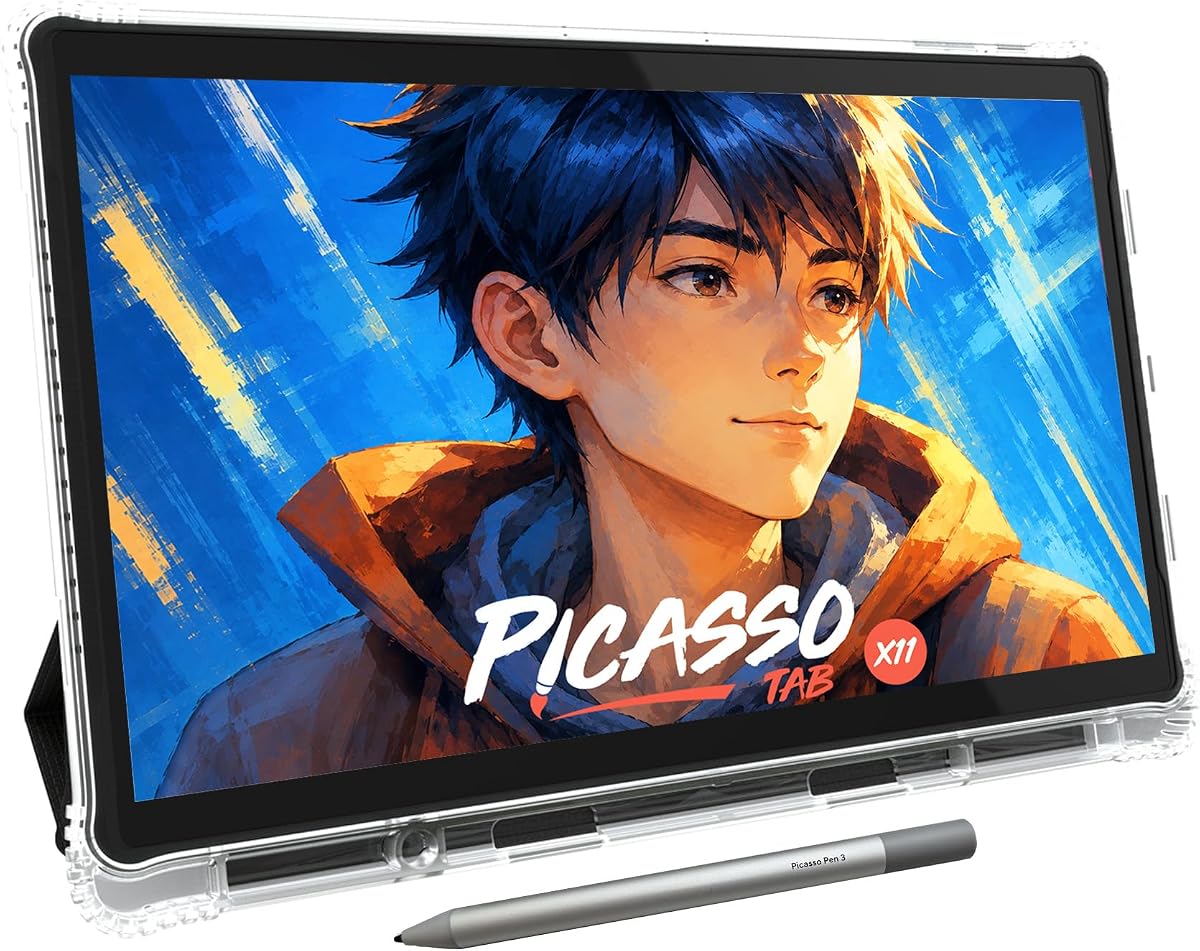
The 11 Standalone Drawing Tablet by PicassoTab is designed to help beginners start creating immediately. Rated 4.2 stars, it comes with lifetime VIP tutorials and premium apps included in the box. This eliminates the need for external subscriptions and accelerates your learning journey.
We may earn a commission when you buy through this link, at no additional cost to you.
The device features a laminated paper-like display that reduces parallax for a smooth drawing feel. It runs on a capable octa-core processor with ample storage for your projects. The included accessories like a drawing glove and case add significant value to the package.
While the setup is straightforward, navigating an Android tablet requires some familiarity which might take time for non-tech users. The weight is slightly more than a paper sketchbook but acceptable for a standalone unit. The included value makes it a strong entry point into digital art.
Ideal for students or beginners who want guidance, this tablet provides everything needed to start. We recommend it for those who value educational support and a large screen for learning. It simplifies the transition from traditional to digital drawing effectively.
Preloaded apps and lifetime tutorials ensure you can start creating right out of the box.
A 2K screen with lamination provides a clear and realistic view of your artwork.
We may earn a commission when you buy through this link, at no additional cost to you.
The Kayoubi LCD Writing Tablet offers a massive 14.5-inch canvas for kids to explore their creativity freely. Rated 4.6 stars, it is designed as a mess-free alternative to paper and crayons. Its large size encourages detailed drawing without space limitations.
We may earn a commission when you buy through this link, at no additional cost to you.
The display is eye-friendly with zero harsh blue light making it safe for long play sessions. It features a one-click erase button and a lock function to save favorite drawings. The lightweight design makes it perfect for travel or classroom use.
While it is great for doodling it lacks advanced features like color or pressure sensitivity which limits professional use. The plastic stylus is simple but effective for basic lines. For young children focusing on fun and safety this simplicity is a positive trait.
This product is perfect for parents looking to reduce waste and keep kids entertained. It suits toddlers and elementary students best. If you want a large safe and simple drawing toy, this is the top choice for children's creative play.
Designed specifically to avoid harsh light ensuring safe usage for developing eyes.
Reusable board eliminates the need for paper and ink saving money and protecting the environment.
We may earn a commission when you buy through this link, at no additional cost to you.
The Bravokids 10 Inch LCD Writing Tablet is tailored for young children with a colorful screen and durable build. Rated 4.6 stars, it allows kids to draw with varying line thickness based on pressure. Its small size makes it perfect for travel and keeping kids quiet on trips.
We may earn a commission when you buy through this link, at no additional cost to you.
The device weighs only 150 grams making it incredibly easy for small hands to carry. It features a fixed battery cover for safety preventing accidental opening. The screen protects eyes from glare while offering a fun colorful experience for imaginative play.
One limitation is the battery is fixed and not easily replaceable which affects long-term usage. The color screen is bright but basic compared to professional displays. However for the target age group the durability and safety features outweigh these minor drawbacks significantly.
This is the ideal gift for parents who need a portable activity for their children. It helps keep kids engaged in cars or planes. If safety and portability are your main concerns this tablet is a reliable and educational choice for young kids.
Ultra lightweight design with a fixed battery door ensures safety for toddlers and small children.
Encourages creativity and fine motor skills development through simple drawing play.
We may earn a commission when you buy through this link, at no additional cost to you.
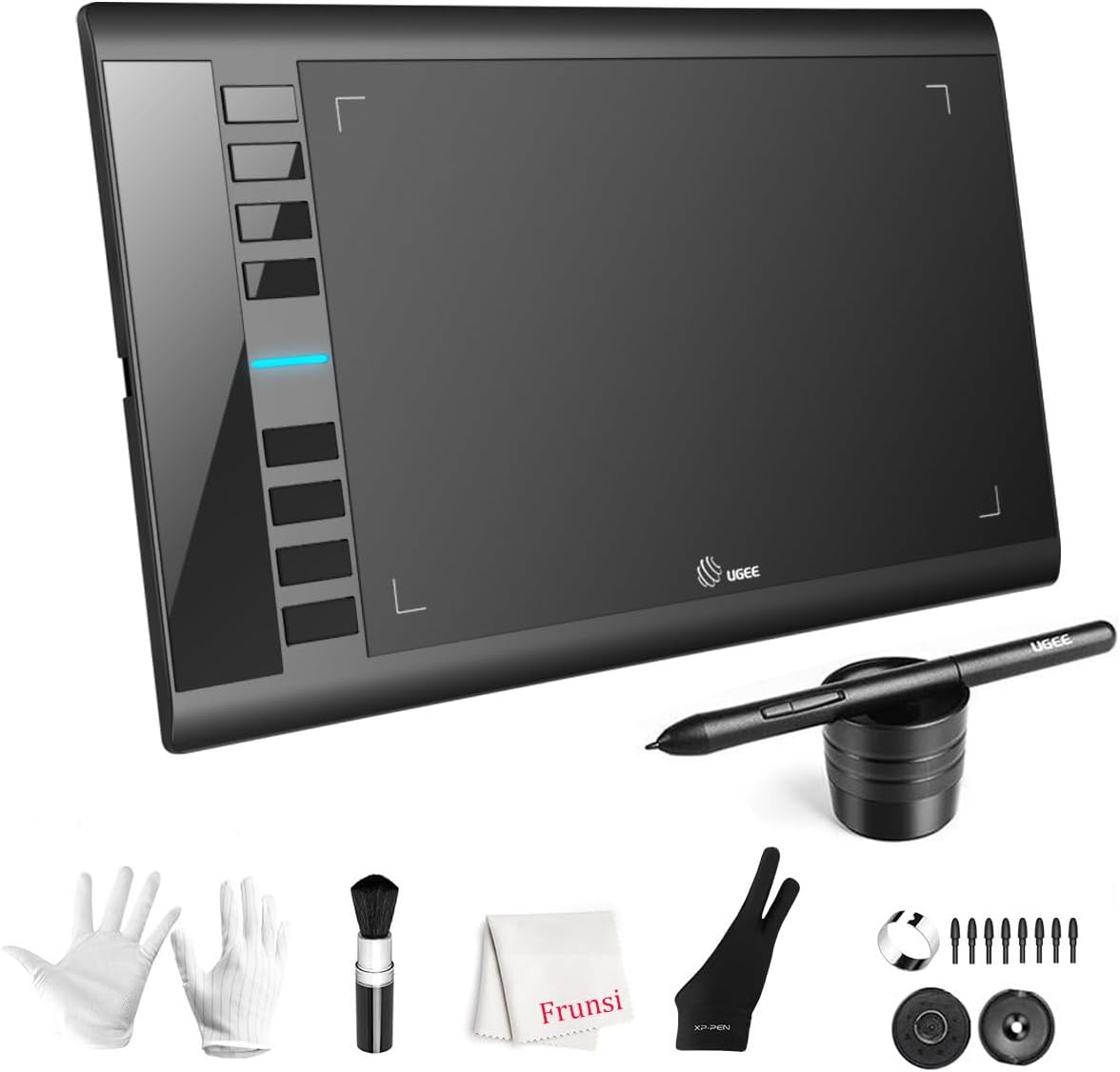
The UGEE M708 Drawing Tablet provides a large working space for artists who use a computer. Rated 4.4 stars, it offers 16384 pressure levels for detailed digital artwork. The 10×6 inch active area gives room for natural hand movements during creation.
We may earn a commission when you buy through this link, at no additional cost to you.
It includes eight customizable express keys on the side to speed up workflows like undoing or zooming. The tablet is compatible with Windows, Mac, and Android devices allowing flexibility. It works well with popular creative software like Photoshop and Illustrator.
The lack of a screen means you must look at a monitor while drawing which can take practice. There is no pressure on the pen itself but the pen is battery-free for convenience. For those already set up with a PC this adds significant value to existing workflows.
This is best for beginners and hobbyists wanting to enter digital art affordably. It suits designers and illustrators on a budget. If you have a computer and want professional features without a high cost this is a solid practical choice.
Eight customizable express keys let you map shortcuts for faster and smoother creation.
Works seamlessly with major creative applications ensuring compatibility with your preferred tools.
We may earn a commission when you buy through this link, at no additional cost to you.
The Mafiti LCD Writing Tablet is an ultra-thin portable board ideal for quick notes or kids. Rated 4.2 stars, it fits easily in pockets or bags due to its 1/8 inch thickness. It offers a simple solution for writing without paper or ink.
We may earn a commission when you buy through this link, at no additional cost to you.
The stylus can double as a kick-stand so you can prop up the board to display messages to others. The battery is replaceable allowing you to extend the life of the device easily. It features a lock switch to prevent accidental erasing of notes.
The small screen size makes it less suitable for detailed drawing compared to larger boards. The writing is clear but not as thick as newer versions. However the convenience of a stand and replaceable battery adds practical utility for everyday notes and simple sketches.
This is perfect for office memos, quick sketches, or simple kids. toys. It is one of the most affordable options available. If you need a compact reliable tool for jotting down ideas on the go, this tablet is a great value.
The included stylus acts as a stand to prop up the display for viewing messages.
A coin-cell battery can be easily replaced to keep the device working long-term.
We may earn a commission when you buy through this link, at no additional cost to you.
The TEKFUN LCD Writing Tablet is built for durability and travel making it a reliable choice for kids. Rated 4.5 stars, it is waterproof and anti-fall protecting it from accidental spills or drops. Its lightweight design ensures it is easy to carry anywhere.
We may earn a commission when you buy through this link, at no additional cost to you.
The 10-inch screen offers enough room for creative play while remaining portable. It uses pressure-sensitive technology to vary line thickness based on how hard you press. A lock key prevents accidental erasing so your artwork is safe until you choose to clear it.
While it lacks advanced digital features the focus on durability and simplicity suits young children well. The battery lasts months but can be replaced when needed. For parents seeking a rugged toy that withstands rough handling this is a practical option.
This is ideal for road trips or travel to keep children entertained safely. It suits preschoolers and young kids who need a sturdy toy. If durability and portability are key priorities for a drawing board, this model is a dependable selection.
Waterproof and anti-fall features ensure the tablet survives the demands of travel and play.
Easy to clear and lock functions make it user-friendly for children of all ages.
We may earn a commission when you buy through this link, at no additional cost to you.
The Wacom Intuos Small is a trusted device for professionals seeking precision. Rated 4.6 stars, it features industry-leading EMR technology that feels like pen on paper. It includes free creative software and training to help you maximize your productivity.
We may earn a commission when you buy through this link, at no additional cost to you.
The battery-free stylus never needs charging so it is always ready to use. It works with virtually any software you use for creative work. Its compact size makes it easy to integrate into any desktop setup without taking up much space.
The small size may feel limiting for large scale projects requiring wide hand movements. It requires a wired connection which can restrict portability compared to newer wireless options. However the reliability and quality of the pen make these minor limitations worth it.
This is the perfect starting point for aspiring professionals who want top-tier tools. It suits designers and artists who already have a powerful computer. If you value pen feel and reliability above all, this is the most trusted choice.
Wacom EMR technology provides a natural pen feel that professionals rely on daily.
Free access to creative apps and training ensures you can start working immediately.
We may earn a commission when you buy through this link, at no additional cost to you.
The XP-PEN Artist12 is a pen display that lets you draw directly on a screen. Rated 4.4 stars, it offers an 11.6-inch FHD display with accurate colors for vivid artwork. It bridges the gap between traditional screens and tablet input.
We may earn a commission when you buy through this link, at no additional cost to you.
The battery-free stylus includes an eraser on the end for intuitive editing. It connects via HDMI to a computer allowing you to use your existing software like Photoshop. The screen is anti-reflective to reduce glare during long working sessions.
The need for a computer limits portability but provides full desktop software power. Cable management might be tricky for beginners new to drawing displays. Despite this, the direct drawing experience offers a more natural workflow compared to looking away from the tablet.
This is best for artists ready to upgrade to a full screen drawing experience. It suits illustrators and designers who want to work with full software suites. If you want to draw directly on your art, this is a great entry-level option.
Draw directly on the screen for a natural workflow that mirrors traditional art.
High definition display ensures your colors are true and vibrant for professional results.
We may earn a commission when you buy through this link, at no additional cost to you.
Choosing the right electronic sketch pad depends on your specific needs and budget. Consider how you will use it and what features matter most.
Screen size affects how much space you have to draw. Larger screens like 10 to 11 inches are better for detailed work while small 8 inch boards suit simple notes. Decide if you need a full display tablet or a non-screen LCD board based on your workflow.
Larger screens improve accuracy but add weight. Choose a size that fits your workspace and portability needs.
Pressure sensitivity determines how much your line weight changes with pen force. Levels like 8192 or 16K allow for subtle shading and varied strokes. This is crucial for artists who want natural brush effects but less important for simple note-taking.
Higher pressure levels provide more control over your art. Look for at least 4096 levels for professional results.
Some tablets work independently with their own operating systems while others need a connected computer. Standalone tablets offer more freedom for on-the-go use. Computer-dependent tablets rely on software installed on your PC but often cost less.
Standalone devices are better for travel. Computer tablets are ideal for home studio setups.
Battery life impacts how long you can use your device between charges. Some pens are battery-free while tablets need charging. Long battery life is essential for professionals working away from power sources for hours.
Check battery ratings for both the pen and the tablet. Battery-free pens are generally more convenient.
Ensure the tablet works with your preferred creative apps like Photoshop or Procreate. Some devices come with pre-installed software while others rely on third-party apps. Compatibility ensures you can use your existing tools without hassle.
Always check system requirements before buying. Universal compatibility offers the most flexibility.
Weight determines how easy the tablet is to carry. Light devices under 500 grams are better for students and travelers. Heavier models are stable for desk use but less convenient for moving around.
Balance durability with weight. A durable shell adds protection without too much bulk.
Prices range from under twenty dollars to several hundred dollars. Determine what features you really need versus what is nice to have. A higher budget often buys better pressure sensitivity and color accuracy.
Invest in what fits your current skill level. You do not need the most expensive model to start.
Some packages include cases gloves or replacement nibs. These extras save money and protect your device. Check what comes in the box to avoid buying necessary tools later.
Look for bundles that provide value. Accessories like cases extend the life of your tablet.
Start by setting up the device according to the manual. Install necessary drivers or apps and connect the pen securely. This ensures all features work correctly from the beginning.
Clean the screen regularly with a soft dry cloth to remove fingerprints and dust. Avoid harsh chemicals that might damage the surface. Keep the stylus in its holder when not in use to prevent loss.
Charge the tablet fully before first use and maintain battery health by not letting it drain completely often. Store the device in a cool dry place to avoid overheating. Proper care will extend the life of your sketch pad.
Not all sketch pads require a computer. Standalone models run their own apps and work independently. Other models like graphics tablets need a PC connection. Choose based on your portability needs.
Many professional styluses use battery-free EMR technology which removes the need for charging. However some active styluses on Android tablets do need power. Check the pen type before purchasing.
Yes many LCD boards are designed specifically for children with eye protection and simple controls. They are great for travel and reducing paper waste. Always supervise younger kids to prevent damage.
Standalone Android tablets may not support Procreate since it is iPad only. However they can use Procreate alternatives. PC tablets connect to your computer to run desktop versions of similar apps.
Pressure sensitivity measures how much your line thickness changes based on pen force. Higher levels like 8192 allow for detailed shading. This is key for artists wanting natural drawing control.
Use a microfiber cloth to wipe the screen gently. Avoid alcohol or abrasive cleaners. If needed slightly dampen the cloth with water but never spray directly on the tablet.
Some tablets include free software like Clip Studio Paint or Corel Painter. Others rely on you to install your own apps. Check the product specs to see what is included.
Most retailers offer a return window usually within thirty days. Keep the original packaging and accessories intact to facilitate returns. Always read the return policy before buying.
We highlighted ten top electronic sketch pads ranging from simple kids boards to professional displays. The XPPen standalone tablet stands out for artists while the HUION Note is great for students.
Prioritize pressure sensitivity and portability based on your usage. If you want freedom from computers look for standalone models. For budget friendly simple use LCD boards are sufficient.
Remember to check current prices and availability before making your decision. Technology evolves quickly so ensure your choice meets future needs. We hope this guide helps you find the perfect sketch pad for your creative journey.