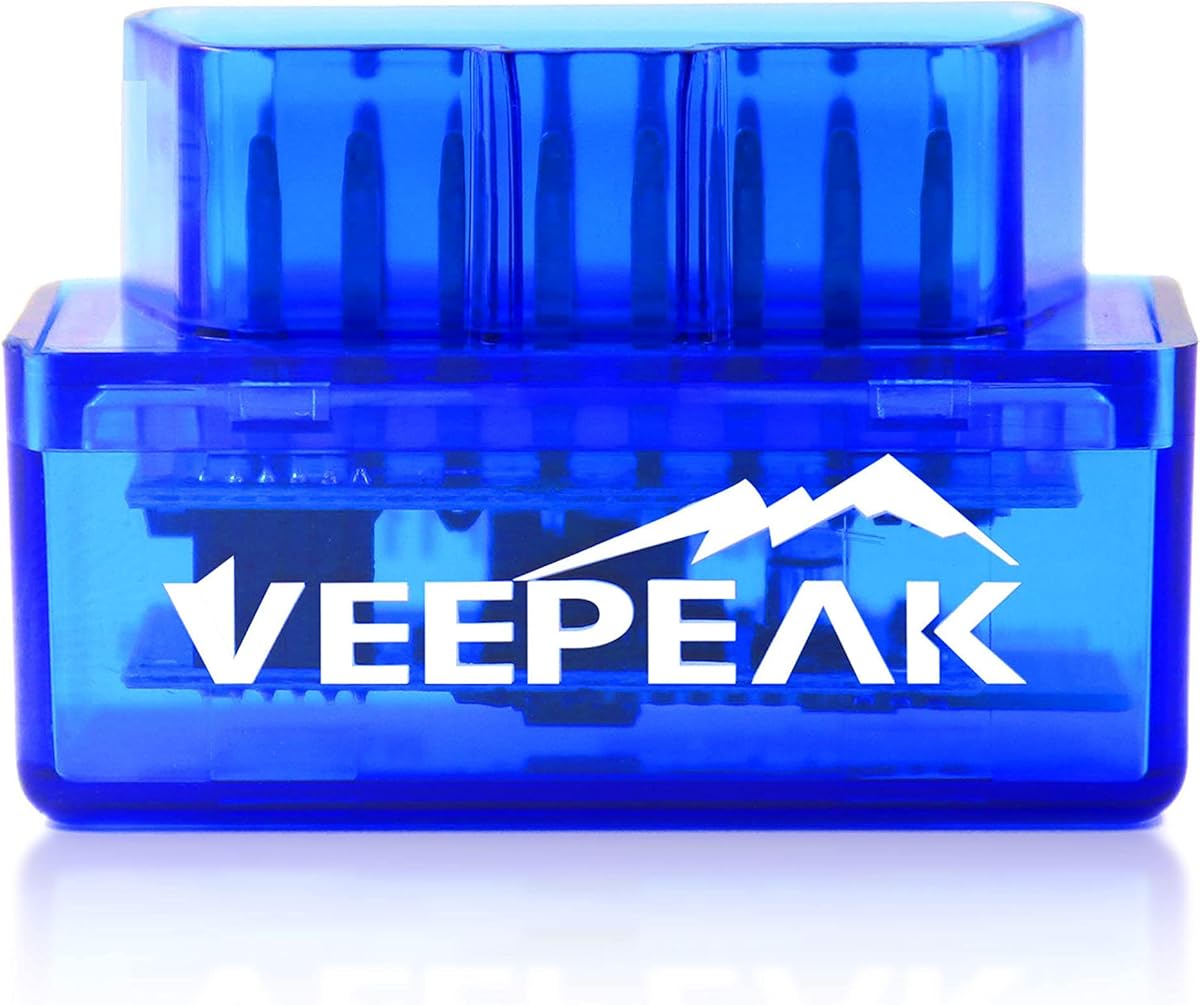
Veepeak Mini Bluetooth OBD2 Scanner Code Reader for Android
4.4Editor score
Classic Bluetooth Android only
Compact lightweight design
Supports generic engine diagnostics
This guide compares the top Android OBDII scanner tools for 2026, helping you choose the best diagnostic device for your vehicle needs and budget.
Modern vehicles rely heavily on electronic systems that require precise diagnostics. An Android OBDII scanner tool allows you to access these systems directly through your smartphone for convenient monitoring.
We evaluated ten leading scanners based on compatibility, connectivity, and diagnostic depth. Our comparison covers budget-friendly adapters and professional-grade tools for comprehensive vehicle health checks.
Each pick highlights specific strengths and limitations for informed decisions. Prices and availability change frequently so verify current details before purchasing to ensure you get the best value.
4.4Editor score

4.5Editor score

4.6Editor score
This side by side comparison highlights key specifications across all ten top rated Android OBDII scanners. Evaluate connectivity types, supported protocols, and diagnostic ranges to find the perfect match for your car.


The BlueDriver OBD2 Scanner stands out as the top choice for Android users seeking professional diagnostic capabilities without the high cost of handheld tools. With a strong 4.5 rating from over 60,000 reviews, it bridges the gap between basic code readers and expensive professional scanners effectively.
We may earn a commission when you buy through this link, at no additional cost to you.
Its standout feature is the library of unlimited, technician-verified repair reports that match your specific vehicle identification number. This means when a trouble code appears, you get clear definitions, likely causes, and confirmed fixes to help you decide if you need a professional repair. Additionally it provides enhanced diagnostics for ABS, SRS, and TPMS on supported vehicles which many basic adapters cannot access.
One trade-off is the initial investment compared to cheaper Bluetooth dongles. However the absence of subscription fees and the inclusion of free app updates ensure you get full access to all features forever. The Bluetooth connection is stable and the app interface is intuitive for both novices and experienced DIY mechanics alike.
This tool is ideal for owners who want to understand exactly what is wrong with their vehicle before visiting a shop. If you value accurate repair guidance and enhanced system access the BlueDriver is the most reliable Android OBDII scanner tool available today.
Get instant access to millions of repair reports matched to your VIN with definitions and causes.
Monitor live data and access ABS or SRS codes on supported vehicles beyond standard engine diagnostics.
We may earn a commission when you buy through this link, at no additional cost to you.
The OBDLink MX+ is widely regarded as the premium choice for Android OBDII scanning especially for users who rely on specific third party applications like FORScan or Torque. With a 4.6 rating it offers robust performance and enhanced OEM support that surpasses many competitors in the same price range.
We may earn a commission when you buy through this link, at no additional cost to you.
This adapter excels in its ability to communicate deeply with vehicle systems including Ford, GM, Toyota, and Honda. It supports live parameters such as ABS and SRS on supported cars giving you insight that generic readers miss. The included over-voltage protection safeguards your vehicle electronics during diagnostics which is a critical safety feature.
While it commands a higher price than basic Bluetooth scanners it justifies the cost through reliability and extensive app compatibility. You do not need to worry about connection drops or limited data access. Just ensure you check the troubleshooting guide to confirm compatibility with your specific vehicle model before buying.
If you are an enthusiast or need detailed diagnostics for maintenance this tool is the best option. It turns your Android device into a professional grade scanner capable of handling complex tasks with ease and confidence.
Access deeper vehicle parameters for major brands like Ford GM and Toyota with enhanced protocol support.
Over voltage and battery drain protection protect your car electronics during diagnosis sessions.
We may earn a commission when you buy through this link, at no additional cost to you.
The Veepeak Mini is the most affordable option on our list and perfect for Android users who just need to check engine codes without breaking the bank. With a 4.4 rating it delivers reliable performance for basic diagnostics and fits easily into any glove box or toolkit.
We may earn a commission when you buy through this link, at no additional cost to you.
This tiny adapter connects via classic Bluetooth to your Android phone and works seamlessly with free apps like Torque or Car Scanner. You can read trouble codes view live data and check readiness monitors. It is an excellent tool for verifying if a check engine light is serious or just a minor sensor glitch.
Its main limitation is the lack of support for advanced systems like ABS or transmission diagnostics. However for routine emission related issues it is more than capable. Just remember it does not work with iPhones so iPhone owners should look at the Veepeak BLE version instead.
For those seeking the cheapest reliable way to monitor their engine this is the best choice. It provides essential diagnostic power without unnecessary costs making it a great home garage staple for Android users.
Get essential OBDII functionality at an incredibly low price point perfect for budget conscious drivers.
Designed specifically for Android phones and tablets using classic Bluetooth connectivity for quick pairing.
We may earn a commission when you buy through this link, at no additional cost to you.
The Veepeak OBDCheck BLE is a versatile entry level scanner that works with both Android and iOS devices using efficient Bluetooth Low Energy technology. It holds a 4.5 rating and is designed for users who need reliable basic diagnostics without complex setup procedures.
We may earn a commission when you buy through this link, at no additional cost to you.
This device excels at reading and clearing check engine codes and viewing live sensor data. You can monitor vehicle health through apps like Car Scanner or Torque. The Bluetooth LE connection ensures low power consumption so your phone battery stays healthy during long sessions.
It does not support advanced functions like ABS or oil resets and you must download a separate app to operate. For standard emission checks however it is highly reliable. Just ensure you avoid imitation apps that might ask for subscription fees.
This scanner is perfect for casual owners who want to check engine lights without investing in expensive tools. It offers a balanced mix of connectivity and functionality for most everyday vehicle monitoring needs.
Bluetooth Low Energy technology keeps your phone battery usage low during diagnostic sessions.
Supports both Android and iOS platforms giving you flexibility regardless of your phone brand.
We may earn a commission when you buy through this link, at no additional cost to you.
The Veepeak OBDCheck BLE+ improves on the standard model by adding classic Bluetooth support in addition to Bluetooth Low Energy. This makes it compatible with a wider range of Android apps while maintaining 4.5 rating for reliability and ease of use.
We may earn a commission when you buy through this link, at no additional cost to you.
This scanner provides standard OBDII functions like reading trouble codes and viewing live data. It also allows access to advanced data like transmission temperature or battery health depending on your vehicle make. You can use popular apps like Car Scanner or BimmerLink to unlock these features.
The only downside is that advanced functions are not guaranteed for all cars. You need to check app compatibility profiles before expecting deep diagnostics. For most users this adapter offers excellent value and versatility without the cost of premium tools.
If you need broader app compatibility for your Android device this upgrade is worth considering. It delivers solid performance for engine health checks and adapts to your specific app preferences easily.
Use both classic Bluetooth and BLE to connect to a wider variety of Android apps.
Access vehicle specific data like transmission temperature when supported by your vehicle profile.
We may earn a commission when you buy through this link, at no additional cost to you.
The ANCEL AD310 is a reliable handheld scanner that connects directly to your car via a durable cable. With a 4.6 rating it is recommended by experts and offers fast accurate results for checking engine lights without needing a smartphone or app.
We may earn a commission when you buy through this link, at no additional cost to you.
This tool reads and clears diagnostic trouble codes for emission systems in seconds. It supports all OBDII protocols ensuring compatibility with most vehicles from 1996 onwards. The screen is large enough to read codes clearly and the buttons are intuitive for quick use.
Unlike Bluetooth scanners you do not need to pair devices or download apps. This simplicity makes it ideal for quick checks. However it only focuses on emission related issues and cannot read ABS or transmission codes.
For a simple reliable way to clear check engine lights this scanner is excellent. It is compact enough to carry in your glove box and provides immediate feedback for most common vehicle issues.
The device gets power directly from your vehicle so you never need to charge or replace batteries.
Compatible with KWP2000, J1850, ISO9141, and CAN protocols for broad vehicle coverage.
We may earn a commission when you buy through this link, at no additional cost to you.
The FOXWELL NT301 is a professional grade handheld scanner that includes a built-in screen for displaying data. It holds a 4.5 rating and offers features like live data graphing that help you diagnose issues without needing to connect to a phone.
We may earn a commission when you buy through this link, at no additional cost to you.
This device reads engine codes and provides enhanced OBDII modes including EVAP checks and oxygen sensor testing. The smog check helper lets you verify readiness before visiting the test center. It is ideal for DIYers who want quick feedback without pairing with Android apps.
You can view live data in graphs which makes spotting engine issues in real time much easier. While it is heavier than a Bluetooth dongle it offers more standalone functionality. Lifetime updates ensure it stays current with vehicle protocols.
If you prefer a tool that works independently without phone dependency this scanner is a strong choice. It delivers professional insights for maintenance and diagnostics without the complexity of mobile setups.
View and log live sensor data in easy to read graphs for real time engine analysis.
Use one click hotkeys to verify emission readiness status before your official inspection.
We may earn a commission when you buy through this link, at no additional cost to you.
The BlueDriver Pro Next-Gen updates the original with optimized support for newer vehicles and expanded make models. While it holds a 3.9 rating it brings advanced features like improved 2024 support and seamless Bluetooth connectivity for modern Android phones.
We may earn a commission when you buy through this link, at no additional cost to you.
This tool offers technician-verified repair reports matched to your VIN to help you understand what is wrong with your car. It covers major brands including GM, Ford, Toyota, and Mercedes and allows you to monitor live data while driving. You can also share scans with others easily.
Although the rating is slightly lower than the original model it remains a strong contender for comprehensive diagnostics. The app is intuitive and there are no subscription fees. Just note that for some very new models you should verify compatibility before buying.
For owners of newer cars seeking reliable diagnostic support this is a top choice. It provides the same trusted repair guidance with updates tailored for today's vehicles and families.
Optimized for select 2024 and newer vehicles with enhanced communication protocols.
Send scans to family or friends to keep everyone informed about vehicle health.
We may earn a commission when you buy through this link, at no additional cost to you.
The XTOOL A30D is a powerful Android diagnostic tool that offers bidirectional control to test components actively. With a 4.4 rating it provides professional level features like ABS bleeding and oil resets without a high monthly cost.
We may earn a commission when you buy through this link, at no additional cost to you.
This scanner can send commands to your vehicle's computer to test valves pumps and windows directly. It also supports 19 reset functions to help with routine maintenance tasks like EPB or throttle relearn. The wireless connection is stable up to 33 feet giving you freedom to move around the car.
You get all system access including ABS, SRS and transmission on supported models. Just note that for Chrysler or Dodge vehicles you may need a paid account for full authentication. Otherwise it offers extensive functionality for the price.
If you want to perform maintenance resets and deep diagnostics yourself this tool is ideal. It empowers DIYers with professional features at an accessible price point for home garages.
Send commands to vehicle components to test functionality like fuel pumps or windows.
Handle routine tasks like oil resets and ABS bleeding without visiting a shop.
We may earn a commission when you buy through this link, at no additional cost to you.
The V011 OBD2 Scanner features the latest Bluetooth 5.4 technology for faster and more reliable connections. With a 4.4 rating it is a strong new option offering comprehensive testing and visual data representation for Android users.
We may earn a commission when you buy through this link, at no additional cost to you.
This tool supports 9 protocols and covers over 96% of vehicle makes. It displays data in clear charts so you can understand coolant temperature or engine speed quickly. The exclusive app guides you through fixing issues and helps you avoid unnecessary shop trips.
It is designed for both novices and seasoned enthusiasts with simple data visuals. Just remember to keep your car ignition on and Bluetooth active for connection. The visual approach makes diagnostics intuitive for those unfamiliar with technical codes.
If you value modern connectivity and easy to understand data this scanner is a great pick. It offers robust performance and helps you stay on top of your vehicle health without frustration.
View detected data in clear easy to read charts for quick status understanding.
Upgraded to Bluetooth 5.4 for faster and more reliable pairing with your phone.
We may earn a commission when you buy through this link, at no additional cost to you.
Selecting the right Android OBDII scanner tool depends on your specific diagnostic needs and vehicle type. Below are key factors to consider.
Most scanners now use Bluetooth Low Energy (BLE) for stable and battery efficient connections. Ensure the device supports both classic Bluetooth and BLE if you plan to use diverse apps.
Check your phone Bluetooth settings to avoid pairing issues before launching the app.
Third party apps like Torque or Car Scanner vary in features and cost. Verify which apps work with your chosen scanner and if in app purchases are required for advanced data.
Choose a scanner that supports popular apps to maximize flexibility without extra fees.
Basic scanners read engine codes while advanced tools access ABS, SRS, or transmission systems. Decide if you need to clear multiple system warnings or just check engine lights.
Prioritize enhanced diagnostics if your vehicle often triggers complex system warnings.
Most tools work with 1996 and newer gas vehicles. Diesel or newer models may need specific protocol support like CAN-FD for full functionality.
Verify compatibility with your VIN or specific model before purchasing to avoid limitations.
Look for intuitive apps with clear data visualizations and repair guidance. Tools that explain codes and suggest fixes save time and effort for DIY owners.
Simple interfaces help beginners interpret results accurately without expert help.
Some scanners come with subscription fees while others offer one time purchase access. Lifetime free updates ensure compatibility with new vehicles and protocols over time.
Avoid models with hidden subscription costs to keep total ownership expenses low.
Sturdy connectors protect your vehicle's port from damage. Wireless adapters should have over voltage protection to safeguard electronics during diagnostics.
Invest in durable tools to ensure long term reliability and safety.
Reliable customer support helps resolve connection issues or compatibility questions. Warranties covering defects ensure you can replace faulty units without extra cost.
Choose brands with positive reviews for responsive service and guarantees.
To use your scanner plug it into the OBDII port under the dashboard and start the engine. Open the app on your Android phone and connect via Bluetooth to view data.
Read codes to identify issues and follow repair guidance before clearing them. Always fix the underlying problem first to ensure lights stay off permanently.
Store the device in a cool dry place and avoid bending the cable on wired models. Update the app regularly to maintain full access to new vehicle features.
Most support 1996+ gas vehicles and some light diesel trucks. Always check the product specs for diesel protocols before buying to ensure your truck is supported fully.
Bluetooth scanners require a third party app to read codes. Some brands include a dedicated app while others work with tools like Torque or Car Scanner depending on your choice.
Yes most scanners allow clearing codes but the light will return if the issue persists. Always diagnose and repair the root cause to pass smog checks successfully.
Basic dongles often have no fees but advanced apps may charge for extra features. Look for one time purchase tools like BlueDriver to avoid monthly costs entirely.
Bluetooth LE uses less battery power than classic Bluetooth for stable connections. It is ideal for long sessions so your phone stays charged while monitoring your car.
For basic engine codes consumer tools suffice. If you need advanced ABS or transmission fixes consider professional grade models with enhanced OEM support.
The BlueDriver and OBDLink MX+ offer top tier diagnostics while Veepeak Mini fits tight budgets. Each tool provides unique strengths so prioritize your specific diagnostic needs before deciding.
Focus on compatibility with your car and the depth of data you require. Simple checks need basic adapters but complex issues benefit from advanced protocols and verified repair guidance.
Prices and availability vary so check current listings to confirm the best deal. Verify compatibility with your model to ensure smooth operation before you buy.