
AULA WIN68 HE
4.5Editor score
8000Hz polling rate
Magnetic rapid trigger
Web based driver
Discover the top rated keyboard for Valorant ranked by speed, accuracy, and value. This guide compares ten gaming keyboards featuring Hall Effect rapid trigger
Choosing the right keyboard for Valorant can drastically improve your counter strafing and rapid tap timing. Players need instant actuation and consistent inputs to win gunfights. A high quality gaming keyboard provides the mechanical reliability required for competitive play.
We evaluated ten top models based on polling rates, switch technology, and build quality. Our analysis focused on Hall Effect magnetic switches and rapid trigger capabilities. These features ensure minimal latency during intense moments in ranked matches.
Each pick highlights specific strengths like budget friendliness or premium features. You will find options ranging from compact 60 layouts to full size designs. Prices fluctuate so check current listings before making your final decision.
4.5Editor score
5.0Editor score

4.4Editor score
This table compares the ten top gaming keyboards selected for Valorant performance. We highlight key specifications like polling rates, switch types, and layout sizes to help you find the perfect match.






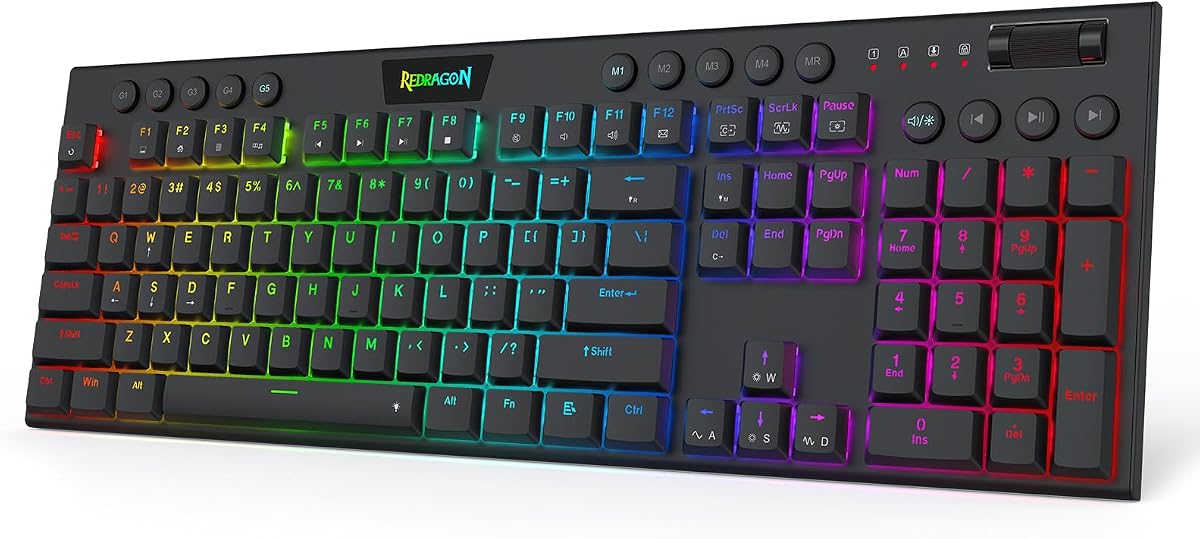
The Redragon K618 HE stands out as the top rated pick for its low-profile magnetic switches. This design allows for lightning-fast counter strafing without the bulk of traditional mechanical keyboards. Its perfect rating reflects exceptional build quality and responsiveness.
We may earn a commission when you buy through this link, at no additional cost to you.
Its standout feature is the ability to sense keypresses without physical contact. This means you get consistent actuation every time you tap a key during a clutch round. The built-in macro zone lets you record complex moves without needing external drivers.
While the macro system is simple, it saves space for competitive setups. The lack of deep software customization might frustrate users who prefer complex mapping. However, the speed gain for Valorant gameplay makes this trade-off worthwhile.
Buy this if you want the fastest actuation possible in a slim package. It suits players who prioritize raw speed over extensive software features. The design ensures your fingers stay light and responsive during long sessions.
Low profile switches reduce finger travel distance significantly. This physical reduction translates directly to faster reaction times in critical moments.
Dedicated hardware macros allow instant access to utility combos. This avoids the need for heavy background software that can lag.
We may earn a commission when you buy through this link, at no additional cost to you.
The AULA WIN68 HE offers incredible value for budget conscious gamers. It features Hall Effect switches that enable rapid trigger modes essential for competitive FPS play. The 8000Hz polling rate ensures every movement is registered instantly.
We may earn a commission when you buy through this link, at no additional cost to you.
Its web-based driver simplifies setup by removing the need for software downloads. You can customize actuation points down to the millimeter for precise control. This flexibility is rare at this price point.
However, the driver does not support macOS which limits its audience. The keycaps are standard PBT which is durable but not as premium as double-shot. For Windows users this is a top tier budget option.
Choose this keyboard if you want premium features without a high price tag. It is ideal for players who need reliability and speed on a tight budget. The web driver makes it accessible for almost anyone.
8000Hz polling means your inputs are checked 8000 times per second. This reduces latency so your shots land exactly when intended.
Web drivers save system resources and avoid installation headaches. You get full control over RGB and macros right from your browser.
We may earn a commission when you buy through this link, at no additional cost to you.
The Corsair Clipper PRO MINI is built for durability and elite performance. Its IP57 rating means it can withstand spills and dust spills intense gaming sessions. This reliability is unmatched in the 60% category.
We may earn a commission when you buy through this link, at no additional cost to you.
It features advanced features like Tap Lock and Multi-Action for complex inputs. These tools help streamline your gameplay and reduce finger fatigue over long matches. The AXON hyper-processing ensures near-instant input registration.
The main drawback is the premium cost which may not fit all budgets. The white finish looks great but requires more cleaning to stay pristine. Still it is a robust choice for serious competitors.
Invest in this if you need a tank-like keyboard with high-end features. It suits players who want every possible advantage in accuracy and endurance. The build quality justifies the investment for daily use.
Spills and dust can ruin standard keyboards quickly. IP57 resistance ensures your setup stays functional even after accidents.
Multi-action features allow one key to do multiple things based on hold time. This expands your control without adding extra keys.
We may earn a commission when you buy through this link, at no additional cost to you.
The Redragon K673 HE combines magnetic speed with exceptional sound quality. Its dual-module floating structure reduces wobble and eliminates harsh clacking. This creates a pleasant typing experience suitable for mixed use.
We may earn a commission when you buy through this link, at no additional cost to you.
It features an independent switch plate design that enhances stability. The noise dampening layers ensure your keystrokes do not disturb others nearby. This is perfect for shared living spaces or quiet work environments.
However the software offers less depth than competitors for fine tuning. Users cannot save multiple profiles as easily as with other models. This limits customization for those who switch between games often.
Pick this keyboard if you want a quiet and fast setup. It suits players who value a satisfying sound profile alongside performance. The media knob adds convenience for managing volume during streams.
Silent keystrokes prevent disturbing roommates during late night sessions. The dampening layers absorb noise without affecting speed.
A dedicated knob adjusts volume and brightness easily. This saves time and keeps you focused on the game.
We may earn a commission when you buy through this link, at no additional cost to you.
The Redragon K686 HE brings magnetic switch technology to a wider audience. Its rapid trigger mode is designed specifically for stop-and-shoot moments. The polling rate ensures inputs are registered faster than standard keyboards.
We may earn a commission when you buy through this link, at no additional cost to you.
Its floating structure makes it light and easy to move around. This design also helps in reducing noise during intense typing. The single knob adds ease of use for adjusting brightness instantly.
While effective it lacks advanced software features for deep tuning. Users who need complex macros may find it limiting. However for pure gaming performance it delivers great value for money.
Choose this if you want magnetic speed at an affordable price. It is a solid choice for players upgrading from standard mechanical switches. The simplicity ensures you can start playing right away.
Rapid trigger lets you reset keys without releasing them fully. This allows faster movements for strafing and dodging.
Managing lighting and volume becomes effortless with a single control. This reduces clutter and keeps your setup clean.
We may earn a commission when you buy through this link, at no additional cost to you.
The Razer Huntsman Mini uses optical switches for blazing fast actuation. These switches register inputs at the speed of light making them faster than traditional mechanical ones. The build quality is premium with a solid aluminum frame.
We may earn a commission when you buy through this link, at no additional cost to you.
Its Snap Tap feature allows prioritizing the latest input for smoother movement. This gives you a competitive edge in high-speed scenarios. The RGB lighting is vibrant and syncs with other ecosystem devices.
However optical switches differ from magnetic ones in reset behavior. Users who prefer true rapid trigger reset may find this less customizable. Synapse is required for macros which adds a software dependency.
Opt for this if you prefer optical tech and RGB aesthetics. It suits players who want a reliable brand with fast response. The durability ensures it lasts through years of heavy gaming.
Optical beams trigger instantly without physical contact. This reduces wear and increases lifespan significantly.
Snap Tap simplifies movement commands for quick direction changes. This helps you stay ahead during close range fights.
We may earn a commission when you buy through this link, at no additional cost to you.
The Aula WIN60 HE offers hot swappable magnetic switches for customization. You can change switches without soldering allowing for future upgrades. The lightweight driver ensures high performance without system resource usage.
We may earn a commission when you buy through this link, at no additional cost to you.
It delivers ultra-fast response times suitable for FPS games. The web-based driver makes customization accessible from any browser. This flexibility is great for users who move between different PCs.
The RGB implementation is standard and may lack depth. Users wanting advanced lighting effects might find it basic. However the core performance remains strong for gaming needs.
Select this if you want hot-swap capability in a compact size. It suits players who like to tweak their keyboard hardware. The web driver keeps your system clean and fast.
Hot-swapping lets you try different switches easily. This helps you find the perfect feel without buying a new board.
A lightweight driver means less background usage. This ensures maximum resources are available for gaming.
We may earn a commission when you buy through this link, at no additional cost to you.
The AULA F75 Pro combines wireless freedom with solid mechanics. It supports tri-mode connectivity allowing you to switch between devices seamlessly. This is useful for users working on multiple screens.
We may earn a commission when you buy through this link, at no additional cost to you.
Its side printed keycaps provide a modern look with clear legends. The switches come pre-lubed for smooth typing out of the box. The battery life is impressive for wireless gaming sessions.
While versatile it lacks the rapid trigger feature of Hall Effect boards. Users needing precise rapid tap reset might prefer magnetic options. Still it offers excellent value for wireless needs.
Buy this if you want a versatile keyboard for work and play. It suits users who need to switch between PC and laptop often. The wireless mode adds freedom for clean desk setups.
Tri-mode connectivity supports Bluetooth and 2.4GHz wireless. This reduces cable clutter and allows flexible positioning.
Side printed keycaps offer a unique aesthetic with RGB shine through. This adds style without sacrificing readability.
We may earn a commission when you buy through this link, at no additional cost to you.
The ATTACK SHARK X68 HE focuses on audio quality and precision. Its top mount structure provides stability and a consistent typing experience. The sound tuning creates a satisfying click during gameplay.
We may earn a commission when you buy through this link, at no additional cost to you.
It offers 0.01mm RT accuracy which is critical for timing in Valorant. The PBT keycaps ensure durability and a premium feel over time. The full NKRO support ensures every input is registered correctly.
Mac users may face limitations with the web driver support. The wired-only design means you cannot enjoy wireless convenience. But for pure performance it delivers top-tier accuracy.
Choose this if you want a keyboard with excellent sound tuning. It suits players who value feedback and stability. The design ensures your moves are recorded with extreme precision.
Top mount construction keeps the board solid during play. This prevents flex and ensures accurate inputs.
Tuned stabilizers create a rich HiFi sound profile. This enhances the sensory experience of each keystroke.
We may earn a commission when you buy through this link, at no additional cost to you.
The ASUS ROG Strix Scope II 96 offers a full-featured 96% layout. It includes a number pad while saving space compared to full-size boards. This is ideal for mixed gaming and productivity use.
We may earn a commission when you buy through this link, at no additional cost to you.
Its tri-mode connectivity ensures seamless switching between devices. The sound-dampening foam absorbs noise effectively for quieter sessions. The pre-programmed hotkeys streamline control over gaming tools.
While expensive it provides a complete feature set. The lack of rapid trigger may be a drawback for FPS purists. But the overall versatility makes it a strong choice for general gamers.
Invest in this if you need a complete keyboard with numpad. It suits users who want to balance work and gaming needs. The connectivity options make it a versatile companion.
The 96% design keeps all essential keys in a compact frame. This saves desk space without sacrificing functionality.
Pre-programmed hotkeys allow easy access to system tools. This improves workflow efficiency during breaks.
We may earn a commission when you buy through this link, at no additional cost to you.
Selecting the perfect keyboard requires understanding specific features that impact gameplay. We break down the key factors to consider before you buy.
Hall Effect and magnetic switches are critical for rapid trigger capabilities. These switches use magnets to register inputs without physical contact. This technology enables faster reset times which is vital for counter strafing in Valorant. Traditional mechanical switches rely on contact points which can introduce latency and wear over time.
Always prioritize Hall Effect switches if you want the fastest response possible.
Polling rate measures how often your keyboard sends data to the PC. Standard keyboards usually have 1000Hz polling rates. High-end gaming models now offer 8000Hz polling for near-instant input registration. A higher polling rate reduces input lag ensuring your shots land exactly when intended during critical moments.
Look for models offering 8000Hz polling for competitive advantage.
The layout size affects mouse space and comfort levels significantly. 60% and 65% layouts save space for low-sensitivity aiming. Full-size boards offer numpads but may restrict mouse movement. Consider your desk size and grip style to find the right balance between functionality and room.
Choose a compact layout if you need more room for large mouse movements.
Adjustable actuation points let you customize how far a key presses. Some keyboards allow settings from 0.1mm to 3.4mm. This lets you set shallow presses for rapid taps or deep presses for deliberate commands. Customizing these values ensures the keyboard adapts to your unique playstyle.
Check if the driver supports individual key actuation tuning for maximum control.
Durability is key for long gaming sessions and heavy usage. Look for PBT keycaps which resist wear and shine better than ABS. Aluminum frames add structural integrity and reduce flex during play. IP57 water resistance is an added bonus for protecting against accidental spills.
Prioritize PBT keycaps and metal frames for long-lasting performance.
Good drivers allow easy customization of lighting and macros. Web-based drivers are becoming popular as they avoid heavy downloads. Ensure the software supports your operating system whether Windows or Mac. Reliable software prevents lag and ensures all settings apply correctly.
Verify software compatibility and driver type before purchasing your new board.
Wired connections usually offer lower latency than wireless options. However modern wireless tech like 2.4GHz can be nearly as fast. Consider if you value cable-free setups or pure speed. For competitive Valorant wired is generally safer to eliminate signal interference.
Stick to wired for competitive play or choose high-speed wireless like ROG SpeedNova.
Gaming keyboards range from affordable options to premium models. Entry-level magnetic keyboards now offer great features under $50. Premium boards offer better build and extra features like multi-device switching. Determine how much you are willing to spend before browsing to save time.
Compare features against price to find the best value for your needs.
Begin by installing the provided driver software or accessing the web driver. Calibrate your actuation points based on your preferred key depth. Set up macros for common abilities if your model supports custom profiles.
Clean your keyboard regularly with compressed air to remove dust and debris. Use a soft brush to wipe away dust from the keycaps. This maintains the smooth feel of magnetic switches and extends the lifespan of your device.
If using wireless models keep the USB receiver close to your PC. This ensures a stable connection without interference. Charge batteries during downtime to avoid unexpected shutdowns during matches.
Rapid trigger allows keys to reset as soon as you lift your finger. This enables faster counter strafing and movement changes in shooters. It is critical for competitive play where split seconds matter.
Yes magnetic switches are generally faster and more durable. They do not require physical contact which reduces wear and latency. This makes them ideal for high-speed games like Valorant.
A 60% layout is popular for saving mouse space. However any layout works as long as it has low latency. Choose the size that fits your desk and comfort.
Check product specs for Hz ratings like 1000Hz or 8000Hz. You can use online tools to measure polling in your browser. Higher numbers mean faster data transmission to the game.
Yes high-speed wireless keyboards like 2.4GHz models work well. Ensure the brand has a good reputation for low latency. Wired is still slightly safer for pro level play.
It is the ability to adjust how deep you press a key to activate. You can set shallow triggers for speed or deep for stability. This customization helps match your finger movement style.
We highlighted ten keyboards that excel in speed and precision for Valorant. The Redragon K618 HE leads with low-profile speed while the Aula WIN68 HE offers budget value. Each model provides unique strengths for different player needs.
Focus on magnetic switches and rapid trigger features for the best results. Prioritize build quality and polling rate to ensure smooth gameplay. Choose a layout that supports your mouse movement comfortably.
Always verify current pricing before buying as deals change frequently. Check the latest driver support to ensure compatibility with your system. With the right choice your performance in competitive matches will improve significantly.