
GIGABYTE B550 Gaming X V2
4.5Editor score
AM4 Socket Support
DDR4 Memory Ready
10+3 Power Phases
This guide compares ten top Gigabyte motherboards for AMD and Intel platforms, highlighting features like power delivery, connectivity, and thermal design for
Choosing the right Gigabyte motherboard is essential for building a stable and high-performance PC system that meets your specific computing needs efficiently.
We compared ten popular models based on socket support, power phases, thermal solutions, and connectivity options to help you find the best match for your build.
Each pick highlights key strengths and trade-offs so you can decide confidently. Prices fluctuate frequently so verify current deals before purchasing your next board.
4.5Editor score

4.4Editor score

4.4Editor score
Here is a side-by-side comparison of all ten models showing their core specifications to help you quickly identify which board fits your upgrade path.


This AM5 motherboard stands out as our top recommendation for its balanced blend of power delivery and modern connectivity features that suit most users.
We may earn a commission when you buy through this link, at no additional cost to you.
The 14+2+1 power phase design ensures stable performance even under heavy loads while the comprehensive thermal guard keeps temperatures in check effectively.
While it lacks USB4 support found on higher end boards the feature set remains compelling for most builders seeking value without sacrificing core capabilities.
Buy this if you want a reliable foundation for Ryzen processors with room to grow without overspending on unnecessary high-end chipset features today.
The digital VRM solution provides clean power to your CPU which is critical for stability during overclocking or sustained multi-core workloads.
Large heatsinks covering MOSFETs and M.2 slots ensure that your components stay cool even in cases with limited airflow or dense configurations.
We may earn a commission when you buy through this link, at no additional cost to you.
This board prepares you for the future with WIFI7 and USB4 ports that offer significantly faster wireless and wired data transfer speeds than previous generations.
We may earn a commission when you buy through this link, at no additional cost to you.
With four M.2 slots you have ample storage expansion options for high speed NVMe drives while the VRM ensures your processor gets stable power consistently.
The premium pricing reflects the advanced features included but if you need the latest connectivity standards this model delivers them without compromising on build quality.
Choose this if you plan to keep your system for many years and want to avoid needing a motherboard upgrade when new peripherals become standard.
WIFI7 technology reduces latency and increases throughput which is ideal for online gaming or large file transfers over a home network.
Having four M.2 slots means you can add multiple high speed SSDs for storage pools or distinct partitions without needing PCIe adapter cards.
We may earn a commission when you buy through this link, at no additional cost to you.
The distinct white colorway makes this board a standout choice for builders who want a clean coordinated look without relying on heavy lighting effects.
We may earn a commission when you buy through this link, at no additional cost to you.
It shares the powerful features of its sibling including WIFI7 and USB4 but the aesthetics are tailored for high end white themed system builds.
The thermal design is equally robust ensuring that the premium look does not come at the cost of performance or stability under heavy computational loads.
Buy this for a premium white build where aesthetics matter as much as performance and you want the latest connectivity options available today.
The white PCB and heatsinks allow your build to look cohesive and professional without requiring extensive custom cable management for colored components.
WIFI7 provides lower latency for gaming and faster wireless speeds which is perfect for high bandwidth tasks like streaming or large downloads.
We may earn a commission when you buy through this link, at no additional cost to you.
This board supports the latest Intel Core Ultra processors and offers Thunderbolt 4 which provides high speed data transfer and display connectivity for professionals.
We may earn a commission when you buy through this link, at no additional cost to you.
The 18 phase power design is overkill for most users but ensures your processor can reach peak performance levels without thermal throttling or instability.
While the price is steep the inclusion of 10GbE LAN and Thunderbolt 4 makes it a compelling choice for workstation builds that need maximum throughput.
Select this if you are building a high end Intel workstation and need the fastest possible data connections for external drives and displays.
Thunderbolt 4 allows for fast data transfer speeds and daisy chaining multiple devices which is essential for creative professionals handling large media files.
The 10GbE LAN port provides significantly faster wired network speeds than standard Gigabit Ethernet improving local file transfer and download times.
We may earn a commission when you buy through this link, at no additional cost to you.
For those new to the AM5 platform this board offers a very affordable entry point without sacrificing essential features like DDR5 memory support.
We may earn a commission when you buy through this link, at no additional cost to you.
The triple M.2 configuration provides good storage options for gamers who want fast drive speeds without spending a fortune on a premium motherboard model.
While the network speed is standard Gigabit the inclusion of WIFI6E ensures you have a reliable wireless connection that performs well in most homes.
Buy this for a budget AM5 build where saving money on the board allows you to invest more in graphics or storage for better performance.
Three M.2 slots allow you to install multiple NVMe drives for a fast OS drive and secondary storage without occupying PCIe slots for other cards.
This board strips away unnecessary high-end features to keep costs low while maintaining quality components that ensure system stability.
We may earn a commission when you buy through this link, at no additional cost to you.
This board is a great choice for those upgrading an existing AM4 system since it supports the Ryzen 5000 series without requiring new RAM.
We may earn a commission when you buy through this link, at no additional cost to you.
The 2.5GbE LAN port is a nice touch for gaming networks and WIFI6 keeps you connected without needing to run a cable across the room.
Q-Flash Plus lets you update BIOS without a CPU installed which is very helpful if you buy a new processor before the motherboard is ready.
Choose this if you are sticking with DDR4 and AM4 but want modern connectivity and strong power delivery for a solid gaming experience.
Using this board allows you to reuse your existing DDR4 RAM which saves money when moving to a newer Ryzen CPU without a full rebuild.
WIFI6 provides faster wireless speeds than older standards which helps reduce lag in online games even when your desktop is far from the router.
We may earn a commission when you buy through this link, at no additional cost to you.
This board offers reliable support for Intel Core 14th generation processors with enough power delivery for most gaming and productivity tasks.
We may earn a commission when you buy through this link, at no additional cost to you.
The inclusion of WIFI6E and 2.5GbE LAN ensures you have fast connectivity options for both wired and wireless network connections at home.
M.2 EZ Latch makes installing SSDs easier and protects the slots from damage which is a helpful detail for builders assembling their system manually.
Pick this if you want a straightforward Z790 option that covers essential features without costing as much as the premium models in this tier.
DDR5 memory support allows for faster data throughput which helps improve performance in applications that rely heavily on memory speed.
The EZ Latch design for M.2 slots simplifies installation and ensures screws do not scratch the motherboard during assembly or maintenance.
We may earn a commission when you buy through this link, at no additional cost to you.
With sixteen power phases this board provides ample power stability for high performance Intel Core processors during intensive workloads or gaming.
We may earn a commission when you buy through this link, at no additional cost to you.
The four M.2 slots offer generous storage expansion options for users who need multiple fast drives for their workflow or game library.
WIFI6E and 2.5GbE LAN ensure that your network performance keeps up with the rest of the system components for a seamless experience.
Choose this for an Intel build where you plan to push your processor hard and want plenty of storage connections for your data.
The high phase count reduces electrical noise and heat which helps maintain consistent performance even when the CPU is under sustained load.
Four M.2 slots give you plenty of room for SSDs without using up PCIe slots that might be needed for graphics or sound cards.
We may earn a commission when you buy through this link, at no additional cost to you.
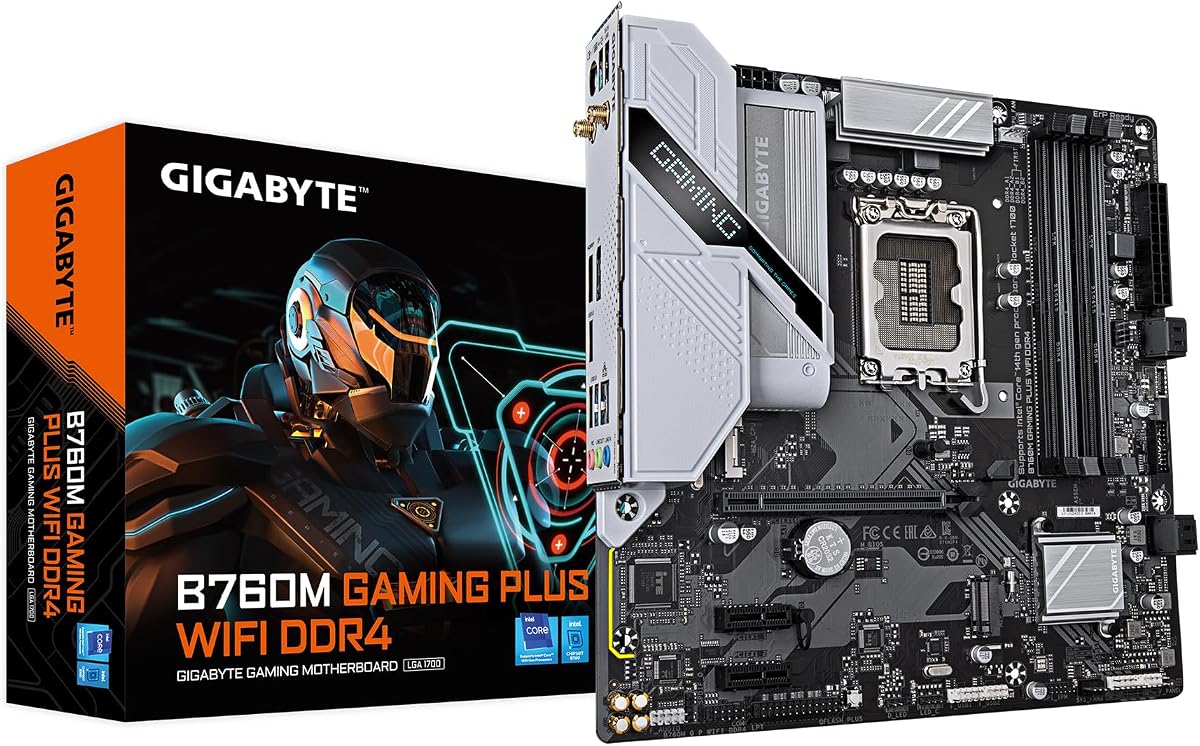
This M-ATX board fits in smaller cases and keeps costs down while still offering DDR4 support for budget friendly system builds.
We may earn a commission when you buy through this link, at no additional cost to you.
It includes WIFI which is great for smaller cases that might have poor antenna reception and Q-Flash Plus for easy BIOS updates later.
The VRM is modest so it works best with non-K Intel processors rather than high end chips that draw significant amounts of power.
Buy this for a small form factor build or a budget gaming PC where saving space and money are your main priorities today.
The M-ATX form factor allows you to use smaller cases which saves desk space and looks cleaner in compact home office setups.
DDR4 memory is cheaper than DDR5 which helps lower the total cost of your build while still providing sufficient performance for most games.
We may earn a commission when you buy through this link, at no additional cost to you.
This model offers the lowest price point in our list while still supporting modern Ryzen processors and features like PCIe 4.0 for storage.
We may earn a commission when you buy through this link, at no additional cost to you.
Q-Flash Plus allows you to update the BIOS without installing components first which is a lifesaver for users upgrading their CPU for a first time.
It lacks built-in WIFI which is a reasonable trade-off given the very low cost and makes it ideal for users with a wired desktop connection.
Choose this if you need to build a PC on a tight budget but still want a stable platform with upgrade potential for a CPU.
Keeping the price low allows you to spend more on a better graphics card or processor which has a bigger impact on gaming performance.
The Q-Flash Plus feature means you do not need to worry about CPU compatibility when you first plug in power if you update BIOS manually.
We may earn a commission when you buy through this link, at no additional cost to you.
Selecting the right motherboard depends on your processor choice budget and the features you need for your specific use case.
The most critical step is ensuring the motherboard socket matches your CPU. AM5 boards work with Ryzen 7000/8000/9000 series while AM4 supports older Ryzen. Intel LGA 1700 is for 12th to 14th gen and LGA 1851 is for Core Ultra Series 2.
Always verify the supported CPU list before buying to avoid incompatible hardware that will not boot or work correctly.
Motherboards come with either DDR4 or DDR5 memory support. Newer platforms like AM5 and modern Intel boards use DDR5 which offers higher speeds. Older or budget boards may still use DDR4 which is cheaper but slower.
Choose DDR5 if you are building new and want future proofing but DDR4 is a great budget option for existing builds or older platforms.
The VRM or voltage regulator module delivers power to the CPU. Boards with more phases like 16+2+2 handle high-end processors better than 4+1+1. High-end GPUs need stable power to prevent throttling during loads.
Match the VRM strength to your CPU power draw. A weak VRM can cause performance drops on powerful chips under heavy workloads.
Check how many M.2 slots the board has for NVMe SSDs. Some models offer 2 to 4 slots. You want enough space for your OS drive and additional storage without needing adapters.
More M.2 slots give you flexibility to add fast storage later. Ensure you know which slots run at PCIe 5.0 and which at 4.0.
Modern boards include USB-C ports and various USB speeds. Look for USB4 or Thunderbolt if you need high-speed data transfer. Front USB-C is useful for case fans and front panels.
Prioritize the ports you need daily. High speed USB is important if you move large files often or use external drives frequently.
Ethernet speed varies from standard Gigabit to 2.5GbE or 10GbE. WIFI options range from WIFI6 to WIFI7. Faster networking is great for gaming and large local transfers.
Decide if you prefer wired or wireless. WIFI7 is the latest standard but may not be needed if you use Ethernet mainly.
Heatsinks on VRM and M.2 slots prevent heat buildup. Larger heatsinks and heatpipes help with stability. Boards labeled Thermal Guard usually manage heat better than basic models.
Good thermal design keeps your system stable during long sessions. It also helps reduce noise as fans do not have to spin as fast.
Some boards offer longer warranties like 5 years. Check if BIOS flash features like Q-Flash Plus are available. These tools help with CPU swaps later.
A longer warranty gives peace of mind. Q-Flash Plus is a valuable feature for future-proofing your system upgrades easily.
When installing your motherboard secure it with standoffs to avoid shorts and connect all power cables including the CPU 8-pin and 24-pin motherboard power connector first.
After installing the CPU and RAM check that the motherboard boots and enter BIOS to enable XMP or EXPO profiles for your memory to run at advertised speeds.
Keep the board clean with compressed air regularly to prevent dust buildup which can trap heat and cause thermal throttling over time.
AM4 supports older Ryzen processors and uses DDR4 memory while AM5 supports newer Ryzen 7000 and up and uses DDR5 memory. AM5 boards offer PCIe 5.0 support which AM4 does not have.
Not necessarily if you have an Ethernet port on your router. WIFI is convenient for laptops or setups where running a cable is difficult but Ethernet is generally faster and more stable.
Higher priced boards offer better power delivery more USB ports and premium features like USB4 or WIFI7. They are built for performance and durability while cheaper boards meet basic needs.
Q-Flash Plus allows you to update the motherboard BIOS without installing a CPU or RAM. You simply insert a USB drive with the BIOS file and press a button to flash it automatically.
Most users need two for an OS and a game drive. If you store large libraries or use high-speed SSDs you may want more. Check which slots support PCIe 5.0 for future drives.
No AM4 boards only support DDR4 memory. DDR5 requires an AM5 or modern Intel platform. Ensure you buy the memory type that matches the motherboard socket.
We recommend the B650 AORUS Elite AX for most AM5 users and the B550 Gaming X V2 for budget builders who want a stable platform.
Prioritize socket compatibility and memory type first then look at power delivery and networking features that fit your workflow and gaming needs.
Prices change frequently so verify the current deals on Amazon before buying to ensure you get the best value for your specific setup.