
Epson Workforce Pro WF-7310
3.8Editor score
PrecisionCore Heat-Free Technology
500-sheet paper capacity
Fast 13×19 printing
Compare the top A3 printers for professional quality and efficiency. This guide reviews features, speed, and reliability for business and creative workflows.
Choosing the right A3 printer can transform your office or studio workflow significantly. These wide-format devices handle everything from detailed technical drawings to vibrant marketing materials with ease and precision.
We evaluated leading models based on print quality, speed, connectivity, and long-term ink costs. Our team analyzed real-world performance data to ensure you find a reliable machine for your specific needs.
Each selection highlights unique strengths such as speed, color accuracy, or cost efficiency. Please note that availability and pricing can change quickly, so verify details before making your final purchase decision.
3.8Editor score

4.0Editor score

3.9Editor score
This side-by-side comparison highlights key specifications across all selected models to help you visualize differences in speed, capacity, and connectivity options.



The Epson EcoTank Photo ET-8550 stands out as a top choice for professionals seeking high-quality wide-format prints. With a rating reflecting strong user satisfaction, this model excels in producing vibrant colors and sharp text using its advanced printhead technology.
We may earn a commission when you buy through this link, at no additional cost to you.
Its standout feature is the cartridge-free system which includes up to two years of ink in the box. This design drastically reduces ongoing costs and waste while supporting prints up to 6200 pages. The 6-color Claria ET Premium inks deliver professional-grade quality ideal for creative projects.
While the upfront cost is higher than standard printers, the long-term savings on ink are significant. The physical size is substantial, requiring dedicated space, but this is a reasonable trade-off for the extensive capabilities it offers for studios and offices.
This printer is best suited for creative professionals and businesses needing frequent high-quality A3 prints. Its reliability and efficiency make it a smart investment for those prioritizing output quality and cost savings over time.
The inclusion of ink bottles equivalent to 100 cartridges ensures you can print extensively without immediate refills or high costs.
High-accuracy printhead and 6-color inks deliver lab-quality photos and graphics that meet strict professional standards.
We may earn a commission when you buy through this link, at no additional cost to you.
The Epson Workforce Pro WF-7820 offers a robust solution for offices needing fast wide-format capabilities without a premium price tag. It delivers reliable performance for heavy workloads with features that streamline daily administrative tasks efficiently.
We may earn a commission when you buy through this link, at no additional cost to you.
Its PrecisionCore Heat-Free Technology ensures high-speed output while maintaining energy efficiency. The printer includes a large touchscreen for easy navigation and supports seamless scanning with Epson ScanSmart. Dual functionality with fax and auto duplex printing adds significant value.
Users must use genuine Epson cartridges which limits ink flexibility but ensures warranty coverage. Some users report average reliability scores which might require patience with occasional issues. Despite this, it remains a solid budget option for productivity.
Ideal for small businesses seeking a complete all-in-one solution, this printer balances speed and features well. Its connectivity options and security features make it suitable for secure office environments.
With up to 25 ppm black printing, this model reduces wait times for high-volume document processing tasks.
Printing copying scanning and faxing in one machine simplifies office workflow and reduces the need for multiple devices.
We may earn a commission when you buy through this link, at no additional cost to you.
The HP OfficeJet Pro 9730 delivers exceptional color accuracy and smart features for demanding office environments. Its unique P3 color gamut support ensures prints match screens closely, making it a premium choice for design work.
We may earn a commission when you buy through this link, at no additional cost to you.
Key strengths include HP AI tools that optimize print formatting to reduce waste and improve layout precision. The dual-band Wi-Fi ensures reliable connectivity while the recycled plastic construction supports sustainability goals. Speed is consistent for professional documents.
Operational costs can be higher due to proprietary ink requirements and potential subscription dependencies. While the security features are strong, some users find the initial setup complex. These trade-offs are acceptable for the advanced capabilities offered.
This model is recommended for creative agencies and offices needing accurate color reproduction. The combination of speed AI tools and security features makes it a versatile premium option.
P3 color gamut support provides a wider range of vibrant colors compared to standard sRGB printers.
HP AI removes unwanted content from web pages and emails ensuring clean professional prints every time.
We may earn a commission when you buy through this link, at no additional cost to you.
The Epson Workforce Pro WF-7310 is designed for productivity with features that support high-volume workflows. It delivers consistent performance for businesses needing reliable wide-format printing without compromising on speed or capacity.
We may earn a commission when you buy through this link, at no additional cost to you.
Its 500-sheet paper capacity via two trays means fewer interruptions during large print jobs. The Heat-Free Technology ensures fast first-page-out and zero warmup time which improves overall workflow efficiency. This model is built for durability and reliability.
The smaller 2.4 inch display offers basic navigation which may be limiting for some users. While it uses proprietary cartridges, the overall value remains strong due to speed and capacity advantages. Energy efficiency is another notable benefit.
This printer suits offices requiring steady throughput and minimal downtime. Its balance of speed capacity and affordability makes it a practical choice for growing businesses.
Two 250-sheet trays allow continuous printing of large jobs without frequent paper reloading.
Zero warmup time and low energy consumption help reduce overhead costs while maintaining high output speeds.
We may earn a commission when you buy through this link, at no additional cost to you.
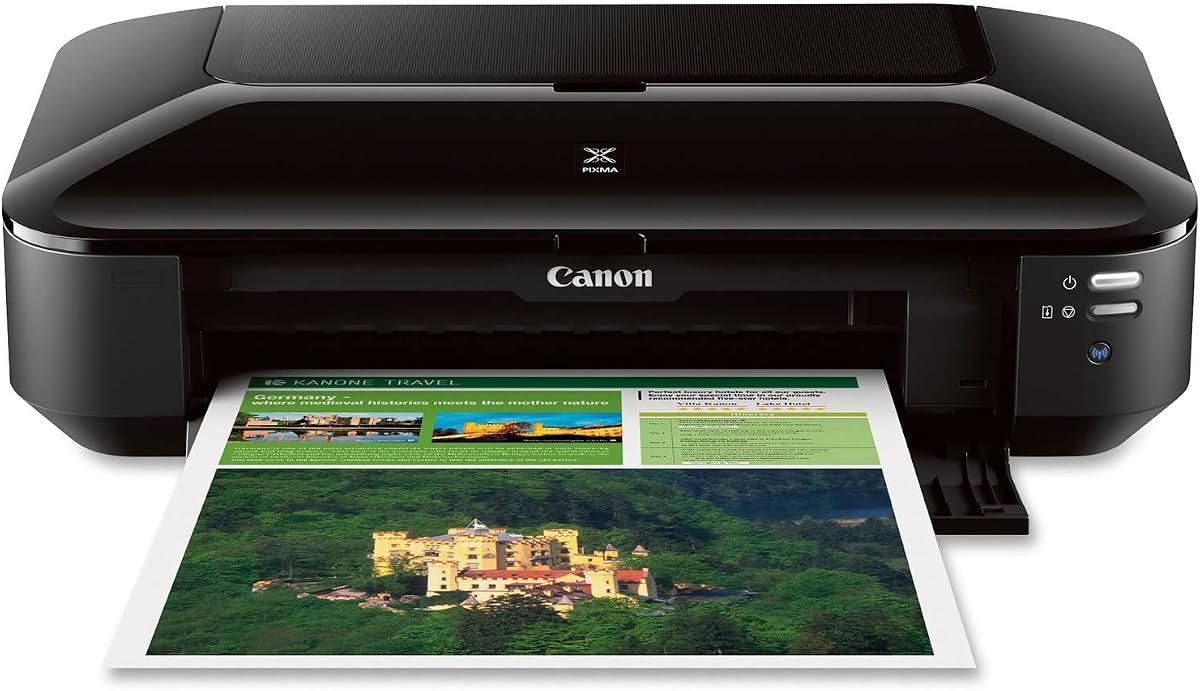
The Canon Pixma iX6820 remains a popular choice for those needing versatile cloud connectivity and high detail. Its support for AirPrint and Google Cloud Print ensures easy access from various devices for seamless remote printing.
We may earn a commission when you buy through this link, at no additional cost to you.
Key strengths include the fine print head technology that delivers sharp text and vivid colors. The 5 individual ink tanks allow you to replace only what runs out which is cost-effective over time. Build quality is robust for standard office tasks.
Paper capacity is limited to 150 sheets which might require more frequent loading for high-volume users. Connectivity standards are older compared to modern Wi-Fi 5 models but still functional. These limits are manageable for most small offices.
Recommended for businesses prioritizing cloud workflows and cost efficiency. Its ease of use and reliability make it a dependable partner for daily printing needs.
Seamless connectivity with Apple and Android devices simplifies printing from mobile phones and tablets easily.
Separate tanks mean you only replace empty colors reducing waste and overall ink expenses significantly.
We may earn a commission when you buy through this link, at no additional cost to you.
The Epson EcoTank ET-15000 is built for heavy-duty environments needing robust wide-format solutions. It offers exceptional capacity and speed to handle large-scale operations without constant maintenance or ink replacements.
We may earn a commission when you buy through this link, at no additional cost to you.
Its monthly duty cycle of 33000 pages exceeds many competitors ensuring reliability during peak business periods. The Supertank system maintains low cost per page while supporting fax and scan capabilities. High resolution ensures crisp details for all types of documents.
The printer requires significant desk space and careful initial setup to align properly. Wired connectivity options are included but might require additional network configuration for some users. These are minor issues given the robust performance.
Best suited for busy offices or print shops needing consistent high volume. Its durability and efficiency make it a strong choice for demanding daily workflows.
With a 33000 page monthly cycle this printer is engineered for high-demand professional environments.
The tank system provides pages at a fraction of cartridge costs reducing operational expenses over time.
We may earn a commission when you buy through this link, at no additional cost to you.
The Epson Workforce Pro WF-7840 combines wide-format capabilities with strong security features for safe office environments. It ensures that data remains protected while still offering flexible printing options for various document types.
We may earn a commission when you buy through this link, at no additional cost to you.
Key strengths include built-in secure wireless and Epson Connect Solutions for remote productivity. The 500-sheet capacity reduces downtime and ensures consistent throughput for daily tasks. PrecisionCore technology delivers reliable quality without excessive energy use.
While speed is average compared to higher-end models it remains sufficient for most business needs. Cartridge dependency adds ongoing costs but these are mitigated by the efficient design. It is a safe choice for data-sensitive settings.
Recommended for organizations prioritizing data security alongside standard printing functions. Its balance of capacity and protection makes it a reliable office partner.
Secure wireless options help protect sensitive documents during transmission and storage within office networks.
Epson Connect Solutions enable printing from anywhere ensuring you stay efficient while working remotely.
We may earn a commission when you buy through this link, at no additional cost to you.
The HP OfficeJet Pro 9135 is optimized for modern office workflows with AI tools and fast speeds. It ensures that documents are printed efficiently with minimal waste and maximum reliability for daily use.
We may earn a commission when you buy through this link, at no additional cost to you.
Its AI formatting optimizes layouts to prevent errors and wasted paper while dual-band Wi-Fi ensures stable connections. Single-pass duplex scanning saves significant time on digitizing tasks. The printer supports recycled materials contributing to sustainability goals.
Users must use original HP cartridges which can increase operational costs. Firmware updates may restrict third-party ink options limiting flexibility. Despite these drawbacks, the speed and AI features offer strong value.
Ideal for teams needing speed and smart tools to streamline printing tasks. Its focus on efficiency makes it a valuable addition to busy workspaces.
HP AI automatically optimizes document layouts reducing errors and ensuring professional output every time.
Single-pass duplex scanning allows quick digitization of two-sided documents without flipping pages manually.
We may earn a commission when you buy through this link, at no additional cost to you.
The Brother INKvestment 6960 stands out for its exceptional speed and high-yield ink options. It handles high-volume office tasks with ease ensuring quick turnaround times for critical documents and reports.
We may earn a commission when you buy through this link, at no additional cost to you.
Its MAXIDRIVE technology delivers up to 31 ppm for black prints which is impressive for this class. The PerfectPrint Auto Detection System ensures consistent quality while high-yield cartridges reduce change frequency. Mobile app support adds flexibility for remote access.
While the subscription trial is helpful it might not suit everyone long term. Premium features like large touchscreens are absent but basic functionality is solid. These limitations are minor given the speed and yield advantages.
Best for offices prioritizing speed and volume over advanced multimedia features. Its efficiency makes it a strong candidate for fast-paced environments.
With up to 31 ppm this printer keeps workflows moving quickly even during peak busy hours.
PerfectPrint detection ensures every page meets quality standards consistently throughout large print runs.
We may earn a commission when you buy through this link, at no additional cost to you.
The Epson Workforce WF-7710 is known for its high reliability and consistent performance in demanding settings. It delivers professional-quality borderless prints and supports efficient workflows through advanced technology integration.
We may earn a commission when you buy through this link, at no additional cost to you.
Its PrecisionCore technology ensures high-speed output with minimal energy use. Auto 2-sided printing helps reduce paper consumption while borderless capabilities enhance document presentation. The high user rating reflects satisfaction with its stability and durability.
The initial purchase price is higher than some budget options but this is offset by longevity. Cartridge costs are also higher but quality justifies the expense for many users. It is a premium but worthwhile investment.
Ideal for users needing a dependable machine for critical daily tasks. Its balance of quality and reliability makes it a top choice for consistent performance.
High user ratings confirm this model offers consistent uptime and performance over long periods.
Professional borderless wide-format output enhances visual appeal for marketing materials and presentations.
We may earn a commission when you buy through this link, at no additional cost to you.
Selecting the right A3 printer involves evaluating several factors that match your specific workflow requirements.
Consider the pages per minute (ppm) and monthly duty cycle to ensure the printer can handle your workload without delays. High-volume offices need models with faster speeds and larger capacities.
Look for machines with higher ppm ratings and robust duty cycles to maintain productivity during busy periods.
Decide between cartridge systems and tank systems based on long-term ink costs. Tank systems often offer lower cost per page but require a higher initial investment.
Calculate total cost of ownership including ink replacements and maintenance to choose the most economical option.
Ensure the printer supports necessary connections like Wi-Fi, Ethernet, and USB for your network setup. Wireless capabilities allow for flexible printing from various devices across the office.
Check for dual-band Wi-Fi and security features to maintain stable and safe network performance.
Adequate paper trays reduce interruptions during long print jobs. Models with multiple trays allow loading different paper types simultaneously for efficiency.
Choose a printer with at least 250 sheets capacity or dual trays for continuous operation.
Resolution and ink quality affect the output of graphics and photos. Look for high DPI and specialized color inks if you need professional-grade visuals.
Select models with precise color gamuts and high-resolution settings for best visual results.
All-in-one models offering scanning, copying, and faxing streamline office tasks. Evaluate additional features like duplex printing and smart tools that enhance productivity.
Prioritize multifunction capabilities if you need to consolidate office equipment.
Wide-format printers can be large and require adequate desk space. Check dimensions to ensure the unit fits comfortably in your workspace without obstructing movement.
Measure your available area and choose a compact design if space is limited.
Secure data protection is vital for business printers. Look for encryption and secure wireless options to protect sensitive documents during transmission.
Ensure the printer includes robust security protocols like Wolf Pro or similar tools.
Install the printer on a stable, flat surface away from direct sunlight and dust to prevent mechanical issues. Ensure the power outlet is easily accessible for regular maintenance tasks.
Regularly update firmware and drivers to maintain performance and security. Clean the printhead and exterior gently with appropriate solutions to avoid clogs and maintain print quality.
Monitor ink levels and replace cartridges or refill tanks as needed to prevent unexpected downtime. Use genuine or manufacturer-recommended ink to ensure compatibility and warranty coverage.
An A3 printer is used for printing documents larger than standard letter size, such as technical drawings, posters, and marketing materials. It is common in design studios, offices, and educational institutions needing wide-format output.
Prices vary widely depending on features and brand, ranging from affordable models to premium units. It is best to compare specifications to find the best value for your budget.
Yes, most A3 printers can handle smaller sizes like A4 or Letter through adjustable trays. This versatility allows for mixed document printing without needing multiple devices.
Tank printers often offer lower long-term ink costs and less waste but require higher upfront investment. Cartridge models are simpler and cheaper initially but cost more over time due to frequent replacements.
Regular cleaning of the printhead and dusting the exterior helps maintain performance. It is important to follow manufacturer guidelines for cartridge replacement and software updates.
Most modern A3 printers support Wi-Fi and wireless printing features for remote access. This allows convenient operation from computers and mobile devices without cables.
The Epson EcoTank Photo ET-8550, Workforce Pro WF-7310, and HP OfficeJet Pro 9730 top our list for offering outstanding value quality and features.
Prioritize your specific needs such as speed or ink costs when making your final choice to ensure satisfaction with performance and efficiency.
Remember to check current availability and verify specifications before purchasing as details can change with new updates.