
Tomee 16MB Memory Card
4.7Editor score
251 blocks of memory
Simple plug and play use
Cost-effective reliable storage
This guide compares the top GameCube Memory Card options for Nintendo GameCube and Wii RVL-001 consoles to help you find reliable storage for your game saves
Preserving your progress in classic titles requires a reliable GameCube Memory Card. Whether you are chasing high scores in competitive shooters or saving your story in epic adventures, the right card ensures your data remains safe from corruption or loss during long gaming sessions.
We analyzed ten top-rated third-party memory cards compatible with the original console and the launch Wii model. Our comparison covers storage capacity, block integrity, build quality, and compatibility features to help you choose the perfect accessory for your specific gaming setup and needs.
Each selection below highlights key specifications, user ratings, and specific strengths to guide your decision. Please note that availability and pricing can fluctuate over time, so always verify the current details on the retailer's page before completing your purchase to ensure you get the best value.
4.7Editor score

4.7Editor score

4.8Editor score
The following table provides a side-by-side overview of the ten selected memory cards, detailing their storage capacity, block count, and primary features to help you quickly identify the right fit for your console and gaming habits.
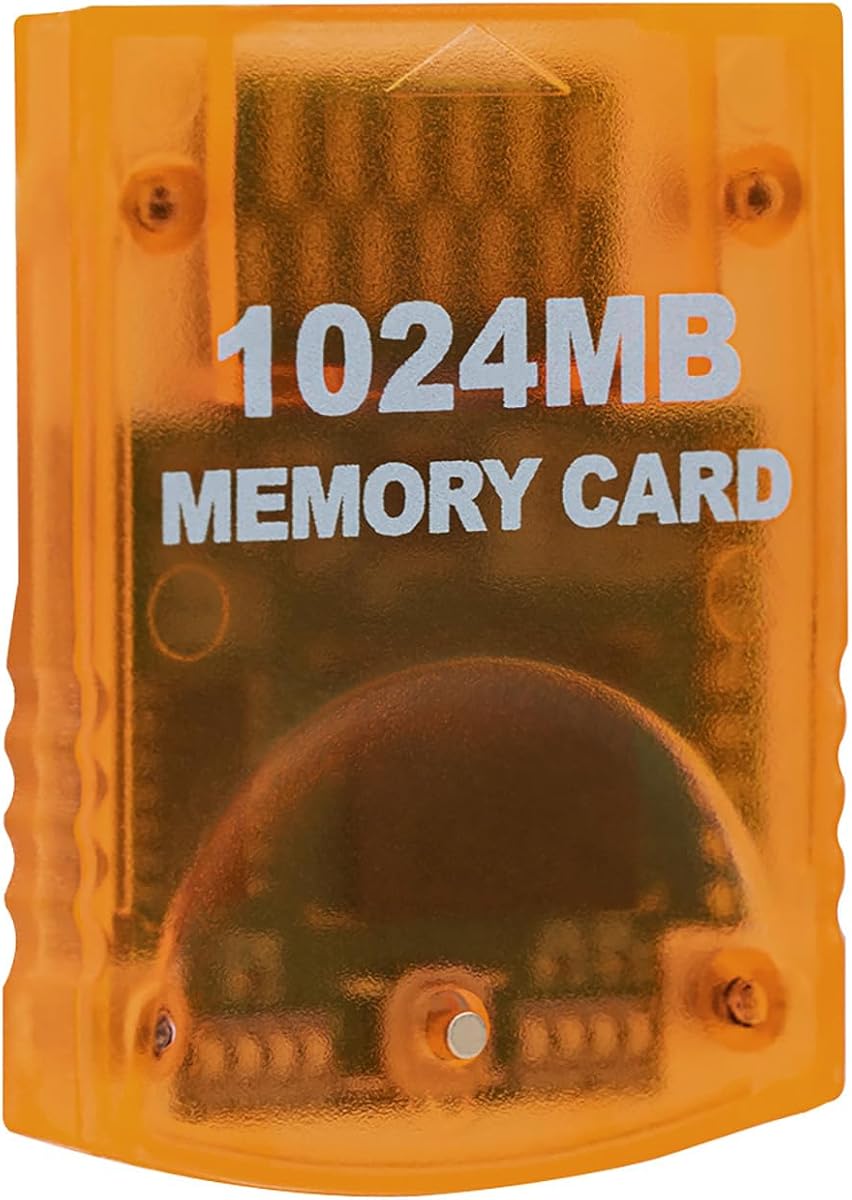


The Tolesum 1024MB Card stands out as a top choice for enthusiasts needing extensive storage. With a user rating of 4.7, it delivers reliable performance for saving large game files across multiple titles without sacrificing speed or integrity.
We may earn a commission when you buy through this link, at no additional cost to you.
This card offers 16344 real uncompressed blocks divided into eight independent 128MB areas. This ensures compatibility with games that reject compressed storage solutions. The front button lets you switch areas easily while LED lights show the active section clearly.
While it lacks official Nintendo branding, the third-party manufacturing ensures you get high capacity without the high cost. You must remember to power down the console before inserting or removing the card to avoid data corruption risks entirely.
Ideal for collectors who play multiple disc-based titles, this card provides ample space for hundreds of save files. We recommend it for anyone prioritizing storage volume and reliability in a compatible accessory for their console setup.
The 16344 block count is fully uncompressed, ensuring broad compatibility with sensitive game titles that require authentic storage structures.
Eight independent areas allow you to organize saves by game or category, making file management straightforward and efficient for heavy users.
We may earn a commission when you buy through this link, at no additional cost to you.
The Mcbazel 1024MB Card is a robust option for players who need significant space for their game saves. Its 4.7 rating reflects consistent performance and user satisfaction with its capacity and ease of use across supported consoles.
We may earn a commission when you buy through this link, at no additional cost to you.
It features 16344 non-compressed blocks split into eight 128MB parts. Pressing the button switches between these parts seamlessly. This design ensures that your data is stored safely while allowing you to manage multiple save files effectively without clutter.
The card works well with GameCube and Wii RVL-001 models. However, like most third-party accessories, it is not an official Nintendo item. You should verify your console model before purchasing to ensure the memory slot matches the required type.
We suggest this card for gamers who frequently switch between different games and need to keep all their progress accessible. It balances cost and performance effectively, making it a practical choice for most retro gaming enthusiasts today.
Storing data in non-compressed blocks helps avoid issues with games that require standard memory block structures for proper save functionality.
Having eight distinct parts allows for logical separation of saves, preventing accidental overwrites and helping you find specific files quickly.
We may earn a commission when you buy through this link, at no additional cost to you.
The Suncala Memory Card offers a unique advantage with its 60-month warranty and upgraded chip technology. Users rate it 4.7 out of 5, highlighting its speed and reliability for storing GameCube game data on compatible Wii consoles.
We may earn a commission when you buy through this link, at no additional cost to you.
It features an upgraded innovation chip that processes saves 20% faster than older versions. This ensures smooth gameplay and steady performance without interruptions. The card holds 16344 blocks across eight improved storage sections for efficient management.
The package is newly designed with a fresh and elegant look. However, since it is third party, you must insert it only when the console is powered off to maintain data integrity. The warranty adds significant peace of mind for buyers.
We recommend this option for those who value long-term support and speed improvements. It is a solid choice for anyone wanting a high-capacity card that promises faster save times and reliable service in case of issues.
The upgraded chip technology delivers faster save processing, reducing wait times and ensuring smooth performance during intense gaming sessions.
With a 60-month warranty, you gain extended protection and access to friendly customer service that answers questions quickly and efficiently.
We may earn a commission when you buy through this link, at no additional cost to you.
The MAYFLASH 512MB Card earns the highest rating of 4.8 among these options. It combines a stylish blue translucent design with practical storage features, making it a favorite for users who care about aesthetics and performance equally.
We may earn a commission when you buy through this link, at no additional cost to you.
It provides 8192 blocks split into four storage areas. Each area offers 2043 blocks for organized saves. You switch areas by pressing the button on the card, which is straightforward and ensures you access the right data quickly.
This card is compatible with both GameCube and Wii consoles. It is third-party but works well with standard game data. Remember to use it only on RVL-001 models or original GameCube consoles to ensure proper slot compatibility and function.
We suggest this for gamers who want a balance of style and function. It is ideal for those who need substantial storage but prefer a distinct visual look that stands out against standard black memory cards in their collection.
The blue translucent design adds a unique visual appeal to your console setup while maintaining full functional compatibility with supported hardware.
With a 4.8 user rating, this card has proven its reliability and quality to a large number of satisfied customers who recommend it consistently.
We may earn a commission when you buy through this link, at no additional cost to you.
The Tolesum Memory Card provides a solid middle-ground option with 512MB of storage. Its 4.5 rating indicates consistent performance for users who need space for multiple games without investing in the largest available capacities.
We may earn a commission when you buy through this link, at no additional cost to you.
It includes four data areas of 128MB each, totaling 8192 blocks. This layout helps organize saves efficiently by game title. The plug-and-play design makes it easy to use immediately after purchasing for compatible systems.
This third-party accessory is designed for Wii RVL-001 and GameCube consoles. It ensures you can save progress reliably without relying on internal system memory. Always check your model number to confirm the slot exists before ordering this specific card.
We recommend this for casual players who need more space than standard 16MB cards offer. It balances cost and capacity well, making it a practical choice for saving a variety of game titles without cluttering the console.
Four separate data areas allow you to group saves logically, preventing mix-ups and making it easier to locate specific game progress files.
No drivers or complex setup are needed, so you can start saving your game data immediately by inserting the card into the console.
We may earn a commission when you buy through this link, at no additional cost to you.
The Tomee 16MB Memory Card is an economical choice for basic saving needs. With a strong 4.7 rating, it proves that even smaller capacity cards can be reliable for preserving single-game progress without complex features or large price tags.
We may earn a commission when you buy through this link, at no additional cost to you.
It offers 251 blocks of memory which is plenty for one or two game saves. You can load, save, copy, and delete game files with ease. This simplicity makes it accessible for anyone looking to avoid losing progress unexpectedly.
This card is fully compatible with GameCube games that have save options. It works well on both Wii RVL-001 and original GameCube consoles. Ensure your console has the memory slot, as newer models do not support this accessory type.
We suggest this for users focused on single-player experiences who do not need vast storage. It is an affordable way to ensure your save file remains safe without paying for unused capacity you will not utilize during play.
This card offers a low-cost solution for essential saving tasks, making it ideal for casual players who do not need complex multi-game storage.
Despite its low price, the 4.7 rating shows that it performs reliably over time, providing peace of mind for your game data integrity.
We may earn a commission when you buy through this link, at no additional cost to you.
The Mcbazel 256MB Card stands out with its unique pink color and fast performance. It holds a 4.7 rating, reflecting its speed and reliability for storing data efficiently across compatible GameCube and Wii console environments.
We may earn a commission when you buy through this link, at no additional cost to you.
It splits storage into two independent 128MB sections allowing you to switch between them using a button. Individual LEDs show the active section. This ensures you always know where your saves are located and avoids accidental overwriting of existing files.
Designed as a plug-and-play accessory it works well for saving game data without extra setup. Always ensure the console is powered off before inserting or removing the card to prevent data loss. It fits the slot securely without wobbling.
We recommend this card for users who want a distinctive look and practical storage. It is ideal for players who prefer visual variety in their accessories while needing reliable and quick saving features for their favorite titles.
Having two independent banks allows you to separate active saves from archived ones, keeping your current progress distinct and secure from changes.
The card offers rapid data transfer rates which help save game files quickly reducing wait times and keeping your gaming flow uninterrupted.
We may earn a commission when you buy through this link, at no additional cost to you.
The 16MB Gamecube Memory Card is designed for durability and simple use. Its 4.6 rating reflects a solid performance for basic saving needs. It offers a compact profile that eliminates wobble issues common in generic memory card alternatives for console slots.
We may earn a commission when you buy through this link, at no additional cost to you.
It features 251 blocks of storage suitable for saving multiple small games. The shock-resistant build protects files from accidental drops or power outages. This makes it reliable for long gaming sessions where sudden power loss might otherwise ruin progress without warning.
This card works seamlessly with GameCube and Wii RVL-001 models. It is third-party but performs well for storing hard-earned progress. Verify your console model before purchasing to ensure full compatibility with the legacy Wii system memory slot.
We suggest this for users seeking a rugged and small accessory. It is perfect for casual gamers who prioritize durability and simplicity over massive storage capacity for their game files in a standard black design.
The durable shock-resistant construction protects your saved data from accidental impacts or power outages ensuring reliability during marathon gaming sessions.
The streamlined profile fits snugly in any console slot eliminating the card wobble issue common in generic alternatives for a secure connection.
We may earn a commission when you buy through this link, at no additional cost to you.
The Gamecube Memory Card 251 is a classic accessory with a strong 4.7 rating. It provides standard flash memory storage for your games and settings. This card is built to maintain the traditional look and feel that fans of the original console appreciate.
We may earn a commission when you buy through this link, at no additional cost to you.
It features 251 blocks of memory to store your game progress. The 16MB capacity is suitable for several titles that do not require massive storage. You can load and save your levels and characters with ease using this standard accessory.
This card is designed for those who want a straightforward memory solution. It is third-party but maintains compatibility with standard GameCube save options. Always ensure your console model supports physical memory cards before purchasing this older style accessory.
We recommend this for users who prefer a no-frills approach to saving. It offers reliable performance for standard games without extra features. It is a solid choice for preserving progress in classic titles without unnecessary complexity in your storage setup.
This card maintains the traditional look and feel that fans of the original console appreciate while delivering reliable storage for your classic games.
With 251 blocks available, you can store progress for several titles without needing to delete old saves constantly during your play sessions.
We may earn a commission when you buy through this link, at no additional cost to you.
The AreMe GC2SD Micro SD Card Adapter offers a modern alternative to traditional memory cards. With a 4.4 rating, it allows you to use Micro SD cards with your console. This provides massive storage potential for game files using standard SD technology.
We may earn a commission when you buy through this link, at no additional cost to you.
It supports Micro SD cards up to 512GB, far exceeding standard cards. However, it requires software like Swiss or GCloader Lite to function. This ensures automatic loading of game lists from the TF card for easy access during your gaming sessions.
The transparent design is sleek and fits all versions of GameCube and Wii. It is ideal for those who want to store hundreds of games without swapping physical discs. Always verify your console can run the necessary homebrew software before purchasing.
We recommend this for advanced users who want maximum storage. It bridges the gap between retro hardware and modern storage standards. If you need a huge library accessible through the memory slot, this adapter is a highly capable solution today.
This adapter allows you to use modern Micro SD cards offering storage limits far beyond traditional memory cards for extensive game collections.
It works on any version of GameCube and Wii consoles making it a versatile option for those with modified systems needing flexible storage.
We may earn a commission when you buy through this link, at no additional cost to you.
Selecting the right GameCube Memory Card involves evaluating capacity, block structure, and compatibility to ensure your save data remains secure.
Consider how many games you play simultaneously. A 16MB card stores only a few saves, while a 1024MB card holds hundreds. Choose based on your habits to avoid constant file management.
For most collectors a 256MB or 512MB card offers a good balance. Larger capacities are best for those who play many different titles over time.
Look for uncompressed block counts. Some third-party cards compress data to inflate block numbers, which can cause compatibility issues with specific games. Always check product descriptions for real block counts to avoid confusion.
Uncompressed blocks ensure that every game recognizes the card as a standard storage device. This prevents save corruption and ensures smoother performance during loading times.
Verify your console model number before buying. Only the original GameCube and the original Wii model RVL-001 have memory card slots. The Wii Family Edition and Mini do not support physical cards.
If you have a newer console you will need an alternative solution like an adapter or internal storage modification. Always check the product listing for model requirements to ensure it fits your hardware.
Official Nintendo cards are rare now, so most options are third-party. Reputable brands like Tomee and MAYFLASH offer reliable quality. Ensure the seller has good reviews to avoid low-quality materials that fail quickly.
Third-party cards often offer higher capacity for less money. Just ensure the build quality is solid and the warranty is acceptable for your needs to prevent loss of data.
Memory cards come in various colors like blue pink and orange. Choose a design that matches your console or controller. Some cards feature translucent designs that look more authentic than standard solid colors.
While aesthetics do not affect performance, a distinct design helps you identify the card quickly on a crowded shelf. It adds a personal touch to your gaming setup.
Cards with multiple areas or banks allow you to organize saves more effectively. Switching between areas usually requires pressing a button on the card. This keeps your progress organized by game title.
Effective management reduces the risk of accidental overwrites. Look for indicators like LED lights that show which area is active to avoid errors during save operations.
Choose cards with shock-resistant builds to protect your data from accidental drops. Some models feature reinforced plastic that withstands daily use better than thin alternatives.
Durability is essential for long gaming sessions where the card might be handled frequently. A sturdy build ensures that your save files remain intact over years of use.
Check if the product offers a warranty. Some brands provide long-term coverage such as 60 months which shows confidence in the product. This protects you from defects that could lead to data loss.
Good customer service is also a plus. If you encounter issues with the card, responsive support helps resolve problems quickly. Always prioritize sellers with positive feedback records.
To use the card, insert it into the memory card slot located on the top of your console. Ensure the label or LED lights face the correct direction as indicated on the slot. Do not force the card in if it resists.
Always power down your console before inserting or removing the card. This prevents data corruption and ensures that your saves are written correctly. Wait for the console to fully shut off before handling the memory card.
Store the card in a dry and cool place when not in use. Avoid exposing it to extreme temperatures or moisture which can damage the internal electronics. Keeping it in a protective case extends its lifespan significantly.
Official Nintendo memory cards are discontinued and hard to find new. Most options today are third-party alternatives that offer better capacity and pricing. You can find reliable third-party options from reputable brands easily online.
No, these memory cards are not compatible with the Wii U console. The Wii U uses internal memory or SD cards for saving data. Only the original GameCube and original Wii model RVL-001 have the physical slots for these cards.
Uncompressed blocks mean the card stores data without compressing it to fake higher capacity. Some games require standard uncompressed structures to save correctly. Using a card with real uncompressed blocks ensures broader compatibility with titles.
A 256MB card can hold roughly hundreds of standard game saves depending on the file size of each game. It is sufficient for most gamers who play several titles at once. This avoids frequent deletion of old files.
Removing the card while the console is on can corrupt data because write operations might be interrupted. Powering off ensures that all saves are finalized and safe on the card. This habit protects your hard-earned progress from loss.
Most cards work with games that have save options, but some titles are sensitive to third-party cards. Using high-quality memory with real block counts reduces this risk. Always test with a non-critical save first if unsure.
Choosing the right GameCube Memory Card ensures your progress is safe and accessible. Our top picks like the Tolesum 1024MB and MAYFLASH 512MB offer reliable storage for most players.
Prioritize uncompressed block counts and compatibility with your console model. A high-quality third-party card often provides better capacity and value than finding an original Nintendo card today.
Prices and availability can change so verify details on the retailer page before buying. With the right card you can enjoy your favorite games without worrying about lost data or progress.