
HDMI to RF Modulator
5.0Editor score
Simple plug and play setup
Includes HDMI cable and power adapter
Compatible with streaming devices and consoles
This guide compares the top Coax to HDMI Converter options for connecting legacy devices to modern TVs, analyzing performance, compatibility, and ease of setup
Finding the right Coax to HDMI Converter can be challenging given the variety of legacy devices and modern displays available today. Whether you are trying to connect an old gaming console or a security camera system, the correct adapter ensures smooth signal conversion without losing quality.
We have carefully evaluated ten distinct models based on their signal stability, compatibility with various input sources, and overall build quality. Our comparison focuses on real-world performance metrics such as resolution support, noise reduction capabilities, and user feedback regarding long-term reliability in daily use.
Each pick highlights specific strengths like budget-friendly pricing or premium feature sets to help you decide quickly. Please note that product availability and pricing fluctuate frequently, so verifying the current details on the retailer site is recommended before making your final purchase decision today.
5.0Editor score

4.7Editor score

4.4Editor score
The following table provides a side-by-side comparison of all ten models reviewed in this guide, highlighting their key specifications, supported formats, and primary use cases to help you identify the best fit for your specific setup needs.


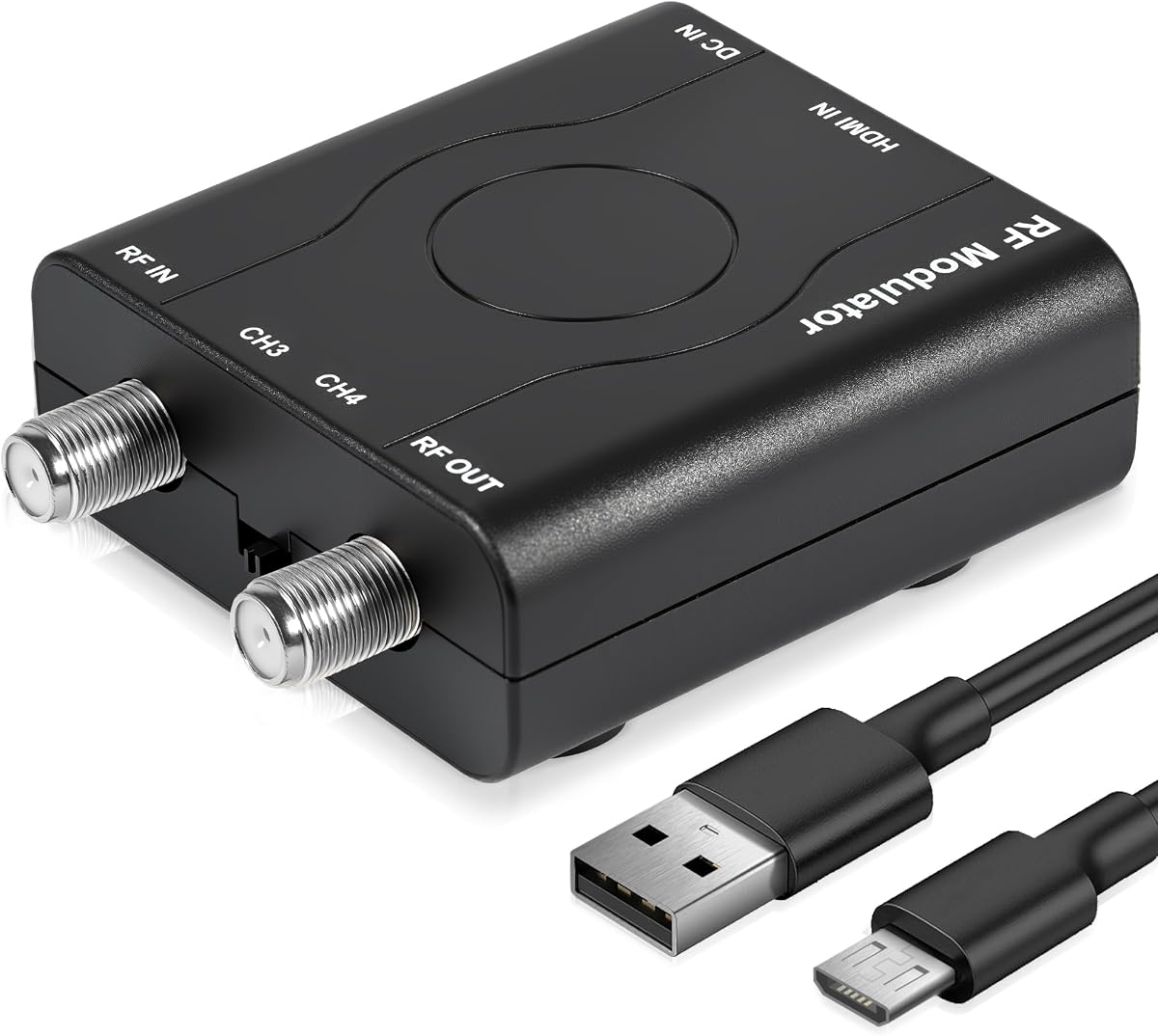


This HDMI to RF Modulator stands out as a top choice for users needing to connect modern consoles to older TVs. With a solid rating and support for 1080P inputs, it ensures that your game systems like the PS5 or Xbox One can output to RF TVs effectively.
We may earn a commission when you buy through this link, at no additional cost to you.
The device features a stable PLL control that maintains frequency output at CH3 or CH4. It includes a 1.2M HDMI cable which saves you from buying one separately. The compatibility list is extensive covering Fire TV Stick and Roku among other streaming devices.
While it works well for gaming, it is strictly a one-way converter from HDMI to RF. This means you cannot use it to bring signals from a coaxial antenna to a modern HDMI TV. Users needing reverse conversion must look at different products in this guide.
If you own older RF displays and want to keep using modern gaming gear this adapter is the ideal solution. It simplifies setup by removing driver needs and provides a reliable signal path. Consider it for any home theater needing coax connections.
The package includes a power adapter and HDMI cable making setup immediate without extra purchases.
It works with major systems like PS4 PS5 Xbox Switch and Apple TV ensuring broad compatibility.
We may earn a commission when you buy through this link, at no additional cost to you.
This demodulator is specialized for bringing vintage gaming devices and VCRs to modern displays. It accepts RF coaxial signals and converts them to HDMI making it perfect for Atari 2600 or Commodore 64 enthusiasts.
We may earn a commission when you buy through this link, at no additional cost to you.
The remote control offers features like timer shutdown and child lock which adds versatility. It supports both NTSC and PAL formats allowing international use. The ability to handle up to 251 channels makes it versatile for cable TV integration.
However the lower rating suggests inconsistent performance or build quality for some buyers. Setup can be tricky compared to plug and play options. Ensure your source device matches the F type input requirements before purchasing.
It is a niche tool for collectors who need to display old signals. If you need reliability for daily use this model might not be the first choice but it serves its retro purpose well.
Specifically designed to bridge the gap between classic gaming systems and modern HDMI monitors.
Includes a remote with timer and channel reservation features for advanced control.
We may earn a commission when you buy through this link, at no additional cost to you.
This converter excels in security applications by turning analog CCTV feeds into sharp HDMI images. Its high rating reflects reliable performance with analog cameras that output BNC signals. The output supports 720P and 1080P ensuring clear viewing.
We may earn a commission when you buy through this link, at no additional cost to you.
It features 3D compensation to reduce noise and optimize color. The ABS casing protects internal components from impact. You can switch between 4:3 and 16:9 aspect ratios easily. It operates stably for 24 hours continuously which is vital for monitoring.
Note that it requires a BNC interface not a standard RF coaxial one. If your cameras use BNC connectors this is the perfect match. It does not support digital AHD or TVI cameras so check your camera specs first.
For those upgrading monitors but keeping analog security systems this unit is essential. It ensures your footage stays clear and accessible on modern displays. Choose this if stability and clarity are your main priorities.
Built to run continuously without overheating making it ideal for always-on security setups.
Uses digital noise reduction to ensure clear video from older analog sources.
We may earn a commission when you buy through this link, at no additional cost to you.
The HDM61 adapter offers a portable solution for connecting HDMI devices to older TVs. It supports up to 1080P inputs and uses PLL control for stable frequency output. This makes it great for travelers or small setups.
We may earn a commission when you buy through this link, at no additional cost to you.
It is constructed from ABS material which ensures durability without adding bulk. It is compatible with local CATV systems and supports HDCP 1.4 for reliable operation. You do not need to install any drivers to get it running.
However it is primarily designed for NTSC systems which may limit use in PAL regions. It focuses on HDMI to RF conversion so reverse signals are not supported. Ensure your TV is compatible with the CH3 CH4 output.
If you need a small box that does the job quickly this is a strong candidate. It simplifies connections for laptops and game consoles alike. Check region compatibility before buying to avoid issues.
Small enough to fit in a travel bag while maintaining consistent signal performance.
Compatible with protected content via HDCP 1.4 for smooth playback.
We may earn a commission when you buy through this link, at no additional cost to you.
This model stands out with a perfect rating and a complete kit ready for immediate use. It converts digital video to RF coaxial output allowing connection to older displays. The included accessories make it easy to start right away.
We may earn a commission when you buy through this link, at no additional cost to you.
It supports streaming media players and gaming consoles seamlessly. You get a power adapter and cable in the box which adds value. The setup guide is step by step ensuring even beginners can configure it.
While it may lack advanced features like channel switching it does the core job well. The build is functional but may not feel premium. For budget buyers this offers the best value for money available.
If you want a no fuss solution without extra costs this is ideal. It gets your modern devices working with legacy TVs efficiently. Check current stock as demand for these kits can be high.
Every cable and adapter you need is included in the box for instant setup.
Users praise its reliability and ease of use for basic home setups.
We may earn a commission when you buy through this link, at no additional cost to you.
This adapter is designed for one-way conversion from HDMI to RF signals. It outputs NTSC-M signals which match specific TV standards. The 5.0 rating indicates high satisfaction among users who have tested it.
We may earn a commission when you buy through this link, at no additional cost to you.
It uses 1080P PLL control to ensure smooth transmission. The housing is ABS material designed for steady daily operation. You can place it flexibly due to its compact size which helps with cable management.
It does not convert RF signals back to HDMI so be clear on your direction. Fixed frequencies mean you cannot scan for other channels beyond CH3 and CH4. Ensure your TV supports NTSC-M before purchasing.
For simple setups where you just need to send a signal to a coax port this works well. It is reliable and straightforward without unnecessary complexity. Ideal for static installations in homes.
Designed for long-term continuous use without signal degradation.
Fits easily in tight spaces without blocking other ports.
We may earn a commission when you buy through this link, at no additional cost to you.
This modulator includes a USB power cable which adds convenience to setup. It supports 1080P PLL control ensuring stable frequency output for TVs. The ABS construction provides longevity for daily use.
We may earn a commission when you buy through this link, at no additional cost to you.
It works seamlessly with PCs and game consoles. The packaging includes a user manual for help. It is a reliable HDMI to Coax adapter for older RF television systems. No driver installation is required.
Be aware it only converts HDMI to RF and not the reverse. This limitation is standard for this type of adapter. Ensure your TV has an antenna input to utilize the RF output properly.
If you need a powered device with good build quality this is a solid pick. It handles diverse applications from home to commercial setups. Check that it matches your specific TV requirements before buying.
Comes with a USB power cable for flexible powering options.
Supports standard HDMI 1.4 and HDCP 1.4 for reliable operation.
We may earn a commission when you buy through this link, at no additional cost to you.
This device offers a unique dual conversion feature turning HDMI to both RCA and RF. It enables you to record content while watching on a TV. This makes it useful for streamers or archivists.
We may earn a commission when you buy through this link, at no additional cost to you.
It supports sharing content across multiple TVs via RF. The channel switch ensures it does not interfere with other VCRs. You can connect a capture card to save videos from modern consoles.
The setup is more involved than simple converters due to multiple output types. It is priced higher but offers flexibility for specific tasks. If you need to capture footage this is a key feature.
Ideal for content creators who need to bridge old and new tech. It provides a versatile solution for media management. Consider this if recording and sharing are your main goals.
Allows simultaneous playback and capture with a separate capture card.
Distributes signals to other rooms via coaxial cables easily.
We may earn a commission when you buy through this link, at no additional cost to you.
This premium adapter is built to handle high-resolution security cameras like 8MP. Its metal housing dissipates heat efficiently ensuring stable 24/7 operation. It supports mixed formats including TVI and CVI.
We may earn a commission when you buy through this link, at no additional cost to you.
It delivers crisp video so details like license plates remain visible. The BNC loop out allows live viewing and recording simultaneously. No drivers are required just plug and play. It is rugged for warehouse or farm use.
It is more expensive than standard adapters but justifies it with build quality. You save on camera replacements by upgrading your monitor instead. Ensure your cameras are compatible with these specific analog standards.
For professional surveillance setups this offers the best balance of quality and durability. It handles mixed systems well and keeps feeds clear. Choose this for critical security applications where clarity matters.
Rugged housing ensures reliability in demanding environments.
Handles high-resolution inputs without losing clarity.
We may earn a commission when you buy through this link, at no additional cost to you.
This portable adapter is ready straight out of the box without installation. It uses 1080P PLL control for stable VHF output. The 5.0 rating shows users trust its performance in various settings.
We may earn a commission when you buy through this link, at no additional cost to you.
It works with PCs cameras and DVD players reliably. The design is professional grade ensuring consistent performance over time. It fits into your CATV system easily without extra work.
While it is simple it is effective for daily use. It does not have advanced remote features but gets the job done. This is ideal if you need a reliable converter for simple setups.
For those seeking a trusted brand with good build quality this fits well. It is portable and easy to manage. Verify compatibility with your TV inputs before finalizing your purchase.
No setup or drivers needed for immediate use with most devices.
Designed to maintain signal quality across long periods of operation.
We may earn a commission when you buy through this link, at no additional cost to you.
Selecting the right converter requires understanding your specific setup needs whether for gaming security or general media viewing.
Determine if you need to convert HDMI to RF or RF to HDMI. Most devices in this list are HDMI to RF modulators. If you have an antenna and want HDMI output you need a demodulator.
Always confirm the direction of conversion before buying to avoid returning the wrong item.
Check the input resolution capabilities. Many support 1080P inputs but output analog signals which may limit perceived clarity. Ensure your source device matches these specs.
Higher resolution support ensures your modern consoles get the best signal quality possible.
Verify whether your device uses BNC connectors or standard RF coaxial inputs. Security cameras often use BNC while TVs use coax. Using the wrong cable type will result in no connection.
Matching the physical connector to your source device is critical for a successful setup.
Most units require an external power adapter or USB power. Ensure you have the right outlet or cable handy. Some kits include the power supply but others do not.
Always check if the power adapter is included to avoid additional costs.
Converters often target specific video standards like NTSC or PAL. NTSC is common in North America while PAL is used elsewhere. Using the wrong standard may result in distorted screens.
Match the converter to your TV region to ensure standard video output.
Look for units with durable materials like ABS or metal. Metal housing helps with heat dissipation which is vital for 24/7 security setups. Plastic is fine for occasional gaming use.
Choose robust materials if you plan to leave the device running constantly.
Some kits come with HDMI cables and power adapters which saves time and money. Others require you to buy these separately. Check the box contents before purchasing.
A complete kit can make installation faster and more convenient.
Higher-priced models often include features like recording capabilities or remote controls. Basic models are cheaper and simpler. Decide if you need advanced functions or just simple connectivity.
Balance your budget with the features you actually need for your setup.
Connect the power adapter to the converter first before plugging it into the wall. Then connect your source device using an HDMI cable to the input port. This ensures the device powers up correctly without signal glitches.
Connect the coaxial cable to the output port and plug it into your TV. Set your TV to CH3 or CH4 to receive the signal. Adjust the channels on the TV if needed to find the best picture.
Keep the converter in a well-ventilated area to prevent overheating. Avoid blocking the air vents with cables or dust. Periodically check connections to ensure tight fitting and clean contacts.
Yes but you need the correct direction. If your TV has an HDMI input you need a demodulator to convert RF signals from an antenna to HDMI. Most standard adapters in this guide convert HDMI to RF for older TVs.
HDMI to RF takes a digital signal from a console and turns it into an analog RF signal for older TVs. RF to HDMI does the reverse bringing antenna signals to modern screens. Know your device type to pick the right one.
Most work with PS5 PS4 Xbox and Switch but require HDMI output. Ensure your console supports the resolution the converter takes. Some adapters support 1080P which covers most modern systems effectively.
This often happens if the TV is set to the wrong channel or region standard. Check if you are on CH3 or CH4 and that NTSC matches your region. Also ensure all cables are securely connected.
Yes if your cameras output BNC signals use a BNC to HDMI converter. Standard RF coax adapters will not work with BNC cameras directly. Always check if your camera uses BNC or coax connectors.
No they do not need internet to function. They are physical signal converters and work locally. However you might need internet for streaming devices connected to them like Fire Stick.
There is always some loss when converting digital to analog because RF signals carry lower quality than HDMI. The goal is compatibility not perfect fidelity. Using higher end adapters minimizes this loss.
Most last for years if kept in a cool dry place. Metal units handle heat better than plastic ones. Proper ventilation and secure connections help extend their lifespan significantly.
We have reviewed ten top models ranging from budget-friendly options to premium security solutions. The BNC to HDMI Converter and HDMI to RF Modulators stood out for their reliability and ease of use.
Prioritize compatibility with your specific source device and display type before buying. Whether you are gaming or monitoring security clear direction and resolution support matter most for a good experience.
Prices and availability change frequently so checking the current details on the retailer site is recommended before finalizing your purchase decision today. This ensures you get the best value available right now.