
BlueSwan for MacBook Air 15 inch Case, M5 M4 M3 M2 2026-2022 Laptop Cover
4.5Editor score
Ultra-slim low profile
Visible Apple logo design
Travel-ready durable protection
This guide compares the top protective cases for MacBook Air 15 inch models to help you choose the right fit for your device.
Protecting your MacBook Air 15 inch is essential for maintaining its sleek design and functionality over time. A good protective case shields against scratches, dents, and daily wear while preserving the laptop's original aesthetic and performance. Choosing the right one ensures your device stays secure during travel or work without adding unnecessary bulk or hindering cooling systems.
We compared ten top-rated protective cases based on fit, material quality, durability, and user feedback. Each option was evaluated for compatibility with recent MacBook Air 15 inch models, including M2, M3, M4, and M5 chips. Our analysis focuses on real-world protection, ease of installation, and overall value to help you make an informed decision.
Each pick in this guide highlights specific strengths and ideal use cases for different users. Whether you prioritize slim profiles, rugged durability, or added accessories like keyboard covers, there is a option here for you. Note that product details and availability may change, so always verify compatibility before purchasing.
4.5Editor score

4.6Editor score

4.7Editor score
Here is a side-by-side comparison of all ten protective cases evaluated for MacBook Air 15 inch models. This table helps you quickly compare key specs like material, design focus, and additional features to find the perfect match for your needs.


The Soonjet protective case stands out as the top pick for users seeking precision and style. It carries a 4.6 rating from verified buyers who praise its flawless fit and premium look. The case is designed specifically for the MacBook Air 15 inch, ensuring it does not interfere with cooling or ports.
We may earn a commission when you buy through this link, at no additional cost to you.
Its standout feature is the exclusive Invisible Armor design, which uses micro-etching to match the original color exactly. The matte finish resists fingerprints and scratches effectively. Reinforced corners and a polycarbonate material make it durable enough for daily use without adding bulk.
One trade-off is the higher price compared to basic options. However, the engineering behind the fit and durability justifies the cost. Users note that the clips lock securely, preventing any wobble or gap issues often seen with cheaper cases.
If you value aesthetics and long-term protection, this case is the ideal choice. It is perfect for students or professionals who want their MacBook to look pristine while staying safe from drops and wear.
This case undergoes 10,000 color adjustments to ensure a perfect match with Apple's official colors. The result is a seamless blend that preserves the laptop's sleek design.
Infused elastic micro-particles disperse stress at corners to prevent cracking. This upgrade addresses common failure points found in standard hardshell cases.
We may earn a commission when you buy through this link, at no additional cost to you.
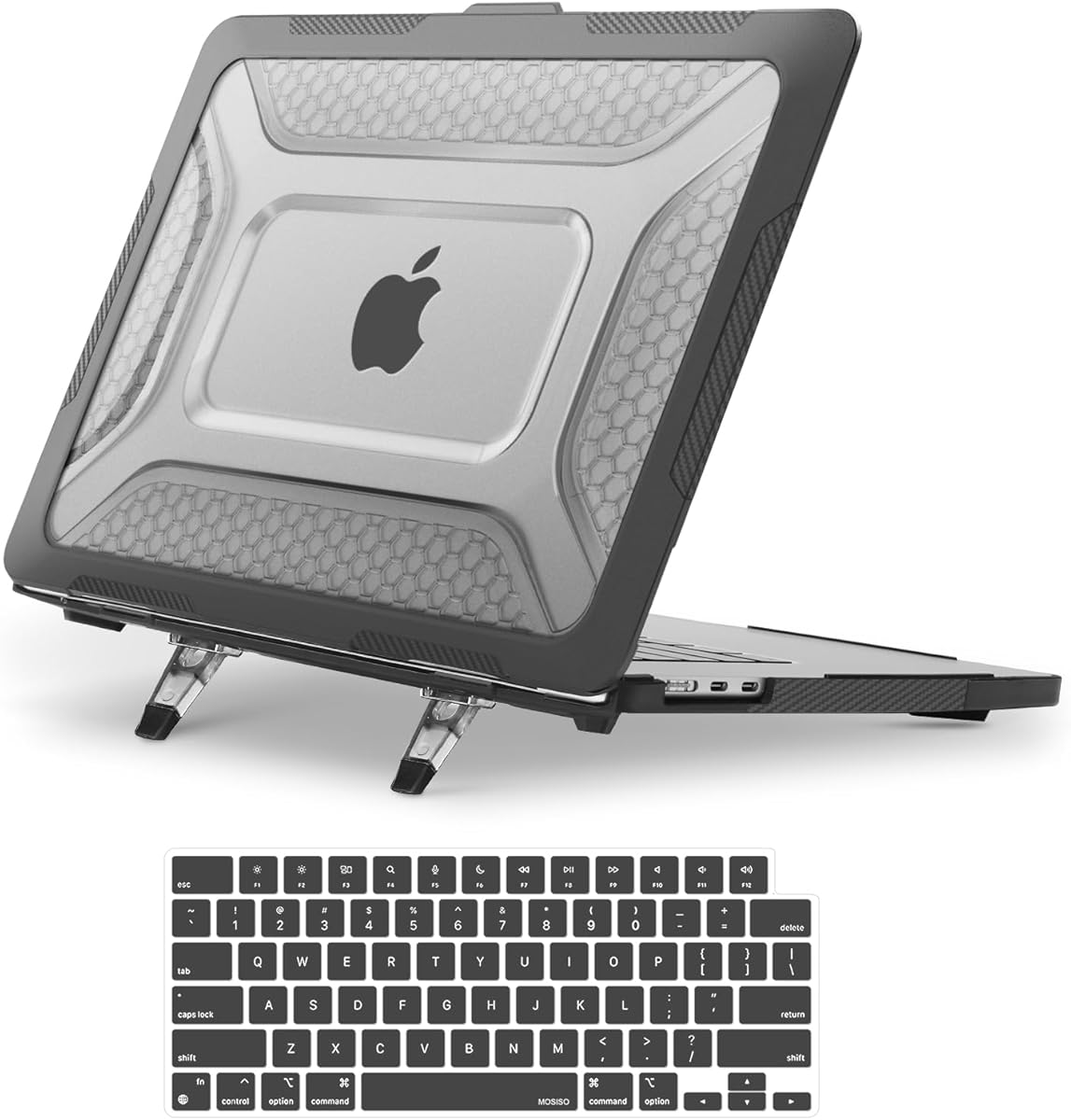
The MOSISO case offers a functional design with built-in kickstands for better ergonomics. It holds a high 4.7 rating thanks to its shock-absorbing honeycomb ridges. This makes it suitable for users who often type in different environments.
We may earn a commission when you buy through this link, at no additional cost to you.
Its rugged construction wraps around the laptop with a hard shell and soft core. The kickstands snap into place instantly, improving posture during video calls or typing. It also includes a keyboard cover to protect against spills.
While it provides excellent protection, the added weight and bulk may not suit those who travel frequently. The case is solid and reliable but lacks the ultra-slim profile of other options.
Buy this if you prioritize typing comfort and drop protection over a lightweight feel. It is a great all-rounder for office work or casual daily use where durability is key.
The kickstands provide multiple angles for typing and viewing. This reduces wrist strain and helps maintain better posture during extended work sessions.
Beveled ridges in a honeycomb pattern absorb impact energy. This design protects the corners and body from bumps and accidental drops.
We may earn a commission when you buy through this link, at no additional cost to you.
SUPCASE provides a transparent case that lets your MacBook's Apple logo shine through clearly. It scores a 4.6 rating for its clear visibility and strong protection. The wraparound bumper is designed to absorb shock during drops or falls.
We may earn a commission when you buy through this link, at no additional cost to you.
The case is engineered with precise cutouts for all ports and sensors. Bottom corners feature raised rubber feet to improve airflow and stability on desks. It offers a balanced mix of protection and aesthetic appeal.
Users note that the transparent material may attract dust more easily than matte finishes. Regular cleaning helps keep it looking new. The bumper adds a bulk but ensures safe corner protection.
Choose this case if you want to showcase your laptop's original look while adding a layer of safety. It is ideal for users who value visibility and simple installation.
The clear cover allows the Apple logo to remain visible. This design choice appeals to users who prefer a minimalist and original look.
Raised rubber feet on the bottom enhance grip and heat flow. This prevents the laptop from slipping and improves cooling efficiency.
We may earn a commission when you buy through this link, at no additional cost to you.
UAG Plyo is the ultimate rugged case for demanding environments. It meets military drop-test standards and features a one-piece hinged design. This case is built to protect your MacBook from tough daily impacts and shocks.
We may earn a commission when you buy through this link, at no additional cost to you.
Its translucent honeycomb body showcases the laptop's design while providing armor-level protection. Rubberized feet and a non-slip frame ensure the device stays stable on any surface. Ports are fully accessible with precise cutouts.
The weight is higher than slim cases, which may be a downside for travelers. However, the durability and safety features make it worth the trade-off. It is clearly meant for active users.
If you work in challenging settings or need maximum protection, this case is the best investment. It combines rugged performance with a stylish modern look.
This case meets MIL STD 810G 516.6 drop-test standards. It guarantees protection against serious drops and impacts beyond normal wear.
Ventilation vents are designed to prevent overheating during use. This ensures the MacBook maintains optimal performance without thermal throttling.
We may earn a commission when you buy through this link, at no additional cost to you.
tomtoc offers a 360-degree protective sleeve ideal for travelers. It has a 4.8 rating for its premium build and military-grade drop tests. The sleeve uses CornerArmor Technology to protect corners from high-impact shocks.
We may earn a commission when you buy through this link, at no additional cost to you.
The front pocket allows you to carry chargers and accessories along with your laptop. It is made from recycled fabrics and includes YKK zippers for smooth use. This option adds versatility to your daily carry.
Unlike hardshells, it does not offer impact protection while the laptop is in use. However, it excels at protecting the device inside bags or cases. It is a great secondary protection layer.
Choose this sleeve if you commute often or use a backpack. It provides reliable cushioning and storage without sacrificing the sleek look of your laptop.
This sleeve is tested to meet military-standard drop requirements. It ensures your device survives accidental drops and harsh travel conditions.
A front pocket holds essentials like cables and mice. This reduces the need for separate pouches and keeps your workspace organized.
We may earn a commission when you buy through this link, at no additional cost to you.
BlueSwan provides reliable protection without a high price tag. With a 4.5 rating, users appreciate its balance of quality and value. The case is lightweight and features a sleek invisible armor design.
We may earn a commission when you buy through this link, at no additional cost to you.
It uses reinforced PC material to resist cracks and scratches. The snap-on clips hold securely, and the fit is precise. The case allows your Apple logo to remain visible subtly.
Compared to rugged options, it offers basic protection against bumps and scratches. It is ideal for daily office use rather than heavy-duty scenarios. The slim profile ensures it fits easily into sleeves.
This is a great choice for budget-conscious buyers who still want style. It keeps your laptop looking new and protected from minor wear.
This case offers solid protection at a lower cost. It is an excellent entry-level option for students or casual users.
Vents are aligned to maintain original airflow paths. This prevents heat buildup and ensures smooth operation during tasks.
We may earn a commission when you buy through this link, at no additional cost to you.
This MOSISO kit offers a comprehensive protection solution. It includes a case, screen protector, and keyboard covers for complete coverage. Users love that it provides everything needed for full-body protection right out of the box.
We may earn a commission when you buy through this link, at no additional cost to you.
The case itself has a TPU exterior for shock absorption and a PC core for shape retention. The kickstand allows for comfortable typing angles. It is designed for life on the move and daily use.
Managing all the included accessories might be slightly inconvenient for some. But having everything in one purchase saves time and effort. It is ideal for home or travel use.
If you want a complete set to protect all parts of your MacBook, this kit is perfect. It ensures your screen and keyboard stay safe as well.
The kit includes a screen protector and keyboard covers. This adds extra defense against spills and scratches to your device.
The built-in kickstand provides two key benefits. It improves typing comfort and elevates the screen for better posture.
We may earn a commission when you buy through this link, at no additional cost to you.
Incase Edge is a precision hardshell designed to preserve the MacBook's silhouette. It uses 100% Makrolon polycarbonate for durability and style. The case offers a seamless fit that complements the original device design.
We may earn a commission when you buy through this link, at no additional cost to you.
Intelligent air-flow vents support thermal performance during heavy tasks. Rubberized feet enhance traction to prevent slipping on desks. It is slim and lightweight, adding minimal bulk to your setup.
Users report a good fit but note it is a basic shell without extra features like kickstands. It is reliable for scratch and bump protection but lacks the ruggedness of other options.
Choose this for a clean, professional look that stays true to the MacBook's profile. It is a solid choice for simple daily protection.
This material provides a durable yet sleek shell. It ensures the case maintains its shape and resists cracking.
Ventilation is integrated into the shell to help cooling. This prevents overheating during long work sessions or gaming.
We may earn a commission when you buy through this link, at no additional cost to you.
This MOSISO option bundles a case with a 360-degree sleeve. It includes a keyboard cover, screen protector, and webcam privacy sticker. This combo addresses multiple privacy and protection needs for users.
We may earn a commission when you buy through this link, at no additional cost to you.
The sleeve protects the laptop when carried in backpacks or briefcases. The case itself is precise and does not add bulk. It allows full access to all ports without interference.
The webcam sticker adds an extra layer of privacy for calls. While useful, some may prefer separate high-quality covers. The bundle offers good value for complete device security.
If you care about privacy and want a carrying solution in one pack, this is a great option. It ensures your laptop stays safe and private on the go.
A webcam cover sticker is included for privacy. It prevents unwanted access to your camera when not in use.
The polyester sleeve protects against spills and drops. It ensures your MacBook stays safe when transported daily.
We may earn a commission when you buy through this link, at no additional cost to you.
Spigen offers a unique dual-layer design with a premium knit fabric exterior. It feels softer to touch than standard hard plastic. This case provides a secure grip while remaining fingerprint resistant.
We may earn a commission when you buy through this link, at no additional cost to you.
The textured fabric surface reduces the risk of accidental drops. Raised TPU feet elevate the base for cooling and stability. It snaps on securely and does not interfere with ports.
The fabric texture might collect lint over time. Regular cleaning helps maintain its appearance. It is a stylish choice that stands out from typical hardshell options.
Choose this if you prefer a unique texture and enhanced grip. It is perfect for users who value comfort and a distinct aesthetic.
The knit fabric gives the case a soft touch. It offers a different feel compared to traditional plastic hardshells.
Textured fabric reduces slip risks. This improves handling safety for active users or travel.
We may earn a commission when you buy through this link, at no additional cost to you.
Selecting the right protective case requires considering several factors to ensure a perfect fit and long-term value. This guide outlines key features to prioritize when evaluating your options.
Always verify that the case matches your MacBook Air model and chip version. New releases like M5, M4, M3, and M2 have specific dimensions and port layouts. Incorrect fit can cause gaps or block cooling vents.
Check the model number on the back of your laptop to ensure the case is designed for your exact unit.
Polycarbonate is a popular choice for hardshells because it balances strength and lightness. Some cases include TPU bumpers or rubber feet for added shock absorption. Look for reinforced corners and scratch-resistant coatings.
Prioritize materials that offer long-term wear resistance without yellowing or cracking over time.
Slim cases are ideal for daily travel and portability without adding bulk. Rugged cases offer military-grade protection but add more weight. Consider where you use your laptop most to decide on the level of protection needed.
Choose slim for style and rugged for outdoor or heavy-use scenarios.
Precise cutouts ensure you can plug in cables without removing the case. Poorly designed cases might cover USB or charging ports. Verify that the design allows easy access to all features including vents.
Test port access before finalizing your choice to avoid frustration.
A good case should not trap heat inside your laptop. Look for airflow vents or raised feet that allow cooling systems to work properly. Overheating can reduce performance and hardware lifespan.
Ensure the case design supports the MacBook's original cooling path.
Some kits include keyboard covers, screen protectors, or even carrying sleeves. These extras can save money and provide comprehensive protection. Check if the accessories match your needs for daily use.
Decide if bundled items add value or if you prefer a standalone case.
Texture affects how secure the laptop feels in your hands. Matte finishes and fabric coatings prevent slipping and fingerprints. This can be crucial for users who carry their device frequently.
Select a surface that offers a comfortable and non-slip feel.
Cases come in transparent, solid, or patterned designs. Consider how much you want the original Apple logo visible. Some cases preserve the look while others offer bold colors or patterns.
Choose a style that matches your personal taste and work environment.
Install your case by aligning it carefully with the MacBook's corners and snapping it into place. Ensure all clips are secure to prevent gaps that could trap dust or damage the screen.
Clean the case regularly with a soft, dry cloth to remove dust and fingerprints. Avoid harsh chemicals that might damage the matte or rubber coatings. Check for scratches or cracks to maintain protection.
Remove the case occasionally to clean the laptop itself and allow full airflow. This helps maintain device health and ensures the vents stay clear of debris.
No, most cases are designed with precise cutouts that allow full access to charging ports. You can connect your charger without removing the case. Ensure your specific case model supports your MacBook's connector type.
Yes, many cases are compatible with screen protectors. Some bundles even include one. Verify the case thickness to ensure the cover closes fully without pressure.
Most hardshell cases are lightweight and fit into sleeves or backpacks. For extra safety, consider adding a padded sleeve as seen in some options. This protects against bumps during transit.
Slim cases add minimal bulk, while rugged ones add more thickness. Most modern cases are engineered to keep the profile low. Check the product specs for exact dimensions.
Yes, cases are replaceable and durable. If your case cracks, simply order a new one compatible with your model. Most options are easy to install and remove.
No, a properly fitted case should not impact performance. Some designs even improve airflow. Avoid cheap cases that block vents or trap heat.
The Soonjet case stands out as the overall top pick due to its precision fit and aesthetic appeal. For budget-conscious buyers, BlueSwan offers great value without compromising essential protection.
Prioritize factors like material durability and heat dissipation when selecting a case. Your lifestyle and usage habits should guide whether you choose a slim or rugged option.
Always verify current product availability and details before purchasing. Prices and features may change, so checking the latest info ensures you get the best protection for your MacBook.