
MONTECH AIR 903 MAX
4.8Editor score
4 pre-installed PWM fans
E-ATX motherboard support
Ventilated mesh front panel
Discover the top high airflow PC cases for 2026. Our guide compares cooling performance, build quality, and features to help you choose the right chassis for
Finding the right chassis is crucial for system stability. High airflow PC cases allow cool air to enter freely and hot air to exit quickly. This prevents thermal throttling and keeps your components running smoothly during intense tasks.
We evaluated ten top models based on ventilation design, fan inclusion, and component compatibility. Our analysis focuses on real-world cooling potential and ease of assembly. Each case offers unique benefits for different build styles and budgets.
This list highlights standout options ranging from budget-friendly to premium choices. You will see detailed specs and pros to guide your decision. Prices and availability change frequently so check the latest details before buying.
4.8Editor score

4.7Editor score

4.8Editor score
This side-by-side comparison helps you weigh options based on key specifications. Look at fan count, radiator support, and dimensions to find the best fit for your hardware.





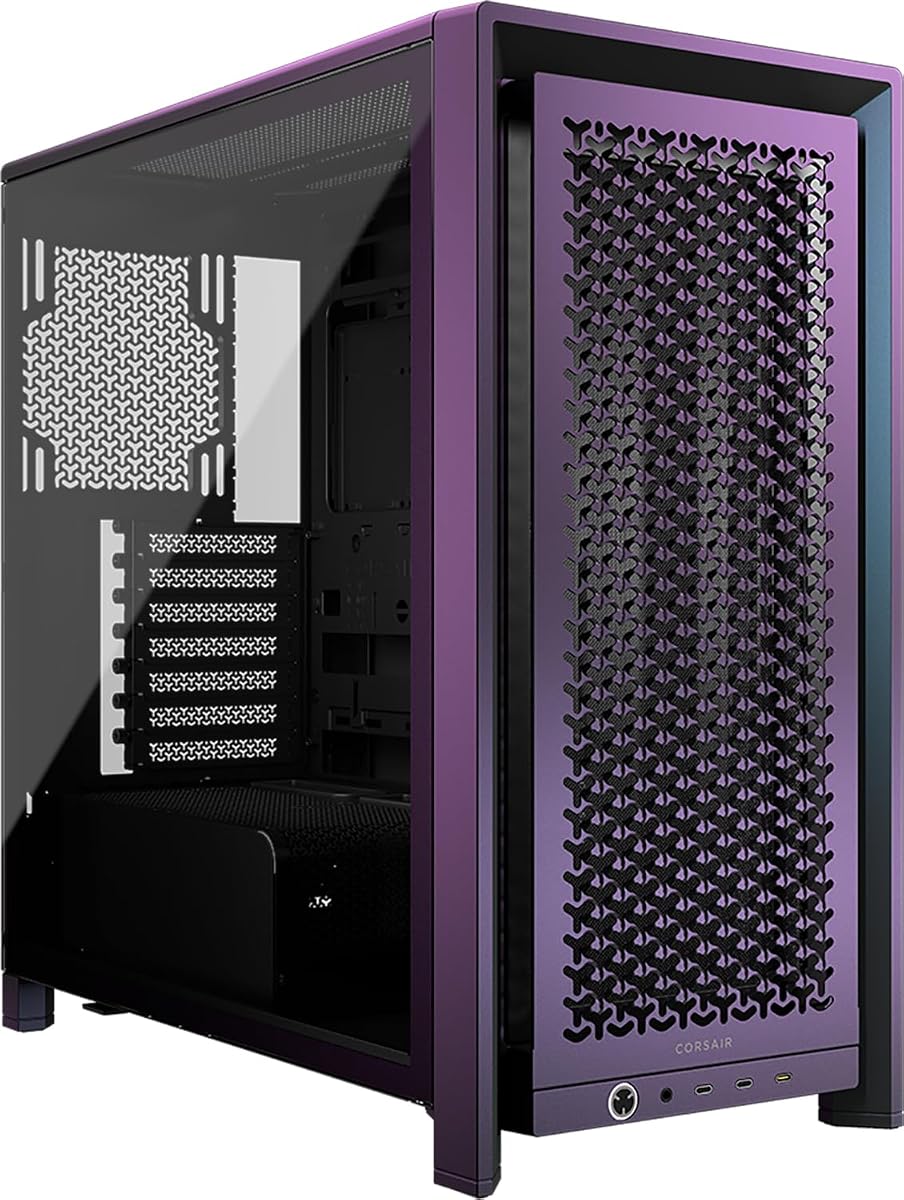
The CORSAIR 4000D RS ARGB stands out as a top choice for builders seeking high airflow without sacrificing style. Rated highly by users, it features a revolutionary FRAME system that allows deep customization of components and panels.
We may earn a commission when you buy through this link, at no additional cost to you.
Its pre-installed RS ARGB fans deliver strong cooling performance out of the box. The InfiniRail mounting system provides unmatched flexibility for positioning fans where you need them most. This targeted airflow approach keeps hardware cool during demanding tasks.
The 3D Y-pattern airflow panel minimizes restriction while maintaining a sleek look. Users can remove the side panel near the motherboard tray for even more cooling potential if needed. Cable management remains tidy thanks to the optional cable cover.
This case is ideal for enthusiasts who value flexibility and thermal performance equally. Whether you prioritize clean aesthetics or raw cooling power the 4000D RS ARGB adapts to your needs. It remains a leading option in the high airflow category.
The steel multi-point mounting system lets you slide rails to mount fans in various positions. This ensures you can optimize airflow paths for your specific hardware layout.
The FRAME system allows you to upgrade the motherboard tray or swap I/O panels easily. This makes the case a long-term investment that grows with your needs.
We may earn a commission when you buy through this link, at no additional cost to you.
The NZXT H5 Flow delivers exceptional cooling in a smaller package. Rated highly for its design, it uses ultra-fine mesh on top front and side panels to maximize airflow while filtering dust effectively.
We may earn a commission when you buy through this link, at no additional cost to you.
Its PSU shroud is perforated on the side and bottom enabling optimal air intake. This feature helps prevent power supply heat from soaking into the rest of the system. Two quiet fans come pre-installed for solid out-of-the-box performance.
Cable management is handled effortlessly with wide channels and straps. This keeps the interior organized even in a tighter footprint. Users appreciate the balance between size and thermal capability.
Ideal for builders with space constraints the H5 Flow maintains high airflow standards. It proves you do not need a large case to get great cooling. This model is a strong contender for compact builds.
The perforated PSU shroud allows air to flow directly to the power supply unit. This prevents hot air recirculation and keeps internal temperatures lower.
Ultra-fine mesh panels catch dust while allowing air to pass through freely. This reduces cleaning frequency without compromising cooling efficiency.
We may earn a commission when you buy through this link, at no additional cost to you.
The MONTECH AIR 903 MAX is a favorite for builders wanting high performance without overspending. With a 4.8 rating it starts with four fans already fitted. Three sit at the front and one at the rear ready for immediate cooling.
We may earn a commission when you buy through this link, at no additional cost to you.
Its ventilated mesh front panel takes in the airflow the system needs efficiently. The chassis leaves room for demanding parts including E-ATX motherboards and large GPUs. This flexibility ensures your next upgrade will fit without issues.
Cable management is simplified with USB Type-C ports and organized routing space. The front I/O includes standard ports and buttons for daily use. Clean desk setup is achievable with thoughtful interior design.
If you prioritize cooling and component support over luxury aesthetics this case is perfect. It offers an airflow-ready starting point that is hard to beat. The value proposition makes it a top pick.
Four pre-installed PWM fans provide a solid airflow baseline immediately. You do not need to buy extra fans to achieve good thermal performance.
Supporting E-ATX and GPUs up to 400mm ensures longevity. Your build remains capable of handling future high-performance upgrades.
We may earn a commission when you buy through this link, at no additional cost to you.
The LIAN LI LANCOOL 216 focuses heavily on cooling large components. It features two 160mm ARGB fans at the front that deliver immense air volume. This setup is perfect for high-end GPUs generating significant heat.
We may earn a commission when you buy through this link, at no additional cost to you.
With room for graphics cards up to 392mm it handles the newest heavy cards. The fine mesh panels at the front top and shroud help with great ventilation. Modular motherboard I/O allows you to adjust positions for air or water cooling.
Cable management tools like velcro straps keep wires neat. The spacious interior allows for easy component installation without struggle. Users appreciate the balance of build quality and thermal focus.
For those with powerful GPUs this case is a top choice. It ensures your hardware gets the airflow it needs without obstruction. The LANCOOL 216 is built for performance.
The two 160mm ARGB fans provide more air than standard 120mm units. This reduces noise while keeping high loads cooler effectively.
Moving the motherboard tray position helps optimize cable and airflow routes. This flexibility supports both air-cooled and water-cooled systems.
We may earn a commission when you buy through this link, at no additional cost to you.
The Antec Flux Pro is designed for those who need maximum cooling potential. Rated highly for build quality it includes six PWM fans pre-installed. This provides extensive coverage for heat removal across the system.
We may earn a commission when you buy through this link, at no additional cost to you.
Its multi-directional vent design supports up to 12 fans simultaneously. The removable cooling brackets allow easy customization of your layout. Users can mount 420mm and 360mm radiators at once for liquid cooling.
The innovative iShift PSU 90 mount adds unique flexibility. It helps with cable routing and cooling efficiency in various builds. Wood metal and glass create a high-quality texture for the exterior.
If you have a powerful build requiring full-tower dimensions this is ideal. It handles multiple radiators and massive airflow needs well. The Flux Pro sets a high bar for extreme systems.
Supporting simultaneous 420mm and 360mm radiators allows for serious liquid cooling setups. This capability is rare in mid-tower cases.
Combining metal glass and wood creates a distinct aesthetic. This adds a premium feel to the functional design of the case.
We may earn a commission when you buy through this link, at no additional cost to you.
The CORSAIR 3500X RS ARGB brings a panoramic view to cooling. Rated highly for its looks it supports motherboards from Mini-ITX to EATX. You get essential features for thermal performance wrapped in glass aesthetics.
We may earn a commission when you buy through this link, at no additional cost to you.
Three RS120-R ARGB fans deliver high-performance cooling right out of box. You can accommodate up to 10 fans ensuring cooling is never sacrificed. Removable tempered glass panels make access easy after installation.
Build quality ensures that cooling remains effective despite the design. The wraparound glass aesthetic matches powerful components inside perfectly. Users appreciate both the look and the functionality provided.
If you want to showcase your build without losing cooling power this works. It combines style with the necessary thermal capability. The 3500X is a standout for visual builds.
The wraparound glass design gives you a view of every internal component. This makes every build look impressive and unique.
Supporting up to 10 fans ensures you never run out of cooling options. You can customize fan layout easily to fit your needs.
We may earn a commission when you buy through this link, at no additional cost to you.
The Lian Li V100RX is designed for cleaner builds with back-connect boards. It supports ATX and back-connect ATX motherboards to route cables differently. With a 4.8 rating it includes four PWM-controlled fans for lighting and airflow.
We may earn a commission when you buy through this link, at no additional cost to you.
The integrated 26-LED ARGB strip enhances visibility significantly. Each side panel features a tool-less mechanism for fast access to components. This streamlines your build process and maintenance tasks.
Fans run up to 1800 RPM for high air pressure. This ensures cooling even with restrictive filters or radiators. Support for GPUs up to 420mm covers modern high-end hardware well.
This case is perfect for those seeking cleaner aesthetics and tool-free access. It balances performance with ease of use. The V100RX supports next-gen motherboard layouts.
Compatible with back-connect motherboards for a cleaner look. Cables disappear behind the motherboard for better cable management.
Tool-less mounting mechanisms make side panels easy to remove. This allows quick hardware access without tools or frustration.
We may earn a commission when you buy through this link, at no additional cost to you.
The Cooler Master HAF II 500 offers oversized cooling power for enthusiasts. With 220mm front intake fans it moves a huge volume of air. This low resistance design improves airflow throughput compared to standard cases.
We may earn a commission when you buy through this link, at no additional cost to you.
Split-level cable management optimizes routing space. It creates room for oversized rear exhaust cooling without clutter. Dual-mode GPU holder ensures stability even for heavy cards.
Flexible storage cage supports 3.5-inch and 2.5-inch drives easily. MasterRail mounting system supports various radiator sizes at front and top. This case handles high-end hardware without issue.
For a premium build needing top-tier cooling this is the best choice. It maximizes air movement and component support. The HAF II 500 is built for serious performance.
Two 220mm fans move more air than standard 140mm units. This provides higher cooling potential with less fan speed.
Split-level management creates dedicated space for cables. This keeps airflow paths clear from obstruction.
We may earn a commission when you buy through this link, at no additional cost to you.
The NZXT H9 Flow uses a dual-chamber design to separate components. This improves thermal performance and cable management significantly. It includes three fans in front-right and one in rear out of box.
We may earn a commission when you buy through this link, at no additional cost to you.
Perforated steel panels and angled front-right fans ensure efficient cooling. Support up to nine 140mm fans across top and bottom plus one rear. This capacity supports massive airflow needs.
Panoramic view showcases every detail of your build with glass. Extra-wide channels with Velcro straps make routing effortless. Compatible with back-connect motherboards for a cable-free look.
Ideal for builders who want clean routing and strong cooling. The dual-chamber design keeps heat isolated effectively. H9 Flow offers style and function well.
Dual-chamber design separates main components from the PSU and drives. This prevents heat from recirculating into sensitive hardware.
Supports up to nine 140mm fans across multiple locations. This allows custom airflow configurations to cool any part of the system.
We may earn a commission when you buy through this link, at no additional cost to you.
The CORSAIR Frame 4000D Vault Series is a limited edition collectible. It showcases the stunning Galaxy finish in a strictly limited run. Each case is individually numbered for the ultimate collector.
We may earn a commission when you buy through this link, at no additional cost to you.
It includes the revolutionary FRAME system giving new meaning to customization. You can upgrade the motherboard tray to billet aluminum easily. InfiniRail mounting system offers unmatched flexibility in front and roof configuration.
Dual 360mm radiator support allows you to take cooling to the next level. Mount up to twelve 120mm fans simultaneously for efficient airflow. The 3D Y-pattern panel provides low obstruction paths for cool air.
For collectors who want both function and exclusivity this is perfect. It combines the proven 4000D design with unique styling. The Vault Series is a rare and high-performance option.
The Galaxy finish is strictly limited and never produced again. This makes each unit a unique collector's item for enthusiasts.
The revolutionary FRAME system allows you to swap out panels or trays. This adaptability means your case can change with your needs.
We may earn a commission when you buy through this link, at no additional cost to you.
Choosing the right case requires understanding airflow design and component needs. This guide covers the essential factors to ensure optimal performance.
Mesh panels allow air to pass through freely. Look for cases with perforated fronts and tops to avoid heat traps.
Prioritize cases with open mesh over solid panels for better thermal performance.
High airflow cases should come with fans or be ready to install them. Check fan size and count to ensure adequate coverage.
Cases with pre-installed fans save money and provide immediate cooling.
Ensure the case supports your motherboard and GPU size. E-ATX and large GPUs need more clearance for airflow paths.
Always check dimensions for GPUs and radiators before buying.
Good cable management prevents airflow obstruction. Look for wide channels and straps to route cables away from intake paths.
Clean routing ensures air flows directly to components instead of around wires.
If you use liquid cooling ensure the case supports your radiator size. Front and top mounting points are critical for cooling.
Check maximum radiator thickness and fan clearance before purchasing.
Steel frames and tempered glass ensure durability. Heavy-duty materials protect your components during transport.
Look for cases with robust construction to support your hardware.
A good case balances intake and exhaust fans. Intake fans pull cool air in while exhaust pushes hot air out.
Ensure the layout supports positive pressure for better dust control.
High airflow can sometimes mean higher noise. Check fan noise ratings if you need a quiet environment.
Balance cooling performance with acoustic comfort for your setup.
Place your PC in a location with plenty of surrounding space. Keep at least a few inches of clearance from walls to allow air intake.
Install all included fans according to the case manual. Ensure intake and exhaust fans face the correct direction for optimal flow.
Clean dust filters regularly to maintain airflow efficiency. Use compressed air or a soft brush to remove debris from mesh panels.
A high airflow PC case features mesh panels instead of solid glass or steel to allow unrestricted air movement. This design prioritizes cooling performance for high-end components.
Most high airflow cases support liquid cooling with radiator mounts on the front and top. Always check max radiator size before purchasing to ensure compatibility.
Ideally a high airflow case comes with at least three fans. However some cases sell empty to let you choose your preferred fan types.
They can be louder if high-RPM fans are used. However many modern models include quiet PWM fans that balance cooling with silence.
Most modern cases support GPUs up to 400mm. Always check the case dimensions against your specific graphics card model before buying.
Yes dust filters on fans and intake panels are essential. They prevent dust buildup while still allowing air to pass through effectively.
We reviewed ten top models including the CORSAIR 4000D RS ARGB and MONTECH AIR 903 MAX. Each offers unique features to suit different budgets and build styles.
Prioritize component compatibility and fan configuration to get the best performance. A well-chosen case ensures your hardware stays cool and stable.
Prices and availability change so check current details on Amazon. Visit the product pages directly to confirm stock and latest pricing.