
Guermok Video Capture Card
4.4Editor score
1080p 60FPS support
USB 3.0 connectivity
Plug and play setup
Finding the right HDMI recorder can transform how you capture digital video content. Whether you need to archive analog tapes or record high-definition gameplay, a reliable device ensures quality footage without complex setups.
We evaluated ten leading HDMI recorders based on resolution support, ease of use, and compatibility. Our list covers standalone units and USB capture cards suitable for various needs and budgets.
Each pick highlights key strengths and ideal use cases to help you decide. Note that availability and specifications may change, so verify details before purchasing to ensure the best fit.
4.4Editor score
4.0Editor score

4.1Editor score
As an Amazon Associate we earn from qualifying purchases.
The following table provides a side-by-side comparison of all ten HDMI recorders reviewed. It highlights essential specifications to help you quickly identify the model that best suits your specific recording requirements.





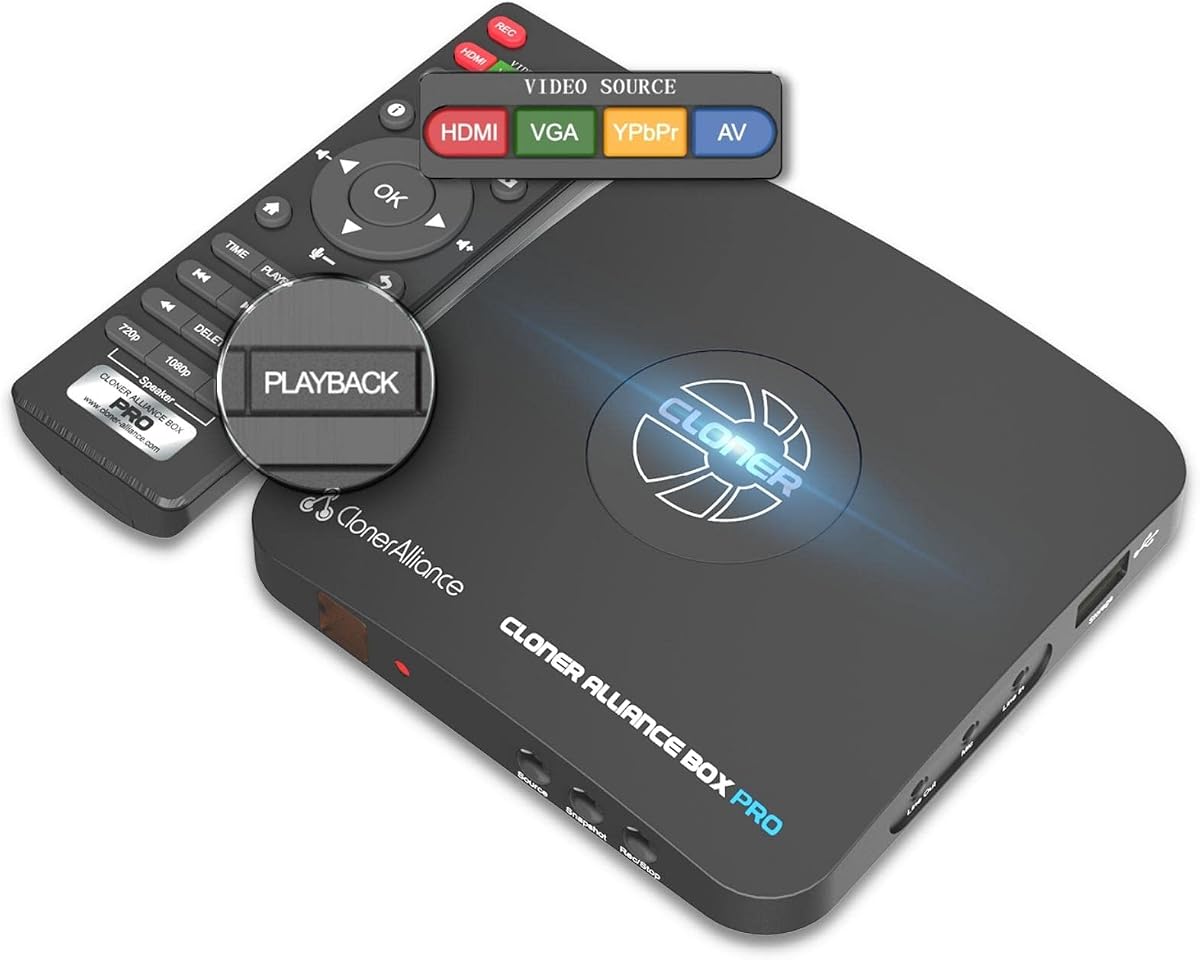
The ClonerAlliance Box Pro is a top choice for users needing a standalone solution. It achieves a 4.0 rating by offering versatile recording options without a PC.
We may earn a commission when you buy through this link, at no additional cost to you.
Its ability to accept HDMI, RCA, VGA, and other analog inputs makes it ideal for digitizing old tapes. You can record directly to USB drives while watching the feed on TV.
While it lacks 4K support, the 1080p quality is sufficient for most archival needs. The lack of HDCP support means some modern protected content cannot be recorded.
This unit is perfect for seniors or those wanting simple plug-and-play functionality. We recommend it for anyone archiving analog footage or capturing unprotected HD signals.
Convert old VHS tapes and camcorder files into modern digital formats for safekeeping and easy sharing on current devices.
Set up automatic recording sessions to capture specific TV shows or events without needing to manually start the device each time.
We may earn a commission when you buy through this link, at no additional cost to you.
The Guermok card is the best budget option for PC-based capture needs. With a 4.4 rating, it balances cost and performance effectively for streamers.
We may earn a commission when you buy through this link, at no additional cost to you.
It supports 1080p at 60fps via USB 3.0, ensuring smooth video feeds. The aluminum body helps with heat dissipation during long recording sessions.
It is not a standalone device, so a computer is required for operation. You must install software like OBS to record or stream the captured video.
Ideal for budget-conscious gamers or teachers needing to record screen content. This card is a reliable tool for live streaming and remote teaching.
Stream to popular platforms like Twitch or YouTube with ease using the included software compatibility for immediate live broadcasting.
Connect various devices from cameras to consoles seamlessly thanks to broad compatibility with Windows, Mac, and Linux systems.
We may earn a commission when you buy through this link, at no additional cost to you.
The ClonerAlliance UHD Pro offers premium 4K recording in a standalone form. It holds a 4.1 rating and delivers professional quality footage for enthusiasts.
We may earn a commission when you buy through this link, at no additional cost to you.
Using H.265 codecs, it compresses video efficiently without losing quality. The 4K60fps passthrough ensures your gaming experience remains uninterrupted while recording.
Recording at 24fps gives a cinematic look to your videos. However, like many in this class, it cannot record protected content due to HDCP limits.
This device is excellent for capturing high-res footage from consoles or cameras. It suits users who need 4K quality without complex PC setups.
Capture your content at 24 frames per second for a film-like aesthetic that enhances the visual appeal of your recordings.
Utilize H.265 technology to store more video data in smaller files, making storage management easier over time.
We may earn a commission when you buy through this link, at no additional cost to you.
This Capture Card is a solid mid-range option for PC streaming setups. Its 4.3 rating reflects reliable performance for gamers and content creators.
We may earn a commission when you buy through this link, at no additional cost to you.
It supports up to 1080p recording with a loop-out that lets you play without lag. The microphone input allows you to add commentary directly.
While it accepts 4K input, the recording output caps at 1080p. This is a trade-off for affordability and ease of use in live scenarios.
Best for those needing a simple, plug-and-play solution for streaming. It fits well into setups with Xbox, PlayStation, or DSLR cameras.
Connect an external microphone to add your voice to gameplay or presentations without needing a separate audio interface.
Maintain a clear signal to your monitor while capturing video, ensuring your gameplay experience is never compromised by recording.
We may earn a commission when you buy through this link, at no additional cost to you.
The Audio Express AXHDCAP is an affordable tool for basic video capture tasks. With a 4.4 rating, it delivers solid performance for static content.
We may earn a commission when you buy through this link, at no additional cost to you.
It uses USB 2.0, which limits resolution to 1080p at 30fps. Despite this, it is effective for meetings and slow-moving video sources.
The anti-static design ensures durability during frequent plugging and unplugging. However, it is not suitable for high-speed action or gaming recording.
Ideal for teaching, remote meetings, or general recording needs. It is a great entry-level device for those not needing high frame rates.
Capture online conferences and lessons efficiently without heavy system requirements, making it accessible for everyday professional use.
Built with anti-static materials to protect internal components from electrical discharge during daily handling and transport.
We may earn a commission when you buy through this link, at no additional cost to you.
This Capture Card is designed for high-speed USB 3.0 connections. It carries a 4.4 rating and offers smooth performance for live content.
We may earn a commission when you buy through this link, at no additional cost to you.
It records at 1080p 60fps with minimal delay, which is crucial for competitive gaming streams. The design is compact and fits easily in a laptop bag.
It does not work standalone, so you will need a laptop or PC for processing. Ensure your computer has a USB 3.0 port for best results.
Perfect for mobile streamers and travelers needing reliable capture. It is a dependable choice for those who prioritize portability and speed.
Take your broadcasting setup anywhere with a lightweight design that fits comfortably in any travel kit or backpack.
Minimize lag during live broadcasts to ensure your reactions and game movements sync perfectly with what viewers see online.
We may earn a commission when you buy through this link, at no additional cost to you.
This Capture Box stands out with its dual HDMI inputs and built-in screen. It holds a 3.8 rating and offers advanced features for multi-source recording.
We may earn a commission when you buy through this link, at no additional cost to you.
You can manage two video feeds simultaneously using PIP modes. The 7-inch screen allows you to preview content without connecting to an external monitor.
Battery support adds flexibility for field use, though you must purchase the battery separately. It is a robust tool for complex production scenarios.
Best suited for users needing multi-source control and portability. It works well for events where a single source is not enough.
Easily switch between two HDMI inputs or view them in PIP mode for comprehensive monitoring during recording sessions.
Power the unit with a battery to record video anywhere without being tethered to a wall outlet or power source.
We may earn a commission when you buy through this link, at no additional cost to you.
The ZowieREC 4K HDMI is a standalone unit with a sleek premium design. It rates 3.3, indicating mixed user satisfaction despite its high-end build.
We may earn a commission when you buy through this link, at no additional cost to you.
It records 4K video directly to storage devices without needing a PC. The schedule recording feature allows you to automate sessions efficiently.
Despite its look, the software interface and feature set are simpler than competitors. This may explain the lower ratings compared to other standalone recorders.
Ideal for users prioritizing design and simplicity. It is a good choice if you want a high-end look with basic recording capabilities.
Enjoy a one-piece molded silver casing that looks professional on any desk and reflects a commitment to build quality.
Set specific times for the recorder to start and stop automatically, ensuring you capture content even when you are away.
We may earn a commission when you buy through this link, at no additional cost to you.
The ViewPro is a portable recorder with a large 7-inch LCD screen. It holds a 4.3 rating and is excellent for standalone preview and recording.
We may earn a commission when you buy through this link, at no additional cost to you.
It supports analog inputs like AV and VGA, making it useful for older cameras. The screen lets you view content anywhere without a TV.
It can also stream to platforms via bundled software. However, it shares the HDCP limitation found in most consumer recorders on this list.
Best for field recording and archiving analog signals. It is a versatile device for professionals needing mobility and screen preview.
Digitize old AV or VGA signals from cameras or VCRs directly into digital files for easier editing and sharing.
Use the integrated LCD screen to confirm recording quality and settings immediately without needing a separate monitor.
We may earn a commission when you buy through this link, at no additional cost to you.
This device is a professional solution for broadcast environments. While listed here, it uses SDI rather than HDMI inputs for higher reliability.
We may earn a commission when you buy through this link, at no additional cost to you.
It supports multiple SDI speeds up to 12G, making it suitable for high-end production. It is built for durability and professional workflows.
It requires additional adapters if you need to connect HDMI sources. This makes it less accessible for casual users compared to USB capture cards.
Ideal for professional studios needing robust recording capabilities. It is the top choice if you work with SDI signals and demand high quality.
Use industry-standard SDI connections for stable, long-distance video transmission suitable for professional production environments.
Route your signal to multiple destinations simultaneously, such as monitors and recorders, using the available program outputs.
We may earn a commission when you buy through this link, at no additional cost to you.
Selecting the right HDMI recorder depends on your specific needs and environment. This guide outlines key factors to consider before making a purchase.
Decide if you need a standalone unit that works without a computer or a USB capture card that requires a PC. Standalone units are better for archiving analog tapes or recording directly from a console without a computer setup. USB cards are ideal if you plan to stream or edit footage on a laptop simultaneously.
Check if the device supports 1080p or 4K resolution. If you are recording modern gaming consoles or high-definition cameras, a 4K model ensures future-proofing. For basic archival tasks, 1080p is often sufficient and more affordable.
Ensure the recorder accepts the inputs your devices use. HDMI is standard for modern gear, but RCA or VGA inputs are necessary for older camcorders and VHS players. Some units offer multiple input options for greater flexibility.
Look for models that support USB drives, SD cards, or both. Standalone recorders often write directly to external storage, so check compatibility with file systems like exFAT or NTFS. Proper storage selection ensures you can hold enough footage for your needs.
Low latency is critical for live gaming or streaming. Some capture cards offer near-zero delay, while others may have lag. If you are playing while recording, ensure the device has a loop-out feature to maintain a responsive display.
Devices supporting H.265 provide better compression than H.264, saving space on your drives. If file size matters, prioritize models with newer codec options. This helps in managing large video libraries without sacrificing quality.
Verify that the capture card works with your computer's OS. Most support Windows, but Mac users should check specific compatibility. Linux users may also need to confirm driver availability for certain hardware.
Be aware that most consumer recorders cannot handle content protected by HDCP. If you try to record from services like Netflix or cable, you may get a black screen. This is a standard limitation and not a defect.
Keep the device clean by dusting it regularly. Avoid covering vents on capture cards to prevent overheating. If using standalone units, update firmware when available to maintain performance.
Yes, you can record gameplay from these consoles using an HDMI recorder. Ensure the model supports 4K passthrough if you want to play in high resolution. Most standard capture cards will record at 1080p 60fps smoothly.
Standalone recorders with RCA inputs can record VHS tapes directly. You will need a VCR with RCA outputs connected to the recorder. The footage is then saved as digital files on a USB drive.
A black screen often indicates HDCP protection on the source. Most recorders cannot bypass this content protection. Try disabling HDCP on the source device if possible or use a compatible non-protected signal.
Standalone units do not require software as they record directly to storage. However, USB capture cards need software like OBS or VLC to capture video. Always check the product requirements before buying.
Yes, capture cards are excellent for recording Zoom or Teams meetings. Connect your camera or PC HDMI out to the card. This allows you to record high-quality video streams directly to your computer.
USB 3.0 offers faster data transfer rates and higher bandwidth. This is crucial for recording 1080p 60fps smoothly without dropped frames. USB 2.0 may struggle with high-resolution video and is generally not recommended for HD capture.
Remember to verify current stock and specs before purchasing as these details may change. This guide aims to simplify your choice process so you can focus on capturing your best content.