
Wireless Caregiver Pager
4.7Editor score
1500 foot range
58 ringtones
18 month warranty
Finding the right gadgets for elderly parents can transform daily life by enhancing safety, independence, and connection. These devices range from emergency alert systems to simple clocks that clarify time and date for those with memory loss. Selecting the right tools ensures peace of mind for caregivers while respecting the dignity of seniors.
We evaluated ten top-rated products based on reliability, ease of use, range, and features tailored to senior needs. Each item offers distinct benefits such as waterproof buttons, app notifications, or large displays. Our comparison highlights the most practical solutions available in November 2026 for home care and remote monitoring.
Each pick below details key specifications, pros, cons, and ideal use cases to help you decide. Prices and availability may fluctuate so check the links for current offers. These gadgets aim to bridge the gap between technology and comfort for aging loved ones living at home or in care facilities.
4.7Editor score

4.8Editor score

4.4Editor score
As an Amazon Associate we earn from qualifying purchases.
Below is a detailed side by side comparison of all ten products highlighting their core specifications and unique selling points to help you find the perfect match for your specific caregiving situation.


This WiFi Caregiver Pager stands out as our top pick for combining modern connectivity with reliable home alerts. With a 4.8 rating it delivers instant notifications to mobile apps and family members without recurring costs. The waterproof button and watch option provide flexible ways to summon help quickly.
We may earn a commission when you buy through this link, at no additional cost to you.
Its multi channel alert system ensures caregivers never miss a call by flashing alarms and sending phone notifications simultaneously. The signal range of 656 feet easily covers most homes including multiple floors. Customizable ringtones allow family to distinguish between different buttons for better response.
While it relies on 2.4GHz WiFi which may limit some networks the core features remain robust. SMS alerts require a subscription but app alerts work freely. This trade off is acceptable for users prioritizing basic safety and remote monitoring.
Ideal for tech savvy families needing real time updates this system bridges the gap between traditional pagers and smart home devices. It offers peace of mind with minimal ongoing expenses.
Pressing the panic button triggers loud alarms plus immediate app notifications ensuring help is dispatched quickly even if caregivers are far away.
Buttons can be screwed mounted adhesive patched or hung on lanyards making it easy to place them in bathrooms bedrooms or near bedsides.
We may earn a commission when you buy through this link, at no additional cost to you.
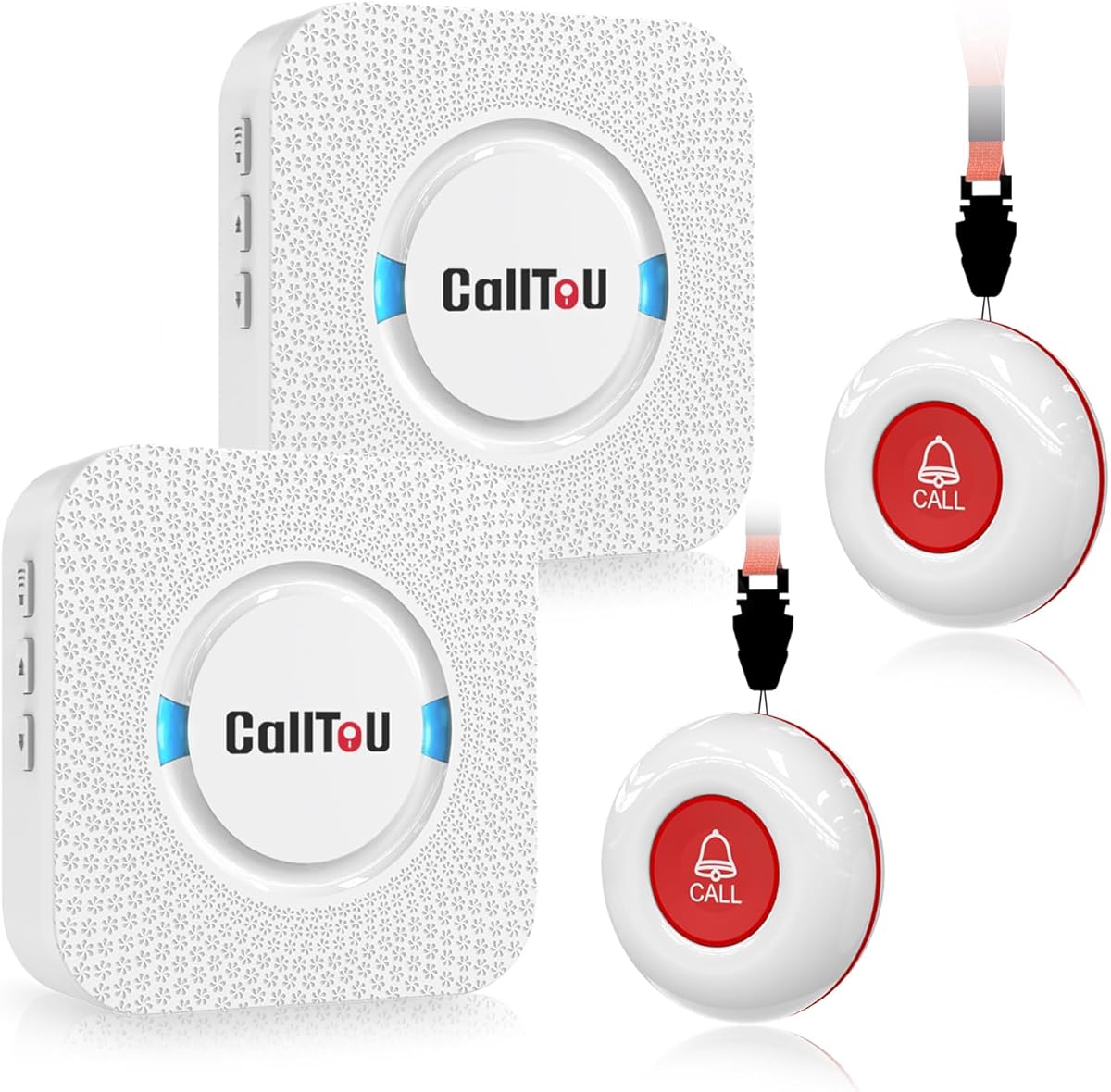
The CallToU Caregiver Pager offers a straightforward wireless solution for seniors needing quick assistance. Rated 4.6 it comes with two receivers and buttons ensuring multiple caregivers can be alerted. The waterproof design ensures durability even in humid environments like bathrooms.
We may earn a commission when you buy through this link, at no additional cost to you.
Its 500 foot range allows freedom of movement while keeping help close. The 55 ringtones and adjustable volume up to 110 decibels cater to hearing preferences. Buttons can hang as pendants or mount on walls for accessibility.
The receiver requires plugging into an outlet which limits portable use for the main unit. However this ensures constant power without battery swaps. This is a minor inconvenience for home setups.
Perfect for basic monitoring at home this system balances simplicity and function. It is a solid choice for families wanting reliable alerts without complex app setup.
Both call buttons and receivers are waterproof and dustproof allowing safe installation in washrooms or outdoor areas without worry of water damage.
The receiver can move with the caregiver so help is always accessible in the bedroom kitchen or living areas with clear open range.
We may earn a commission when you buy through this link, at no additional cost to you.
This Wireless Caregiver Pager is our best budget pick offering exceptional range and scalability. With a 4.7 rating it supports up to 1500 feet wireless transmission ideal for larger homes. The IP55 waterproof design protects against dust and rain.
We may earn a commission when you buy through this link, at no additional cost to you.
Its expandability allows up to 30 buttons and multiple receivers for flexible family coverage. The built in 58 ringtones and volume levels up to 120 decibels ensure alerts are always heard. This flexibility makes it great for shared living spaces.
The receiver needs outlet power so portability is limited for the main unit. However the long range compensates for this. The 18 month warranty adds long-term value for buyers seeking reliability.
For those needing wide coverage at a low cost this system is unbeatable. It suits large homes and caregivers requiring multiple alert points across different rooms.
Supports up to 30 buttons and multiple receivers allowing customizable setups for families with many members or large properties needing broad alert coverage.
IP55 waterproof and dustproof design ensures reliable operation in diverse environments from humid bathrooms to outdoor covered areas with consistent signal.
We may earn a commission when you buy through this link, at no additional cost to you.
The SYMYNELEC camera redefines connection with a dedicated screen and one touch video calls. Rated 4.4 it lets aging parents see family faces instantly without apps. Fall and distress sound alerts provide proactive safety monitoring.
We may earn a commission when you buy through this link, at no additional cost to you.
Its 1080P PTZ auto tracking keeps parents in view while mechanical privacy mode respects comfort. No monthly fees make it cost effective. The 2.8 inch screen simplifies interactions compared to smartphones.
Constant plug in power eliminates battery anxiety but limits placement. However the stable WiFi performance ensures smooth calls. This trade off is minor for home use.
Ideal for reducing loneliness this camera offers peace of mind with visual checks. It suits families wanting frequent face to face contact without technical barriers.
Parents see smiling faces clearly on the 2.8 inch screen with just one press easing loneliness without needing apps or complex setup on their end.
Instant phone alerts trigger if loud crashes or cries for help are detected keeping parents safe with automatic tracking during distress events.
We may earn a commission when you buy through this link, at no additional cost to you.
FullHouse Caregiver Pager combines range with wearable options for flexible emergency alerts. With a 4.5 rating it offers up to 1000 feet range ideal for multi room homes. The splash proof button and wristband allow versatile placement.
We may earn a commission when you buy through this link, at no additional cost to you.
Five level volume and LED flash cater to light sleepers avoiding noise. The 52 melodies and silent mode provide discretion. Buttons can mount on walls or hang as pendants for easy access.
The button cannot immerse so remove before bathing which requires slight habit adjustment. Otherwise its design suits private homes and care facilities well. This limitation is minor for safety.
Great for users needing both home and wearable options this pager supports independence. It ensures help reaches caregivers quickly with minimal disruption to daily routines.
Silent mode with LED flash prevents noise disturbances for babies or light sleepers while still alerting caregivers effectively during emergencies.
The panic button can wear as a necklace or wristband for hands free help near bedside wheelchair or bathroom walls for immediate access.
We may earn a commission when you buy through this link, at no additional cost to you.
The SSYA Digital Calendar Clock helps seniors with memory loss understand time and date clearly. Rated 4.6 it spells out morning afternoon and night without confusing abbreviations. The 7 inch HD display ensures easy reading even with poor vision.
We may earn a commission when you buy through this link, at no additional cost to you.
Auto night dimming and 5 brightness levels prevent eye strain. It supports 8 languages and offers alarm tags for meals and medicine. Backup battery restores settings after outages though a full reset occurs.
While it resets on power cuts this is rare for stable grids. The plug and play setup simplifies installation. This is acceptable for most home environments.
Essential for dementia care this clock brings routine and orientation. It reduces anxiety by providing clear visual cues for daily activities and time passage.
Clearly spells out time periods like MORNING NIGHT without abbreviations helping seniors with memory loss understand the time easily.
Auto dims at 7 PM and brightens at 7 AM with 5 levels of brightness choice to reduce eye strain during different times.
We may earn a commission when you buy through this link, at no additional cost to you.
The Mitoart Digital Alarm Clock supports elderly with weak vision through voice announcements and large fonts. Rated 4.7 it displays the week month and date in bold letters. The voice timing function aids those with poor sight.
We may earn a commission when you buy through this link, at no additional cost to you.
It supports multiple alarms for medications and schedules. Automatic dimming at night keeps rooms dark for sleep. The interface is intuitive so seniors can set alarms without frustration.
The voice function requires button presses which some might forget. However the display remains clear. This minor step is manageable for regular use.
Best for visually impaired seniors this clock blends reminders with accessibility. It simplifies daily routines with clear visual and auditory support.
Lightly press back to OK button for automatic voice time announcement supporting 9 languages ideal for elderly with weak vision.
7 inch screen displays week month and date in large bold letters without complex abbreviations for easy viewing even with poor vision.
We may earn a commission when you buy through this link, at no additional cost to you.
The DAYTECH WiFi pager ensures family stay informed via shared app alerts. With a 4.3 rating it sends notifications to multiple phones if a button is pressed. Custom ringtone options help identify who called.
We may earn a commission when you buy through this link, at no additional cost to you.
Shared alert settings allow siblings or caregivers to receive messages simultaneously. The receiver plugs into outlets for constant power. Offline text upgrades ensure no missed calls during internet outages.
Offline messaging requires subscription which adds cost. But app alerts remain free. This trade off suits larger families needing coordination.
Ideal for shared caregiving this system keeps everyone connected. It supports teamwork among family members to ensure consistent support and quick responses.
Set shared alerts so multiple family members receive notifications instantly when a button is pressed ensuring no one misses a call.
Set the buttons ringtone and adjust volume in the app so you know immediately where the call is coming from when it rings.
We may earn a commission when you buy through this link, at no additional cost to you.
This Clock with Day and Date offers extensive customization for seniors with memory needs. Rated 4.4 it provides 20 alarms and reminders for personal tasks like medication. The 12 themes and color options suit different vision preferences.
We may earn a commission when you buy through this link, at no additional cost to you.
It plays photos from SD or USB drives adding a digital frame function. Auto dimming and brightness control reduce strain. The snooze options ensure gentle wakeups.
Battery backup stores settings but is not for full operation. Power cuts reset time so stable power is key. This is a standard limitation.
Great for tech friendly seniors this clock merges time with memories. It enhances comfort through customizable displays and personal photo integration.
Set up to 20 reminders for personal needs like taking medicine with colorful icons to avoid misunderstanding.
Insert SD or USB drive to play photos turning the clock into an electronic frame for keeping family memories close.
We may earn a commission when you buy through this link, at no additional cost to you.
The SYNLETT Caregiver Pager delivers a compact alert system for small homes. With a 4.6 rating it offers 500 feet range for standard living spaces. The portable belt clip ensures caregivers stay mobile while receiving alerts.
We may earn a commission when you buy through this link, at no additional cost to you.
It allows switching between dingdong chime and alarm siren tones. This flexibility helps choose appropriate sounds. Buttons can mount on walls or hang as pendants for easy access.
The range may limit use in large properties but suffices for apartments. Its portability and support make it practical. This is a solid fit for small units.
Best for compact living this pager offers essential safety. It ensures timely help through portability and simple alert tones.
The belt clip allows the pager to attach to a belt or be placed on a flat surface for easy mobility.
Switch to DINGDONG for a loud chime or ALARM for a continuous siren to suit different alert preferences.
We may earn a commission when you buy through this link, at no additional cost to you.
Choosing the right gadgets requires evaluating specific needs like range, display clarity, and alert types. This guide breaks down key factors to simplify your decision.
The range of wireless pagers determines how far caregivers can move from seniors. Look for models offering 500 to 1500 feet to ensure coverage across rooms or floors. Signal penetration through walls is also vital for consistent alerts.
Prioritize devices with strong signal stability to avoid missed calls. A reliable range ensures help arrives promptly regardless of location.
For dementia clocks large fonts and high contrast are essential. Clear displays showing time of day without abbreviations reduce confusion. Auto dimming helps preserve night sleep while maintaining visibility.
Check for adjustable brightness and simple layouts to aid visual comfort. Large displays prevent misreading critical information like alarms.
Buttons should be accessible in bathrooms bedrooms and near beds. Waterproof options allow safe use in humid areas. Some buttons can hang as pendants or wristbands for continuous access.
Ensure the system supports multiple mounting options to fit home layouts. Flexible placement ensures seniors can reach help effortlessly.
Modern systems offer app notifications phone calls or simple alarms. Families needing remote updates should choose WiFi enabled models. Traditional pagers work well for caregivers present at home.
Assess whether app alerts or sound alerts better suit your routine. Multi channel alerts improve chances of timely response.
Many medical alert systems demand monthly fees but some gadgets do not. Check if core features are free versus paid SMS phone call alerts. No fee options save long term expenses.
Select tools with transparent pricing to avoid hidden costs. Free apps provide reliable monitoring without ongoing financial burden.
Devices should require minimal setup for seniors or caregivers. Plug and play clocks reduce frustration. Simple interfaces with one touch buttons prevent confusion.
Look for clear instructions and intuitive designs. Easy setup encourages consistent use and better adoption.
Battery powered receivers offer mobility but need regular changes. Plug in models ensure constant power without maintenance. Consider backup batteries for power outages.
Choose power sources matching your needs. Backup features add safety during electrical failures.
Monitoring devices should respect privacy while ensuring safety. Cameras with privacy modes allow control over feeds. Discrete alerts avoid embarrassment for seniors.
Ensure features align with comfort levels. Privacy modes maintain dignity without compromising security.
Begin by installing receivers near outlets in common areas and placing buttons where seniors spend time. Test the system by pressing buttons to confirm alerts reach caregivers. Adjust volume and ringtone settings to match hearing preferences.
Clean waterproof buttons with mild soap and dry before reuse to maintain durability. For clocks and displays dust screens gently with a soft cloth. Update app settings regularly to ensure accurate notifications and shared access.
Replace batteries in portable devices promptly when indicators warn of low power. Periodically check range by moving away from receivers to ensure signal strength. Contact support if issues arise for prompt maintenance and replacement.
Most wireless pagers and clocks do not need monthly fees. Some WiFi alert systems offer free app notifications while SMS or call alerts may cost extra. Always verify features before purchasing to avoid unexpected charges.
Many models are waterproof or water resistant for bathroom use but check specific ratings. Some allow splashes but should not be immersed. Confirm waterproof claims before installing in humid areas.
Yes these gadgets feature simple buttons large displays and minimal setup. Dementia clocks spell out times clearly to reduce confusion. Most are designed for intuitive use by seniors without tech experience.
Some devices have backup batteries that reset after power returns. Others plug directly into outlets for constant power. Check models with battery backups to maintain functionality during outages.
Range varies from 500 to 1500 feet depending on walls and obstacles. Larger homes benefit from longer range models. Test the signal across rooms to confirm reliable coverage.
WiFi enabled models support shared app notifications for multiple users. Some systems allow adding family members via email or phone. This ensures coordinated care if one person misses a call.
These ten gadgets offer diverse solutions for safety monitoring and daily support. From pagers to dementia clocks each product addresses unique caregiving needs. Select based on range, display clarity, and alert preferences.
Prioritize ease of use and reliability to ensure consistent adoption. Consider family setup and whether remote notifications are needed. The right device enhances independence and reduces stress.
Always verify current pricing and availability before purchasing. Links provided may change so check Amazon for the latest deals. These tools bring peace of mind and better quality of life for loved ones.