
Noctua NA-FC1
4.8Editor score
Compact manual PWM control
No stop mode prevents errors
Includes 3-way splitter
This guide compares the top ten front panel fan controller options to help you find the best model for managing CPU and case cooling with precision and ease.
Finding the right front panel fan controller helps you manage airflow and noise levels effectively. A good model provides clear temperature readings and precise speed adjustments for your entire system.
We evaluated ten top-rated controllers based on build quality, display clarity, and control features. Each product offers unique advantages for different PC builds and cooling requirements.
Each pick shows key strengths and limitations based on verified specifications. Prices and availability may change, so check the latest details before making your final decision.
4.8Editor score

4.2Editor score

4.6Editor score
The following table provides a side-by-side look at key specifications for all ten selected front panel fan controllers to help you compare them quickly and choose the right fit for your build.

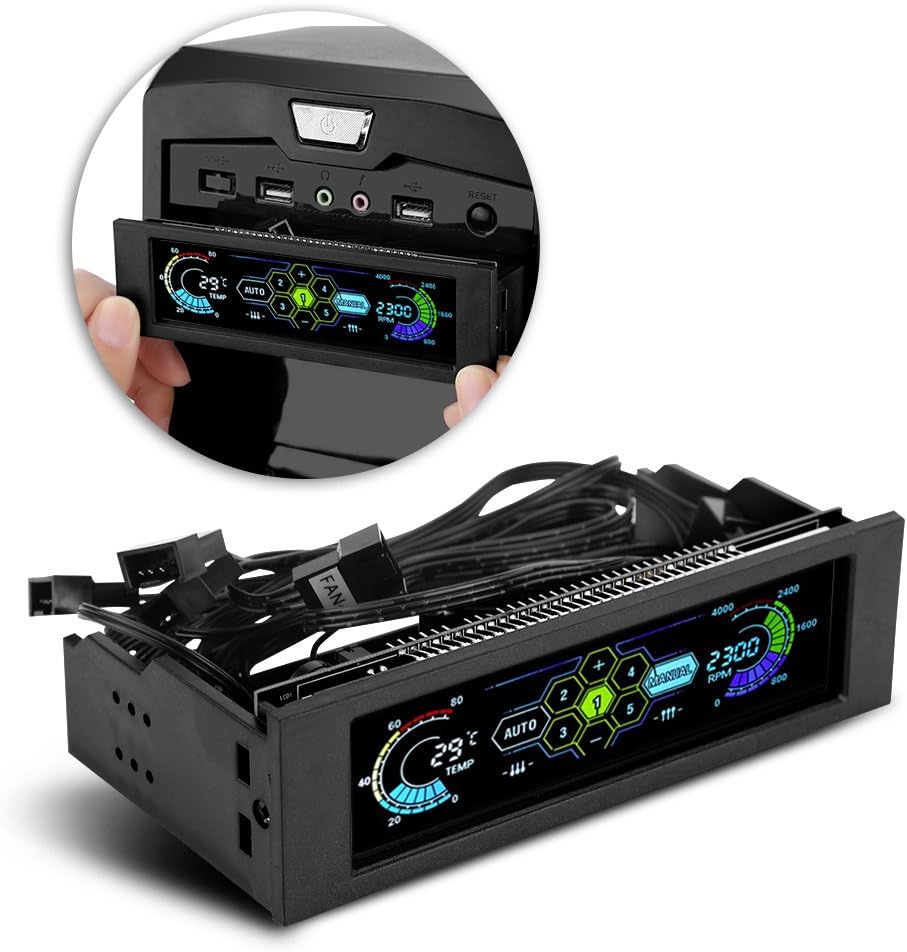


This controller stands out with its RGB LCD screen and six-channel design. It scores well among users seeking detailed monitoring and aesthetic customization for their setup.
We may earn a commission when you buy through this link, at no additional cost to you.
The six voltage control knobs allow independent management of fan speeds. Six temperature sensors provide comprehensive thermal data, ensuring every critical component stays within safe limits.
While the price is higher than basic units, the visual feedback and flexibility justify the cost. It integrates seamlessly with compatible LED strips for a cohesive system look.
Buy this if you want premium visual feedback and control for a complex build. It offers the best balance of features for enthusiasts who value appearance and performance.
The RGB LCD provides real-time data on fan speeds and temperatures. This visual feedback helps users quickly assess system health without opening case software.
Six separate knobs mean you can tune each fan zone precisely. This independence prevents one hot zone from forcing all fans to spin loudly.
We may earn a commission when you buy through this link, at no additional cost to you.
This unit is a compact solution for PWM fans needing manual speed adjustment. It is rated highly for reliability and ease of use in standard cases.
We may earn a commission when you buy through this link, at no additional cost to you.
The no stop mode ensures fans do not drop below 300 RPM, which prevents BIOS errors. This feature makes it safe for continuous operation in quiet environments.
While it lacks automatic temperature control, its manual knob offers precise adjustment. The included splitter cable allows control of up to three fans with one module.
Choose this if you need a reliable way to reduce fan noise without software. It is perfect for users who prioritize simplicity and quiet operation over automation.
The no stop mode keeps fans spinning even at low speeds. This prevents system logs from flagging fan errors that often occur when fans stop completely.
Designed for small spaces, this unit fits into tight builds. The high build quality ensures it lasts longer than cheaper plastic alternatives.
We may earn a commission when you buy through this link, at no additional cost to you.
This controller offers ten ports for individual PWM control, making it ideal for large cases. It scores highly for its software integration with Windows and Linux systems.
We may earn a commission when you buy through this link, at no additional cost to you.
With native driver support, you can manage fans directly through familiar software. The magnetic or adhesive mounting options make installation flexible and cable-free.
The high current output per port ensures even demanding fans run at full capacity. It reduces cable clutter significantly compared to using multiple splitters.
Buy this if you have many fans and want centralized software control. It provides the best premium solution for complex cooling setups needing precise management.
Two amps per port support high-performance fans without voltage drops. This ensures your cooling solution performs consistently even under heavy load.
Centralizing all fan connections into one hub cuts down on messy cables. A cleaner build improves airflow and makes maintenance much easier over time.
We may earn a commission when you buy through this link, at no additional cost to you.
This controller uses a wide LCD screen to show fan speeds and temperatures clearly. It is rated highly for its robust safety system that warns of overheating.
We may earn a commission when you buy through this link, at no additional cost to you.
The aluminum alloy panel is treated for durability and fits most chassis. Four sets of fan speeds and temperatures can be monitored simultaneously on the display.
When temperatures exceed 60 degrees, the alarm sounds and the temperature flashes. This feature prevents hardware damage by alerting you immediately to cooling failures.
This is a great choice for users who want visual monitoring and high safety. It balances a high price point with excellent build quality and alarm features.
The alarm triggers at 60 degrees to prevent damage. This gives you a direct, hardware-level alert that works even if software fails.
Multiple data points appear on one screen for quick checks. You can see all fan speeds and temperatures at a glance without diving into software.
We may earn a commission when you buy through this link, at no additional cost to you.
This controller offers a big LCD screen to display temperature, fan speed, and hard disk state. It is praised for its ability to show critical disk health info.
We may earn a commission when you buy through this link, at no additional cost to you.
You can manually set the alarm temperature range from 40 to 90 degrees. The switch between automatic and manual modes allows flexibility based on your needs.
While it does not have software control, the physical display is easy to read. It alerts you immediately if a fan breaks down and cannot cool the system.
Consider this if you want to monitor disk health alongside fan speed. It is a solid mid-range option for those who value clear visual warnings.
Displaying hard disk state helps identify drive issues early. This is useful for systems with multiple drives that generate heat and need monitoring.
Adjusting alarm limits from 40 to 90 degrees adds control. You can set strict limits for sensitive hardware or higher limits for cooling-focused builds.
We may earn a commission when you buy through this link, at no additional cost to you.
This unit supports four channels with independent control and PWM operation. It is designed to reduce high-frequency noise through precise speed adjustments.
We may earn a commission when you buy through this link, at no additional cost to you.
The PWM circuitry allows for precise fan control, lowering noise levels. High-temperature capacitors ensure the controller remains reliable under extended use.
With double safety function, temperature alarms protect against overheating. You can keep an eye on RPM and temperature values conveniently on the LCD.
This is a reliable choice for reducing noise in mid-range systems. It balances affordability with solid performance and standard alarm features.
PWM control minimizes high-frequency buzzing often caused by voltage control. This is essential for audio stations or quiet living spaces.
High-temperature capacitors and aluminum panels extend lifespan. This means fewer replacements and better value over the life of the system.
We may earn a commission when you buy through this link, at no additional cost to you.
This controller features a large screen that displays temperature and date time. It is a budget-friendly option that includes essential alarm functions for safety.
We may earn a commission when you buy through this link, at no additional cost to you.
It can control up to three groups of fans manually or automatically. The fan jam alarm ensures you are notified immediately if a fan stops working.
The date time display is a unique feature not found on many units. It adds utility to the controller beyond just cooling management.
Consider this if you need a simple controller with extra display features. It is a practical choice for basic builds that need visual monitoring.
Displaying date and time on the panel adds utility. This can be useful for recording system uptime or maintenance schedules without software.
The alarm sounds immediately when a fan fails. This prevents overheating damage by alerting you before the system gets too hot.
We may earn a commission when you buy through this link, at no additional cost to you.
This unit supports auto and manual modes with a digital display. It is rated highly for its versatility in thermal management scenarios.
We may earn a commission when you buy through this link, at no additional cost to you.
The digital display can switch between temperature and fan speed. When the probe is disconnected, it automatically switches to manual mode for direct control.
Power-off memory ensures all settings are saved after shutdown. It supports wide voltage input from 5V to 30V for various applications.
Buy this if you need flexibility between automatic and manual control. It is a top-rated choice for DIY enthusiasts with varied needs.
Automatic switching to manual when probe is removed is clever. This prevents errors if you use it for projects without temperature sensors.
Settings are retained even after power loss. This saves time by avoiding the need to reset speeds every time the system restarts.
We may earn a commission when you buy through this link, at no additional cost to you.
This controller provides date time and temperature on a wide LCD. It offers basic safety features to monitor CPU and case fan performance.
We may earn a commission when you buy through this link, at no additional cost to you.
High specification capacitors resist high temperatures for longer life. The PWM circuit reduces noise by adjusting speed according to load.
When temperature exceeds 60 degrees, alarms and flashes activate. This prevents damage by giving clear alerts to users.
Consider this for a basic system with visual feedback needs. It is a budget option for users who want date and time display on their panel.
Displaying date time helps track system logs easily. This is helpful for logging maintenance times without needing software tools.
PWM adjustments lower noise by reducing power when not needed. This keeps the system quiet during idle periods.
We may earn a commission when you buy through this link, at no additional cost to you.
This controller supports five groups of fans with a big LCD. It allows manual setting of alarm ranges for better hardware protection.
We may earn a commission when you buy through this link, at no additional cost to you.
It switches between auto and manual modes easily. The hard disk state display keeps you informed about drive performance.
If a fan breaks down, an immediate alert occurs. This helps prevent overheating by giving you instant feedback on fan health.
Buy this if you have five fan zones to manage. It is a suitable budget option for basic multi-fan setups.
Controlling five groups allows precise zoning of your case. This is useful for balancing airflow between hot and cold areas.
Setting alarm ranges manually helps avoid false positives. You can tune the system to ignore normal spikes while catching real issues.
We may earn a commission when you buy through this link, at no additional cost to you.
Choosing the right controller requires understanding your build's size and specific thermal needs.
The number of channels determines how many fans you can control independently. A single-channel unit works for a few fans, while multi-channel units support complex setups.
Select a unit with enough channels for all your fans to avoid using Y-splitters.
Controllers come with basic LEDs or full LCD screens. LCDs show detailed data like RPM and specific temps, while LEDs just show on/off status.
Choose LCDs if you want detailed insight into your system's health at a glance.
Auto mode adjusts speeds based on probe temperature, while manual lets you set fixed speeds. Auto is better for quiet efficiency, manual for consistent cooling.
Look for dual-mode controllers that offer the flexibility to switch between styles.
Each controller has a total amperage limit. Ensure the controller can handle the combined power draw of all connected fans to prevent overload.
Check the current ratings per port and total to match your fan requirements.
Some units plug into USB ports, while others use internal power headers. USB ones offer easier control but add a port to your system.
Pick internal models for a cleaner look and USB models for plug-and-play flexibility.
A good controller includes high-temperature and fan-fail alarms. These features protect your hardware by alerting you to critical cooling failures.
Prioritize units with audible alarms for maximum safety and peace of mind.
Aluminum alloy panels last longer and look better than plastic. They also dissipate heat better from the internal electronics.
Choose metal panels for durability and a premium finish.
Some modern controllers support Windows and Linux software. This allows you to manage fans from within your OS rather than using physical knobs.
Consider software integration if you prefer digital control over physical dials.
First, ensure the controller fits the 5.25-inch bay. Most units have standard mounting brackets that slide into the drive bay slot securely.
Second, connect the fans to the controller ports and attach the temperature probes to hotspots like the CPU or GPU. Ensure power is connected to the unit.
Third, calibrate the auto modes by setting the desired temperature thresholds. Use the physical knobs to set manual speeds if you prefer fixed airflow.
Install by mounting the panel into a 5.25-inch drive bay. Connect the power cables to your PSU and the fans to the controller ports. Finally, connect the temperature probes to hot spots for accurate readings.
Yes, most modern units support 4-pin PWM fans for precise speed control. They use PWM signals to adjust fan speed smoothly rather than reducing voltage which causes noise.
If the probe fails, the controller may default to manual mode or a fixed speed. You should check the user manual for specific fail-safe behaviors for your model.
You can use Y-splitters to add more fans to a single channel. This treats multiple fans as one unit, reducing precision but increasing total capacity.
Basic units require no software and work via physical knobs. Advanced USB units may require drivers for full OS integration, but basic functions work out of the box.
Ensure the alarm threshold is set correctly in your manual settings. Verify the temperature probe is connected correctly and not touching a cold component.
The Thermaltake Commander F6 offers the best visual experience with its RGB LCD. For those needing simple reliability, the Noctua NA-FC1 provides a high quality compact choice.
When choosing, prioritize features like alarm systems and channel count. Ensure your controller has enough power and fits your case bay size.
Always check the latest details before buying as specs may vary by region. These controllers are essential tools for optimizing your system cooling today.