
ARCTIC Case Fan Hub
4.7Editor score
10 Fold PWM Distributor
SATA Power Supply
Compact Black Design
Discover the top fan control hub for PC options to manage cooling and lighting efficiently. This guide compares features, ports, and compatibility for your
Managing airflow and lighting in a modern PC build can be complex. A reliable fan control hub for PC simplifies wiring and ensures every fan runs at optimal speeds without overloading your motherboard headers.
We compared ten highly rated hubs based on port count, power delivery, mounting options, and RGB support. Each product was evaluated for build quality, ease of installation, and real-world stability under load.
Each pick highlights specific strengths like magnetic mounting, individual PWM control, or extensive ARGB synchronization. Prices and availability change frequently, so check current listings before making your final decision.
4.7Editor score

4.7Editor score
4.6Editor score
This side-by-side comparison highlights the key specifications of each hub to help you choose the right fit for your chassis and cooling needs.


The ARCTIC Fan Controller stands out as a top choice for users needing precise airflow management. With a rating of 4.7 stars, it delivers individual control for up to ten fans without overloading system resources.
We may earn a commission when you buy through this link, at no additional cost to you.
Its standout feature is the ability to control each port independently rather than syncing all fans to one signal. This allows for optimized cooling zones where intake and exhaust fans can run at different speeds based on specific thermal needs.
While it lacks RGB lighting support which may limit aesthetic customization, this limitation ensures focused performance on cooling efficiency. The Linux kernel support adds significant value for server or open-source enthusiasts.
This hub is ideal for builders prioritizing thermal performance over lighting effects. If you need robust cooling with software compatibility across operating systems, this model offers the best balance of power and control.
Each port runs independently allowing you to fine-tune airflow for specific case zones without manual header adjustments.
Native support for Linux Kernel 7.2+ makes this a rare find for users running alternative operating systems.
We may earn a commission when you buy through this link, at no additional cost to you.
For budget-conscious builders, the ARCTIC Case Fan Hub offers exceptional value without sacrificing core functionality. It connects up to ten fans directly to a single motherboard header using reliable SATA power.
We may earn a commission when you buy through this link, at no additional cost to you.
Its key strength lies in its simplicity and reliability. By providing a unified signal to all connected fans, it ensures consistent cooling performance while freeing up valuable motherboard headers for other components.
The trade-off is that all fans move at the same speed which limits customization compared to individual control hubs. However, for standard cases where uniform airflow is sufficient, this limitation rarely impacts overall system stability.
Choose this hub if you need a straightforward solution to expand fan capacity on a tight budget. It is a reliable workhorse that keeps cables organized and fans running smoothly without complex software requirements.
Small dimensions allow the hub to be tucked away in tight cases without blocking other internal components.
Direct SATA power prevents voltage drops ensuring smooth fan operation even under high load conditions.
We may earn a commission when you buy through this link, at no additional cost to you.
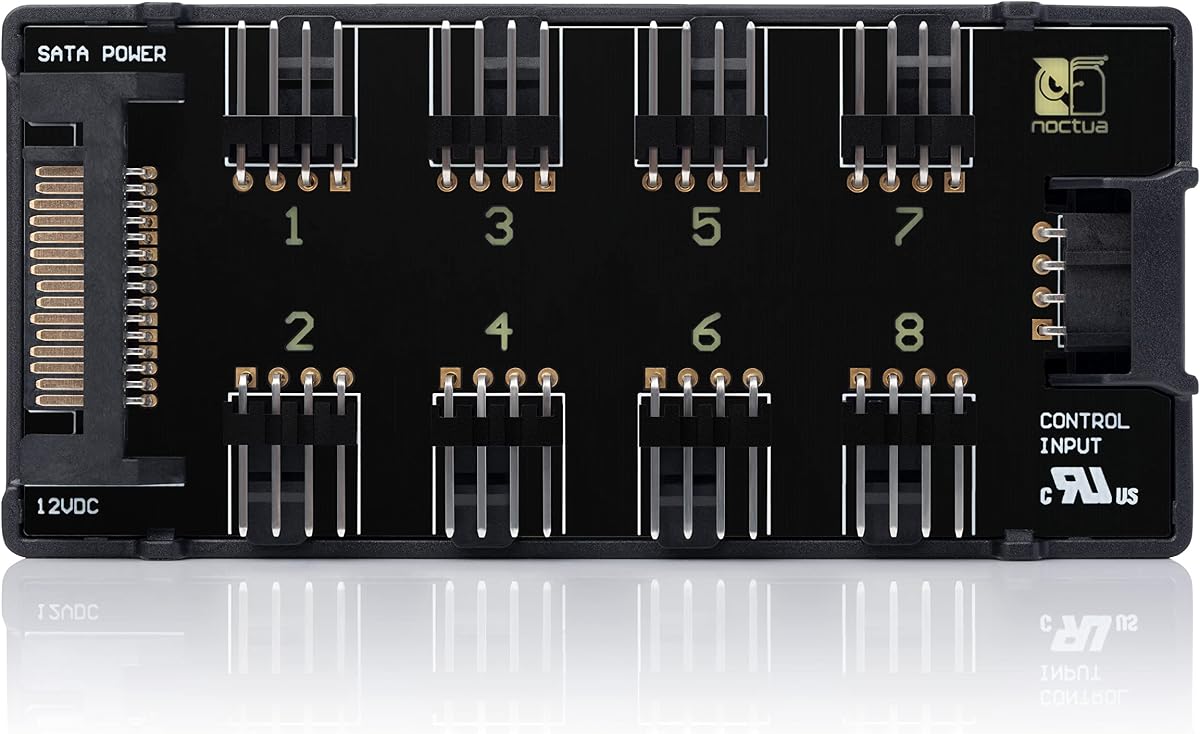
The Noctua NA-FH1 is a premium hub known for its exceptional build quality and safety features. With a 4.6 rating it is engineered for users who demand long-term reliability and robust protection against electrical faults.
We may earn a commission when you buy through this link, at no additional cost to you.
Key strengths include integrated short circuit protection and safety fuses that protect your motherboard and fans from power surges. The magnetic mounting system allows for flexible placement without adhesives that could peel over time.
While it costs more than other options and supports fewer fans than some rivals, the added safety and durability justify the investment. This hub is designed for high-end builds where system integrity is a top priority.
If you are investing in expensive cooling gear, this hub provides the safety net you need. It combines Noctua's reputation for quality with practical features that keep your system secure and stable for years.
Fuses provide critical protection against overcurrent ensuring your hardware stays safe during power irregularities.
Power magnets allow you to position the hub anywhere on metal case surfaces without drilling or tape.
We may earn a commission when you buy through this link, at no additional cost to you.
Thermalright offers an affordable solution for builders focused on 5V ARGB lighting. This hub supports eight groups of fans and ensures that lighting synchronization works seamlessly across compatible devices.
We may earn a commission when you buy through this link, at no additional cost to you.
Its strength lies in the dual mounting options combining strong paste with magnetic suction for secure placement. The clear pin labeling helps users avoid accidental damage by ensuring correct insertion direction for 5V devices.
Users must be careful not to plug 12V RGB devices into this hub as it is strictly designed for 5V signaling. Ignoring this detail can damage connected equipment instantly.
This hub is perfect for cost-effective builds using modern 5V ARGB components. It manages cables neatly and provides reliable power delivery for both fans and lighting strips.
Strong double-sided stickers and magnetic suction ensure the hub stays firmly in place during system movement.
Visual cues on plugs help prevent incorrect insertion that could lead to hardware damage.
We may earn a commission when you buy through this link, at no additional cost to you.
The Thermalright X12 IR stands out with its clean white housing, making it a top choice for white-themed PC builds. It supports up to twelve groups of fans and lighting devices for extensive cooling setups.
We may earn a commission when you buy through this link, at no additional cost to you.
Its key benefit is the ability to handle both PWM fans and 5V ARGB devices simultaneously. This versatility ensures that all aspects of your build lighting and cooling are centralized in one reliable unit.
Although it does not include a SATA cable and requires separate purchase, the direct power output maintains stability under high load. This ensures fans run smoothly without voltage drops even when fully populated.
For builders prioritizing aesthetics, this hub matches white components beautifully while providing robust functionality. It simplifies cable management for large cases without compromising on cooling performance.
The white housing blends seamlessly with white cases and components to maintain a unified visual theme.
Supporting twelve fan groups allows for extensive setups in large chassis without multiple hubs.
We may earn a commission when you buy through this link, at no additional cost to you.
The upHere P10PARGB offers unique convenience with a included remote control for managing lighting effects. This hub supports nine fans and five ARGB devices, making it versatile for RGB-focused builds.
We may earn a commission when you buy through this link, at no additional cost to you.
Its standout feature is the front-facing RGB panel that syncs with connected fans. Users can customize colors and dynamic effects using the remote without needing to access software interfaces directly.
While the lighting effects are not as advanced as motherboard software, the ease of use is significant. The magnetic mounting ensures quick installation and the hub remains secure during transport.
Ideal for casual users who want easy lighting control without complex software, this hub combines cooling and lighting into one convenient unit. It is an excellent choice for simple custom RGB setups.
Quickly change lighting modes using the RF remote without accessing your desktop operating system.
Sync fan colors with the front panel for a coordinated lighting effect across the entire system.
We may earn a commission when you buy through this link, at no additional cost to you.
This Thermalright hub offers ten ports for fans, making it a dense and efficient solution for large cases. It is designed to handle significant airflow needs without overloading your motherboard headers.
We may earn a commission when you buy through this link, at no additional cost to you.
The direct SATA power input ensures stable operation under high load, preventing performance dips when fans run at maximum speed. Its small body keeps internal clutter minimal despite supporting ten connections.
Installation is straightforward with strong adhesive paste, though users must supply their own SATA cable. This is a minor trade-off for the cost savings and reliability provided by the unit.
If you need to manage ten fans without paying for individual controllers, this hub is the practical choice. It balances capacity and cost effectively for performance-oriented builds.
Ten fan ports allow for extensive airflow management in large mid-tower or full-tower chassis.
Direct power from the PSU ensures fans receive consistent voltage even during heavy system loads.
We may earn a commission when you buy through this link, at no additional cost to you.
The Thermalright X8 ARGB balances cooling and lighting needs for mid-range builds. It supports eight ARGB fans and eight PWM fans, offering a solid mix of performance and aesthetics.
We may earn a commission when you buy through this link, at no additional cost to you.
Key features include dual-sided connectors that simplify cable routing. The black housing matches most internal components, while the adhesive mount secures the hub easily without complex screws.
While it lacks advanced software control and requires a separate SATA cable, the direct power delivery ensures stable lighting and fan speeds. This reliability is crucial for avoiding flickering or thermal issues.
This hub is perfect for users who want a mix of cooling capacity and RGB lighting without overspending. It provides a clean organizational point for both power and lighting cables.
Connectors on both sides allow flexible placement within the case for easier cable routing.
Direct SATA power delivery prevents flickering by ensuring consistent voltage for lighting devices.
We may earn a commission when you buy through this link, at no additional cost to you.
The upHere J-10 Pro provides multiple ways to control your lighting and cooling. With both RF remote and chassis key options, it offers flexibility that many competitors do not match.
We may earn a commission when you buy through this link, at no additional cost to you.
It supports PWM temperature control and reading allowing fans to adjust based on heat levels. The magnetic suction mount ensures the hub can be positioned easily without permanent adhesives.
However, the lighting control is basic and does not support advanced motherboard sync. Users looking for deep software integration might find this limiting despite the hardware advantages.
For builders who prefer physical control over software, this hub is a practical choice. It combines cooling management and lighting control into one compact unit with multiple interaction options.
Use a remote for convenience or a key switch on the chassis for quick lighting toggles.
PWM temperature reading allows automatic speed adjustments based on system load without manual input.
We may earn a commission when you buy through this link, at no additional cost to you.
The final choice, the Thermalright X8 Hub, prioritizes stability for systems under constant load. Its direct SATA output ensures that power delivery remains consistent even when all fans and lights are active.
We may earn a commission when you buy through this link, at no additional cost to you.
A red interface helps identify the specific fan speed recognition port, simplifying setup for beginners. The engraving on the surface adds a professional touch while confirming the product's identity.
While it lacks advanced software capabilities and includes no SATA cable, the focus remains on core functionality and reliability. This design minimizes points of failure for long-term daily use.
Choose this hub if you need a dependable solution for a server or workstation setup. It provides solid cooling and lighting support without the overhead of unnecessary features.
Designed to maintain output stability even when all eight groups are running at full capacity.
Visual cues on interfaces help prevent incorrect connections that could disrupt system performance.
We may earn a commission when you buy through this link, at no additional cost to you.
Selecting the right hub depends on your cooling needs, lighting preferences, and case compatibility. This guide breaks down the essential factors to consider.
Determine how many fans you plan to install. If your case has more fans than motherboard headers, ensure the hub supports the total number. Most hubs support between eight to ten ports.
Check the total power capacity to avoid overloading the hub. If you have high-RPM fans, ensure the unit can handle the combined amperage safely.
Identify whether you need fan speed control, lighting synchronization, or both. PWM hubs manage fan speeds while ARGB hubs handle color effects. Some units support both simultaneously.
Make sure the hub supports the specific voltage of your fans. Most modern RGB uses 5V 3-pin, while older systems may use 12V 4-pin which is incompatible with many hubs.
Most hubs require a direct SATA power connection to prevent voltage drops. Ensure your power supply has an available SATA connector for the hub to function correctly.
Avoid relying on motherboard power for high-fan setups as this can lead to voltage instability. Always check if the SATA cable is included or must be purchased separately.
Mounting options like magnetic plates, adhesive tape, or screw mounts vary between models. Magnetic mounts offer flexibility while adhesives provide a permanent solution.
Consider the available space inside your case. Some hubs are compact while others are larger. Ensure the mounting method allows you to place the hub in an accessible but out of the way spot.
Advanced hubs may offer driver support for specific operating systems. If you use Linux or specialized software, verify compatibility before buying.
Basic hubs are often plug-and-play without software. If you need advanced monitoring features, choose a controller that integrates with your existing ecosystem.
Safety features like fuses protect your hardware from short circuits and power surges. Premium models often include these protections for peace of mind.
Check the warranty terms as they indicate confidence in product durability. A longer warranty often reflects higher quality components and better construction.
Look for hubs with multiple connectors on both sides to reduce wire tangles. Good cable management keeps airflow unobstructed inside the case.
Simpler setups benefit from a centralized hub. Avoid Y-splitters where possible as they can create messy connections that are hard to maintain.
Balance your budget against the features you need. Basic hubs are affordable but lack advanced controls. Premium hubs cost more but offer better safety and build quality.
Read reviews to ensure you are getting value for money. A mid-range hub often provides the best balance of features and reliability for most users.
Connect the SATA power cable first to ensure the hub receives stable electricity. Then link the hub to a single motherboard PWM header to enable fan speed control.
Route your fan cables carefully to avoid blocking airflow or touching moving parts. Secure any loose wires with cable ties to maintain a clean and safe internal environment.
Regularly check connections and dust accumulation inside your case. Keeping the hub free from dust ensures it continues to function reliably without overheating.
If your motherboard has enough physical fan headers for all fans, a hub is not strictly necessary. However, hubs still help organize cables and distribute power evenly. This is useful if you want to group fans for cleaner management.
Connecting a 12V RGB fan to a 5V ARGB hub can damage the lighting LEDs immediately. Always check the voltage ratings on your fan labels before connecting to avoid permanent hardware failure.
The hub requires direct power from the PSU to avoid voltage drops caused by motherboard header limits. Many manufacturers exclude the cable to reduce packaging costs so you may need to buy one separately.
Yes you can use multiple hubs if your setup requires more fans than a single hub supports. Ensure each hub has its own dedicated SATA power connection to prevent overloading your power supply.
A hub does not inherently increase noise but poor power delivery can cause fans to stutter. Using a high-quality hub with direct power ensures fans run smoothly and quietly without electrical interference.
Magnetic mounts are more flexible because you can move the hub without leaving residue. Adhesive mounts are permanent but may be stronger for securing hubs in high-vibration environments.
We reviewed ten top options ranging from budget-friendly splitters to robust controllers with individual fan management. Each hub offers unique benefits whether you prioritize price, stability, or advanced control features.
When making your choice, prioritize the features that matter most to your build. If you need high port counts, look for hubs like the ARCTIC or Thermalright 10-port models.
Remember that product prices and availability fluctuate frequently. Always check current listings on Amazon for the best deal and ensure the specs match your specific PC build needs.