
SSK Portable SSD 1TB
4.5Editor score
Lightweight 36.6g design
1050MB/s read speeds
SLC caching for stability
Discover the top external SSDs for Linux in this comprehensive guide comparing speed, compatibility, and durability for reliable performance.
Linux users require reliable storage solutions that offer speed and security. External SSDs provide the perfect balance of performance and portability for various workflows.
We evaluated ten top models based on compatibility, speed, and build quality. Each product was assessed for its ability to handle Linux file systems and daily demands.
Our guide highlights key features and strengths for every option. Note that availability and offers change frequently, so verify current details before purchasing.
4.5Editor score

4.7Editor score

4.6Editor score
This table offers a side-by-side comparison of the ten best external SSDs for Linux users. It highlights key specifications to help you find the ideal drive.





The Samsung T7 stands out as the best overall external SSD for Linux users. It delivers blazing fast speeds and a rugged design that fits any professional workflow.
We may earn a commission when you buy through this link, at no additional cost to you.
Its embedded PCIe NVMe technology ensures read and write speeds up to 1050MB/s. This makes it nearly twice as fast as previous models, ideal for heavy file transfers.
While the price is higher than budget options, the durability and performance justify the cost. The Magician software helps monitor drive health and updates firmware seamlessly.
If you need a reliable drive for video editing or large backups, the T7 is the top recommendation. It balances speed, size, and security perfectly for Linux systems.
The PCIe NVMe technology ensures that large files transfer quickly without bottlenecks during critical work sessions.
The aluminum unibody construction provides excellent heat dissipation and protection against accidental drops.
We may earn a commission when you buy through this link, at no additional cost to you.
The SSK Portable SSD offers an excellent balance of performance and affordability for Linux users. It provides fast speeds without breaking the bank.
We may earn a commission when you buy through this link, at no additional cost to you.
It features SLC caching which allocates part of the capacity for high-speed transfers. This ensures consistent performance even during large file operations.
Although it may not have the brand recognition of others, it delivers reliable results. The lightweight design makes it easy to carry around.
For those on a budget who still need speed, the SSK is the perfect choice. It is a practical solution for everyday storage needs.
You get top-tier speed features at a fraction of the cost of premium brands.
The caching technology prevents slowdowns during intense data writing tasks.
We may earn a commission when you buy through this link, at no additional cost to you.
The Samsung T9 is the fastest portable SSD available, designed for professionals with demanding needs. It offers sustained high speeds that rarely slow down.
We may earn a commission when you buy through this link, at no additional cost to you.
Its Dynamic Thermal Guard technology keeps the drive cool even under heavy load. This ensures that performance remains consistent during long editing sessions.
While the price is high, it is worth it for those who prioritize speed above all else. The drive is built to last with exceptional endurance.
If you are a pro creator or developer, the T9 is the ultimate choice. It sets a new standard for what a premium external drive can do.
With speeds up to 2000MB/s, you can move massive datasets in seconds.
Advanced cooling prevents overheating during continuous high-speed data transfers.
We may earn a commission when you buy through this link, at no additional cost to you.
The SanDisk Extreme Portable SSD is a rugged drive built for the outdoors and high-capacity storage. It is ideal for Linux users who need space and security.
We may earn a commission when you buy through this link, at no additional cost to you.
With an IP65 rating, it resists dust and water, making it perfect for field work. The 3-meter drop protection adds extra safety for your data.
The included password protection keeps your files safe with 256-bit encryption. This is a great feature for those handling sensitive Linux project files.
If you need a lot of storage and can handle a slightly larger drive, this is a strong pick. It is reliable for travel and daily backups.
The water and dust resistance ensure your drive survives tough environments.
Keep your massive libraries safe with built-in hardware encryption.
We may earn a commission when you buy through this link, at no additional cost to you.
The Lexar ES3 is designed for users who want a drive that disappears in their pocket. It combines speed with a thin, stylish chassis.
We may earn a commission when you buy through this link, at no additional cost to you.
Its DataShield encryption protects your files effectively using AES technology. This adds a layer of security that many Linux users appreciate.
Despite its slim size, it offers solid read speeds for daily file transfers. It is lightweight and easy to carry with you everywhere.
For those prioritizing portability above all else, the Lexar ES3 is a great fit. It works well for students and professionals on the move.
This drive fits easily in any pocket due to its thin design.
DataShield encryption keeps your personal data private and safe.
We may earn a commission when you buy through this link, at no additional cost to you.
The Samsung T7 Shield is built for harsh environments, offering top-tier protection for your data. It is perfect for Linux users working in tough conditions.
We may earn a commission when you buy through this link, at no additional cost to you.
With an IP65 rating and drop protection up to 9.8 feet, it can withstand almost anything. This makes it ideal for fieldwork or construction sites.
Its fast transfer speeds ensure you do not lose time while moving large files. The 2TB capacity provides plenty of room for all your projects.
If you need a drive that can take a beating, the T7 Shield is the best choice. It combines durability with the performance you expect from Samsung.
The rugged design protects your drive from drops and weather elements.
Backed by strong software support and top-tier flash memory tech.
We may earn a commission when you buy through this link, at no additional cost to you.
The Western Digital My Passport SSD is known for its reliability and strong security features. It offers fast speeds and a solid build for daily Linux use.
We may earn a commission when you buy through this link, at no additional cost to you.
The 256-bit AES hardware encryption keeps your personal data safe from prying eyes. This is crucial for professionals handling sensitive project files.
Its fast speeds and shock resistance make it a versatile choice for various tasks. It works well for both desktop backups and mobile storage.
If security and speed are your top priorities, this drive is an excellent option. It is a trustworthy choice for those who value data protection.
Hardware encryption ensures that your files are protected from unauthorized access.
Experience quick transfers with a drive built to withstand daily drops.
We may earn a commission when you buy through this link, at no additional cost to you.
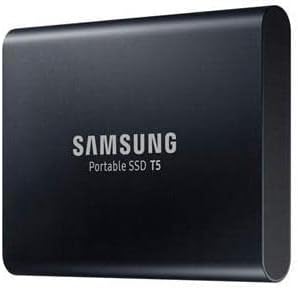
The Samsung T5 remains a popular choice due to its durable design and reliable performance. It is a great option for users who need large storage.
We may earn a commission when you buy through this link, at no additional cost to you.
Its metal construction protects the drive from bumps and scrapes effectively. This ensures longevity even if you carry it in a crowded bag.
While it is slightly slower than newer models, it still offers fast speeds. It is a solid choice for those who do not need maximum transfer rates.
If you want a trusted brand with a high rating and good capacity, the T5 fits the bill. It is a practical solution for general Linux storage.
Samsung has a long history of reliable flash memory and strong product support.
The metal case provides robust protection against physical damage.
We may earn a commission when you buy through this link, at no additional cost to you.
The Samsung T7 500GB is a great portable option for Linux users with smaller storage needs. It fits easily in a pocket and delivers fast speeds.
We may earn a commission when you buy through this link, at no additional cost to you.
Its Dynamic Thermal Guard prevents overheating during long transfers. This ensures the drive stays cool and performs well even under stress.
Password protection adds a layer of security for your personal files. It is ideal for students or professionals needing a secure backup drive.
If you need a fast, secure, and portable drive, this model is a top pick. It balances quality and features perfectly for everyday use.
The drive keeps itself cool to maintain consistent performance.
Keep your files private with built-in password protection features.
We may earn a commission when you buy through this link, at no additional cost to you.
The Samsung T5 500GB is an excellent entry-level option for Linux users needing extra space. It offers reliable performance in a compact form.
We may earn a commission when you buy through this link, at no additional cost to you.
Its metal construction ensures durability, while the included cables make setup easy. The encryption features keep your data safe from unauthorized access.
Although it is older, it still performs well for general file transfers. It is a great choice for students or casual users on a budget.
If you want a trusted drive with great reviews, the T5 500GB is a safe bet. It provides quality storage without needing the latest high-end tech.
This model has a long track record of solid performance and high ratings.
Hardware encryption options ensure that your private data remains protected.
We may earn a commission when you buy through this link, at no additional cost to you.
Choosing the right external SSD for Linux involves considering several key factors to ensure compatibility and performance.
The interface determines how fast your drive can transfer data. USB 3.2 Gen 2 offers speeds up to 1050MB/s, which is ideal for large files. Faster speeds mean less waiting time for backups or video edits.
Look for drives with USB-C connectors as they are widely supported on modern Linux systems. Ensure your host ports match the drive capabilities for maximum performance.
Linux supports many file systems, but some drives come pre-formatted with formats like NTFS or exFAT. You may need to reformat the drive to ext4 or Btrfs for full Linux support.
Always check if the drive works out of the box with your specific Linux distribution. Most modern drives are plug-and-play after formatting.
A sturdy build is crucial for portable drives that are moved often. Look for IP ratings for water and dust resistance if you work in rugged environments.
Shock resistance ensures your data is safe from accidental drops. Aluminum or rubber casings provide excellent protection for your hardware.
Security features like hardware encryption are vital for protecting sensitive data. AES encryption allows you to set passwords to access your files.
This is essential if you carry personal or professional data across different networks. It adds a layer of safety against theft or loss.
Capacity depends on how much data you need to store. For basic files and documents, 500GB to 1TB is sufficient. For video editing, 2TB or more is recommended.
Always check the price per gigabyte to get the best value. Higher capacity often costs more but provides better long-term utility.
Software tools help manage drive health and firmware updates. Some brands offer suites that allow you to monitor temperature and performance.
Ensure the software is compatible with Linux or provides a web-based alternative. Open-source tools often work well for Linux users who prefer community solutions.
Prices vary widely between brands and capacities. Budget options offer good value but may lack premium features like high durability.
Decide on a budget range before shopping. Investing in a reliable drive often saves money in the long run by preventing data loss.
A good warranty ensures you are covered if the drive fails. Most brands offer at least a three-year warranty for their portable drives.
Check the support options for Linux users to ensure you can get help if issues arise. Good support adds peace of mind to your purchase.
To start using your new drive, connect it to a USB port on your system. Most Linux distributions will automatically mount the drive on the desktop or file manager.
If the drive is not recognized, check if it needs formatting. Use tools like GParted to partition the drive with a Linux-native file system such as ext4.
To maintain performance, safely eject the drive before unplugging it. Avoid exposing the drive to extreme temperatures or physical impacts to extend its lifespan.
Yes, most external SSDs are compatible with Linux via USB. They may need formatting to Linux-friendly file systems like ext4 or Btrfs to function fully.
ext4 is the standard file system for Linux due to its stability and features. It supports Linux permissions and works well with most distributions.
Yes, you can read and write to NTFS drives on Linux using drivers like NTFS-3G. However, using native Linux formats is recommended for better performance.
Use encryption tools like LUKS to secure your drive. Many SSDs also offer hardware encryption which can be managed with password protection.
Most SSDs work without special software. However, tools like CrystalDiskInfo or vendor-specific apps can help monitor drive health on Linux.
Speed depends on the USB port version and the cable quality. Ensure you use USB 3.2 ports and high-quality cables for maximum transfer rates.
The Samsung T7 and SSK Portable SSD stand out as top choices for their speed and value. They offer a great balance for most Linux users.
Prioritize durability and security features if you handle sensitive data. A rugged drive with encryption ensures your files remain safe in all conditions.
Always check current pricing and availability before making a decision. Technology updates frequently, so verifying the latest specs ensures you get the best deal.