
HDMI Media Player Black Mini 1080p Full-HD Ultra HDMI Digital Media Player
4.1Editor score
Compact portable aluminum alloy design
Full HD 1080p output support
Dual USB and AV connectivity
This guide compares the top external hard drive media players for 2026, evaluating 4K playback, storage compatibility, and digital signage features for home
Finding the right external hard drive media player can transform your entertainment setup or business display needs. These devices allow you to play high-resolution videos directly from USB drives or internal hard drives without relying on streaming services. They offer robust format support and reliable performance for various applications.
We have carefully evaluated ten leading models based on their video decoding capabilities, storage flexibility, and user-friendly interfaces. Our analysis focuses on real-world performance with large files, connectivity options, and ease of use for both tech-savvy users and beginners. This list covers a wide range of price points and feature sets.
Each pick in this guide highlights specific strengths such as 4K support, offline playback, or compact design. We also include detailed buying advice to help you match a device to your specific screen and storage requirements. Keep in mind that product availability and pricing can change frequently on retailer sites.
4.1Editor score

4.1Editor score

5.0Editor score
This side-by-side comparison reviews all ten products featured in our guide. We look at resolution support, file format compatibility, storage options, and special features like digital signage modes to help you find the best fit for your needs.


The Micca 4K Ultra-HD USB and microSD Media Player stands out as a versatile solution for playing local media files. With a solid rating from users, it delivers smooth 4K playback and supports a wide array of video and audio formats. Its compact design makes it easy to hide behind TVs or monitors.
We may earn a commission when you buy through this link, at no additional cost to you.
Key strengths include its ability to play videos up to 4096×2304 resolution at 30fps. It supports FAT, exFAT, and NTFS file systems, ensuring compatibility with most USB drives and hard drives up to 8TB. The device also offers digital signage features like automatic looping and resume functionality which are rare at this price point.
While it lacks Wi-Fi for streaming, this focus on offline playback ensures reliability without network interruptions. The remote is simple but requires a direct line of sight which might be inconvenient if the player is tucked away. Overall the trade-offs are minimal for users prioritizing local file playback.
This player is ideal for homeowners wanting to turn any TV into a media hub or businesses needing simple digital signage. Whether displaying restaurant menus or museum installations, the Micca 4K offers reliable performance. We recommend it for those seeking a straightforward powerful offline media solution.
Enhance any TV with the ability to play videos music and photo slideshows from a USB drive or MicroSD Card easily and intuitively.
Automatic video playback with endless repeat and looping along with configurable rotation angles makes it great for professional display applications.
We may earn a commission when you buy through this link, at no additional cost to you.
The HDMI Media Player Black Mini offers excellent value for users needing reliable 1080p playback. Its compact aluminum alloy housing ensures durability during travel while keeping the device lightweight. It supports most common video formats and includes composite AV output for older television sets.
We may earn a commission when you buy through this link, at no additional cost to you.
Strengths include support for full HD 1080p at 60hz and compatibility with USB drives up to 8TB. The player allows file deletion and copying directly from the drive and includes loop and repeat functions for continuous playback. This makes it suitable for both home entertainment and basic office presentations.
While it does not support 4K resolution, it handles 1080p content smoothly. Users should note that file management requires some manual navigation which might be slightly less intuitive than higher-end models. However the performance per dollar is impressive for budget-conscious buyers.
We recommend this player for travelers or those using older displays who need a simple media source. It pairs well with external speakers via AV output for better audio. This model is a practical choice for anyone seeking dependable HD media playback without extra costs.
Fits into the palm of your hand making it a perfect travel partner for those short on space and sockets for easy portability.
Supports most video audio and image formats on the market with random loop playback modes and convenient remote control for menu navigation.
We may earn a commission when you buy through this link, at no additional cost to you.
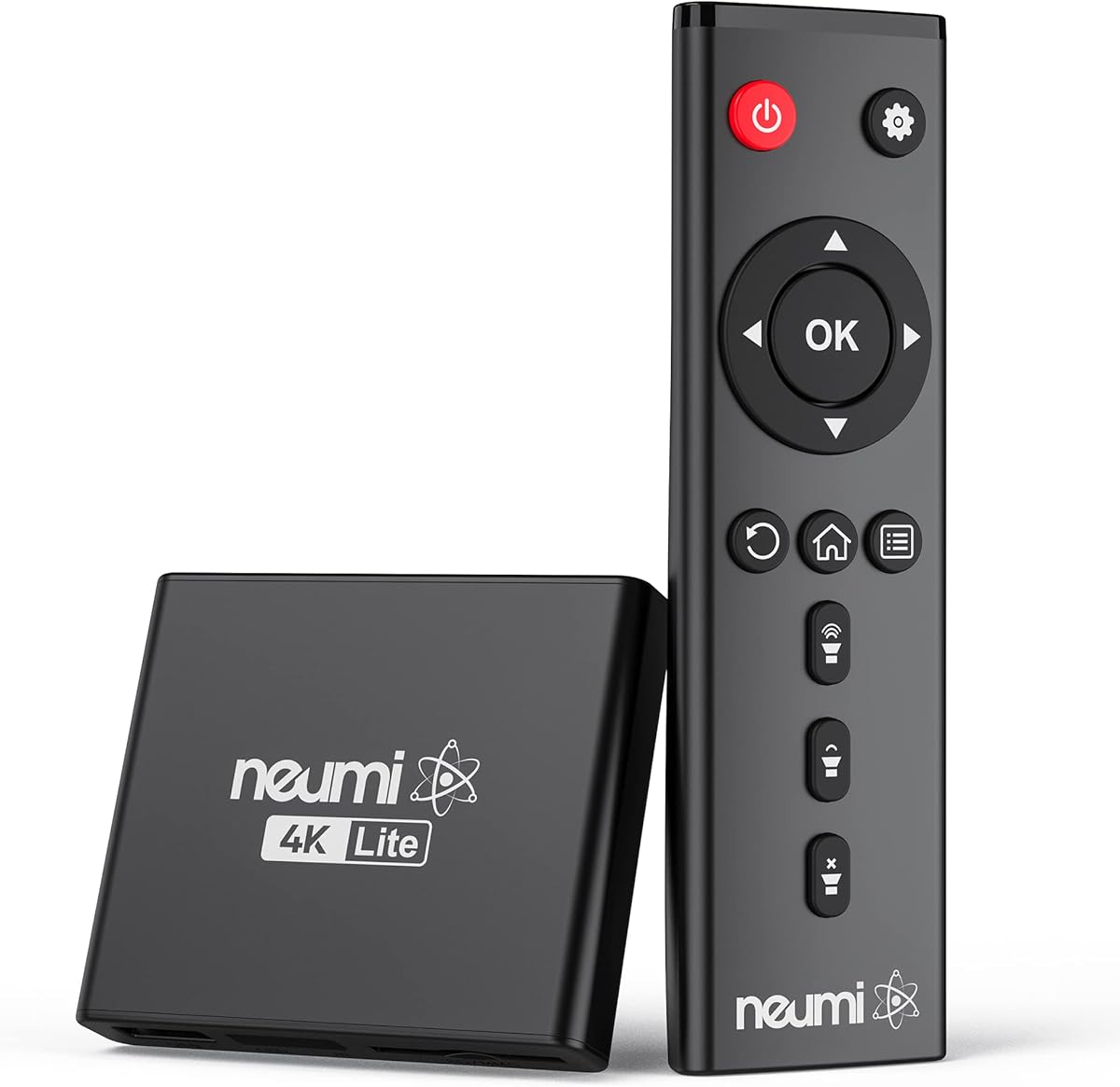
The NEUMI Atom 4K Lite stands out due to its unique trigger sensor input feature. This allows for interactive digital signage where videos play when a button or motion sensor is activated. It plays videos photos and music directly from USB or SD cards with stunning 4K quality.
We may earn a commission when you buy through this link, at no additional cost to you.
Its key strengths include support for 2160p at 60hz and digital surround sound for an immersive experience. The device is incredibly compact smaller than a deck of playing cards which helps in stealthy installations. It also supports common file systems and resumes playback from the last stop point.
Users should be aware that push-button and motion sensors are sold separately which adds to the setup cost. While it lacks network streaming, its offline reliability and interactive features make it valuable for galleries or museums. The AV output ensures compatibility with older display equipment.
This device is perfect for building interactive displays or art installations without complex software. We recommend it for users needing motion-triggered content playback. Whether for Halloween effects or museum guides it offers a creative and reliable media solution.
Build an interactive digital signage display art gallery or museum on-demand video player or special effect in just a few steps with sensor input.
Feeds digital surround sound to home theater receivers for a cinema-like movie experience with stunning HDMI video quality up to 2160p at 60 hertz.
We may earn a commission when you buy through this link, at no additional cost to you.
The ACEMAX 4K@60Hz Offline Media Player offers a unique dual function as both a media player and a hard drive enclosure. This means you can install a 2.5-inch SATA drive directly into the unit for integrated storage. It supports offline playback which is ideal for secure or remote environments.
We may earn a commission when you buy through this link, at no additional cost to you.
Strengths include H.265 10-bit video decoding and a metal housing that helps dissipate heat during extended use. The device supports FAT32 exFAT and NTFS file systems. It also features auto play loop and resume functions making it suitable for retail displays or exhibitions.
Some users may find the drive formatting requirements strict which requires careful setup to ensure compatibility. The remote control requires a clear line of sight which might limit placement options in some setups. However the integrated design reduces cable clutter significantly.
We recommend this player for businesses wanting a self-contained display solution. It simplifies setup by eliminating external drives. Whether for menu boards or office presentations it provides reliable performance and a clean aesthetic with minimal external hardware.
Media player and hard drive enclosure in one unit lets you install a 2.5-inch SATA HDD or SSD inside the metal enclosure or play media from USB.
Play videos music and photos from local storage without Wi-Fi subscriptions or streaming apps ensuring stable unattended display operation.
We may earn a commission when you buy through this link, at no additional cost to you.
This 4K@30hz media player emphasizes audio quality with support for up to 7.1 surround sound via HDMI. It handles video files efficiently using H.265 decoding which halves bandwidth usage compared to older codecs. The aluminum alloy build ensures durability during transport.
We may earn a commission when you buy through this link, at no additional cost to you.
Key features include dual USB ports allowing connection of two devices though only one reads at a time. It also supports PPT files which adds value for business presentations. Vertical screen display mode offers flexibility for vertical signage setups without extra adapters.
The 30fps limit in 4K might be insufficient for high-frame-rate content but suits most movie playback needs. Users should note that only one USB device is read at a time despite having two ports. These minor constraints do not impact general usability for most users.
We recommend this model for home theater enthusiasts needing strong audio output. It supports external subtitle files and optical audio out for better sound management. If audio clarity is your priority this player delivers robust performance for movies and presentations alike.
Powerful H.265 decoding loads files by taking half time and half bandwidth of H.264 decoding for efficient faster and higher quality video experience.
Reads PPT documents and supports horizontal and vertical screen display making it versatile for office use and digital presentation needs.
We may earn a commission when you buy through this link, at no additional cost to you.
This HDMI media player boasts versatile connectivity with HDMI fiber optic VGA and AV outputs. It supports 4K at 30Hz and decodes H.265 efficiently for high quality playback. The ability to play direct Blu-ray file copies adds significant value for media enthusiasts.
We may earn a commission when you buy through this link, at no additional cost to you.
Its strengths include broad format support covering MKV MOV AVI and more. The player handles up to 128GB SD cards and 8TB USB hard drives ensuring ample storage options. It also includes AV cables for older TVs which simplifies initial setup.
While the SD card limit is lower than USB support, this does not affect most users. The inclusion of optical and VGA outputs ensures flexibility for various display setups. Users should ensure correct cabling for VGA to avoid display issues.
We recommend this unit for advertising or multimedia displays needing multiple output options. Whether for home entertainment or commercial loops it handles diverse file types seamlessly. Its flexibility makes it a strong contender for multi-screen installations.
Support direct playback of files copied from Blu ray 4K ultra high definition discs with automatic playback fully supported in file directory.
Supports HDMI fiber optic VGA and AV interface outputs providing flexibility for connecting to different display and audio devices easily.
We may earn a commission when you buy through this link, at no additional cost to you.
While not a media player itself the WD Elements Portable Hard Drive is an essential companion for offline playback setups. It offers vast capacities up to 6TB allowing users to store extensive video libraries. The plug-and-play design ensures it works instantly with compatible media players.
We may earn a commission when you buy through this link, at no additional cost to you.
Its strengths include SuperSpeed USB 3.2 Gen 1 transfer speeds which help load large 4K files quickly. The small lightweight design makes it ideal for travel or moving between devices. Compatibility with both PC and Mac adds versatility for different file sources.
Since it does not decode video you must pair it with a dedicated media player for playback. This is expected given its design focus on storage. However its reliability and capacity make it a trusted choice for backing up media files.
We recommend this drive for users needing bulk storage for their media player. Whether for home movies or business archives it provides secure fast access to files. Pair it with a capable player for a seamless offline entertainment experience.
High capacity in a small enclosure offers up to 6TB capacity making it ideal companion for consumers on the go needing vast storage.
Plug and-play expandability supports up to 6TB capacity to store your photos videos music and important documents on PC or Mac seamlessly.
We may earn a commission when you buy through this link, at no additional cost to you.
This 4K media player and HDD enclosure combo offers an integrated solution for playback and storage. It supports internal 2.5-inch SATA hard drives allowing for a clean setup without external cabling. Users praise its stable 4K at 60hertz playback performance highly.
We may earn a commission when you buy through this link, at no additional cost to you.
Strengths include support for FAT32 exFAT and NTFS drives ensuring broad compatibility. The included Type-C cable allows data transfer to laptops easily which adds utility. Shuffle loop and repeat modes make it versatile for both home theater and commercial signage.
Installation of the internal drive requires opening the enclosure which might deter users seeking instant setup. However once installed the unit operates smoothly and quietly. The high rating indicates strong customer satisfaction with its reliability and ease of use.
We recommend this unit for users wanting a streamlined all-in-one device. It simplifies media management by hosting content internally. Whether for promotional videos or personal collections it delivers high-quality visuals and dependable performance for all scenarios.
Works as a 4K digital media player and 2.5 inch SATA HDD enclosure in one unit for integrated media playback and storage.
Features auto loop playback resume playback repeat and shuffle modes for videos images and audio making it suitable for home theater and digital signage.
We may earn a commission when you buy through this link, at no additional cost to you.
This Ultra HD media player combines playback with an integrated hard drive enclosure for a compact all-in-one solution. It supports 4K at 60hertz and reads various storage types including Type-C and SD cards. The auto-play and resume features make it suitable for unattended displays.
We may earn a commission when you buy through this link, at no additional cost to you.
Key benefits include the included Type-C cable for laptop data transfers and a one-year warranty for peace of mind. The device handles H.265 decoding ensuring smooth video performance. It supports FAT32 exFAT and NTFS file systems for broad compatibility.
Note that remote batteries and the internal hard drive are not included which adds to initial setup costs. However the compact design and included cable provide good value. Its smooth playback makes it a solid choice for home theaters or offices.
We recommend this model for users needing a tidy media setup without external drives. It supports commercial signage like restaurant menus effectively. With its warranty and playback features it remains a reliable option for various display environments.
Unlike most digital media players our HDD media player comes with an integrated hard drive enclosure so it can play high-capacity media files directly.
Perfect for commercial digital signage applications such as restaurant menu boards lobby welcome videos and shopping malls with steady loop function.
We may earn a commission when you buy through this link, at no additional cost to you.
This 4K media player offers versatile rotation options and broad format support at an affordable price. It supports configurable 90 180 and 270 degree rotation which is useful for vertical displays. Automatic playback and resume features make it practical for unattended business environments.
We may earn a commission when you buy through this link, at no additional cost to you.
Strengths include support for USB drives up to 8TB and MicroSD cards up to 1TB ensuring flexibility in storage. It plays a wide range of video audio and photo formats seamlessly. The compact size allows easy installation in tight spaces.
While the user rating is lower than other models it remains a viable option for those prioritizing budget. The lack of included batteries for the remote may inconvenience some users. However the rotation feature adds unique value for signage layouts.
We recommend this player for businesses seeking flexible signage solutions. It is ideal for gym displays or welcome videos. If you need adjustable screen orientation on a budget this device provides the necessary features effectively.
Includes configurable video rotation angles 90 180 270 degrees for flexible installation in vertical or horizontal display setups easily.
Perfect for dynamic displays such as restaurant menu boards lobby welcome videos in-store promotions museum exhibits and fitness facilities.
We may earn a commission when you buy through this link, at no additional cost to you.
Choosing the right media player involves balancing video quality, storage support, and specific feature needs. This section breaks down key factors to consider before making your decision.
Look for players that support 4K resolution if you have a 4K display to ensure sharp and clear playback. Some models only support 1080p which might be sufficient for older TVs but not for high definition screens. Check the refresh rate as well since 60Hz offers smoother motion than 30Hz for fast moving content.
Prioritize 4K support if your TV or projector can display it for the best visual quality.
Ensure the player supports your preferred storage type such as USB drives, MicroSD cards, or internal SATA hard drives. File system support like FAT32 exFAT or NTFS is crucial for accessing larger files without errors. If using high capacity drives verify the maximum supported size which can range from 1TB to 8TB.
Verify compatibility with your storage drives and file systems to avoid connectivity issues.
Check for HDMI ports as the standard for digital audio and video but consider AV or optical outputs if you have older equipment. Some models offer multiple outputs to connect to different speakers or displays simultaneously. VGA output might be necessary for older monitors without HDMI inputs.
Select a player with outputs that match your existing TV and audio equipment setup.
A wide range of format support is essential for playing your existing video music and photo files. Look for support for MKV MP4 AVI H.265 and AAC which cover most common media types. Subtitle support like SRT or PGS can enhance your viewing experience with foreign language films.
Choose a device that supports your common file formats including video audio and subtitle types.
If using the player for commercial displays look for auto loop and resume playback to maintain consistent content. Rotation options and trigger sensors are valuable for custom interactive installations like restaurants or museums. Ensure the device runs reliably without network interruptions for unattended operation.
Prioritize loop and resume functions for any unattended or commercial display use cases.
Metal enclosures offer better heat dissipation for long playback sessions compared to plastic models. Compact designs allow easier hiding behind screens or in cabinets without affecting performance. Durability is also important if you plan to transport the device regularly between locations.
Pick a build quality that ensures stability and thermal management for your usage needs.
A user-friendly interface and intuitive remote make navigation easier especially for non-technical users. Some players allow mouse or keyboard inputs which provide flexibility for file management. Simple setup without complex settings saves time and frustration during initial configuration.
Opt for models with straightforward controls and simple navigation for daily use.
Check if the player requires an external power adapter or draws power from USB. Some units need separate power for high capacity hard drives to function correctly. USB ports that support power output can also help charge peripheral devices or hubs.
Ensure your setup provides adequate power for the player and any connected storage drives.
Start by connecting the media player to your display via HDMI or AV cable. Connect your storage drive to the USB port and power on the device to access the file menu. Select the file you wish to play and use the remote to navigate through video audio or image options.
For regular maintenance keep the device in a well-ventilated area to prevent overheating during long playback sessions. Use a soft cloth to dust the exterior periodically and avoid exposing it to liquids or direct sunlight. Ensure all cables are securely connected to prevent signal interruptions.
When storing the device for extended periods remove any attached drives and store the player in a protective case. Update the firmware through the official website if updates are available to maintain compatibility with new files. This ensures consistent performance over time without technical issues.
Yes, most players will downscale 4K content to fit a 1080p screen automatically. This ensures compatibility without needing to convert files manually. The player handles the conversion process smoothly for consistent viewing quality.
No, these devices are designed for offline playback from USB drives or internal hard drives. They do not include streaming apps or internet connectivity features. You must download content locally to watch it on these players.
Most models support external USB hard drives up to 8TB in capacity. Internal SATA drives are typically limited to 2.5-inch sizes. Always check the specific product specifications before purchasing a large drive to ensure full compatibility.
Yes, many models include features like automatic looping and resume playback ideal for signage. Ensure the player can handle continuous operation without overheating. These units work well for menu boards or promotional loops in business settings.
Most players come with an infrared remote included in the package. Some models support wireless air mouse remotes for hidden setups. If using a remote ensure you have a clear line of sight to the device for accurate control.
Connect your drive to your computer via USB and copy files directly into folders. Ensure the drive is formatted to FAT32 exFAT or NTFS for compatibility. This simple drag-and-drop method works for most storage types and operating systems.
We have reviewed ten top models including standout choices like the Micca 4K and the NEUMI Atom 4K Lite. Each offers unique strengths whether for home media playback or commercial digital signage needs. Our top picks balance performance affordability and specific feature sets for diverse users.
Prioritize resolution support and storage compatibility based on your display and file requirements. For businesses look for loop and rotation features while home users might value audio support and size. Matching these factors ensures you choose a device that meets your long-term goals.
Remember to check current availability and pricing as these values change frequently on retailer websites. Verify the warranty and return policy before finalizing your purchase for peace of mind. With the right setup your TV or display can become a versatile offline media hub.