
HP LaserJet M207dw
4.0Editor score
28 ppm print speed
Self-reset Wi-Fi
Ethernet and USB
This guide compares the top Ethernet laser printers for offices and homes, evaluating speed, security, connectivity, and reliability to help you choose the
Ethernet laser printers remain the backbone of reliable office printing, offering stable connections and consistent performance for businesses of all sizes. They ensure your documents print quickly and securely without the interruptions that can plague wireless networks during critical workflows.
We analyzed ten top-rated models based on print speed, connectivity options, security features, and overall value. Our comparison highlights which printers deliver the best balance of performance and cost for small teams, home offices, and professional environments.
Each pick below showcases key strengths, pros, cons, and real-world use cases to guide your decision. Keep in mind that prices and availability fluctuate frequently, so check the latest offers before finalizing your purchase to get the best deal.
4.0Editor score

4.4Editor score

4.2Editor score
The following table provides a side-by-side comparison of all ten Ethernet laser printers, highlighting their core specifications, connectivity options, and standout features to help you evaluate which model fits your specific workflow requirements.



The HP LaserJet Pro 4001dn stands out as the top choice for Ethernet laser printers due to its blazing 42 ppm speed and robust security features. It delivers consistent high-quality prints perfect for small teams needing professional documents daily.
We may earn a commission when you buy through this link, at no additional cost to you.
Its connection speed means multipage reports finish quickly while the included HP Wolf Pro Security protects your data from cyber threats. Setup is straightforward and mobile printing works seamlessly with AirPrint and other common platforms.
The lack of wireless capability limits flexibility for users needing multi-device access without cables. However the Ethernet focus ensures stable connectivity and reduces potential network interference for mission-critical printing tasks.
Ideal for small businesses prioritizing speed and security over wireless convenience. If you need fast reliable printing and a secure networked solution this model delivers exceptional value for office environments.
With 42 pages per minute this printer handles high-volume tasks efficiently reducing wait times for busy teams and improving overall productivity.
HP Wolf Pro Security offers customizable settings to protect sensitive data and prevent unauthorized access or cyberattacks on your networked device.
We may earn a commission when you buy through this link, at no additional cost to you.
The HP LaserJet M207dw offers an affordable entry point into Ethernet laser printing with reliable performance for small offices. Its dual-band Wi-Fi and Ethernet options provide flexibility for various network setups.
We may earn a commission when you buy through this link, at no additional cost to you.
Self-reset connectivity helps resolve issues automatically minimizing downtime while built-in security protects against threats. Duplex printing reduces paper waste and supports eco-friendly initiatives within your workspace.
At 28 ppm it lags behind premium models which may slow high-volume workflows. Basic paper handling also limits capacity for large jobs requiring frequent reloading or specialty media.
Perfect for small offices or home users needing a budget-friendly networked printer with essential security. Its balance of features and cost makes it a smart choice for cost-conscious buyers.
Includes both Ethernet and dual-band Wi-Fi to ensure reliable connections whether you need wired stability or wireless convenience.
Affordable price point combined with duplex printing and energy efficiency helps reduce total ownership costs over time.
We may earn a commission when you buy through this link, at no additional cost to you.
The Brother HL-6210DW dominates the premium category with 50 ppm speeds and robust paper handling for demanding office workflows. Its Gigabit Ethernet ensures fast data transfer ideal for high-volume environments.
We may earn a commission when you buy through this link, at no additional cost to you.
With up to 1660 sheets expandable capacity this printer minimizes refill interruptions during busy periods. Triple Layer Security safeguards sensitive documents and network access effectively.
The larger size and higher price make it less suitable for compact spaces or tight budgets. But for teams needing top-tier speed and capacity these trade-offs deliver exceptional long-term productivity.
Best for professional offices requiring maximum speed and reliability. If your workflow involves heavy printing and security needs this model provides the premium performance you demand.
A 520-sheet main tray plus multipurpose options support continuous printing without frequent manual intervention or paper refills.
Gigabit Ethernet delivers faster data transfer rates standard Ethernet improving efficiency for large files or networked printing.
We may earn a commission when you buy through this link, at no additional cost to you.
The Brother HL-L2460DW offers home offices a reliable Ethernet option with crisp output and smart features. Its compact footprint fits small spaces while maintaining strong performance for daily tasks.
We may earn a commission when you buy through this link, at no additional cost to you.
Connectivity includes Ethernet for stability and dual-band Wi-Fi for convenience. The Brother Mobile Connect app simplifies management and printing from devices remotely with ease.
While toner subscription trials help reduce upfront costs recurring expenses may add up. Also the 250-sheet tray might need refills during heavier usage compared to larger models.
Great for home professionals needing a compact reliable printer with both wired and wireless options. Its blend of efficiency and flexibility suits home office workloads effectively.
Engineered for smaller spaces without sacrificing speed or features ideal for desks or home office corners.
Alexa support and mobile app management add modern convenience for hands-free and remote printing workflows.
We may earn a commission when you buy through this link, at no additional cost to you.
The Brother DCP-L2640DW combines printing scanning and copying in one compact Ethernet-ready unit. It serves small businesses needing multifunction capability without sacrificing network stability or speed.
We may earn a commission when you buy through this link, at no additional cost to you.
With a 50-page automatic document feeder scanning multi-page documents becomes effortless. Ethernet plus dual-band Wi-Fi ensures your printer stays accessible across multiple devices reliably.
Its scanner resolution and speed are adequate but not best-in-class. Also footprint exceeds standalone printers which may matter for tight desk setups.
Perfect for small teams wanting an all-in-one solution with Ethernet backbone. If scanning and copying needs are frequent this model delivers strong value and efficiency.
Handles printing scanning and copying tasks all in one device reducing the need for separate machines.
Auto document feeder streamlines multi-page scanning and copying saving time and effort for repetitive tasks.
We may earn a commission when you buy through this link, at no additional cost to you.
The HP Laserjet Pro 3001dw offers small teams a balanced Ethernet printer with strong security and connectivity. Intelligent Wi-Fi helps maintain stable connections while Ethernet ensures reliable network access.
We may earn a commission when you buy through this link, at no additional cost to you.
HP Wolf Pro Security protects your documents and network from threats with customizable settings. Bluetooth support adds extra options though Ethernet remains the core for networked workflows.
Tray capacity limits high-volume printing before refills. Also Bluetooth is rarely necessary for office setups reducing its practical value compared to more common ports.
Ideal for small offices needing secure reliable printing with flexible connectivity. If you prioritize security and stability this printer fits well into team workflows.
Wi-Fi system seeks best connection for stability complementing Ethernet for a reliable network experience.
Built-in hardware and firmware protections safeguard against attacks ensuring your data stays secure during print jobs.
We may earn a commission when you buy through this link, at no additional cost to you.
The Brother HL-L2405W delivers solid Ethernet performance at a budget-friendly price for home offices. Its compact design saves space while offering essential wired and wireless connectivity.
We may earn a commission when you buy through this link, at no additional cost to you.
Alexa integration allows voice commands for printing tasks adding convenience. The 250-sheet tray and dual-band Wi-Fi ensure reliable operation for everyday document needs.
Print speed of 30 ppm may feel slow for large jobs compared to faster models. Features focus on essentials rather than advanced productivity tools.
Best for home users needing a compact budget Ethernet printer. If simplicity and cost matter most this model covers core tasks well.
Alexa compatibility adds convenience hands-free printing options for streamlined workflows from your desk.
Design fits easily into smaller office spaces while maintaining essential features and connectivity options.
We may earn a commission when you buy through this link, at no additional cost to you.
The HP LaserJet Pro M404dn remains a reliable workhorse for Ethernet-focused offices with strong 40 ppm speed. Its built-in Ethernet ensures stable connection for consistent printing performance.
We may earn a commission when you buy through this link, at no additional cost to you.
Automatic duplex printing saves paper while HP Wolf Pro Security protects data. Compact design fits shared workspaces without consuming excessive room or resources.
Lacks newer wireless options making it less flexible than modern models. Older firmware may limit integration with latest mobile apps or cloud workflows.
Ideal for offices prioritizing wired stability and proven reliability over latest features. If network stability and speed matter most this model delivers dependable performance.
Built-in Ethernet and proven reliability provide consistent performance for critical printing tasks without wireless interruptions.
Automatic two-sided printing and energy saving features reduce operational costs and environmental impact.
We may earn a commission when you buy through this link, at no additional cost to you.
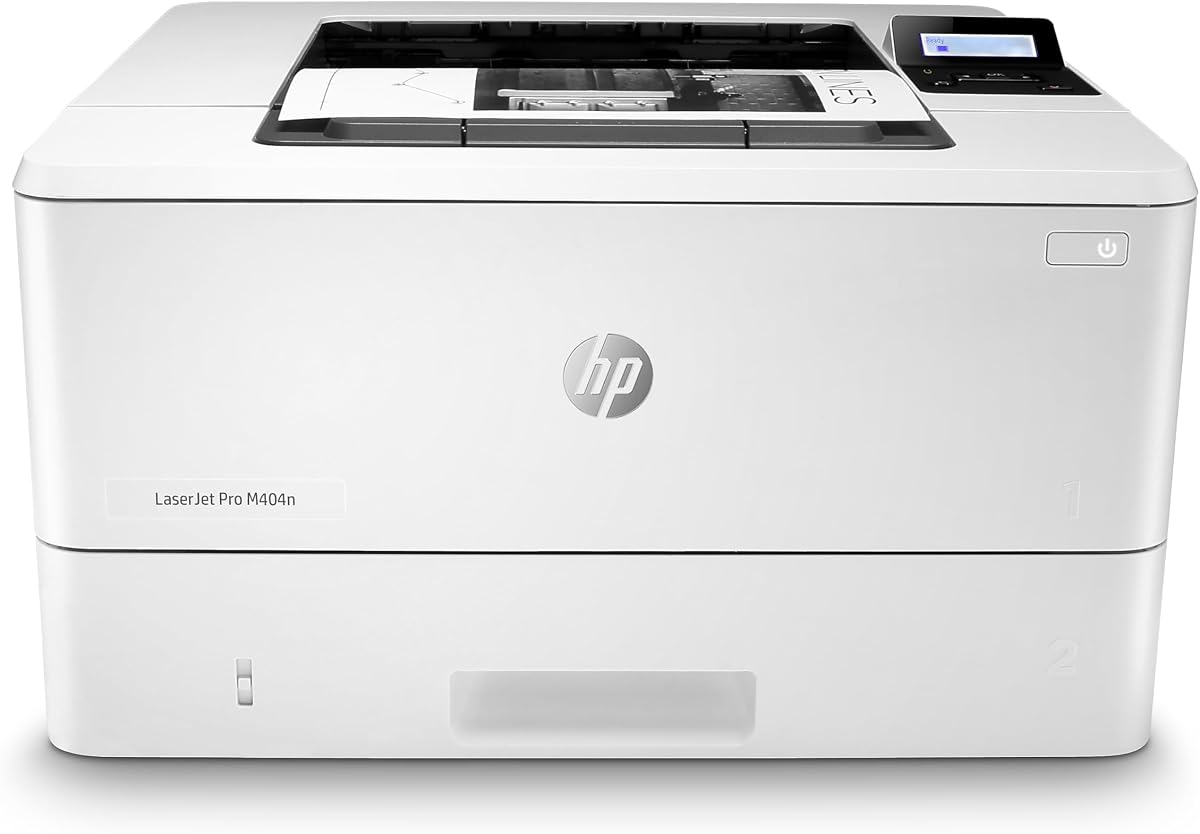
The HP LaserJet Pro M404n offers pure Ethernet connectivity with fast 40 ppm speeds for straightforward network printing. Its focus on essential features simplifies setup and operation.
We may earn a commission when you buy through this link, at no additional cost to you.
HP Wolf Pro Security protects against threats while compact design saves space. Energy-efficient operation aligns with sustainability goals and reduces electricity costs.
Absence of automatic duplex printing increases paper usage. Lack of newer wireless options limits flexibility for mobile or multi-device workflows.
Perfect for offices needing dedicated Ethernet stability without extra frills. If security and speed are priorities this model provides reliable performance.
Built-in Ethernet ensures stable reliable connections ideal for shared office networks requiring consistent performance.
HP Wolf Pro Security protects data from cyberattacks safeguarding sensitive documents during printing and transmission.
We may earn a commission when you buy through this link, at no additional cost to you.
The Brother HL-L5100DN delivers high-speed Ethernet printing with expandable capacity for growing teams. Its 42 ppm speed handles large volumes efficiently while network interface simplifies sharing.
We may earn a commission when you buy through this link, at no additional cost to you.
Secure print and network features protect sensitive data from unauthorized access. Mobile printing support ensures flexibility across devices without requiring cables.
Price exceeds budget options and connectivity focuses on Ethernet reducing wireless options. Also tray capacity needs expansion trays for higher volumes adding to setup cost.
Ideal for teams needing reliable fast Ethernet printing with security. If productivity and data protection matter most this model balances features well.
Support for optional trays expands paper capacity allowing continuous operation during high-volume workflows without frequent refills.
Secure print and lock features restrict access ensuring only authorized users can release sensitive documents from the queue.
We may earn a commission when you buy through this link, at no additional cost to you.
Choosing the right Ethernet laser printer involves evaluating several key factors that impact performance and value. Understanding these elements helps you select a model tailored to your workspace and printing demands.
Print speed measured in pages per minute determines how quickly your documents are produced. For busy offices speeds of 35 ppm or faster reduce wait times and improve overall productivity.
Look for models matching your volume needs to avoid bottlenecks during peak printing periods.
Ethernet provides stable wired connections but consider models offering dual Wi-Fi or Bluetooth if you need flexible multi-device access. Hybrid setups offer the best of both worlds for modern offices.
Prioritize Ethernet if network stability is your main concern for critical printing tasks.
Paper tray capacity and support for different media sizes affect workflow efficiency. Models with 250 sheets or more minimize refills while auto duplex printing saves paper and reduces costs.
Choose trays that accommodate your typical document sizes and volume without constant manual intervention.
Networked printers face cyber risks making security features essential. Look for built-in hardware protections firmware encryption and secure print capabilities to safeguard sensitive data.
Invest in models with customizable security settings to control access and prevent unauthorized use.
Beyond upfront costs consider toner capacity replacement costs and energy consumption. High-yield cartridges and subscription services may reduce long-term expenses despite higher initial prices.
Calculate ongoing costs based on your monthly print volume to find the most economical option.
Crisp sharp text and consistent toner application define professional quality. Most laser printers deliver excellent black and white results but check DPI and toner options for your needs.
Prioritize models with quality reviews if your work demands precise readable documents.
Compact designs suit small offices or shared spaces while larger models offer higher capacity. Measure available desk or floor space before purchasing to ensure proper fit.
Balance physical dimensions with capacity and feature needs to maximize workspace utility.
Modern workflows require printing from mobile devices and cloud apps. Ensure your printer supports AirPrint Android printing and common cloud platforms for seamless integration.
Mobile apps from manufacturers add convenience for remote management and toner ordering.
Set up the printer by connecting the Ethernet cable to your network and installing the manufacturer software. Run test prints to confirm connection and adjust settings for optimal performance and quality.
Regularly clean the exterior and interior rollers to prevent paper jams and maintain print quality. Replace toner and maintenance kits as indicated to avoid issues or damage to internal components.
Update firmware periodically to ensure security patches and feature improvements. Monitor usage and schedule regular checkups to keep your printer running efficiently throughout its lifespan.
An Ethernet laser printer connects to your network via a wired Ethernet cable ensuring stable reliable performance without wireless interference. It allows multiple devices to share the printer over a local network.
Ethernet provides more stable and faster data transfer reducing connection drops. It is ideal for offices needing consistent performance for large print jobs and secure data transmission.
Connect the Ethernet cable to your printer and router then install the driver software on your computer. Configure network settings in the printer menu to enable shared access over the network.
Most Ethernet laser printers listed are monochrome focused on black and white. For color you would need a color laser model which typically costs more and uses four-toner cartridges.
Toner replacement depends on your monthly print volume and cartridge yield. High-yield cartridges can print thousands of pages so check the estimated page count in product specs for guidance.
Yes laser printers excel at high-volume tasks with faster speeds and lower cost per page. They are built for durability and consistent output ideal for busy office environments.
The top picks including the HP LaserJet Pro 4001dn and Brother HL-6210DW offer outstanding performance for diverse office needs. Whether you prioritize speed capacity or budget there is a model suited to your workflow.
Focus on factors like speed, security, and paper handling when deciding which printer fits your environment. A balanced choice ensures reliability and productivity for years of daily use.
Remember that prices and stock change so verify the latest offers before buying. Checking current deals and warranty terms helps you secure the best value for your investment.