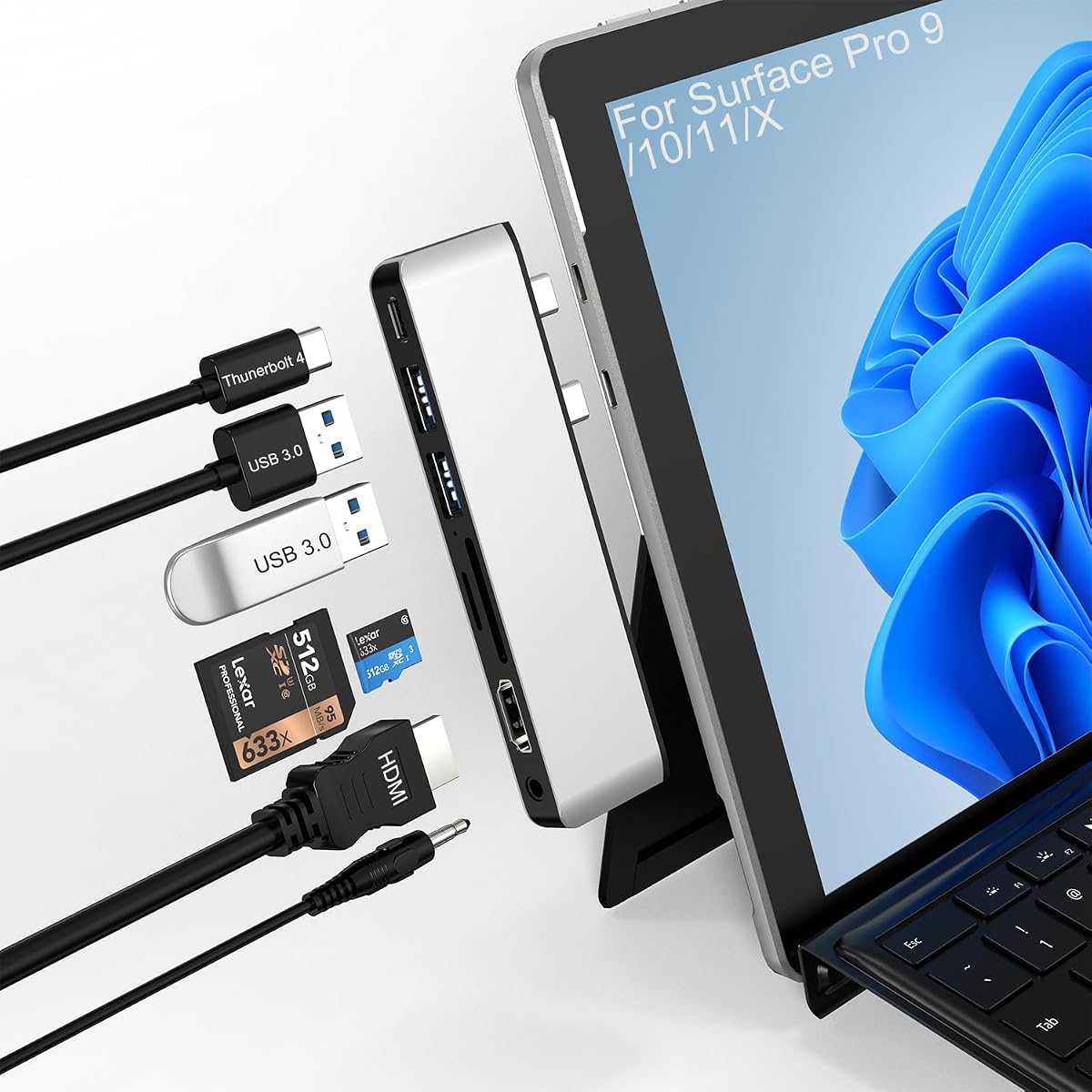
Surface Pro 11 USB Hub
4.2Editor score
Compact aluminum design
Thunderbolt 4 connectivity
Affordable price point
Compare the top docking station for Surface Pro 11 options. This guide reviews connectivity, display support, and charging to help you choose the perfect hub.
Finding the right docking station for Surface Pro 11 can transform your mobile laptop into a powerful desktop workstation. You need reliable connections for monitors, peripherals, and fast charging to stay productive throughout your busy workday without interruption or hassle.
We compared ten top-rated docks based on port selection, display capabilities, charging speed, and build quality. Our analysis focuses on real-world performance, compatibility with the latest Surface models, and value for money to ensure you get the most reliable hub.
Each pick highlights specific strengths like triple display support, gigabit ethernet, or compact design for travel. Note that prices and availability change frequently so check current deals before purchasing to ensure you get the best value for your specific setup needs.
4.2Editor score
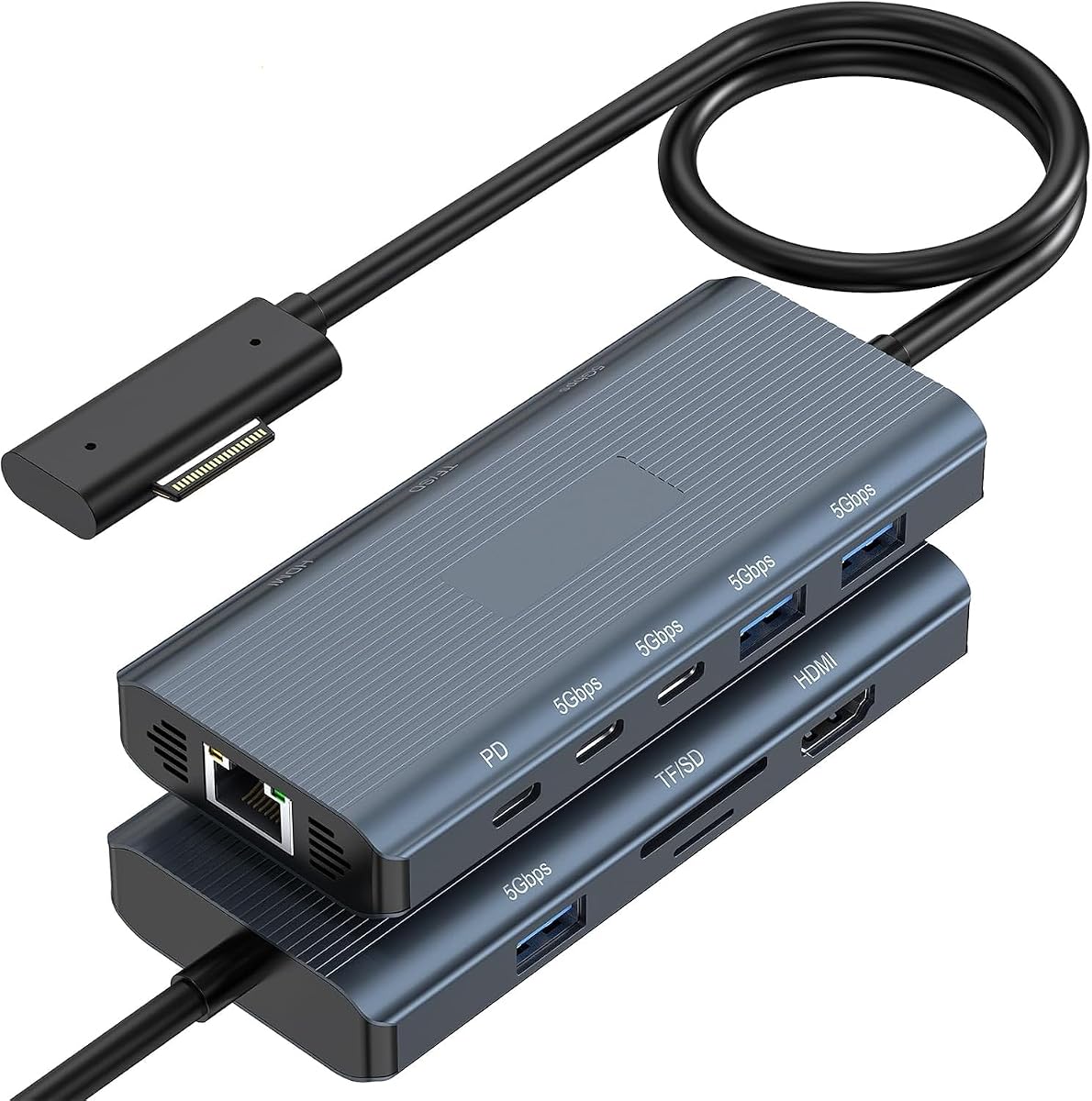
4.8Editor score

4.3Editor score
This side-by-side comparison highlights the key specifications and unique features of each docking station to help you decide which hub fits your workflow and budget requirements most effectively.



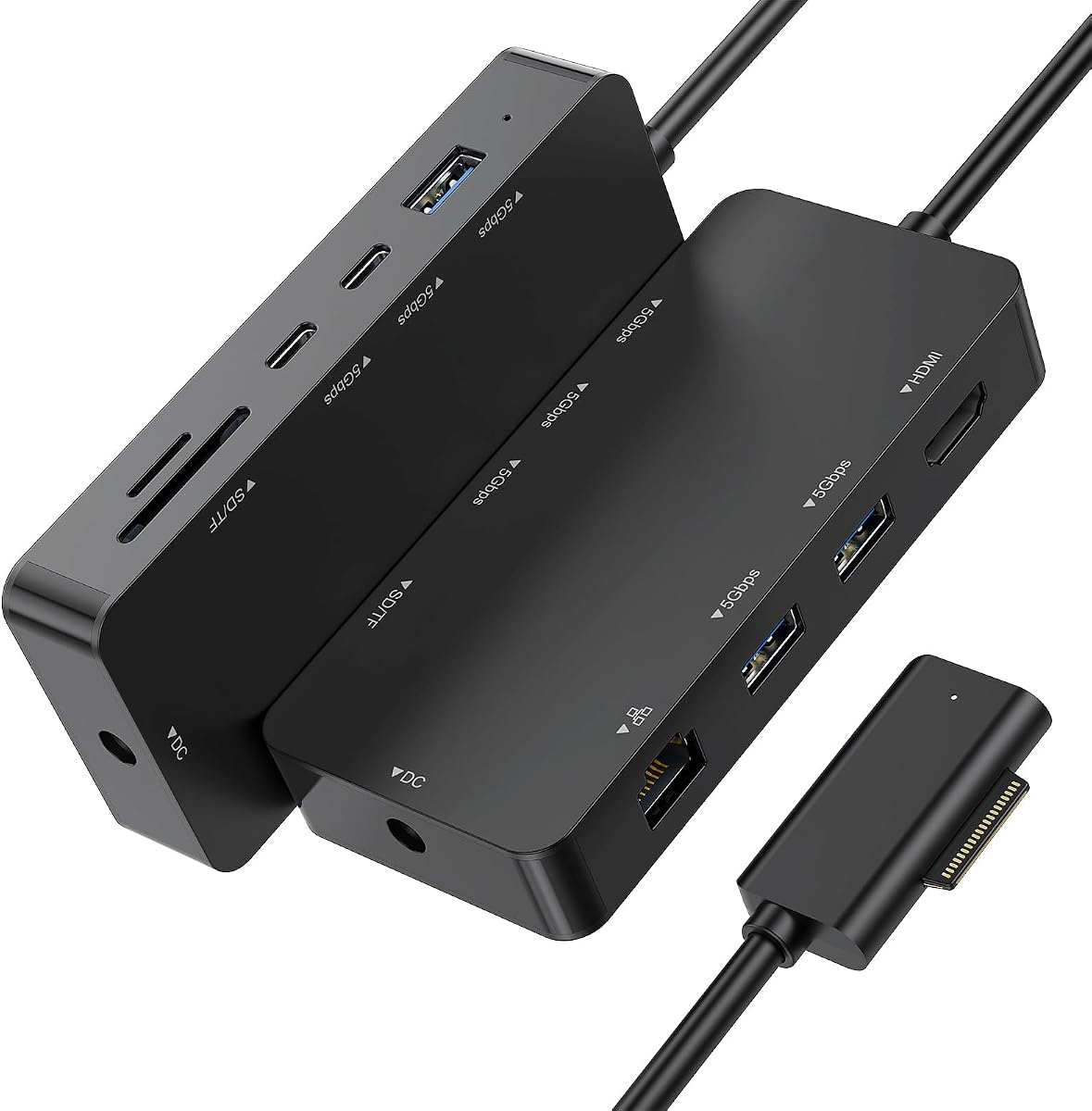
This 11-in-1 docking station is the top choice for Surface Pro 11 users who need reliable connectivity. With a high rating of 4.8, it stands out for its ability to deliver 4K@60Hz visuals and fast data transfer speeds.
We may earn a commission when you buy through this link, at no additional cost to you.
The standout feature is the 100W power input which ensures your laptop stays charged while you run multiple peripherals. The gigabit ethernet port provides a stable connection for video calls or large file transfers without any lag.
One trade-off is that it requires an external power adapter which adds a bit of bulk to your setup. However this ensures stable performance even when driving high-resolution displays and multiple USB devices simultaneously without draining your battery.
If you want a reliable desk setup that supports multiple monitors and peripherals this dock is the perfect choice. It balances performance and features better than most competitors in this price range for everyday productivity work.
The HDMI port supports resolutions up to 3840 x 2160 at 60Hz which ensures smooth scrolling and sharp text on external monitors for creative work or spreadsheets.
With 100W PD power input this dock can charge your Surface Pro 11 at full speed while connected so you never run out of battery during long work sessions.
We may earn a commission when you buy through this link, at no additional cost to you.
This 12-in-1 dock is ideal for users who need triple display capabilities to maximize their screen real estate. It allows you to connect two HDMI monitors and one VGA monitor to expand your workspace significantly beyond the built-in screen.
We may earn a commission when you buy through this link, at no additional cost to you.
The included 72W power adapter ensures your Surface gets enough power to drive multiple displays without draining the battery. This makes it a strong choice for office workers or traders who need constant visibility of multiple charts or documents.
While the VGA port is limited to 1080p resolution it still provides a useful third screen for reference materials or communication tools. The rating is slightly lower than top competitors likely due to the mixed resolution outputs affecting visual consistency.
If your primary goal is to connect three external screens this dock offers a unique solution that many other hubs cannot match. It is a premium choice for multitasking professionals who prioritize screen quantity over uniform resolution quality.
By connecting three monitors you can keep email on one screen reference documents on another and your main work on the third to boost workflow efficiency significantly.
The integrated SD and TF slots let you quickly access photos or files from cameras or devices without needing extra USB card reader adapters on your desk.
We may earn a commission when you buy through this link, at no additional cost to you.
For users on a budget who still need reliable connectivity this USB hub offers an excellent balance of features and price. Its compact design makes it easy to throw into a bag for travel while supporting 4K displays and fast data.
We may earn a commission when you buy through this link, at no additional cost to you.
The Thunderbolt 4 port is a standout feature allowing for high-speed data transfer and charging at the same time. This means you can connect fast storage or a monitor and keep your Surface Pro 11 topped up simultaneously without extra cables.
Because it is a smaller hub it has fewer ports than larger docking stations but it covers the essentials like HDMI USB 3.0 and card readers. Note that it may not fit well if you use a thick protective case on your Surface.
This hub is perfect for students or travelers who need a lightweight way to connect to a projector or monitor occasionally. It delivers solid performance for the price without the bulk of a full desktop docking station setup.
The aluminum case is lightweight and durable so you can carry it easily in your laptop bag without worrying about damage or excess weight on the go.
With USB 3.0 ports and Thunderbolt 4 support you can transfer large video files or backups in seconds rather than minutes to keep your workflow moving fast.
We may earn a commission when you buy through this link, at no additional cost to you.
This docking station provides a robust solution for users needing to run multiple high-resolution displays. It supports dual HDMI ports for 4K output alongside a VGA port making it versatile for different monitor types and older projectors or screens.
We may earn a commission when you buy through this link, at no additional cost to you.
The included 72W power adapter ensures your Surface stays charged even when driving multiple screens. This eliminates the need to find a separate charger and keeps your workspace tidy with just one power cable needed for the dock.
While the USB-C ports on this model support data only you can still get fast file transfers via the USB-A ports or card readers. The 4K HDMI output ensures your content looks crisp which is great for media editing or design work.
If you need to connect two 4K monitors and a third standard monitor this dock fits that need well. It is a reliable choice for hybrid workers who need a consistent desktop experience when docking their Surface Pro.
Connecting two 4K screens allows you to have full resolution on both monitors which is ideal for detailed editing or comparing high-resolution documents side by side.
The gigabit ethernet port ensures a stable internet connection for video conferences and downloads so you never worry about Wi-Fi drops during important meetings.
We may earn a commission when you buy through this link, at no additional cost to you.
This dock is engineered for productivity with a focus on allowing you to run multiple monitors easily. The triple display support with dual HDMI and VGA gives you the flexibility to use different types of screens for your home office or desk.
We may earn a commission when you buy through this link, at no additional cost to you.
It comes with a 72W power supply which is sufficient to charge your Surface while running peripherals. This helps maintain stable performance during long sessions without worrying about battery drain when your laptop is connected to the dock.
The USB ports offer fast transfer speeds which is great for moving files between external drives or cameras. While the VGA port limits resolution it is still useful for legacy monitors or secondary displays where perfect resolution is not critical.
If you work in an environment where screen real estate is key this dock offers a solid way to expand your workspace. It balances display options with necessary connectivity for a professional office setup without excessive complexity or cost.
Designers and analysts can use multiple screens to view code or charts while keeping tools or reference windows open on other monitors for a smoother work process.
The 3.5mm headphone jack allows you to connect headsets directly to the dock which keeps your desk clean and simplifies your audio setup for calls.
We may earn a commission when you buy through this link, at no additional cost to you.
This dock stands out for its ability to support 60Hz refresh rates on HDMI which is great for smooth video playback and gaming. It offers dual HDMI ports with high resolution support making it a strong choice for media creators or gamers.
We may earn a commission when you buy through this link, at no additional cost to you.
The 100W DC power input ensures your Surface is fast-charged while in use. This allows you to leave your Surface Pro 11 connected and running a heavy workload like rendering or compiling without worrying about losing battery power.
While the VGA port is limited to 1080p the HDMI ports deliver high performance. If you prioritize video smoothness this model offers better specs than cheaper docks that often cap at 30Hz for 4K displays.
If you need a high-performance dock that can handle video and fast charging this is a premium option worth considering. It is best suited for users who want the best visual experience on their external monitors without compromise.
The 60Hz support ensures animations and scrolling look fluid on your external monitor which reduces eye strain and makes the desktop experience feel more responsive.
With 100W power input this dock can supply enough energy to run your Surface and all connected drives without throttling performance or causing power issues.
We may earn a commission when you buy through this link, at no additional cost to you.
This 10-in-1 dock is a great mid-range option that balances essential ports with a compact design. It offers 4K HDMI support and a solid number of USB ports for common peripherals like drives, mice, and keyboards.
We may earn a commission when you buy through this link, at no additional cost to you.
The included 65W PD power adapter ensures your Surface stays charged while you use the dock. This is helpful for users who want a clean desk setup without needing to plug in multiple cables for power and data.
The gigabit ethernet port ensures you can get a stable connection for video calls and downloads. While it does not have Thunderbolt 4 speeds the USB 3.0 ports provide enough speed for most external storage needs.
If you need a reliable dock for daily office tasks without paying a premium this is a solid choice. It covers all the basics like video, USB and ethernet with enough quality to handle regular work without issues.
With only one cable to connect and an included power adapter your desk stays organized and free from cable clutter that often comes with older docking solutions.
The wired ethernet connection ensures your internet is stable for calls and cloud uploads which helps you avoid interruptions during online meetings or file syncing tasks.
We may earn a commission when you buy through this link, at no additional cost to you.
This dock offers a high number of ports and broad compatibility with most Surface models. It supports triple displays and includes a 72W power adapter which is good for users who need to connect many devices at once.
We may earn a commission when you buy through this link, at no additional cost to you.
The 72W power input helps keep your Surface charged while connected. This is useful for extended work sessions where you rely on the dock for all your peripherals and don't want to plug in another charger.
With dual HDMI and VGA you can easily set up a multi-monitor workspace. The SD and TF slots also allow quick access to photos and files from cameras or other devices without extra adapters.
If you need a dock that supports many devices and models this is a strong pick. It is best for home offices or students who want plenty of connection options in a single reliable unit without compatibility issues.
Having multiple USB ports and card slots means you can connect all your peripherals without needing separate hubs which saves desk space and reduces cable clutter significantly.
The 72W power adapter ensures your Surface stays powered while driving multiple screens and devices so you can focus on work without worrying about battery drops.
We may earn a commission when you buy through this link, at no additional cost to you.
This dock is built for power users who need high power delivery and multiple high-speed ports. With a 120W adapter and Thunderbolt 4 support it can handle demanding workloads like video editing or data transfers efficiently.
We may earn a commission when you buy through this link, at no additional cost to you.
The HDMI and DP ports support 4K at 60Hz which ensures smooth visual performance on external monitors. This is ideal for designers or engineers who need precise visuals while working on complex projects on their Surface Pro.
While it is a more complex setup the benefits of having triple display support and fast data are significant. The high power adapter means you can charge your Surface and run accessories without needing any extra power cables.
If you need a dock that can handle heavy tasks and high-resolution displays this is an excellent choice. It is best for professionals who prioritize performance and connectivity options over simplicity or lower cost options.
The 120W adapter ensures you have enough power for all your devices and your Surface so you never have to worry about running out of battery during long sessions.
With Thunderbolt 4 support you can move large files quickly between your Surface and external storage which speeds up your workflow significantly for video or design work.
We may earn a commission when you buy through this link, at no additional cost to you.
This dock is unique for its magnetic Surface Connect cable which makes attaching and detaching the dock very easy. It supports 4K at 60Hz and includes a gigabit ethernet port for stable wired connections during your workday.
We may earn a commission when you buy through this link, at no additional cost to you.
The PD charging support ensures your Surface stays powered while you use the dock. This helps maintain your workflow without interruptions and keeps your battery topped up even when using multiple external devices or monitors.
While it has slightly fewer ports than some 12-in-1 models it covers the most essential needs like HDMI USB-C and ethernet. The magnetic cable is a great convenience feature that reduces wear on your laptop's charging port over time.
If you value ease of use and reliable performance this dock is a top contender. It is ideal for users who want a simple plug-and-play setup that offers high-quality video and fast data without complicated connections.
The magnetic cable snaps into place easily so you can dock your Surface quickly without worrying about aligning ports which saves time and protects your Surface's charging port.
With 4K@60Hz HDMI you get crisp visuals on your monitor which is great for watching videos or working on detailed graphics without motion blur on the external screen.
We may earn a commission when you buy through this link, at no additional cost to you.
Choosing the right dock requires understanding your display and power needs. Here are key factors to consider before buying.
Check if the dock supports 4K resolution at 60Hz. A 60Hz refresh rate ensures smooth visuals for video and scrolling while 30Hz may appear laggy for moving content or gaming tasks.
For professional work like video editing or design prioritize 4K@60Hz support. For basic office tasks 4K@30Hz is usually acceptable and saves money on the docking station purchase price.
Ensure the dock supports Power Delivery (PD) to charge your Surface while connected. Look for docks with at least 65W to 100W input to ensure full charging speed when running multiple devices.
Higher wattage inputs like 100W or 120W are better for power users. They guarantee your Surface stays charged even during heavy workloads or when multiple high-power peripherals are attached.
If you need a stable connection choose a dock with a Gigabit Ethernet port. This is essential for video conferencing or large file uploads where Wi-Fi might be unreliable or slow.
For most users a standard 100/1000Mbps port is sufficient. It ensures a wired connection that avoids interference from other devices or congestion on your wireless network.
Count the number of USB ports you need for drives, mice, or printers. Most docks offer a mix of USB-A and USB-C ports to fit legacy and modern devices simultaneously.
Look for SD or TF card readers if you use cameras. These allow direct access to media files without needing a separate card reader adapter for your workflow.
Aluminum builds usually offer better heat dissipation and durability. A compact design is better for travel while larger units often have better cooling for long desktop use.
Choose a dock that fits your desk space. Ensure cables are long enough or included so you can reach your Surface without stretching or needing extra extension cables.
Verify the dock works with Surface Pro 11 specifically. Some older docks may not support the latest ports or power requirements of newer models like the 11 or 12 series.
Check if the dock requires a specific connector direction. Some magnetic connectors may need to be aligned correctly to function properly with your specific Surface model.
Select a dock that works without extra drivers. Most modern docks are plug and play meaning they will work immediately once connected to your Surface Pro 11.
This saves time and avoids software installation issues. It ensures your dock works on any PC or Surface device without needing to install specific software packages.
Compare the features against the price. A slightly more expensive dock with better power or video support often offers better long-term value than a cheap one that underperforms.
Look for warranties of at least 12 months. A good warranty ensures you are protected against defects and gives peace of mind when investing in a desktop accessory.
Start by connecting the power adapter to the dock and plugging it into a wall outlet. Ensure the dock is on a flat surface before attaching your Surface Pro 11 to avoid any physical stress on the connector.
Align the magnetic connector properly with your Surface and attach it until it clicks. Once connected check if your monitors turn on and if your Surface recognizes the USB peripherals automatically.
Clean the connector regularly with a dry cloth to remove dust and debris. Store the dock in a cool place to prevent overheating and ensure it lasts as long as possible during your work sessions.
No, not all docks support 4K at 60Hz. Many budget models support 4K at 30Hz which can be laggy for moving content. Always check the product specs for 60Hz support if you need smooth visuals.
Most modern docks support Power Delivery to charge your Surface while connected. Look for a minimum of 65W to 100W PD input to ensure your laptop gets enough power during use.
Yes, some docks support triple displays using HDMI and VGA ports. However, you may need to turn off the Surface screen to enable three external monitors depending on your Windows settings.
Yes, most full-featured docks require an external power adapter to deliver enough power for charging and peripherals. Bus-powered hubs exist but usually offer fewer ports or lower performance.
Most docks are plug and play and do not require extra drivers. They should work immediately once connected to your Surface Pro 11 via the USB-C or Surface connector.
Many docks are compatible with a wide range of Surface models including older ones. However always check the list of supported devices to ensure compatibility with your specific version.
We found that the 11-in-1 Surface Pro Docking Station stands out as the best overall choice for most users due to its balanced features and high rating. It offers reliable 4K video and fast charging without excessive cost or complexity.
If you need triple displays prioritize the Triple Displays models despite the lower resolution VGA. For travelers the compact Surface Pro 11 USB Hub is an affordable option that still delivers high-speed data and decent performance.
Remember to check current prices and availability before purchasing since deals change frequently. Ensure the dock you choose matches your specific needs for ports video quality and power to get the best experience.