
CENMATE Aluminum 4 Bay Hard Drive Enclosure with Cooling Fan
4.3Editor score
Aluminum alloy heat dissipation
Supports 2.5 and 3.5 drives
Includes USB A and C cables
Direct attached storage offers a powerful way to expand your digital workspace without the complexity of networked servers. These devices connect directly to your computer via USB or Thunderbolt, delivering fast speeds and instant access to large media files. Whether you edit video or archive data, the right enclosure ensures reliability and performance.
We evaluated ten leading models based on transfer speeds, drive compatibility, build quality, and ease of use. Our analysis focuses on real-world performance metrics and user feedback to highlight which units deliver consistent results. We considered both budget-friendly options and premium docks that support high capacity drives for demanding workflows.
Each pick in this list highlights specific strengths like hardware support, hybrid drive support, or compact designs. You will find detailed pros and cons to help you match a unit to your specific needs. Note that pricing and availability change frequently, so check current listings before making your final selection.
4.3Editor score

4.2Editor score

3.5Editor score
As an Amazon Associate we earn from qualifying purchases.
This side-by-side comparison table breaks down the core specifications of each model to help you quickly identify the right capacity and speed profile for your workspace.


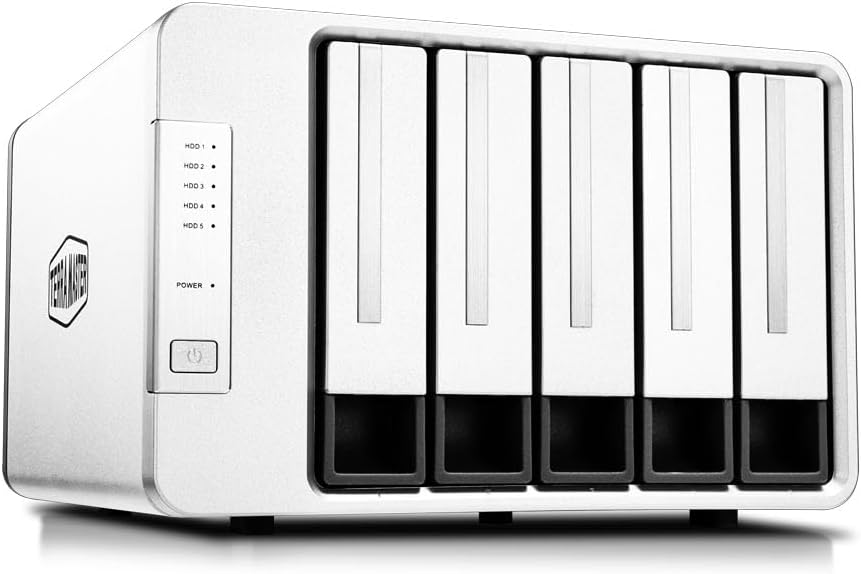


The TERRAMASTER D4-320 stands out as a robust solution for users needing fast access to multiple hard drives. It supports four 3.5 inch drives without complex RAID setups, making it ideal for straightforward storage expansion.
We may earn a commission when you buy through this link, at no additional cost to you.
Its USB 3.2 Gen2 connection enables speeds up to 10Gbps, ensuring rapid file transfers for large media libraries. The tool-free push lock mechanism simplifies drive swaps, while the intelligent fan maintains safe operating temperatures.
While it lacks hardware RAID for redundancy, the individual drive access offers flexibility for backups. The device runs quietly when idle, fitting well in home offices without noise distractions.
Choose this unit if you prioritize speed and ease of use over advanced data protection. It is a reliable DAS for professionals who need immediate access to large files.
With up to 10Gbps transfer rates, this enclosure minimizes wait times during large file transfers.
The temperature-controlled fan ensures drives stay cool without unnecessary noise during light usage.
We may earn a commission when you buy through this link, at no additional cost to you.
The QNAP TR-004 provides hardware RAID options for users seeking redundancy without a full NAS system. It connects via USB-C and supports four 3.5 inch drives for flexible data protection.
We may earn a commission when you buy through this link, at no additional cost to you.
You can configure RAID 0 1, 5, or JBOD to match your needs. The lockable bays secure drives against accidental removal, which is useful in shared environments.
Compatibility is limited to newer QNAP models, so verify your NAS system before purchase. It does not run NAS applications, focusing solely on storage expansion.
This unit suits QNAP owners wanting a secure external storage pool. It bridges the gap between simple DAS and full network storage.
Hardware RAID options allow you to balance speed and redundancy based on your specific requirements.
Lockable bays prevent unauthorized or accidental removal of critical data drives.
We may earn a commission when you buy through this link, at no additional cost to you.
The D8 Hybrid offers a unique mix of four HDDs and four NVMe SSDs for tiered storage. This design lets you store hot data on fast SSDs while keeping backups on high capacity drives.
We may earn a commission when you buy through this link, at no additional cost to you.
You get up to 152TB of total space, perfect for video editors or data centers. The USB 3.2 Gen2 connection ensures the SSDs perform at their peak speed.
Power on recovery helps restore operations after unexpected outages without manual intervention. However, the cost is higher due to the complexity of supporting both drive types.
Select this if you need a single unit for both speed and volume. It streamlines workflows by eliminating separate storage solutions.
Use SSDs for active projects and HDDs for archives to optimize cost and performance.
Automatic reboot after power loss reduces downtime during critical operations.
We may earn a commission when you buy through this link, at no additional cost to you.
The CENMATE 4 Bay delivers solid performance at a low entry price. Its aluminum chassis helps dissipate heat effectively, which is crucial for 4 drive arrays.
We may earn a commission when you buy through this link, at no additional cost to you.
It supports both 2.5 and 3.5 drives with a max capacity of 80TB. The fan cools drives during heavy transfers but may generate 40 dB of noise.
Plug-and-play compatibility with Windows and Mac makes it easy to use immediately. While lacking advanced features, it meets basic expansion needs reliably.
Ideal for budget-conscious users needing simple storage expansion. It balances cost and function well for home media libraries.
This model offers a low cost entry into 4 drive DAS solutions without sacrificing basic features.
The built-in fan ensures drives stay within safe operating temperatures during use.
We may earn a commission when you buy through this link, at no additional cost to you.
The SABRENT DS-SC5B expands to five drives using dedicated controllers for stability. This design ensures that one drive issue does not affect others.
We may earn a commission when you buy through this link, at no additional cost to you.
Internal power reduces cable clutter by eliminating external bricks. The USB-C interface supports up to 10Gbps for fast data transfer.
Daisy-chain support allows you to connect a second dock for even more space. It runs quietly thanks to PWM fan control that adjusts based on heat.
Choose this for heavy workloads requiring maximum local capacity. It is ideal for studios needing reliable access to multiple large drives.
Dedicated controllers ensure each drive performs consistently without cross-talk or bottlenecks.
Internal power supply simplifies setup by removing the need for an external power adapter.
We may earn a commission when you buy through this link, at no additional cost to you.
The D8 Hybrid 2 improves on the original with advanced power management controls. You can switch between save and active modes to balance performance and energy use.
We may earn a commission when you buy through this link, at no additional cost to you.
With 1020 MB/s read speeds on NVMe drives, it handles fast transfers efficiently. The eight independent bays offer flexibility for different storage needs.
Plug-and-play functionality works across Windows and macOS without driver installation. It fits well in NAS workflows as an external pool.
Best for users needing energy-efficient high-speed storage. It provides a smart balance of power and performance for daily use.
Proprietary power management tools help reduce energy consumption during idle periods.
High-speed M.2 SSDs ensure rapid access for active files and projects.
We may earn a commission when you buy through this link, at no additional cost to you.
The D5-310 features a physical RAID knob for switching modes without software changes. This makes it intuitive for users who need quick data protection changes.
We may earn a commission when you buy through this link, at no additional cost to you.
It supports hot spare disks to maintain RAID integrity after a drive failure. The included backup software adds value for Windows users managing critical data.
With 120TB capacity and USB 3.1 Gen 1 speeds, it fits home office needs. However, the transfer speed is lower than newer USB-C units.
Choose this for manual control over RAID settings. It suits users needing physical access to configuration options.
A physical knob allows immediate mode changes without requiring software access.
Included TPC Backupper software simplifies scheduled data protection tasks.
We may earn a commission when you buy through this link, at no additional cost to you.
The WAVLINK 4-Bay adds an HDMI port for direct display output alongside storage. This allows you to view media files without connecting through a computer.
We may earn a commission when you buy through this link, at no additional cost to you.
It supports up to 88TB with dual fans that adjust based on temperature. The 10Gbps USB-C port ensures fast data flow for modern computers.
Daisy-chaining lets you connect additional devices to the port. The hot-swappable bays make drive changes convenient and quick.
Use this for direct media playback or dual monitor setups. It blends storage with display capabilities for multimedia use.
The HDMI port allows you to connect directly to a TV for media viewing.
Fans activate only when drives reach 48C to save energy and reduce noise.
We may earn a commission when you buy through this link, at no additional cost to you.
The ORICO 5 Bay uses a magnetic cover to simplify access to the drive bays. This eliminates screws and tools for quick drive maintenance.
We may earn a commission when you buy through this link, at no additional cost to you.
It supports up to 110TB and recognizes drives within three seconds. The cooling fan manages heat though it may produce audible noise during heavy use.
It includes protections against overvoltage and overheating to safeguard data. For basic expansion needs, it offers a reliable and simple solution.
Pick this for quick home storage upgrades. It is best for users prioritizing ease of access over advanced cooling.
The magnetic lid allows for rapid drive swaps without screwdrivers or tools.
Built-in overvoltage and short-circuit protection helps keep drives safe during power fluctuations.
We may earn a commission when you buy through this link, at no additional cost to you.
The QNAP TR-002 is a compact unit designed for 2 drives without bulk. It serves well as an external expansion for existing QNAP systems.
We may earn a commission when you buy through this link, at no additional cost to you.
You can configure RAID 0 or 1 for data protection. The USB-C connection ensures decent transfer speeds for modern laptops.
Lockable bays keep drives secure in transit. It is a reliable choice for travelers or small home offices needing minimal storage.
Select this for portability and QNAP integration. It fits tight spaces where larger units are impractical.
Its small size makes it easy to transport for remote work or travel.
Hardware RAID ensures data safety without slowing down the USB connection.
We may earn a commission when you buy through this link, at no additional cost to you.
Selecting the right direct attached storage involves evaluating capacity, interface speed, and drive compatibility to match your workflow needs.
Determine how many drives you need to support. Most models offer 4 to 5 bays, with some hybrid units offering 8 slots for mixed drive types. Ensure each bay supports your chosen drive capacity for future expansion.
Look for enclosures that accommodate up to 30TB per drive if planning for long-term use.
Interface standards like USB 3.2 Gen2 provide speeds up to 10Gbps which is vital for large media files. Older USB 3.0 units are limited to 5Gbps and may bottleneck high-speed SSDs. Always check the port type on your computer for best performance.
Prioritize USB-C connections for compatibility with modern laptops and faster transfer rates.
Hot swapping allows you to change drives without powering down the unit. This feature is essential for shared workspaces or frequent backups. Ensure the trays support tool-free access to simplify this process.
Verify that your operating system supports hot plug features before relying on it.
Multiple drives generate significant heat which can damage components over time. Enclosures with built-in fans and aluminum casings help maintain safe temperatures. Noise levels vary so check decibel ratings if using in quiet environments.
Look for models with temperature-controlled fans that adjust speed based on heat.
RAID provides data redundancy but adds cost and complexity. Most DAS units run in JBOD mode which shows each drive separately. If redundancy is key, look for hardware RAID support to protect against drive failure.
Decide if you need data safety or simple storage expansion when choosing a mode.
Larger enclosures require external power adapters which adds cables. Internal power supplies reduce clutter but increase cost. Ensure the power supply matches the region and provides stable voltage for data safety.
Check if the unit uses a standard DC brick or proprietary connector for easy replacement.
Most DAS units work with Windows and macOS out of the box. Some models have better Linux support while others require formatting. Always verify the manufacturer lists your OS for plug and play access.
Check if formatting tools or specific drivers are required for your platform.
Metal enclosures offer better heat dissipation and durability than plastic. Lockable bays prevent accidental removal in shared offices. Look for sturdy hinges or locking screws to keep drives secure during movement.
Choose models with reinforced corners and quality trays for long-term use.
Always connect the power supply before attaching the device to your computer. This ensures stable voltage and protects drives from sudden surges. Use the included cables or high-quality alternatives to maintain transfer speeds.
Keep the unit in a well-ventilated area to prevent overheating. Dust buildup can block fans so clean vents regularly with compressed air. Avoid placing it near heat sources like radiators for safe operation.
Regularly check drive health using included tools or third-party software. Update firmware if available to fix bugs and improve performance. Back up critical data to separate locations for maximum security.
Direct attached storage connects directly to a single computer via USB or Thunderbolt while NAS connects to your network. DAS offers faster speeds for local work but lacks multi-user access. NAS is better for shared files but slower and more complex to set up.
Many modern enclosures work with Mac out of the box but may format drives to exFAT. If drives are pre-formatted to NTFS you can read files but not write. Check the product specs for native Mac compatibility before purchasing.
Most basic DAS units support both SATA SSDs and HDDs interchangeably. Some hybrid models allow M.2 NVMe alongside SATA for mixed speeds. Verify the bay type matches your drive format before installing drives.
Check your laptop or desktop USB ports for the SuperSpeed+ icon. Thunderbolt ports also support 10Gbps if the cable is rated for it. Without compatible ports the enclosure will fall back to slower speeds automatically.
Many units now offer tool-free trays with push locks for easy installation. Some older models might still use screws to secure drives. Look for tool-free design keywords if you want quick access without a screwdriver.
Yes if the unit has reliable power and heat dissipation. Check for quiet fans if noise is a concern. Ensure the operating system supports the device for 24/7 uptime requirements.
Use built-in backup software like TPC Backupper if included. Alternatively use standard file copy methods or Windows File History. Always copy important data to a second location for redundancy.
Some models with Thunderbolt or extra USB ports allow daisy-chaining. Check if the device has two USB-C ports for this feature. Not all enclosures support it so verify specs before planning a setup.
The TERRAMASTER D4-320 leads this list for its balance of speed and usability. The QNAP TR-004 stands out for hardware RAID support while the CENMATE offers great budget value. Each pick serves different needs from capacity to compatibility.
Prioritize interface speed if you work with large media files daily. If data redundancy is critical look for hardware RAID options over simple JBOD setups. Match the capacity to your current and future file growth plans.
Always verify current prices and warranty terms before buying. Prices change often and availability varies by region. Check user reviews for the latest experiences to confirm reliability before committing.