
WALI Computer Monitor Stand for Desk
4.7Editor score
Adjustable height settings
Large metal shelf
Ventilated platform design
This guide compares the top desktop monitor risers for ergonomics and storage, helping you choose the best stand for your office setup in October 2026.
Finding the right desktop monitor riser can transform your workspace by improving posture and reducing strain. A good riser elevates your screen to eye level, creating room underneath for keyboards and accessories while keeping your desk organized and clutter-free.
We have carefully evaluated ten top-rated models based on stability, adjustability, and storage capacity. Each product was selected for its ability to support various devices and enhance your daily computing experience through thoughtful ergonomic design and durable materials.
Every pick in this list highlights specific strengths like adjustable height or extra drawers. Keep in mind that availability and pricing can shift over time, so checking current listings ensures you get the best value for your specific workspace needs today.
4.7Editor score
4.7Editor score

4.6Editor score
Here is a side-by-side comparison of all ten monitors monitor risers to help you decide which features best fit your specific desk setup and ergonomic needs.


The WALI Computer Monitor Stand offers an exceptional value for those seeking a basic yet effective way to lift their screen. With a strong 4.7 rating from users, it delivers on stability and utility without costing a fortune.
We may earn a commission when you buy through this link, at no additional cost to you.
Its large 14.6 by 9.3 inch metal shelf can support most laptops and monitors up to 44 pounds. The vented holes on the platform help keep devices cool during long use sessions, which is a thoughtful touch often missing in budget models.
While it lacks fine-tuned height adjustment, offering three preset levels instead of infinite positioning, this trade-off keeps the price low and setup simple. The rubber pads ensure it stays put on your desk and protects the surface from scratches.
This stand is perfect for students or home office workers who need a quick ergonomic boost. If you want to raise your monitor for better posture without spending much, this is a reliable and highly recommended choice.
The vented design allows air to flow under your laptop or monitor, preventing heat buildup that could affect performance or longevity.
The open space underneath provides ample room to slide in a keyboard when not in use, freeing up precious desktop real estate.
We may earn a commission when you buy through this link, at no additional cost to you.
The TEAMIX Monitor Stand brings a touch of elegance to your workspace with its wood-finish look. It holds a solid 4.6 rating and is built to support heavier devices with ease.
We may earn a commission when you buy through this link, at no additional cost to you.
Made from high-quality MDF wood board, this stand can hold up to 80 pounds. This makes it suitable for larger monitors or even small printers that might be too heavy for plastic alternatives.
Its minimalist modern design fits well with various home decor styles. While the height is fixed and assembly is needed, the sturdy construction ensures it won't wobble even with heavy loads placed on top.
Choose this if you value aesthetics and strength. It transforms a functional necessity into a piece of furniture that enhances the look of your office or home desk.
With an 80-pound capacity, you can confidently place heavy monitors or even printers on this stand without worrying about it bending.
The wood finish blends seamlessly with wooden desks or bookshelves, creating a cohesive look rather than a stark plastic look.
We may earn a commission when you buy through this link, at no additional cost to you.
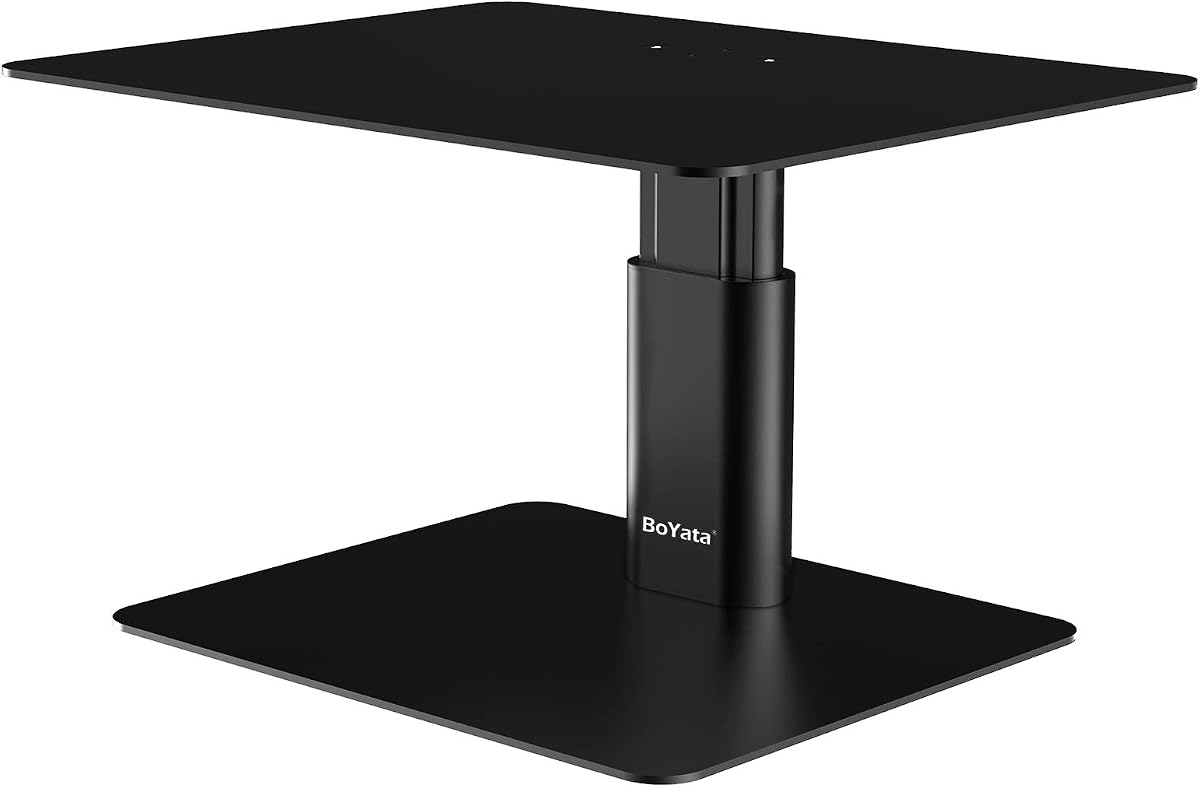
The BoYata Monitor Stand stands out because of its ability to adjust height using a twist knob. With a 4.7 rating, users appreciate the flexibility to find their perfect viewing angle.
We may earn a commission when you buy through this link, at no additional cost to you.
It is made of strong metal that resists bending and dents. This durability ensures that once you set the height, it stays stable even if you bump into it lightly during work.
The included screwdriver makes setup straightforward, taking only a few minutes. While it has a 33-pound limit, that is sufficient for most standard monitors and laptops.
We recommend this for anyone needing precise ergonomic control. It is a solid investment for long-term comfort and reduces strain effectively through adjustable positioning.
The twist knob allows you to raise or lower the stand to match your eye level, reducing neck pain from looking down.
The metal build combined with skidproof pads means the stand stays put on smooth surfaces without sliding around.
We may earn a commission when you buy through this link, at no additional cost to you.
Amazon Basics delivers a no-frills solution with this height-adjustable stand. It holds a 4.6 rating and is ideal for light-duty office setups.
We may earn a commission when you buy through this link, at no additional cost to you.
Made from durable ABS plastic, it is very lightweight. This makes it easy to move around if you change desks often or need to pack it away.
The 3-level stackable design uses detachable legs to offer three different heights. The tapered design saves a bit of space on your desktop surface.
It is best for laptops and small monitors. If you want a temporary or travel-friendly riser, this affordable and simple option fits the bill perfectly.
Because it is made of lightweight plastic, you can easily carry it to a new location without lifting a heavy load.
The stackable legs let you choose between three heights depending on your chair or desk height preferences.
We may earn a commission when you buy through this link, at no additional cost to you.
If you run a dual-monitor setup, this YAOHUOO stand is a premium solution designed specifically for that need. With a 4.6 rating, it is a robust option for power users.
We may earn a commission when you buy through this link, at no additional cost to you.
The 38.6-inch length provides enough space for two screens side by side. Heavy-duty steel footing ensures it stays stable even with the weight of two large displays.
Assembly takes about ten minutes and is straightforward. The ergonomic height lifts your screens to eye level, helping maintain good posture throughout the workday.
This is the ultimate choice for multitaskers who need real estate and stability. It transforms a cluttered desk into a professional workstation with room for accessories below.
The wide 39-inch shelf allows you to place two monitors securely without them hanging off the edge.
Steel legs with non-slip pads ensure that even when typing heavily, the stand does not shake or slide.
We may earn a commission when you buy through this link, at no additional cost to you.
Buying two units at once makes this package a great deal for offices with multiple desks. It holds a high 4.7 rating for its durability and thoughtful design features.
We may earn a commission when you buy through this link, at no additional cost to you.
Each stand has 150 heat dissipation holes to keep your laptop or PC cool. This feature protects your equipment from overheating during long usage sessions without extra fans.
The included phone holder on the front is a nice touch for keeping your mobile device nearby. Assembly is tool-free and takes only seconds to complete.
This pack is perfect for shared workspaces or if you want a spare. You get double the storage and ergonomic benefits for a single price point.
Having two stands allows you to upgrade both your work desk and home desk simultaneously at an effective discount.
The holes allow air to circulate under devices, preventing heat buildup that can slow down performance.
We may earn a commission when you buy through this link, at no additional cost to you.
The Klearlook stand is unique because it folds flat for easy storage when not in use. With a 4.7 rating, it combines convenience with functional features.
We may earn a commission when you buy through this link, at no additional cost to you.
It includes a hidden storage drawer for pens or cables. Additionally, it can adjust to three widths to fit your desk footprint better.
Ready out of the box, there is no screwing parts together. The rubberized legs prevent slipping, and it can hold up to 55 lbs securely.
Ideal for renters or dorm rooms, this stand offers flexibility. You can adjust its size or store it away to reclaim floor space during the night.
The legs fold inward allowing you to slide the stand under a couch or in a drawer when not in use.
The built-in drawer keeps small items like cables or sticky notes organized and close at hand.
We may earn a commission when you buy through this link, at no additional cost to you.
OPNICE focuses on organization with this stand. It holds a 4.6 rating and is designed to reduce clutter on your workspace immediately.
We may earn a commission when you buy through this link, at no additional cost to you.
It comes with a drawer and two pen holders. This means you do not need extra cups or boxes for your writing tools.
The sleek metal construction looks professional and modern. You can unbox and use it right away without any setup time.
If you have a messy desk, this stand helps fix it. It organizes your tools while raising your screen for better posture.
The drawer and pen holders keep your essentials organized in one place so you do not lose items.
By storing accessories under the shelf, your desk surface looks cleaner and more professional.
We may earn a commission when you buy through this link, at no additional cost to you.
WESTREE offers a dual monitor stand with a rustic wood finish and steel legs. It has a 4.6 rating and looks distinct compared to standard black plastic stands.
We may earn a commission when you buy through this link, at no additional cost to you.
The bearing load is very strong due to the thick steel legs. You can choose whether to install the anti-slip pads depending on your preference.
It includes pre-drilled holes and all tools for assembly. This makes installation very quick even if you are not handy.
This stand is great for those who want a stylish look. It blends industrial and rustic elements to create a unique desk center.
The wood and steel combination adds a warm aesthetic to your desk that fits many office styles.
Thick steel legs ensure the stand remains steady even with two heavy monitors attached.
We may earn a commission when you buy through this link, at no additional cost to you.
gianotter provides a stand that is ready to use right out of the box. It holds a 4.5 rating and is perfect for those who hate assembly.
We may earn a commission when you buy through this link, at no additional cost to you.
It features magnetic pen holders and a drawer to keep your space clear. The design ensures your desktop is neat and tidy immediately.
Made from high-strength materials, it supports monitors securely. The ergonomic design helps reduce eye strain by lifting screens to eye level.
Choose this if you want convenience above all. Transform your workspace instantly without unscrewing or building any parts.
Magnetic holders keep your pens in place so they do not roll off the desk edge.
Just unbox the stand and place it on your desk. You start working immediately without any setup time.
We may earn a commission when you buy through this link, at no additional cost to you.
Selecting the right monitor riser depends on several factors including your desk space and device weight. Understanding these elements helps you pick a model that truly improves your workflow.
Measure your available desk width and depth before buying. Some risers are very wide for dual monitors while others are compact to save space. Ensure the chosen width fits comfortably without blocking your view.
Check dimensions carefully to match your monitor size. A riser that is too small might cause your monitor to slide off.
Check the maximum weight limit of the stand. Ensure it supports your monitor or laptop weight with a safe margin. A stand with higher capacity prevents wobbling.
Stronger materials like steel or solid wood support more weight than plastic. Consider your heaviest device before choosing.
Common materials include metal wood and plastic. Metal offers durability while wood adds style. Plastic is lightweight but may scratch easier over time.
Durable materials ensure long-term stability. Look for coatings that prevent rust or scratches on your desk.
Some risers have fixed heights while others allow adjustment. Adjustable stands let you find the perfect eye level for your posture. Look for knobs or stackable legs.
Height adjustment helps reduce neck strain effectively. Choose a model that offers flexibility if your desk height varies.
Many risers offer space underneath for keyboards or drawers for pens. Extra storage keeps your desk organized. Consider if you need hidden storage or open space.
Organized desks improve focus and workflow. Features like drawers or shelves save space on your surface.
Some stands come fully assembled while others need tools. If you dislike assembly look for ready-to-use options. Others might need screwdrivers which are often included.
Simple assembly saves time and frustration. Check if tools are provided before purchasing the stand.
Laptops generate heat during use. A stand with holes helps air circulate and prevents overheating. Look for designs with ventilation features.
Proper airflow extends device life. A vented stand keeps your tech running cool and stable.
Choose a color and style that fits your office. Black or white models are standard but wood finishes look unique. Ensure the stand complements your other furniture.
A good looking desk motivates better work. Aesthetic harmony makes your workspace inviting and calm.
Place the stand on a flat stable surface. Ensure the legs are fully extended and secured if adjustable. This ensures your monitor sits level and does not wobble.
Clean the surface regularly with a soft cloth. Avoid harsh chemicals that might damage wood or metal finishes. Dust accumulation can make surfaces slippery over time.
Check the non-slip pads periodically. If they wear down replace them to prevent sliding. This keeps your equipment safe from accidental drops.
Yes raising your monitor to eye level reduces the need to look down. This proper posture prevents neck and back strain during long work sessions.
Most modern stands come with simple instructions and included tools. Some are ready to use out of the box without any assembly required.
Most models support between 20 and 80 pounds. Always check the product specifications to ensure it holds your specific monitor safely.
Yes many risers have wide flat surfaces suitable for laptops. Ensure the size matches your laptop for secure placement.
Some models include drawers or pens for extra storage. Others simply offer open space underneath for keyboards and accessories.
Some models allow stacking or have adjustable legs. Check if your specific stand supports this before trying to stack them manually.
Metal and wood offer high durability while plastic is lightweight. Choose based on your weight needs and aesthetic preferences.
Most stands include rubber pads to protect surfaces. However ensure pads are intact to prevent scratches on your desk.
We have covered ten excellent monitor risers that vary in design and features. From budget options to dual monitors stands there is a pick for every workspace.
Prioritize ergonomic height and stability when choosing a model. A good riser improves posture and keeps your desk organized efficiently.
Always check current prices and availability before buying. These details can change and you want the best deal for your setup.