
SANSUI 24 Inch Curved 160Hz Gaming Monitor
4.4Editor score
160Hz refresh rate
1500R curvature
1ms response time
FreeSync compatibility
Choosing the right curved 160Hz gaming monitor transforms your setup into a competitive edge. High refresh rates reduce motion blur while curvature enhances immersion. You need a panel that balances speed with visual fidelity to dominate every match without strain.
We evaluated ten leading models based on response times, panel quality, and ergonomic design. Our analysis focuses on real-world performance metrics like HDR support and color accuracy. Each product was compared against industry standards to ensure reliable recommendations.
Every pick includes detailed specs and honest trade-offs to help you decide quickly. Prices fluctuate frequently so verify current deals before purchasing. This list covers budget options to premium ultrawides ensuring a fit for any gaming environment.
4.4Editor score

4.5Editor score

4.6Editor score
As an Amazon Associate we earn from qualifying purchases.
This side-by-side comparison highlights key differences across all ten models. We examine resolution, curvature, and port options to show which monitor fits your specific needs.





The SANSUI 24 Inch Curved 160Hz Gaming Monitor offers exceptional value for budget-conscious gamers. With a 4.4 rating it delivers solid performance for the price. The 1500R curvature wraps around your vision enhancing immersion without breaking the bank.
We may earn a commission when you buy through this link, at no additional cost to you.
Key strengths include a fast 160Hz refresh rate that ensures smooth gameplay in competitive titles. The 110% sRGB color gamut provides vibrant visuals while FreeSync compatibility reduces screen tearing. Response times of 1ms help keep motion blur minimal during fast action.
Trade-offs involve the lack of built-in speakers and a basic stand with tilt only. These are acceptable given the price point and can be mitigated with external audio or wall mounting. The monitor remains a strong contender for entry-level setups.
Gamers seeking an affordable curved display without sacrificing speed should consider this model. It balances cost and performance effectively for those entering the 160Hz market.
The 1500R curvature matches the human eye for a natural viewing experience. This design reduces eye strain during long gaming sessions.
Running at 160Hz allows for fluid motion in fast-paced games. This speed helps competitive players track targets more accurately.
We may earn a commission when you buy through this link, at no additional cost to you.
This 27 inch model provides more screen real estate than the 24 inch version. It maintains the same fast 160Hz refresh rate and curved design. The 4.4 rating reflects consistent performance across various use cases.
We may earn a commission when you buy through this link, at no additional cost to you.
Strengths include a high 4000:1 contrast ratio for deeper blacks and vivid colors. Game Assistant features like crosshair and timer add utility for FPS players. The anti-glare coating helps reduce distractions in bright rooms.
Cons include the absence of built-in speakers and limited ergonomic adjustments. Users may need external audio solutions. However the larger screen size makes up for these minor drawbacks.
Ideal for gamers wanting a bigger display without a significant price hike. It offers a great balance of size and speed for competitive gaming.
The 27 inch size allows for multitasking during breaks. You can keep guides open while playing without cluttering the screen.
Built-in tools like timers help manage rounds in competitive games. The crosshair overlay assists with aiming accuracy.
We may earn a commission when you buy through this link, at no additional cost to you.
This monitor stands out with a 4.5 rating and superior color performance. It covers 97% of the DCI-P3 color space which is rare at this price point. The 160Hz refresh rate ensures smooth gameplay for competitive titles.
We may earn a commission when you buy through this link, at no additional cost to you.
Key benefits include HDR support and flicker free technology for reduced eye strain. The color accuracy makes it suitable for content creation alongside gaming. The 1500R curvature enhances immersion without distortion.
Cons include the lack of built-in speakers and a basic stand design. These are common in budget monitors but worth noting for ergonomic needs. The color performance outweighs these limitations for most users.
Recommended for users prioritizing color accuracy and smooth motion. It is a solid choice for those needing versatility beyond just gaming.
The 97% DCI-P3 coverage delivers rich and accurate colors. This makes it great for watching movies and editing photos.
Flicker free technology reduces strain during extended sessions. You can play longer without headaches or discomfort.
We may earn a commission when you buy through this link, at no additional cost to you.
This model offers a rare 4K resolution with a 160Hz refresh rate. The 32 inch screen provides significant detail for modern games. Built-in speakers reduce clutter on your desk for a cleaner setup.
We may earn a commission when you buy through this link, at no additional cost to you.
Strengths include breathtaking clarity and depth thanks to 4K UHD. The 1500R curvature wraps around your vision for immersion. High contrast ratios ensure deep blacks and vibrant colors across various scenes.
Cons include the higher price point and the need for a powerful GPU. Many users may need to upgrade their graphics card to drive 4K gaming effectively. The build quality justifies the cost for serious enthusiasts.
Best for those with high-end PCs who prioritize resolution. It delivers a premium visual experience that stands out among 1080p options.
The 3840×2160 resolution offers razor-sharp visuals. Every detail in open-world games is rendered clearly.
Built-in speakers mean fewer cables and devices on your desk. This simplifies your setup significantly.
We may earn a commission when you buy through this link, at no additional cost to you.
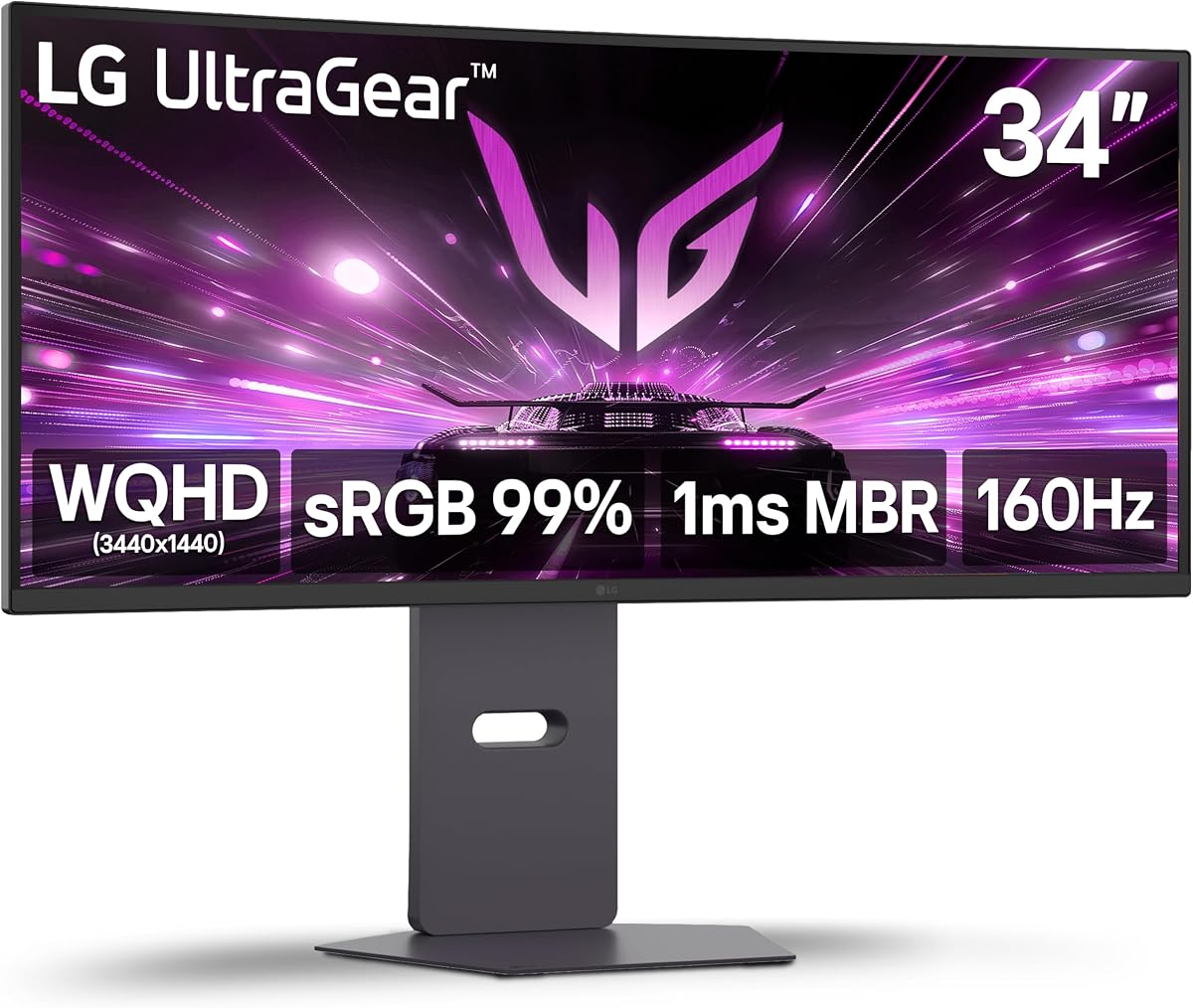
This ultrawide model brings immersive viewing with a 34 inch display. The WQHD resolution balances sharpness and performance. With a 4.5 rating it delivers high-quality visuals for both work and play.
We may earn a commission when you buy through this link, at no additional cost to you.
Key strengths include FreeSync Premium and a 160Hz refresh rate for smooth motion. The stand offers tilt height and swivel adjustments for optimal positioning. HDR10 support ensures vivid colors and deep contrasts.
Cons include the higher cost and a slightly less aggressive curvature. Some users may prefer tighter curves for immersion. However the ergonomic flexibility compensates for this trade-off.
Ideal for users who need ergonomics and immersion. It suits professional gamers and content creators seeking a reliable ultrawide.
The stand allows full adjustment for comfort during long sessions. You can customize the angle perfectly for your desk.
Black Stabilizer brightens dark scenes for better visibility. You can spot enemies hiding in shadows easily.
We may earn a commission when you buy through this link, at no additional cost to you.
This renewed option offers premium features at a reduced cost. It maintains the same 34 inch ultrawide and 160Hz refresh rate. The 5.0 rating indicates high satisfaction among users who purchased this unit.
We may earn a commission when you buy through this link, at no additional cost to you.
Strengths include all the ergonomic adjustments and HDR10 support of the new version. FreeSync Premium ensures smooth gameplay without tearing. The renewed status provides significant savings for budget-minded buyers.
Cons involve the uncertainty of stock availability and limited warranty. However the price savings are substantial compared to buying new. It remains a strong choice for value shoppers.
Recommended for those wanting top-tier features on a budget. It is a smart way to access premium technology without the full cost.
Buying renewed saves money while keeping premium features. You get the same performance for less cash.
The perfect rating suggests consistent quality control. You can trust the performance matches the new model.
We may earn a commission when you buy through this link, at no additional cost to you.
This monitor is defined by its deep 1000R curvature. It wraps tightly around your vision for maximum immersion. The QHD resolution offers sharp details and a higher pixel density than Full HD.
We may earn a commission when you buy through this link, at no additional cost to you.
Key strengths include a 165Hz refresh rate and HDR10 support for vibrant visuals. Eye Saver Mode minimizes blue light to reduce strain during long sessions. AMD FreeSync keeps graphics cards in sync for fluid action.
Cons include the aggressive curve which may not suit all users. Those preferring flat monitors might find it uncomfortable. However fans of immersive setups will love the wraparound feel.
Best for gamers who prioritize immersion above all else. It is a top choice for those wanting to feel inside the game.
The 1000R curve matches human eye geometry perfectly. This creates a natural and engaging viewing experience.
Eye Saver Mode reduces strain for longer gaming hours. It helps keep your eyes comfortable during late nights.
We may earn a commission when you buy through this link, at no additional cost to you.
This model pushes speed with an 180Hz refresh rate. The 34 inch ultrawide panel expands your field of view significantly. Built-in speakers add convenience for casual users who want sound without extras.
We may earn a commission when you buy through this link, at no additional cost to you.
Strengths include fast response times and ample screen space for multitasking. The 180Hz rate ensures fluid motion in competitive shooters. LED lighting on the back adds a modern touch to your setup.
Cons include a slightly lower rating compared to premium rivals. Design aesthetics are functional but not unique. For the price however it delivers exceptional performance.
Recommended for speed enthusiasts seeking an ultrawide budget option. It offers high refresh rates without a premium price tag.
The 180Hz refresh rate is faster than most budget monitors. This gives you an edge in fast-paced competitive games.
34 inches gives 30% more screen space. You can have multiple windows open comfortably.
We may earn a commission when you buy through this link, at no additional cost to you.
Alienware delivers a top-tier experience with this 34 inch WQHD model. It features a 180Hz refresh rate for ultra-smooth visuals. The 4.6 rating reflects high satisfaction among users seeking premium quality.
We may earn a commission when you buy through this link, at no additional cost to you.
Strengths include VESA DisplayHDR 400 certification for vibrant highlights and deep shadows. 95% DCI-P3 coverage ensures rich color reproduction across media. A dedicated console mode optimizes performance for console gamers.
Cons include the higher price compared to mass-market brands. However the build quality and feature set justify the cost. You get a durable and high-performance display.
Ideal for users wanting the best experience. It suits gamers who demand high fidelity and reliability.
VESA DisplayHDR 400 ensures bright highlights and deep blacks. This adds real depth to your gaming visuals.
Console mode optimizes settings automatically for play. You can start playing immediately without tweaking.
We may earn a commission when you buy through this link, at no additional cost to you.
This model leads in speed with a 200Hz refresh rate. The 0.3ms response time minimizes blur for sharp visuals. With a 4.5 rating it offers impressive performance for competitive gaming.
We may earn a commission when you buy through this link, at no additional cost to you.
Strengths include adaptive-sync technology and an ergonomic stand with height adjustment. The 34 inch ultrawide panel provides massive screen real estate. HDR support enhances contrast and brightness in supported titles.
Cons include the need for a high-end GPU to drive 200Hz. VA panel contrast may not match OLED levels. However for speed focused users it is unmatched.
Recommended for competitive gamers who prioritize speed. It delivers fluid motion that few other monitors can match.
The 200Hz refresh rate delivers the smoothest motion available. This helps competitive players react faster to threats.
0.3ms MPRT response reduces blur during fast movement. You can track enemies precisely in intense moments.
We may earn a commission when you buy through this link, at no additional cost to you.
Selecting the right monitor requires understanding several key technical factors. This guide breaks down the essentials to help you make an informed decision.
A 160Hz refresh rate ensures smooth visuals in fast-paced games. Look for response times of 1ms or lower to minimize motion blur. This combination helps competitive players track targets more accurately.
Prioritize refresh rate and response time if you play shooters or racing games.
Curved monitors range from 1800R to 1000R. Lower numbers indicate tighter curves for greater immersion. A 1500R curve is a popular balance for most users.
Choose a tighter curve if you want to feel inside the game.
Higher resolutions like QHD and 4K provide sharper details. Ensure your PC can support the chosen resolution at 160Hz. A 27 inch screen is ideal for 1080p while 34 inch suits ultrawides.
Match resolution to your graphics card power to avoid stuttering.
FreeSync and G-Sync eliminate screen tearing by syncing refresh rates. AMD FreeSync is widely available and cost-effective. NVIDIA G-Sync often requires a premium but offers better performance.
Ensure your GPU matches the monitor's adaptive sync technology.
High sRGB and DCI-P3 coverage ensure vibrant visuals. HDR support adds depth with brighter highlights and deeper blacks. Look for at least 90% sRGB coverage for accurate colors.
Check color gamut coverage if you also do content creation.
An adjustable stand with height and tilt options improves comfort. VESA compatibility allows you to use custom monitor arms. A rigid build ensures stability during intense gaming sessions.
Prioritize ergonomic adjustments to reduce neck strain over time.
HDMI 2.0 and DisplayPort 1.4 are essential for 160Hz. USB hubs can reduce cable clutter and improve convenience. Audio jacks and built-in speakers add extra utility for casual users.
Verify ports match your PC's output capabilities before buying.
Connect your PC via DisplayPort or HDMI 2.0 to support 160Hz. Check your graphics card settings to enable the refresh rate in display options.
Clean the screen with a microfiber cloth to avoid scratches. Use compressed air to remove dust from ports and vents regularly.
Use presets like FPS or RTS for different game types. Adjust brightness and contrast to match your room lighting conditions.
Yes 160Hz offers noticeably smoother motion than 144Hz. This improvement helps competitive players track moving targets more effectively. The difference is most visible in fast-paced action games.
Curvature improves immersion but does not directly impact speed. It reduces eye strain by matching the natural field of view. Competitive players benefit from faster target tracking on curved screens.
You need a strong GPU to maintain high frame rates. For 1080p a mid-range card suffices. For QHD or 4K higher-end models are recommended for consistent performance.
Curved monitors reduce eye strain during long work sessions. The wraparound design keeps your gaze centered on the screen. This setup is ideal for multitasking on ultrawide displays.
Start by enabling game modes and adaptive sync. Adjust brightness to match room lighting to avoid glare. Use calibration tools to balance color accuracy with visibility.
Yes most models support HDMI 2.0 and HDR. Consoles can utilize up to 120Hz on current gen systems. The refresh rate scales with the console capabilities.
Most monitors last 3 to 5 years with regular use. Avoid leaving static images on screen for long periods. Proper care extends the life of the panel significantly.
Most include VESA compatibility for third-party mounts. Some premium models come with stands that offer swivel and height adjustments. Check product details for specific mounting options.
We reviewed ten top models offering excellent immersion and speed. Our top picks balance performance with affordability across different screen sizes.
Prioritize refresh rate and resolution based on your gaming style. If you play competitive shooters choose faster response times over extra pixels.
Remember to verify current pricing and stock before purchasing. Deals change frequently so act quickly once you find the right fit.