
HP OmniBook 3 14 inch
4.4Editor score
Up to 41 hours battery life
2K OLED display
Snapdragon X processor
AI laptops represent the cutting edge of portable computing, integrating dedicated neural processing units to handle complex tasks locally. These devices promise enhanced privacy, faster response times, and smarter assistance without relying heavily on cloud connectivity for every function.
We evaluated ten top models based on processor efficiency, memory capacity, display fidelity, and real-world battery endurance. Each selection offers unique strengths, from enterprise-grade security features to vibrant OLED panels and extended all-day usage capabilities for professionals and students alike.
Every pick highlights specific advantages tailored to different workflows, ensuring you find the right machine for your needs. Please note that pricing and availability fluctuate frequently, so verifying current details before purchasing is always recommended for the best value.
4.4Editor score
4.8Editor score

5.0Editor score
As an Amazon Associate we earn from qualifying purchases.
The following comparison table outlines the key specifications and standout features of each selected laptop to help you make an informed decision based on your specific performance and portability requirements.


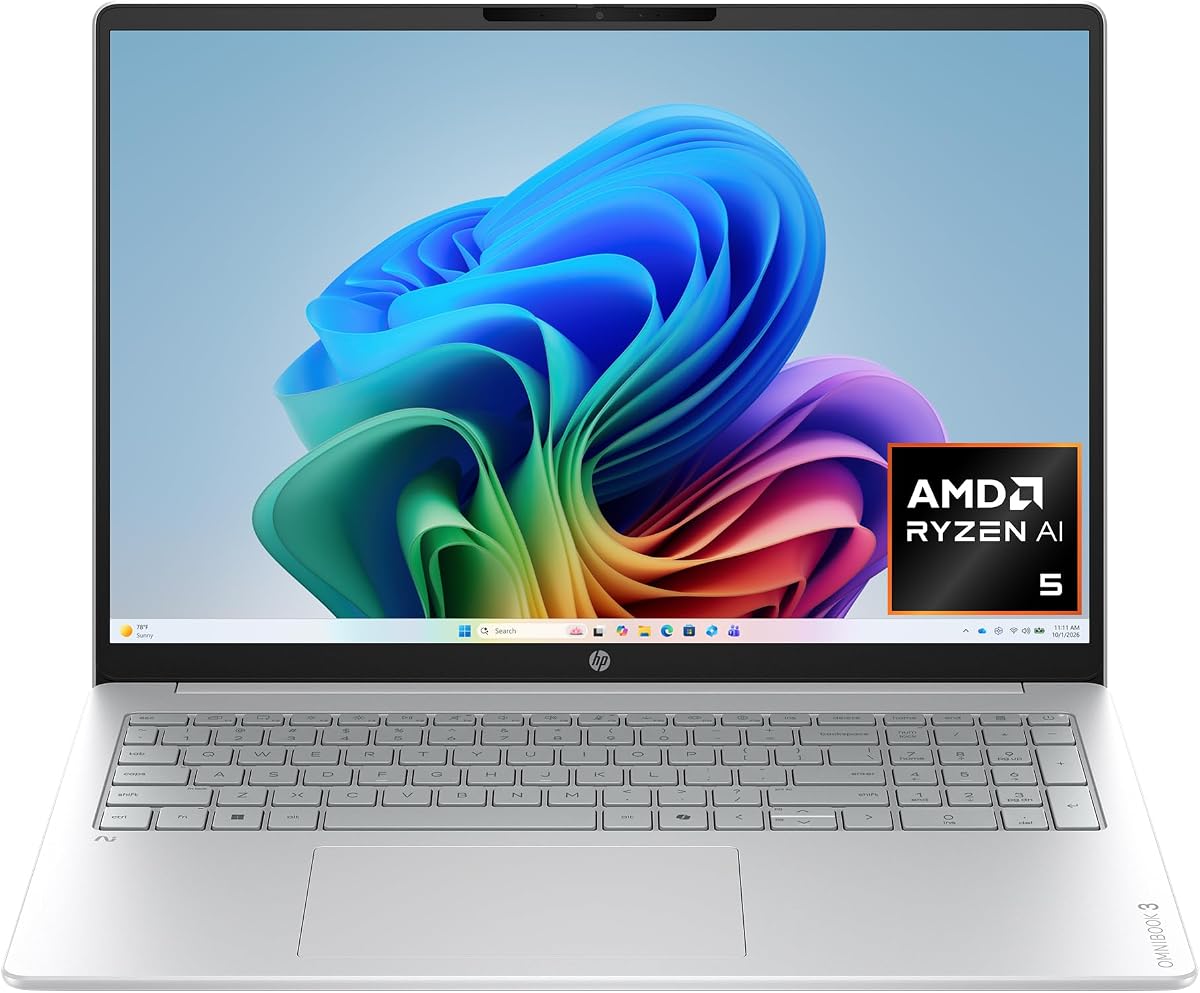
The HP OmniBook 3 16 inch stands out as a top contender for users seeking reliable AI performance without breaking the bank. With a rating of 4.8, it delivers a balanced mix of speed, screen quality, and endurance that suits daily professional needs effectively.
We may earn a commission when you buy through this link, at no additional cost to you.
Its AMD Ryzen AI 5 430 processor powers essential Copilot+ PC features, allowing for smooth multitasking and intelligent assistance. The Advanced AI Noise Reduction ensures clear communication during calls by filtering out background sounds automatically, which is invaluable for remote work settings.
While the 512 GB SSD is sufficient for many users, those with large media libraries might need external storage. The integrated graphics handle everyday tasks well but are not intended for heavy 3D rendering or high-end gaming.
Ideal for business professionals and students, this laptop combines practical features with a user-friendly design. Its long battery life means you can work throughout the day without hunting for a power outlet, ensuring consistent productivity wherever you are.
The built-in noise reduction and HDR auto-switch for the camera ensure your video calls look and sound professional even in imperfect lighting or noisy environments.
With up to 19 hours and 30 minutes of battery life plus fast charging, you can rely on this machine for long meetings, lectures, or travel days without interruption.
We may earn a commission when you buy through this link, at no additional cost to you.
The Lenovo ThinkBook 16 Gen 8 is engineered for businesses that prioritize security and robust performance. Rated at 4.6, it handles complex spreadsheets and enterprise applications with ease thanks to its powerful processor and generous memory allocation.
We may earn a commission when you buy through this link, at no additional cost to you.
With 32GB of DDR5 RAM and a 1TB SSD, this laptop eliminates lag when running multiple heavy applications simultaneously. The fingerprint reader and Windows 11 Professional add layers of protection for sensitive business data, making it a secure choice for corporate environments.
While the FHD+ display provides ample screen real estate for multitasking, it lacks the vibrancy of OLED options found in premium models. The focus here remains on reliability and security rather than media consumption aesthetics.
This machine is best suited for IT departments and business professionals who need a dependable mobile workstation. Its seamless collaboration features and enterprise security ensure that productivity remains high and data stays protected during daily operations.
Windows 11 Professional combined with hardware-based security like the fingerprint reader ensures that confidential information remains safe from unauthorized access during travel or remote work.
The 32GB RAM and 1TB SSD allow you to run virtual machines, large datasets, and video conferencing software simultaneously without performance drops or storage bottlenecks.
We may earn a commission when you buy through this link, at no additional cost to you.
The HP OmniBook X 14 inch offers a premium experience with its 3K OLED touchscreen and impressive battery endurance. Rating at 4.3, it appeals to users who value visual fidelity and portability above raw gaming performance.
We may earn a commission when you buy through this link, at no additional cost to you.
The OLED display lights each pixel separately for deeper blacks and richer contrast, making it ideal for creative work and media consumption. Additionally, the Smart Sense AI optimizer adjusts fan noise and temperature based on your activity for a comfortable user experience.
Despite its sleek design, it relies on integrated graphics which limits its utility for demanding 3D tasks. The higher price reflects the premium materials and display technology but may not suit budget-conscious buyers.
This laptop is perfect for creatives and executives who need a lightweight yet powerful device. The extended battery life and quick charging ensure you stay productive throughout the day without worrying about running out of power during meetings or travel.
The 3K OLED touchscreen delivers true-to-life colors and deep contrasts that make photo editing and video viewing a truly immersive and accurate experience for creative professionals.
Smart Sense technology automatically manages heat and noise levels to keep your lap comfortable and the environment quiet during important calls or focused work sessions.
We may earn a commission when you buy through this link, at no additional cost to you.
The HP OmniBook 5 16 inch provides a practical and well-balanced setup for everyday productivity and creative workloads. Its 4.5 rating reflects satisfaction with its speed, memory, and modern design features that cater to general users.
We may earn a commission when you buy through this link, at no additional cost to you.
Powered by an Intel Core Ultra 7 processor, it handles multitasking and AI-enhanced Windows 11 experiences smoothly. The 1TB SSD ensures you have plenty of room for files and applications without needing immediate cloud storage solutions.
While the 16GB RAM is sufficient for most tasks, heavy video editors might prefer more memory for complex timelines. The design focuses on usability with a backlit keyboard and durable materials that withstand daily wear.
This laptop is recommended for students and professionals who need a reliable all-rounder. Its large screen and responsive touch controls make navigating apps and presenting content effortless for work or personal use.
Windows 11 Copilot AI support offers intelligent suggestions and faster workflows that help you complete tasks efficiently and manage your digital life more effectively.
Wi-Fi 6E connectivity ensures faster speeds and improved performance when streaming media or transferring large files over wireless networks compared to older standards.
We may earn a commission when you buy through this link, at no additional cost to you.
The HP OmniBook 5 with Snapdragon X processor prioritizes battery efficiency and on-the-go productivity. Rated at 4.2, it is an excellent choice for users who need a device that lasts through long flights or meetings without recharging.
We may earn a commission when you buy through this link, at no additional cost to you.
With up to 34 hours and 45 minutes of battery life, this laptop minimizes reliance on power outlets. The Otter.ai integration automatically captures meeting notes and generates summaries, helping you save time and stay organized without manual transcription.
While the Snapdragon architecture is efficient, some legacy Windows applications may need compatibility checks before purchase. The 2K OLED display provides rich colors, but the integrated GPU is better suited for light tasks than heavy graphics work.
Ideal for frequent travelers and students, this model combines portability with smart features. The fast charging ensures you get a quick top-up when needed, keeping you connected and productive throughout your day with minimal interruption.
Integrated Otter.ai capabilities allow you to record audio and generate meeting summaries automatically so you can focus on the conversation instead of taking notes manually.
The energy-efficient processor and optimized battery management deliver exceptional endurance, allowing for all-day usage even with constant email checking and web browsing.
We may earn a commission when you buy through this link, at no additional cost to you.
The HP OmniBook 3 14 inch is a compact and affordable option for users needing maximum portability. Its 4.4 rating highlights its strength in battery life and display quality within a budget-friendly price range.
We may earn a commission when you buy through this link, at no additional cost to you.
With up to 41 hours and 45 minutes of battery life, this laptop is designed for extended use without access to power. The 2K OLED display ensures visuals remain crisp and vivid whether you are browsing the web or editing documents.
Storage is limited to 256 GB which may require cloud solutions for large file collections. The Snapdragon processor is efficient but users should verify application compatibility if they rely on specific Windows tools.
This laptop is perfect for students and budget-conscious professionals who prioritize weight and battery. Its small form factor makes it easy to carry in any bag, ensuring you can work comfortably anywhere with long-lasting power.
The combination of an efficient Snapdragon processor and optimized power management allows for days of usage on a single charge, ideal for remote locations or travel.
The 2K OLED panel provides high-resolution visuals with deep blacks and vibrant colors that make reading text and viewing media comfortable and enjoyable.
We may earn a commission when you buy through this link, at no additional cost to you.
The Dell 16 Plus Touchscreen is built for users who need top-tier connectivity and processing power. Its 4.5 rating indicates solid performance for professional tasks requiring fast data transfer and reliable security features.
We may earn a commission when you buy through this link, at no additional cost to you.
Equipped with Wi-Fi 7, it offers unprecedented wireless performance for faster downloads and streaming. The 32GB RAM and 1TB SSD ensure smooth multitasking and ample storage for large project files and media libraries.
While it has a standard display brightness, its extensive port selection reduces the need for dongles and hubs. The on-device AI capabilities allow for efficient local processing of AI-enhanced applications and features.
Ideal for IT professionals and heavy users, this laptop supports complex workloads with ease. The modular design and robust build quality provide durability for daily transport and reliable performance in demanding environments.
Wi-Fi 7 support ensures your device remains future-proof for the latest high-speed internet standards allowing faster file sharing and smoother streaming without lag.
On-device AI capabilities allow for faster processing of intelligent features without relying on cloud servers protecting your data privacy and reducing latency.
We may earn a commission when you buy through this link, at no additional cost to you.
The ASUS Vivobook S16 stands out with a perfect 5.0 rating for its blend of high performance and modern design. It is a favorite among users who need powerful AI capabilities without compromising on screen quality or weight.
We may earn a commission when you buy through this link, at no additional cost to you.
With an AMD Ryzen AI 9 465 processor, it delivers up to 50 NPU TOPS for seamless multitasking and local AI work. The 16-inch OLED display provides deep contrast and vivid detail, making it a joy to use for any creative task.
The device is slim and lightweight at just 3.75 lbs, making it easy to carry everywhere. While it has fewer ports than some models, the included variety covers essential connectivity needs without extra adapters.
This laptop is recommended for power users and creatives seeking top-tier specifications. Its efficient cooling and long battery life ensure that performance remains consistent even during intensive work sessions or extended usage periods.
The 50 NPU TOPS performance allows for advanced AI features like image recognition and natural language processing to run locally on the device quickly and securely.
The OLED panel offers true blacks and vibrant colors that enhance every image and video, providing a cinematic experience even for standard daily tasks.
We may earn a commission when you buy through this link, at no additional cost to you.
The acer Aspire 16 AI offers a unique combination of a 120Hz touchscreen and Wi-Fi 7 at a competitive price. Rated at 4.2, it appeals to users who want smooth visuals and fast connectivity without paying premium costs.
We may earn a commission when you buy through this link, at no additional cost to you.
The 120Hz refresh rate makes scrolling and animations feel incredibly smooth, enhancing the overall user experience. Wi-Fi 7 ensures you stay connected with the latest wireless speeds, which is beneficial for large file transfers or streaming.
While it is a capable machine, the storage is mid-range and may need cloud expansion for heavy media users. The Snapdragon chip ensures good battery life but users should check compatibility for specific professional applications.
This laptop is suitable for students and casual users who value screen smoothness. The responsive touchscreen and modern connectivity make it a practical choice for daily tasks and multimedia consumption on the go.
The 120Hz refresh rate provides fluid motion and reduced motion blur, making navigation and animations on the touchscreen feel responsive and natural.
Wi-Fi 7 support ensures your device is ready for faster wireless internet speeds, improving online gaming and streaming experiences significantly.
We may earn a commission when you buy through this link, at no additional cost to you.
The HP Omnibook 16 inch combines a powerful processor with 32GB of DDR5 RAM for serious multitasking needs. With a 4.6 rating, it serves well for users requiring high memory capacity for complex workflows and professional software.
We may earn a commission when you buy through this link, at no additional cost to you.
The AMD Ryzen AI 7 350 processor includes a 50 TOPS NPU for efficient local AI workloads. Windows 11 Pro adds enterprise-grade security and AI Studio Effects, making it suitable for business environments and sensitive data handling.
While the 1TB SSD provides ample storage for large project files, integrated graphics limit heavy 3D rendering. The Zen 5 architecture ensures energy efficiency, offering all-day battery life for regular office and creative tasks.
This laptop is ideal for professionals who need a reliable workstation. Its high memory and professional OS features support demanding applications, ensuring smooth performance during heavy usage cycles and complex data processing.
Windows 11 Pro ensures enterprise-grade security measures are in place protecting your business data and providing better management tools for network environments.
The 32GB RAM allows you to run heavy applications like video editors or virtual machines simultaneously without performance bottlenecks or slowdowns.
We may earn a commission when you buy through this link, at no additional cost to you.
Selecting the right AI laptop involves balancing hardware specifications with your specific workflow needs and budget constraints.
The NPU is the core component enabling local AI tasks like background noise cancellation and video effects. Look for NPUs rated at 40 TOPS or higher to ensure smooth Copilot+ PC experiences without slowing down your CPU.
A powerful NPU ensures that AI features run efficiently without draining battery life or causing system lag during multitasking.
Modern AI laptops use Snapdragon, Intel Core Ultra, or AMD Ryzen AI chips. Snapdragon typically offers the best battery life while Intel and AMD provide strong performance for traditional Windows apps.
Choose a processor that matches your usage priorities such as battery longevity or raw computing power for demanding professional software.
For AI workflows, 16GB RAM is the minimum but 32GB ensures future proofing and smooth multitasking. Aim for at least 512GB SSD storage to accommodate large files and system updates.
Higher memory and storage allow you to keep more apps and files ready without constant cloud syncing or performance drops.
Displays range from FHD+ to OLED 4K. OLED panels offer better contrast for media but consume more power. Size matters for portability with 14 inch models being lighter than 16 inch ones.
Select a display that balances visual clarity with portability based on how often you move your laptop for work or travel.
AI features can impact battery life so check real-world endurance rather than just specs. Fast charging is crucial for quick top-ups during busy days away from a power source.
Long battery life and fast charging ensure you can work uninterrupted throughout the day without carrying heavy chargers.
Most modern AI laptops run Windows 11 Home or Pro with Copilot+ features. Windows 11 Pro offers better security for business users. Ensure the OS supports local AI tools effectively.
A supported OS guarantees that you can utilize the latest AI assistants and productivity tools without compatibility issues.
Wi-Fi 6E or Wi-Fi 7 ensures fast internet connections crucial for cloud-based AI tasks. Adequate USB and HDMI ports reduce the need for dongles.
Modern connectivity ensures you can transfer data quickly and connect to peripherals easily for a seamless workflow.
Premium laptops often feature aluminum chassis and better hinges for longevity. A sturdy build protects internal components during travel and daily use.
Investing in a durable build ensures your device withstands the rigors of professional use over several years.
To maximize the benefits of AI features, keep your operating system and drivers updated regularly. This ensures you have access to the latest neural processing optimizations and security patches.
Avoid exposing the laptop to extreme temperatures or moisture which can degrade the battery and internal components. Use a protective sleeve when transporting it to prevent scratches and physical damage.
Periodically clear your storage and manage your running applications to maintain optimal performance. Using the built-in AI tools can help you organize files and automate routine tasks efficiently.
AI laptops include a dedicated Neural Processing Unit designed to handle complex tasks locally without needing cloud servers. This enables faster response times for features like noise cancellation and intelligent assistance while improving data privacy.
Most daily AI tasks rely on the NPU rather than dedicated graphics cards. Integrated GPUs are sufficient for standard productivity but you may need stronger graphics for heavy 3D rendering or gaming.
Copilot+ PC offers on-device intelligent features like natural language search and enhanced video call effects. These tools streamline workflows and reduce the need to switch between different applications during work.
Most traditional Windows software runs fine on these machines but some legacy apps may need checks for compatibility. Modern apps are optimized to take advantage of the new hardware features for better performance.
Yes many models offer long battery life and durable designs ideal for campus use. The AI features help automate note-taking and organize schedules making daily study tasks more manageable.
Many AI laptops feature soldered RAM which cannot be upgraded after purchase. Always choose a configuration with enough memory to meet your future needs at the time of buying.
We found that models like the HP OmniBook 3 and ASUS Vivobook S16 offer exceptional value depending on whether you prioritize battery life or raw power.
Consider your primary use case such as business security or creative work to guide your decision. A balanced choice ensures your device supports both current tasks and future software updates.
Always check current pricing and availability before purchasing as deals change frequently. Investing wisely in an AI laptop ensures you get reliable performance for years to come.