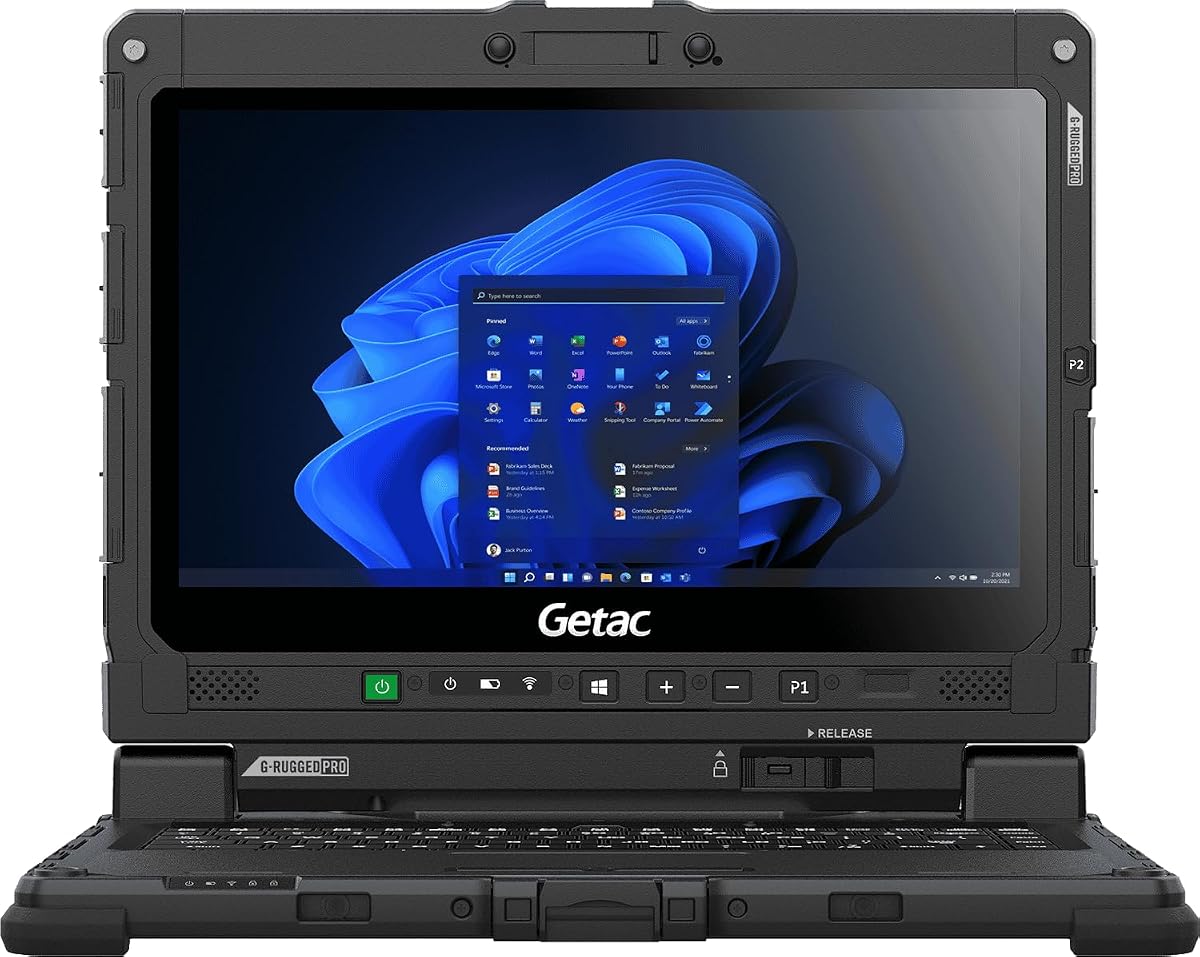
Getac Renewed K120
5.0Editor score
1200 nits brightness
Military grade durability
Renewed condition value
Finding a laptop that remains visible under direct sunlight is critical for field professionals and outdoor enthusiasts who need reliable performance in challenging environments.
This guide compares ten top-rated models featuring high brightness displays, rugged construction, and powerful specs to help you choose the right machine for your needs.
Each pick highlights key strengths and trade-offs so you can compare specifications and features easily while keeping in mind that product availability and pricing may change over time.
5.0Editor score

4.1Editor score

As an Amazon Associate we earn from qualifying purchases.
Below you will find a side-by-side comparison of all ten laptops included in this guide to help you quickly evaluate specifications and features across the lineup.


The MUNBYN IRX17 is a rugged powerhouse designed for professionals working in bright outdoor environments. It earns an Editor's Choice badge for combining high brightness with industrial reliability.
We may earn a commission when you buy through this link, at no additional cost to you.
Its standout feature is the 1000 nit sunlight-readable display ensuring clear visibility even under direct sun. The Intel i7 1255U processor and 32GB DDR5 RAM handle demanding tasks like AutoCAD and ANSYS simulations efficiently.
Durability is a major strength with IP65 protection and MIL-STD-810H certification. The physical camera switch adds privacy control which is valuable for sensitive field work though the weight may be a consideration for travel.
This laptop is ideal for construction managers or field researchers who need a reliable device outdoors. It delivers top-tier performance and visibility making it a smart investment for demanding industrial use.
The 1000 nit display ensures content remains legible even in harsh direct sunlight conditions.
DDR5 RAM and an i7 processor provide the speed needed for complex engineering applications.
We may earn a commission when you buy through this link, at no additional cost to you.
The Getac K120 offers exceptional brightness at 1200 nits making it one of the most visible screens available. As a renewed unit it provides great value for budget-conscious buyers.
We may earn a commission when you buy through this link, at no additional cost to you.
It features a compact 12.5 inch design with multi-touch capability that works even when wearing gloves. The laptop meets rigorous military standards for durability and operates in extreme temperatures from Arctic to desert.
While the processor is older than some newer models it still handles field applications well. The renewed status means minimal wear but users should check warranty terms for long-term support.
Choose this model if you need maximum screen brightness and durability without breaking the bank. It is perfect for mobile workers who prioritize visibility and robust construction over raw speed.
With 1200 nits this screen surpasses many competitors in visibility under intense light.
The small form factor makes it easy to carry while maintaining extreme durability.
We may earn a commission when you buy through this link, at no additional cost to you.
The Getac S510 represents the premium tier with cutting-edge Core Ultra 5 technology and generous storage. It delivers top performance for heavy multitasking and data-intensive workflows.
We may earn a commission when you buy through this link, at no additional cost to you.
Its 15.6 inch touchscreen offers 1000 nits of brightness ensuring clear outdoor visibility. The 32GB DDR5 RAM and 1TB SSD provide ample room for large datasets and applications.
Despite the high cost the build quality justifies the investment for enterprise users. It includes advanced security features and supports docking which enhances productivity in mobile offices.
If you require the latest hardware and rugged durability this model is an excellent choice. It balances modern performance with the reliability needed for professional field environments.
Core Ultra 5 delivers AI-enhanced performance for faster data handling and efficiency.
1TB SSD ensures you have plenty of space for files and software offline.
We may earn a commission when you buy through this link, at no additional cost to you.
The IRX16 is a solid mid-range rugged laptop offering 1000 nits brightness for outdoor tasks. It supports replaceable SSDs which adds long-term flexibility for storage upgrades.
We may earn a commission when you buy through this link, at no additional cost to you.
Its IP65 rating ensures resistance to dust and water making it suitable for wet or dusty sites. The Intel i5 processor handles standard productivity apps smoothly without overheating.
While not the fastest model it strikes a good balance between performance and price. The camera shutter provides privacy control which is essential for secure business communications.
Consider this if you need a reliable outdoor laptop without the highest cost. It offers practical features for field technicians who need durability and clear visuals.
The user-replaceable SSD allows easy upgrades to meet growing storage needs.
IP65 certification keeps the device safe during rain or dusty work conditions.
We may earn a commission when you buy through this link, at no additional cost to you.
This model focuses on portability and battery life rather than extreme brightness. The Snapdragon processor delivers efficient performance with exceptional battery duration ideal for travel.
We may earn a commission when you buy through this link, at no additional cost to you.
Its OLED display offers rich colors but 300 nits is moderate for direct sun. For users who work mostly indoors and step outside occasionally this may suffice.
The AI features and Copilot key add modern convenience for daily tasks. It is well suited for business travelers who value light weight over rugged durability.
Choose this if you prioritize battery endurance and sleek design over intense brightness. It works well for occasional outdoor use but not for sustained direct sun tasks.
Enjoy up to 41 hours of usage which supports long unplanned travel days.
The OLED panel provides deep blacks and vivid colors for media consumption.
We may earn a commission when you buy through this link, at no additional cost to you.
The 16 inch touchscreen offers a spacious workspace for content creation and viewing. It includes noise reduction which improves call quality in noisy environments.
We may earn a commission when you buy through this link, at no additional cost to you.
While the brightness is standard this model is great for indoor productivity and occasional outdoor work. The touch interface adds ease of use for navigation and drawing.
With 8GB RAM it handles basic multitasking but may struggle with heavy loads. It is a cost-effective option for students or home users needing a large screen.
This laptop fits users who value screen real estate and interaction. It is not designed for harsh sunlight but performs well in typical indoor or shaded settings.
The large touch display enables natural gestures and intuitive navigation.
Advanced noise reduction filters background noise for cleaner calls.
We may earn a commission when you buy through this link, at no additional cost to you.
This model focuses on user comfort for extended indoor sessions. It uses ComfortView software to reduce blue light which helps protect eyes during long hours.
We may earn a commission when you buy through this link, at no additional cost to you.
The ergonomics include lifted hinges for a comfortable typing angle. It is a solid choice for office work or education where portability is less critical.
While not built for bright sunlight it offers reliable daily performance. The battery support and service options add value for business or home users.
Select this if you need a comfortable and reliable computer for standard tasks. It is best used indoors rather than in direct outdoor light.
ComfortView software reduces harmful blue light to ease eye strain.
Lifted hinges support a natural typing posture for better wrist health.
We may earn a commission when you buy through this link, at no additional cost to you.
The 17.3 inch screen provides ample space for multitasking and media. Anti-glare coating helps reduce reflections in moderately bright environments.
We may earn a commission when you buy through this link, at no additional cost to you.
Powered by a 6-core processor it handles streaming and editing tasks well. The camera shutter adds privacy convenience for video calls and sensitive work.
While not designed for direct sunlight the larger screen is useful for presentations. It is a great home office machine for users who want a big display.
This laptop suits those who value screen size over portability. It works best in well-lit rooms rather than harsh outdoor sunlight conditions.
The wide screen offers plenty of room for documents and media.
Reflective light is minimized to improve visibility indoors.
We may earn a commission when you buy through this link, at no additional cost to you.
This Toughbook offers 1000 nits brightness making it suitable for outdoor data entry. The renewed status provides reliability at a lower cost.
We may earn a commission when you buy through this link, at no additional cost to you.
It includes a touchscreen which aids navigation in field environments. The processor supports multitasking and data analysis tasks well.
Durability is a key factor with IP53 protection against dust and water. It is a proven tool for workers who move between indoor and outdoor sites.
Choose this for robust field data collection and reliable visuals. It balances high performance with a reasonable price for rugged needs.
The high nit display ensures clear readings in direct sun.
Certified resistance protects the device in harsh environments.
We may earn a commission when you buy through this link, at no additional cost to you.
This model delivers modern performance with a 16 inch display for productivity. It adapts thermals to manage power efficiency during use.
We may earn a commission when you buy through this link, at no additional cost to you.
ComfortView Plus maintains color accuracy while reducing blue light. The laptop is ideal for business tasks and media consumption indoors.
Though not rugged or highly bright it offers a smooth experience. It is best suited for office environments or controlled indoor lighting.
Use this for daily business work needing speed and screen clarity. It provides a reliable platform for typical computing needs without outdoor focus.
Intel Core 7 offers fast response times for complex tasks.
Sensors adjust power use to keep the device cool.
We may earn a commission when you buy through this link, at no additional cost to you.
Selecting the right laptop for bright sunlight requires attention to several key technical and physical factors that affect visibility and durability in outdoor settings.
The most critical factor for outdoor use is display brightness measured in nits. Laptops with 1000 nits or higher ensure clear visibility under direct sunlight where standard screens appear dark.
Look for devices rated above 1000 nits to maintain readability in harsh light without eye strain.
Matte or anti-glare screens reduce reflections and improve clarity in bright environments. This coating helps prevent glare from washing out colors or text on the display.
Prioritize models with matte finishes to minimize glare during outdoor work sessions.
Field laptops often require protection against dust and water. Ratings like IP65 or military standards ensure the device survives drops and exposure to harsh elements.
Check for IP ratings or MIL-STD certifications to guarantee reliability in rough conditions.
Outdoor professionals often run heavy software for design or data analysis. Choose a laptop with a multi-core processor and sufficient RAM to handle these tasks without lag.
Opt for modern i7 or Core Ultra processors to manage demanding industrial applications efficiently.
Remote work often means limited access to power outlets. Long battery life allows you to stay productive throughout the day without needing to recharge.
Select models with extended battery duration to support uninterrupted outdoor usage.
While rugged laptops are sturdy they can be heavy. Balance durability with weight to ensure you can carry the device comfortably during travel.
Consider weight and dimensions if you frequently move between job sites or vehicles.
Field work may require specific ports for peripherals or external displays. Ensure the laptop has enough USB ports and supports high-speed Wi-Fi 6 or LTE.
Verify you have necessary connections for your specific workflow requirements and tools.
Secure field environments need robust privacy features. Physical camera switches or shutters provide control over what is transmitted during sensitive operations.
Look for built-in camera privacy tools to protect sensitive data during video calls.
Clean the screen regularly with a microfiber cloth to remove dust and fingerprints that can reduce visibility. Avoid harsh chemicals that might damage anti-glare coatings on the display.
Store the device in a protective case when transporting to prevent physical shocks. Exposure to extreme temperatures can degrade battery performance over time.
Update drivers and software regularly to maintain system stability and performance. This ensures that security patches and improvements are applied for safe outdoor use.
For direct sunlight visibility look for a laptop with at least 1000 nits of brightness. Screens below 500 nits may become hard to see outdoors and cause eye strain.
Yes if you work in demanding environments they offer better longevity and reliability. The higher cost is often offset by reduced repair needs and better performance.
Standard laptops work in shade but struggle in direct sun. They are fine for brief outdoor tasks but not for long periods of intense light exposure.
They slightly soften colors compared to glossy screens but improve readability. For outdoor work the reduction in glare is usually worth the minor loss in sharpness.
Use a soft microfiber cloth to wipe away dust and smudges gently. Avoid spraying liquid directly on the screen to prevent moisture damage.
Field laptops often provide 8 to 12 hours on a charge depending on usage. Carrying a spare battery can extend your operational time significantly.
This guide highlights top models ranging from budget-friendly renewed units to premium rugged workhorses. Each option delivers high brightness and reliable performance for outdoor professionals.
Prioritize brightness and durability first then consider processing power and portability. Your specific use case will determine the best fit for your workflow needs.
Always check current product availability and pricing before purchasing as market conditions may change. Select a model that balances performance with your budget constraints.