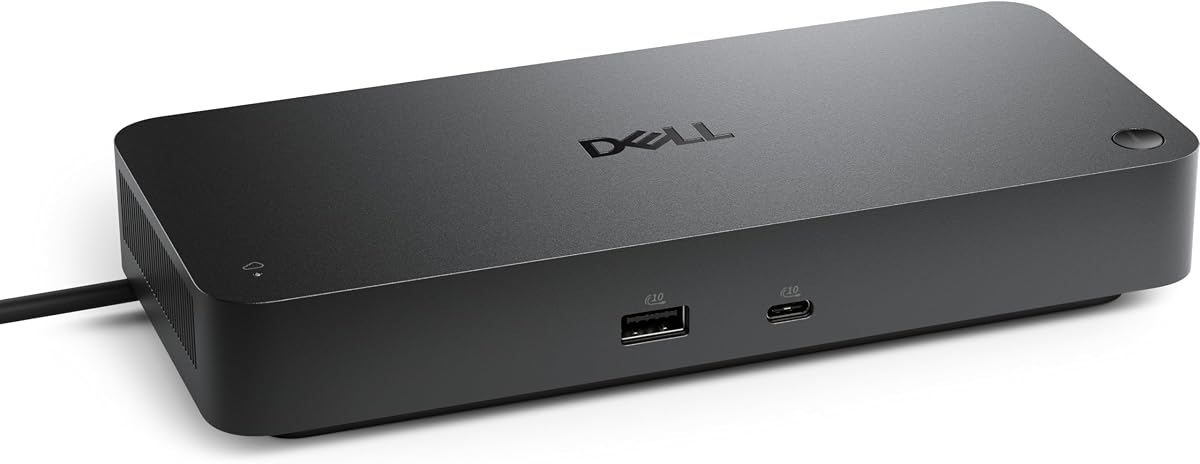
Dell Pro Thunderbolt 4 Smart Dock SD25TB4
4.2Editor score
130W Charging Performance
Dual Thunderbolt 4 Ports
Remote Wi-Fi Management
This guide compares the top 10 docking stations for Dell Pro 14 Plus laptops, evaluating power delivery, display support, and connectivity for professionals.
Finding the right docking station for your Dell Pro 14 Plus is crucial for maximizing productivity and maintaining a clean workspace. A high-quality dock expands your connectivity options significantly.
We compared ten top-rated models based on power delivery, display capabilities, and build quality. Our analysis focuses on compatibility with Dell AI PCs and universal USB-C standards.
Each pick highlights unique strengths for different workflows and budgets. Please note that product availability and pricing may fluctuate over time on major retail platforms.
4.2Editor score

4.5Editor score

4.3Editor score
The following comparison table details the specifications and capabilities of each featured docking station to help you choose the perfect match for your setup.

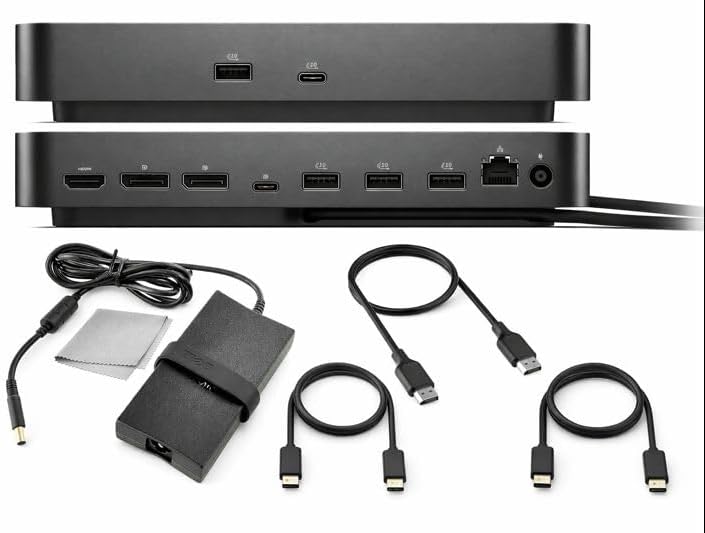


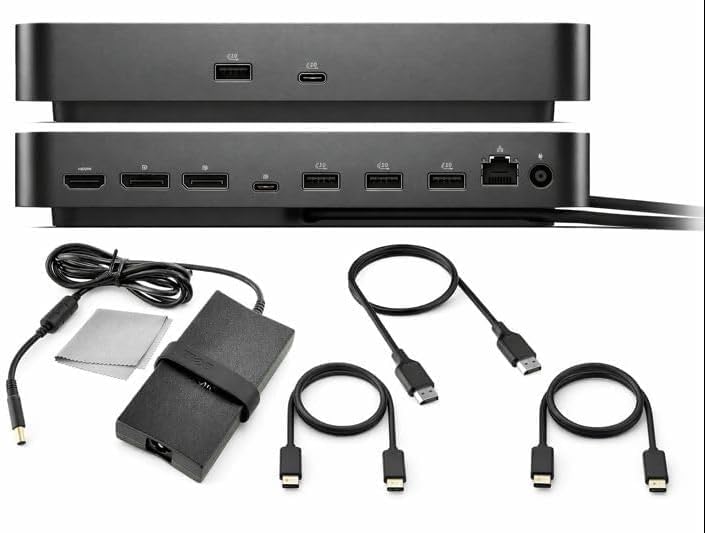

This docking station is the top recommendation for Dell Pro 14 Plus users seeking reliability and modern connectivity. It scores highly with a 4.5 rating due to its robust build and flexible power options.
We may earn a commission when you buy through this link, at no additional cost to you.
Its standout qualities include native support for up to four high-resolution displays and up to 100W of power delivery. This ensures your laptop stays charged while you multitask across multiple screens effortlessly.
The ambidextrous USB-C cable allows for flexible cable management on your desk. Additionally, it features thoughtful sustainability with significant recycled content and reduced power consumption in standby.
It is ideal for professionals who need a clean workspace without compromising on performance or connectivity options for peripherals and high-speed networks.
The ambidextrous USB-C cable can be routed left or right to suit your desk layout preferences.
Compatible with new mainstream Dell AI PCs and non-Dell PCs for broader workstation utility.
We may earn a commission when you buy through this link, at no additional cost to you.
The Dell Pro Smart Dock SD25 is designed for enterprise environments requiring centralized control over peripherals. Its high rating reflects strong security and manageability features for IT teams.
We may earn a commission when you buy through this link, at no additional cost to you.
It offers holistic peripheral management via the Dell Device Management Console allowing remote configuration and updates. This reduces the need for physical presence during maintenance or deployment.
Security is enhanced with enterprise-grade WPA3 encryption and hardware-based tamper resistance. This protects sensitive data while maintaining secure wireless communication for your docking hardware.
This dock is perfect for corporate settings where security and efficient device management are top priorities for your workforce.
WPA3 encryption safeguards wireless communication against potential external threats.
Schedule updates during off-hours to eliminate interruptions for end users.
We may earn a commission when you buy through this link, at no additional cost to you.
For demanding creative and data workloads this Thunderbolt dock provides exceptional power and bandwidth. It stands out with dual Thunderbolt 4 ports and support for four 4K monitors simultaneously.
We may earn a commission when you buy through this link, at no additional cost to you.
The 130W power delivery ensures fast charging for Dell systems and supports efficient workflows without cable clutter. Dual data ports allow chaining up to six devices for maximum workspace expansion.
It includes business-level security features like DMA protection and secure enclosure to safeguard against unauthorized access. The compact design also minimizes desk footprint while maximizing utility.
Choose this dock if you need premium speed and visual clarity for professional creative or AI-focused tasks.
Support up to four 4K monitors for detailed image and data visualization.
Fast efficient power delivery reduces charging time and keeps devices ready.
We may earn a commission when you buy through this link, at no additional cost to you.
The Anker Prime docking station is a versatile hub designed to connect a wide array of devices effortlessly. Its 4.3 rating reflects its robust performance across Windows ChromeOS and many laptops.
We may earn a commission when you buy through this link, at no additional cost to you.
It offers a massive 160W total output allowing simultaneous charging of multiple devices through its USB-C and USB-A ports. Data flows quickly with speeds up to 10Gbps across its 11 data ports.
Dual HDMI ports enable clear streaming or mirroring up to 2K@60Hz depending on your laptop capabilities. The extensive port selection reduces the need for additional adapters in your workflow.
This is an excellent choice for users who juggle many peripherals and require high data throughput.
Charge up to four devices simultaneously for a clean multi-device workspace.
Transfer files quickly with 10Gbps speeds across versatile USB ports.
We may earn a commission when you buy through this link, at no additional cost to you.
This bundle provides everything needed to set up a multi-monitor workstation immediately. It includes the dock plus essential cables and accessories to streamline the initial installation process.
We may earn a commission when you buy through this link, at no additional cost to you.
The high-power 100W adapter ensures reliable performance for connected devices and peripherals. Premium cables are included to minimize compatibility issues right from the start of your usage.
A bonus microfiber cloth helps maintain your screen and device cleanliness effortlessly. The risk-free purchase guarantee adds confidence to your investment in this setup.
Ideal for users who want a hassle-free solution without buying accessories separately later.
Everything needed for multi-monitor connectivity comes included for instant setup.
Premium cleaning cloth keeps screens spotless and professional looking.
We may earn a commission when you buy through this link, at no additional cost to you.
The Dell Pro Dock WD25Z is a powerhouse capable of delivering substantial power to demanding laptops. Its near perfect rating of 4.9 suggests high customer satisfaction and reliability in daily use.
We may earn a commission when you buy through this link, at no additional cost to you.
With 180W power capacity it supports charging for laptops that require significant wattage. This makes it suitable for powerful workstations that need stable and efficient power delivery constantly.
The universal USB-C connectivity ensures it works across a broad range of devices beyond Dell models. Its compact design helps maintain a clean desk environment even when fully equipped.
Consider this model if power delivery capacity and universal compatibility are your primary concerns.
Delivers high wattage to support intensive workloads and battery charging simultaneously.
Designed for broad compatibility with various USB-C laptop models.
We may earn a commission when you buy through this link, at no additional cost to you.
This model offers solid performance with the added benefit of a comprehensive three-year warranty. It is designed to support dual 4K displays and includes necessary cables for immediate use.
We may earn a commission when you buy through this link, at no additional cost to you.
The inclusion of anyhdd HDMI DisplayPort and USB-C cables simplifies your setup process significantly. You do not need to source these separately ensuring you can connect all devices right away.
Networking is enhanced with a 2.5GbE Ethernet port providing stable internet connectivity. Multiple USB-A and USB-C ports ensure plenty of options for connecting peripherals without limits.
Choose this option for reliable performance combined with long-term protection and convenience.
Enjoy peace of mind with a three-year warranty covering potential issues.
2.5GbE Ethernet ensures faster and more stable wired internet access.
We may earn a commission when you buy through this link, at no additional cost to you.
This bundle delivers an exceptional user experience with a perfect 5.0 rating from users. It combines high power with a complete set of accessories to maximize your productivity immediately.
We may earn a commission when you buy through this link, at no additional cost to you.
The 130W charging capability ensures efficient power delivery for your laptop and connected peripherals. Includes HDMI USB-C and DisplayPort cables mean you can start working right out of the box.
A premium cleaning cloth is included to keep your setup looking professional and dust-free. The risk-free purchase guarantee ensures confidence in your decision to invest in this setup.
Ideal for professionals who value a complete solution with high ratings and premium support.
Achieve a perfect setup with highly rated components and accessories.
130W charging handles demanding workloads efficiently and effectively.
We may earn a commission when you buy through this link, at no additional cost to you.
The WD25 Dell Pro Dock is a robust and reliable choice for professional environments. With a high 4.8 rating it offers consistent performance and strong support through its warranty.
We may earn a commission when you buy through this link, at no additional cost to you.
It includes six USB ports and a 2.5GbE Ethernet port to support various devices and fast internet. Video connectivity is versatile with HDMI DisplayPort and USB-C display port options available.
The three-year warranty provides additional security for long-term usage without worrying about repairs. This makes it a safe investment for offices needing dependable connectivity solutions.
Select this dock for balanced performance and reliability in daily professional operations.
Versatile video and USB ports support a wide range of peripherals.
Three-year warranty ensures you are covered for extended usage periods.
We may earn a commission when you buy through this link, at no additional cost to you.
This dock combines powerful connectivity with a durable and compact design to save desk space. It supports up to four displays and provides 100W charging for efficient workspace management.
We may earn a commission when you buy through this link, at no additional cost to you.
The ambidextrous USB-C cable allows you to route it left or right based on your setup needs. Six USB ports and a fast Ethernet port ensure you can connect all essential peripherals easily.
Sustainability is a focus with recycled plastic content and reduced power consumption. This eco-friendly approach aligns well with modern corporate and personal sustainability goals.
Choose this model if you need a compact yet versatile docking station for your workspace.
Compact footprint maximizes desk space while maintaining full connectivity.
Made with significant recycled content to reduce environmental impact.
We may earn a commission when you buy through this link, at no additional cost to you.
Selecting the right docking station involves understanding your power needs display requirements and port availability for your specific Dell Pro 14 Plus model.
Ensure the dock provides sufficient wattage to charge your laptop while connected to peripherals. The Dell Pro 14 Plus benefits from docks offering at least 100W to ensure stable performance.
Look for at least 100W output to keep your device charged and ready for heavy workloads.
Evaluate how many displays the dock can support simultaneously. If you use multiple monitors check for HDMI DisplayPort and Thunderbolt compatibility.
Choose a dock supporting at least two to four monitors based on your multitasking needs.
Check the variety and number of USB and Ethernet ports available. A good dock should have enough USB-C and USB-A ports for your peripherals and storage.
Prioritize models with six or more USB ports to minimize adapter usage.
Determine if you need Thunderbolt 4 or standard USB-C connectivity. Thunderbolt offers higher data speeds and broader device chaining capabilities.
Select Thunderbolt 4 if you need maximum transfer speeds and daisy chaining.
Business users should look for docks with remote management capabilities. This allows IT teams to update and configure devices without physical access.
Opt for models with Wi-Fi management for easier fleet control and maintenance.
The durability of the connector and cable is essential for long-term use. Look for robust connectors and high-quality cable routing options.
Choose docks with reinforced connectors and flexible cable designs for longevity.
Consider the environmental impact of your tech purchases. Many modern docks use recycled materials and reduced power consumption.
Select options with high recycled content and lower standby power for eco-friendliness.
Check the manufacturer warranty and support policies before buying. A longer warranty period adds security to your purchase against defects.
Look for at least a three-year warranty to ensure long-term coverage and support.
Connect the docking station to a reliable power outlet before attaching your laptop. Ensure the power adapter is firmly seated to avoid unstable power delivery.
Use the provided USB-C cable to connect the dock to your Dell Pro 14 Plus. Verify that the cable supports data transfer and power delivery for optimal performance.
Clean the ports regularly with a dry microfiber cloth to prevent dust buildup. Avoid using liquids directly on the connectors to maintain their integrity and conductivity.
Yes the Dell Pro 14 Plus supports Thunderbolt 4 connectivity allowing for high-speed data transfer and dual 4K display support. This ensures compatibility with advanced docking stations requiring higher bandwidth.
Most docks in this guide support up to four displays depending on their capabilities. Check individual product specs to confirm the maximum resolution and number of supported screens.
Wi-Fi management is primarily useful for business environments where IT teams need to manage multiple docks remotely. Personal users typically do not require this feature unless they manage fleets.
Yes many docks offer multiple USB ports allowing you to charge phones tablets and other peripherals. Verify the wattage distribution to ensure enough power is available for all devices.
Some bundles include necessary cables while others may require you to purchase them separately. Always check the product description to confirm which cables are included in the box.
An ambidextrous cable allows you to route the connection either left or right on your desk. This flexibility helps reduce clutter and improves cable management in different setups.
We reviewed ten top options including the Dell Pro Laptop Docking Station WD25 and the Anker Prime 14-in-1 for their distinct strengths. Each model offers a unique balance of power performance and design for various user needs.
Prioritize power delivery and display support based on your daily tasks to ensure your setup meets your expectations. Consider features like remote management and sustainability if they align with your professional values.
Remember to check current availability and pricing on official retail pages since these details can change. Selecting the right dock will enhance your productivity and keep your workspace organized.