
OMTech K40+ 45W Desktop CO2 Laser
4.4Editor score
45W upgraded laser power
Compact 12 by 8 inch bed
Compatible with LightBurn software
Compare the top ten CO2 laser cutters for precision cutting and engraving across budgets. This guide reviews power, speed, safety features, and workspace
CO2 laser cutters have transformed how creators and businesses approach material processing. These machines use gas lasers to cut or engrave non-metallic materials with high precision. Finding the right model depends on your specific needs, budget, and the types of projects you plan to undertake regularly.
We evaluated ten leading CO2 laser cutters based on power output, working area size, safety features, and software compatibility. Our analysis focuses on real-world performance metrics like cutting speed, material compatibility, and ease of use for both beginners and professional operators in various settings.
Each pick highlights unique strengths, from budget-friendly desktop units to industrial-grade production systems. We include detailed specs, pros, cons, and usage tips to help you decide. Note that product availability and pricing can change frequently, so verify current details before purchasing.
4.4Editor score

4.5Editor score

4.8Editor score
This side-by-side comparison highlights key specifications across ten top-rated CO2 laser cutters. Review power output, workspace dimensions, and unique features to find the machine that best fits your production needs and workspace constraints.



The xTool P3 stands out as a top-tier CO2 laser cutter designed for professionals needing automation and speed. With an 80W laser and dual HD cameras, it delivers industrial-grade performance in a desktop-friendly form factor. Its intelligent automation significantly reduces setup time for complex projects.
We may earn a commission when you buy through this link, at no additional cost to you.
Its Revolutionary Automated Creation System uses LiDAR for perfect autofocus and a dual camera system for precise positioning. The AutoLift Base supports materials up to 8.7 inches high, expanding what you can engrave. The 36 by 18 inch workspace accommodates large sheets, while AI Smart Nesting saves material costs.
While expensive, the investment pays off through reduced labor time and higher production yields. The Class 1 safety rating ensures safe operation without needing a separate enclosure, making it ideal for shared workspaces or offices where safety is paramount.
This machine is perfect for serious makers and small businesses needing reliable, high-volume output. If you prioritize efficiency, safety, and cutting-edge technology over upfront cost, the xTool P3 is the clear winner in this category.
ACS automates setup so you spend less time positioning and more time cutting.
Class 1 rating with interlocks means safe operation without extra enclosures.
We may earn a commission when you buy through this link, at no additional cost to you.
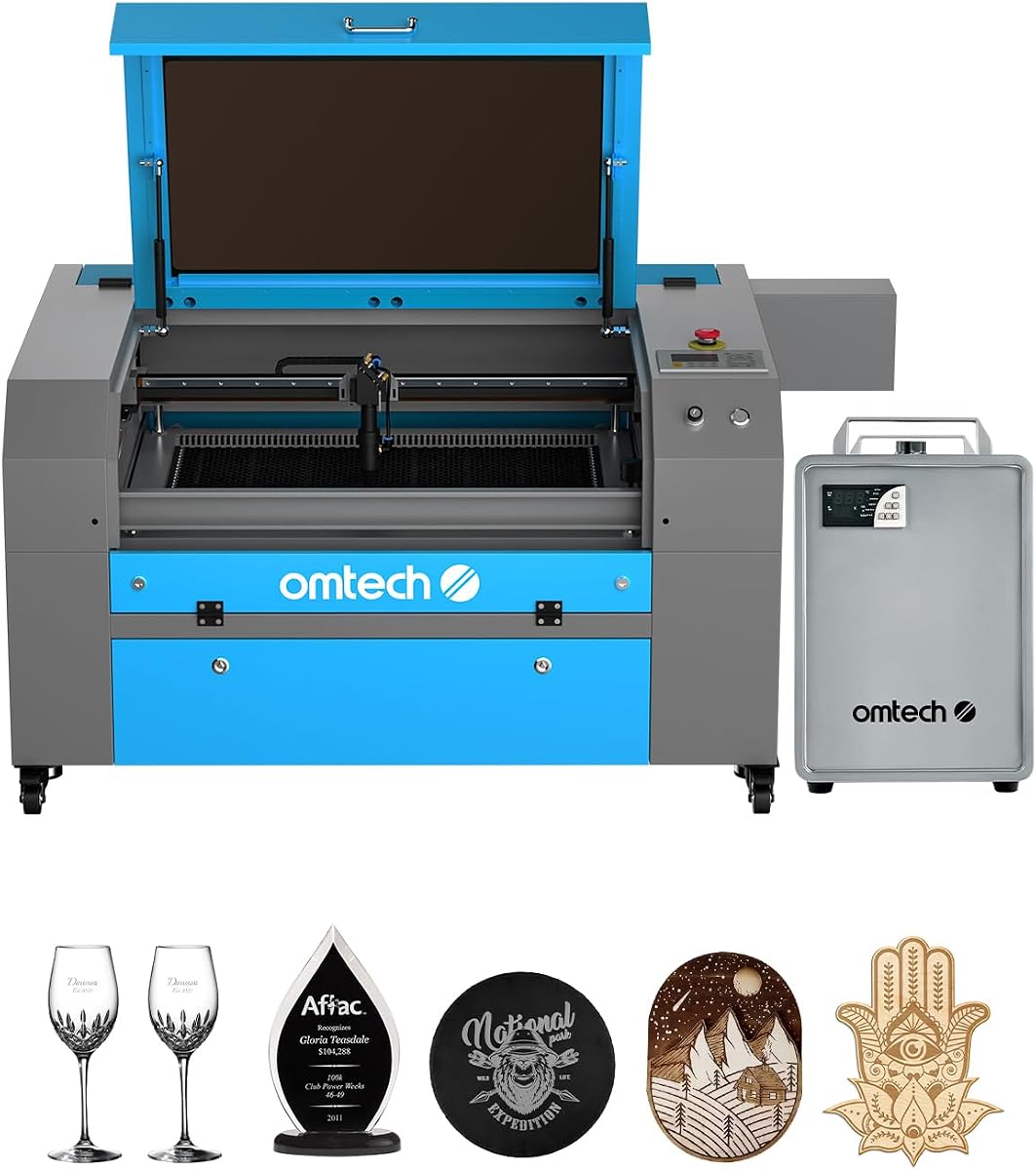
The OMTech K40+ offers a compelling entry point for hobbyists seeking a reliable CO2 laser cutter. At 45W, it handles wood and acrylic with ease while staying within a budget-friendly range. Its compatibility with LightBurn ensures you have professional software options.
We may earn a commission when you buy through this link, at no additional cost to you.
With a compact 12 by 8 inch workspace, it fits easily on most desks. The integrated air assist reduces smoke and debris, protecting your lens and improving cut quality. OMTech provides 24/7 global support and local demos to help new users get started confidently.
The trade-off is the limited workspace size, which might restrict larger projects. However, for personal use and small business prototypes, this size is often sufficient. The robust safety features add peace of mind during operation.
If you need a reliable machine without breaking the bank, this is an excellent choice. It strikes a balance between cost and performance that suits DIY enthusiasts and small shops starting with laser cutting.
Full support for LightBurn and LaserGRBL makes it accessible for all skill levels.
Small size allows it to fit on standard workbenches without much clutter.
We may earn a commission when you buy through this link, at no additional cost to you.
For high-volume production, the OMTech Pro 130W delivers unmatched power and speed. Its built-in water chiller ensures consistent performance during long runs, while the massive 35 by 55 inch workspace handles large-scale projects effortlessly. Servo motors provide precise movement for detailed engraving.
We may earn a commission when you buy through this link, at no additional cost to you.
This model is designed for professionals needing industrial capabilities without the industrial price tag. The Ruida 6445G touchscreen simplifies control, and WiFi connectivity allows remote job monitoring. It is built to withstand daily use in a busy workshop environment.
The size and weight mean you need dedicated floor space, but this is necessary for the workspace benefits. The investment in a water chiller and higher power pays off in faster cycle times and longer tube life for heavy production.
If you run a commercial operation or need to cut thick materials regularly, this machine is ideal. It offers the robustness and capacity required for serious manufacturing tasks and large format engraving.
High wattage and servos mean faster cuts and sharper edges for bulk orders.
WiFi connectivity lets you manage jobs without being physically near the machine.
We may earn a commission when you buy through this link, at no additional cost to you.
The VEVOR 100W model offers substantial workspace and power for its price. The 24 by 35 inch area accommodates larger sheets than most desktop units, and the front and back pass-through doors allow feeding long materials through. Its intuitive digital control panel supports many software options.
We may earn a commission when you buy through this link, at no additional cost to you.
With a Class 1 safety rating, it ensures safety during operation without additional enclosures. The intelligent laser head minimizes burrs for clean cuts, while the honeycomb bed ensures stability. It is a versatile machine for both wood and acrylic projects.
While it lacks the advanced automation of higher-end models, it delivers excellent value. The pass-through doors are a standout feature for handling long stock. It is straightforward to set up and operate right out of the box.
This machine suits small businesses needing more space without buying a full industrial unit. It balances power and usability effectively, making it a top contender for those needing a reliable mid-range CO2 laser cutter.
Front and back doors make long projects possible without manual shifting.
Honeycomb bed provides consistent support for precise cutting across the surface.
We may earn a commission when you buy through this link, at no additional cost to you.
The OMTech Maker 90W delivers a solid performance with a bundled water chiller for extended sessions. The 20 by 28 inch workspace fits most standard project needs, and the four-way pass-through doors help handle larger items. Its high-performance tube ensures longevity for consistent use.
We may earn a commission when you buy through this link, at no additional cost to you.
Safety features include flame-retardant windows and automatic interlocks that cut the laser if opened. The built-in air assist protects optics and reduces smoke, keeping the work area clean. This model is designed for commercial reliability and user safety.
It may lack some modern connectivity features, but the core performance is strong. The water chiller ensures the laser tube runs cool even during long engraving sessions. It is an excellent choice for small shops needing steady, reliable operation.
Choose this if you need dependable performance with essential safety features. It balances power and durability well, making it a trusted option for everyday cutting tasks without requiring external cooling upgrades.
Bundled chiller ensures long tube life even under heavy daily usage conditions.
Interlocks and flame retardant materials reduce risks significantly during operation.
We may earn a commission when you buy through this link, at no additional cost to you.
This model comes with LightBurn software and a water chiller, offering a complete startup package. The 60W power handles most non-metal materials well, and the autofocus feature removes the guesswork from focusing. Its workbeds adjust easily to accommodate different material thicknesses.
We may earn a commission when you buy through this link, at no additional cost to you.
Safety is prioritized with flame-retardant windows and air assist to protect your lens. The 20 by 28 inch workspace fits standard project sheets. This bundle saves time and money by including essential software and cooling tools upfront.
For those who want to start cutting right away, this is a convenient choice. While it may not handle the thickest materials, it provides excellent value for hobbyists and small shops. The inclusion of LightBurn is a major plus.
If you value ease of use and ready-to-go setup, this is the pick. It reduces initial setup headaches and ensures you have the right tools to manage your designs effectively from day one.
Pre-installed LightBurn lets you start cutting immediately without extra purchases.
Autofocus eliminates manual dialing, speeding up the setup process significantly.
We may earn a commission when you buy through this link, at no additional cost to you.
The OMTech Pronto 100W focuses on speed and efficiency with engraving up to 39.4 inches per second. Its autofocus technology ensures precision on every cut. The 40 by 24 inch workspace accommodates larger sheets, and the powerful air pump keeps cuts clean and free of burn marks.
We may earn a commission when you buy through this link, at no additional cost to you.
This machine is designed for makers and businesses needing fast turnaround times. The 100W tube handles thick materials with ease, and safety features like temperature alarms add security. It transforms creative visions into reality quickly and efficiently.
While the speed requires robust power, the results are well worth it. The large workspace and airflow mean you can process orders faster without quality loss. It is built for those who prioritize speed in their workflow.
If you need to produce high volumes quickly, this model delivers. The combination of power, speed, and workspace makes it a top choice for productivity-focused environments.
Speeds up to 39 IPS allow bulk orders to be finished in record time.
Autofocus ensures consistent depth across large areas without manual adjustments.
We may earn a commission when you buy through this link, at no additional cost to you.
This model offers a massive 51 by 35 inch workspace for large-scale projects. The 130W power handles heavy-duty materials with ease and speeds up to 39.8 inches per second. Its autofocus simplifies setup for complex designs on large sheets.
We may earn a commission when you buy through this link, at no additional cost to you.
Ideal for makers and businesses needing to handle large items, the two-way pass-through doors are practical. The tube lasts up to 12,000 hours with proper care. Safety features ensure peace of mind during intensive engraving sessions.
The size means you need significant floor space, but the capability is unmatched in this class. It supports high output without sacrificing detail on intricate designs. It is built for serious production environments.
If you need to cut or engrave large items regularly, this is the pick. The workspace and power combination provides freedom for ambitious projects and large format designs.
51 by 35 inch bed handles oversized sheets and complex production runs easily.
High-quality tube ensures thousands of hours of reliable performance over time.
We may earn a commission when you buy through this link, at no additional cost to you.
This model offers a low-cost entry into CO2 laser cutting with essential features. The 45W power works well for thin materials like paper and wood. Its compact size fits easily on small desks or tables. LightBurn compatibility ensures professional software support.
We may earn a commission when you buy through this link, at no additional cost to you.
It is designed for hobbyists and those testing the waters with laser cutting. Safety features like emergency stops protect users during operation. While limited in size, it provides the fundamentals needed to learn and create.
For a first machine, it provides value without a huge commitment. The trade-off is limited capacity for large projects, but it is perfect for learning curves and small prototypes.
If you are new to laser cutting and need an affordable machine, this is a good start. It offers the essential capabilities without overwhelming complexity or high cost.
Affordable and simple to learn, it is perfect for beginners exploring laser tech.
Small footprint means it fits on standard desks without major rearrangement.
We may earn a commission when you buy through this link, at no additional cost to you.
The OMTech Pro 130W combines industrial power with modern controls. Servo motors provide precise movement for intricate details, and the 130W power cuts thick materials efficiently. Its futuristic design includes tri-color status lights and a tempered glass window for visibility.
We may earn a commission when you buy through this link, at no additional cost to you.
This machine supports remote control via WiFi and offers a touchscreen interface for intuitive operation. It is built for professional environments needing speed, precision, and connectivity. The build quality reflects its industrial focus.
While costly, the features justify the investment for serious production. The combination of high power and precise movement ensures excellent results. It is designed to handle heavy daily use reliably.
If you run a commercial operation, this is the top choice for performance. It delivers the power and connectivity needed for modern, high-volume manufacturing needs.
130W and servos deliver unmatched accuracy for detailed, high-volume production.
WiFi control lets you manage workflows remotely with ease.
We may earn a commission when you buy through this link, at no additional cost to you.
Selecting the right CO2 laser cutter involves balancing power, size, budget, and specific project needs. Consider these factors carefully to find the machine that fits your production goals and workspace constraints.
Laser power measured in watts determines cutting speed and material thickness capabilities. Higher wattage like 80W or 130W allows cutting thicker acrylic and wood quickly. For hobbyists, 40W to 60W often suffices, while industrial use requires higher power.
Choose higher wattage for speed and thickness, or lower for budget savings on light work.
The bed size dictates the maximum sheet dimensions you can process without manual shifting. Large beds like 36 by 18 inches handle bigger projects, while desktop sizes like 12 by 8 inches save space. Consider the typical sizes of materials you buy regularly.
Pick a workspace that fits your material needs and available floor space comfortably.
Safety features like Class 1 ratings, door interlocks, and emergency stops protect users from exposure. Enclosed systems are safer for shared environments, while open systems may require separate enclosures. Check safety standards before buying.
Prioritize Class 1 safety or reliable interlocks to minimize risks during use.
Software control is essential for design input and machine operation. Compatibility with popular options like LightBurn ensures flexibility and ease of use. Some models include software in the bundle, saving setup costs and time.
Ensure the machine supports preferred software or includes a license for ease.
Laser tubes generate heat and need cooling for consistent operation. Built-in water chillers maintain temperatures for long runs, while external ones require more space. Consistent cooling extends tube life and improves cut quality.
Invest in built-in chillers for durability and extended production sessions.
Manual focus requires adjusting the lens height for each material thickness. Autofocus systems use sensors or cameras to find focus automatically, saving time. Consider this if you change materials frequently during projects.
Autofocus simplifies operation and ensures consistent focus across varying materials.
USB, network, and WiFi connectivity options affect how you transfer files to the machine. WiFi allows remote monitoring, which is useful for production workflows. Standard USB is sufficient for hobbyists, but advanced options help businesses.
Choose connectivity that matches your workflow needs and remote control preferences.
Price ranges from a few hundred to thousands depending on features. Consider long-term value like warranty length and support availability. Local or 24/7 support helps resolve issues quickly and reduces downtime for production.
Balance upfront cost with warranty and support options for long-term peace of mind.
Before starting, clean the lens and mirrors to ensure optimal light transmission and cut quality. Check water levels in chillers and ensure ventilation is clear for proper smoke extraction. Verify material settings match your machine's power and speed capabilities.
During operation, keep flammable materials away and monitor the process to prevent fires. Use air assist to clear debris and protect optics. Stop immediately if you see unexpected smoke patterns or hear irregular noises.
Regular maintenance includes cleaning optics weekly and checking belts monthly for tension. Replace tubes or lenses when performance drops to avoid poor results. Store the machine in a dry place and keep firmware updated for best safety.
Standard CO2 lasers typically cannot cut metals due to lower power and wavelength. For metal cutting, fiber lasers are recommended. CO2 lasers work best on wood, acrylic, and other non-metallic materials.
Wear laser safety glasses rated for CO2 wavelength and ensure proper ventilation. Use fire-resistant gloves when handling hot materials. Follow manufacturer guidelines for ventilation to prevent fume buildup.
Laser tubes typically last 2,000 to 12,000 hours depending on usage and quality. Regular cooling and gentle usage extend lifespan. High-power models often feature longer life tubes for industrial use.
Most support standard software like LightBurn or LaserGRBL. Some include software in bundles. Verify compatibility before purchasing to avoid compatibility issues with existing workflows.
Use higher speeds and air assist to clear debris. Adjust power settings based on thickness. Ensure the lens is clean and focused properly for consistent cuts and minimal scorching.
Air assist helps clear smoke and debris, improving cut quality and protecting lenses. It is especially useful for wood and acrylic to prevent burning. Many models include it as standard.
Yes, many models like OMTech Pro and xTool P3 are built for commercial use. Ensure you check local regulations for ventilation and safety in business environments.
Clean mirrors and lenses monthly, check belt tension, and lubricate rails as instructed. Monitor water levels for chillers and clear the dust collector. Regular maintenance keeps performance consistent.
This guide compared ten CO2 laser cutters ranging from budget-friendly K40+ units to high-power OMTech Pro models. Key considerations include power, workspace size, safety features, and software compatibility to meet specific needs.
Prioritize safety and software compatibility when making your decision. Ensure the chosen machine fits your budget and offers reliable support for long-term use in any production environment.
Remember to verify current pricing and availability as these factors change often. Choosing the right tool sets you up for success in your creative and production projects.