
Logitech Litra Glow
4.5Editor score
USB-powered design
TrueSoft technology
Portable plug-and-play
Streaming requires professional lighting to engage viewers. A key light for streaming illuminates your face evenly, reducing shadows and enhancing video quality. Choosing the right model ensures your content looks polished and credible across all platforms.
We evaluated ten top-rated lights based on brightness, color temperature range, and build quality. Each product was assessed for ease of control, energy efficiency, and suitability for home studios. Our list covers various budgets and setups.
Each pick highlights specific strengths and ideal use cases for creators. Note that availability and pricing may shift over time. Always verify current details before purchasing to ensure you get the best value for your streaming setup today.
4.5Editor score

4.5Editor score
4.7Editor score
As an Amazon Associate we earn from qualifying purchases.
This side-by-side comparison highlights key specifications across all ten featured lighting solutions. Review output power, control methods, and portability to find the ideal match for your specific streaming environment and production needs.


The Elgato Key Light stands out as the premier choice for serious streamers seeking professional-grade illumination. With a rating of 4.5 stars, it delivers consistent high-quality light that significantly enhances video clarity and skin tone reproduction during live broadcasts.
We may earn a commission when you buy through this link, at no additional cost to you.
Its 2800 Lumens output ensures your face is well-lit even in larger rooms. The 160 OSRAM LEDs provide a glare-free, evenly balanced diffusion thanks to the opal glass face. You can adjust color temperature from warm sunset amber to cool arctic blue via the desktop app.
While the price is higher than budget options, the durability and performance justify the investment. The Wi-Fi connectivity allows seamless integration with your streaming software. Heat output remains impressively low compared to traditional soft boxes, making it safe for long sessions.
If you need reliable, studio-quality lighting for professional streams, this is the top recommendation. It transforms your home setup into a broadcast-ready environment. Invest in this model to ensure your visual quality matches your content quality.
The Opal Glass Face ensures even diffusion without harsh hotspots on your skin.
Desktop app integration lets you fine-tune settings without interrupting your workflow.
We may earn a commission when you buy through this link, at no additional cost to you.
The Logitech Litra Glow offers exceptional value for creators starting their streaming journey. With a solid 4.5 rating, it provides reliable lighting without breaking the bank. Its TrueSoft technology ensures natural skin tones that look radiant on camera.
We may earn a commission when you buy through this link, at no additional cost to you.
The frameless diffuser radiates wide soft light, eliminating harsh shadows effectively. You can control brightness and temperature using the free G HUB desktop app. The 3-way monitor mount allows flexible positioning on desktops or laptops for precise placement.
While it lacks the raw power of premium models, it is UL tested for safe all-day streaming. The lightweight design makes it easy to move between setups. For beginners, it strikes a perfect balance between cost and performance.
Choose this light if you need an affordable, high-quality solution for Zoom or Twitch. It simplifies your setup process significantly. Your viewers will appreciate the clear, shadow-free video quality it delivers.
TrueSoft technology delivers full-spectrum light for cinematic color accuracy.
USB-powered design makes it the ultimate portable light for mobile streamers.
We may earn a commission when you buy through this link, at no additional cost to you.
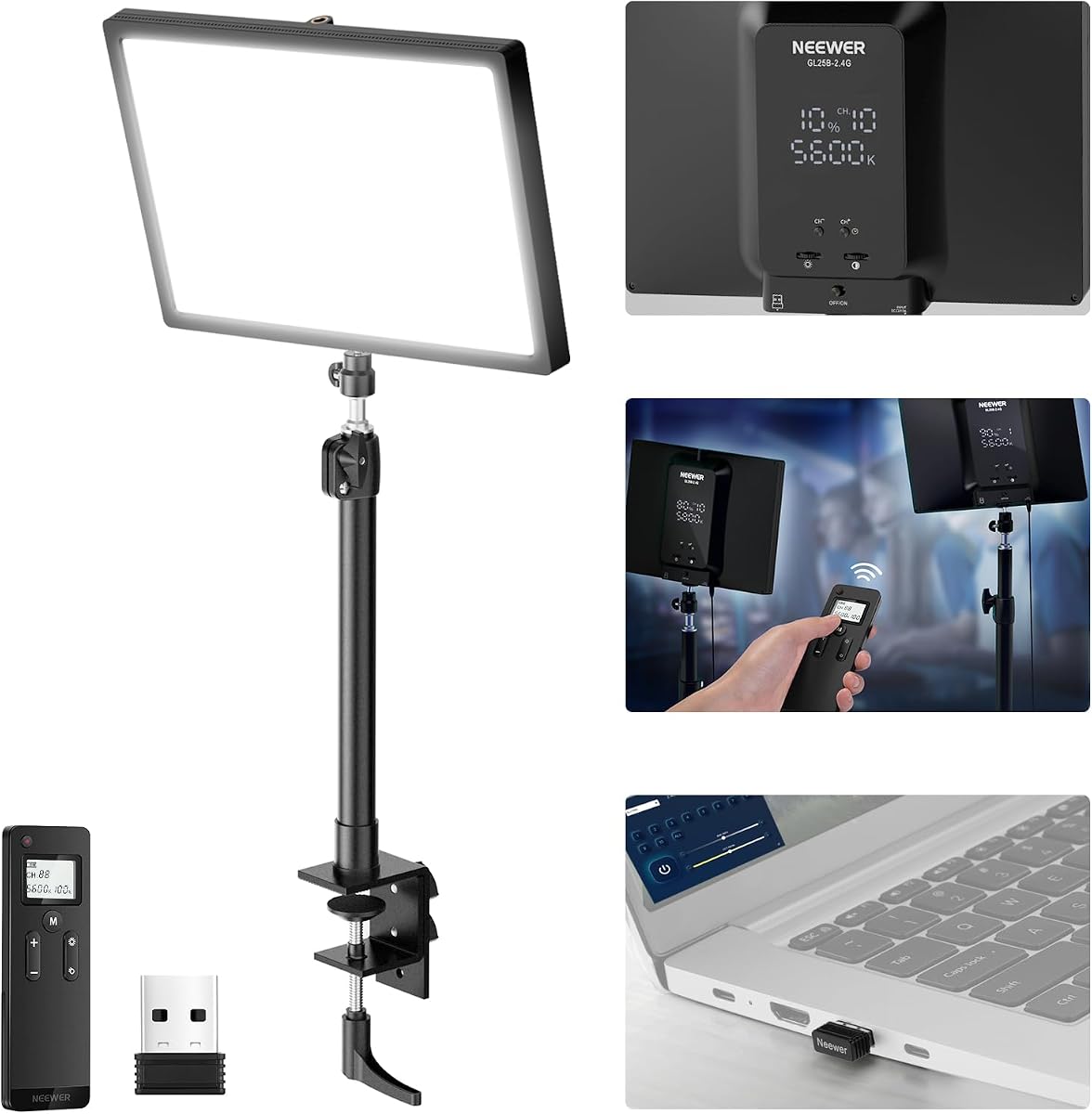
The NEEWER GL25B impresses with a 4.7 rating for its professional features at a competitive price. It features a 12.9-inch panel delivering 2300lux at 0.5m. This brightness ensures your background and subject are clearly defined in every frame.
We may earn a commission when you buy through this link, at no additional cost to you.
A standout feature is the high CRI of 98+, ensuring colors look accurate on camera. The fanless cooling system keeps it silent during recording, preventing audio interference. You can control it via a physical panel or the included 2.4G remote.
The edge-emitting technology provides a soft, diffused glow without glare. Heat dissipation is handled efficiently without fans. While setup involves plugging a USB transmitter into your PC, the control flexibility is worth the minor extra step.
For creators needing high precision and silence, this light excels. It suits gaming streams and video calls perfectly. Upgrade to this model for studio-level control and silent performance in your workspace.
Fanless design ensures zero noise for immersive live streaming experiences.
CRI 98+ ensures precise color accuracy for professional video results.
We may earn a commission when you buy through this link, at no additional cost to you.
The Elgato Key Light Air MK.2 offers a sleek alternative with a slim 15-inch profile. Despite a lower 3.8 rating, its edge-lit design effectively illuminates without glare. It delivers up to 2100 lumens, making it brighter than the original Air version.
We may earn a commission when you buy through this link, at no additional cost to you.
You can power it via USB-C from a laptop or battery bank using MagSafe. This flexibility is great for portable setups or tight spaces. The touch panel allows direct control over brightness and temperature without needing apps.
However, achieving full output often requires a specific PD adapter. The panel detaches easily for other rigs, adding versatility. While not as bright as the flagship model, it saves significant desk space.
Ideal for minimalists or portable streamers, this model balances size and performance. Use it for smaller rooms or where space is premium. Ensure you have the right adapter for maximum brightness.
USB-C, PD adapter, and battery bank support make it highly versatile.
Automate your light settings with a single keypress on your Deck.
We may earn a commission when you buy through this link, at no additional cost to you.
The Weilisi Ring Light provides unique flexibility with a 360-degree rotating head. Rated 4.5 stars, it offers uniform light that enhances subject features without shadows. The telescoping stand allows for optimal vertical positioning on any desk.
We may earn a commission when you buy through this link, at no additional cost to you.
Its C-clamp design keeps your workspace clean and tidy. The ring style reduces shadows effectively compared to square panels. Brightness and color levels are adjustable to suit different times of day.
While the diameter is smaller than full panels, it suits focused face lighting. The clamp holds securely to desks up to 2.34 inches thick. It is easy to install without tools.
For podcasters or desk workers, this versatile light is an excellent choice. It adapts to various tasks beyond streaming. Use it for video calls or creative projects needing soft illumination.
Rotate the light to any angle for perfect lighting in any position.
Big metal C-clamp saves desk space and keeps your setup clean.
We may earn a commission when you buy through this link, at no additional cost to you.
The NiceVeedi Studio Kit offers a complete two-light setup for comprehensive coverage. With a 4.4 rating, it delivers stable output of 15W per panel. The included 73-inch tripods are ideal for floor positioning in larger rooms.
We may earn a commission when you buy through this link, at no additional cost to you.
Each panel provides three color temperature options from warm to cool. You can dim brightness from 10% to 100% using the remote. High CRI ensures precise color rendering for professional-looking results.
The panels are compact and include a storage bag for portability. However, the stands are lightweight which might limit stability in high-wind areas. Still, for the price, getting two units is a great value.
Choose this kit if you need fill lighting alongside your key light. It creates a multi-point studio environment. Perfect for YouTube creators expanding their production capabilities.
Includes two panels and two stands for a full studio lighting kit.
CRI 97+ ensures colors appear natural and accurate on camera.
We may earn a commission when you buy through this link, at no additional cost to you.
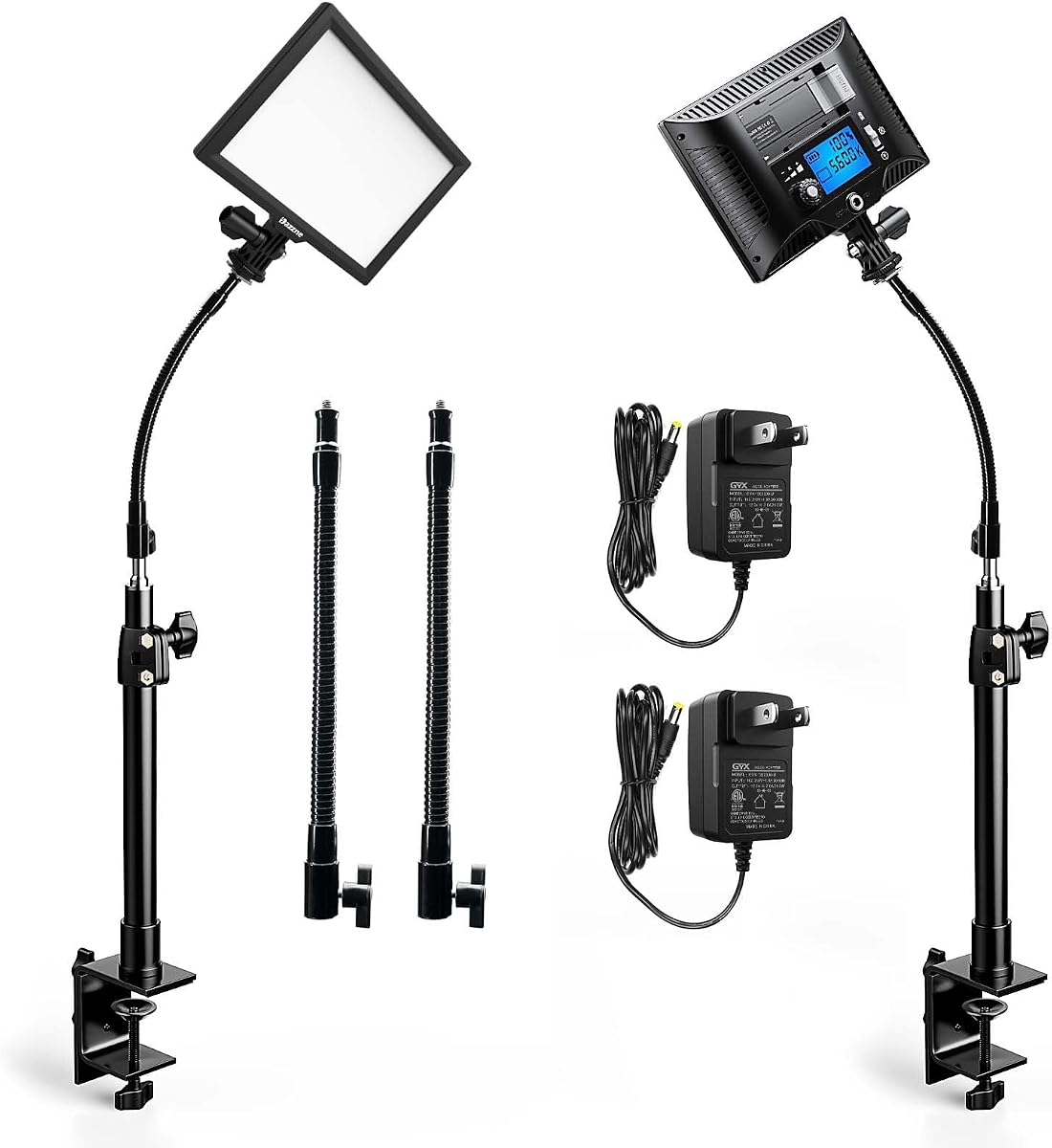
With a 4.8 rating, this two-pack features flexible gooseneck tubes for precise direction. The C-clamp stands fit desks from 0.3 to 3.3 inches thick, keeping surfaces organized. The LCD screen displays brightness and color clearly without guesswork.
We may earn a commission when you buy through this link, at no additional cost to you.
Each panel uses 118 LED beads for soft flicker-free illumination. Heat dissipation is handled via cooling holes on the back. The memory function recalls your last settings when powered on.
The gooseneck design allows angles that rigid stands cannot match. It is great for tight desk setups. However, the physical height range is limited compared to tripod models.
For detailed work or podcasts, these lights offer superior flexibility. They are gentle on eyes and easy to position. Use them for focused lighting on faces or products.
Adjustable gooseneck tubes let you aim light exactly where needed.
LCD screen ensures accurate settings control for consistent lighting.
We may earn a commission when you buy through this link, at no additional cost to you.
The Godox ES45 prioritizes comfort with an edge-lit OLED panel that reduces eye fatigue. Rated 4.4 stars, it minimizes harsh shadows for smooth skin tones. The magnetic remote attaches to the back and charges automatically.
We may earn a commission when you buy through this link, at no additional cost to you.
Use the app to control multiple lights simultaneously via groups and channels. The design hides cables to keep your workspace tidy. Brightness and temperature adjust from 0-100% and 2800-6500K.
The clamp works for desks up to 2 inches thick. It is designed specifically for long gaming or streaming sessions. The remote detaches instantly for quick access during live streams.
Ideal for professionals concerned about comfort and aesthetics. This light supports a clean, modern studio look. Invest in it for long-term comfort and multi-light control.
Edge-lit OLED panel reduces glare to prevent eye strain during long sessions.
Control multiple units via the app for a complete studio setup.
We may earn a commission when you buy through this link, at no additional cost to you.
This two-pack from Dazzne delivers consistent value for budget-conscious creators. With a 4.4 rating, it features 118 LED beads for soft illumination. The gooseneck tubes provide flexibility similar to higher-priced flexible arm setups.
We may earn a commission when you buy through this link, at no additional cost to you.
The LCD display allows precise control over color and brightness. A memory function saves your last settings for convenience. The C-clamp brackets keep your desk organized while holding units securely.
Note that batteries are not included for portable use. However, for fixed desk streaming, it provides excellent stability. Dazzne focuses on user experience with solid build quality for its class.
Choose this if you need two lights without spending heavily. It is great for dual-monitor or wide desk setups. Verify power needs before purchase to ensure full utility.
Two lights allow for balanced main and fill lighting setups.
Last settings are saved to ensure quick setup for daily streams.
We may earn a commission when you buy through this link, at no additional cost to you.
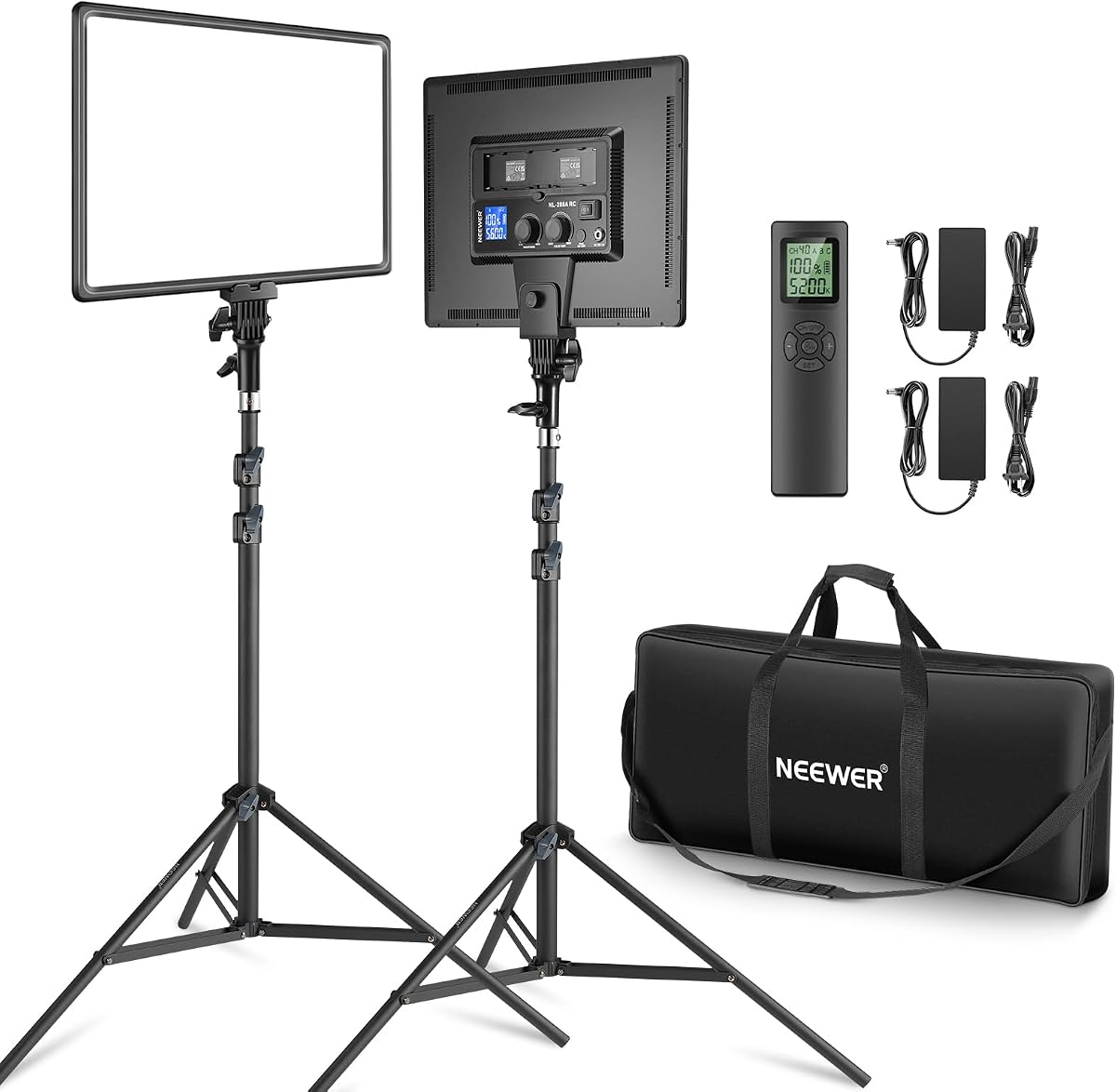
The Neewer 18-inch Kit offers high brightness at 4800Lux for large spaces. Rated 4.6 stars, these 45W panels ensure strong output even with daylight interference. Includes two stands and a remote for multi-unit control.
We may earn a commission when you buy through this link, at no additional cost to you.
You can control 40 channels and 4 groups to manage complex setups. Dual power options allow running on AC or Sony NP-F batteries. This versatility supports both studio and on-location shooting.
The panels are larger and heavier, requiring sturdier stands. Ensure your setup can handle the weight. This kit suits professional video production needs where brightness is critical.
For high-end streaming requiring fill and key lights, this is ideal. It ensures visibility in any environment. Use it to create broadcast-quality lighting for your channel.
4800Lux brightness ensures clear visibility even in bright rooms.
Use Sony NP-F batteries for portable or backup power.
We may earn a commission when you buy through this link, at no additional cost to you.
Selecting the right key light for streaming depends on understanding your specific needs and constraints. This guide breaks down the critical factors to ensure you make an informed decision.
Brightness is measured in lumens or lux. For streaming, 2000 lumens is often enough for small rooms, while larger spaces may need more. Look for dimmable options to adjust for time of day.
Always check the lux output at a specific distance to gauge real-world performance.
A wide range from 2800K to 6500K allows you to match room lighting. Warmer tones suit evening streams, while cooler tones work for daytime. Adjustable color helps with skin tone accuracy.
Ensure the range covers both warm and cool extremes for flexibility.
A high CRI ensures accurate color representation on camera. Values above 90 are preferred for professional looks. Avoid lights with low CRI as they may make skin look unnatural.
Prioritize CRI ratings of 95 or higher for the best results.
Consider how you adjust settings. Remote controls, touch panels, or app-based controls each have benefits. App control allows precise adjustment without reaching for the device.
Choose a control method that does not interrupt your streaming flow.
Mounting options like clamps, stands, or monitor mounts determine placement flexibility. Clamps save desk space. Stands offer height flexibility but take more room.
Select a mounting style that fits your available workspace.
USB-powered lights are portable but limited by cable length. AC adapters provide steady power. Dual options offer best flexibility for different setups.
Ensure you have the right power supply for your location.
Streaming sessions can last hours, so heat management is vital. Fanless cooling ensures silence during recording. Avoid models that run hot as they can cause discomfort.
Check for thermal design to ensure safe long-term usage.
Aluminum or sturdy plastic builds last longer. Check the warranty period provided by the manufacturer. A solid build indicates reliability and better value for money.
Invest in models with positive user feedback regarding durability.
Position your key light at a 45-degree angle to your face to create dimension and reduce shadows. Keep the light slightly above eye level to mimic natural lighting patterns.
Clean the diffuser panel regularly with a soft microfiber cloth to maintain light quality. Dust accumulation can reduce output and create uneven lighting spots.
Avoid turning the light on and off frequently to extend LED lifespan. If not using, dim the light rather than unplugging it immediately.
While natural light helps, a dedicated key light ensures consistency. It prevents flickering from window changes. It provides reliable illumination regardless of outdoor weather conditions.
5600K is standard for neutral daylight. 3200K to 4000K works for cozy indoor looks. Match your room's ambient lighting for a natural appearance.
Most streamers need 2000 to 3000 lumens. Brighter is better than dimmer since you can dim it. Ensure the output is sufficient for your room size.
Yes, adding a fill light helps reduce shadows. Three-point lighting creates depth. Start with one key light before expanding your setup.
USB lights work for low to medium brightness. High-output lights usually need AC adapters. Check your port's power output for reliability.
Use a diffuser panel or adjust the angle. Avoid direct light reflecting into the lens. Keep the light at a comfortable angle away from the camera.
The Elgato Key Light offers the best overall balance for serious creators. Logitech Litra Glow stands out as the top budget option. NEEWER GL25B provides premium features at a great price.
Prioritize brightness and color accuracy to maintain viewer engagement. Choose a mounting style that suits your desk layout. Ensure the light fits your budget and room size.
Check current pricing and availability before purchasing. Lighting needs vary by content type. Invest wisely to improve your streaming quality and professionalism.