
Redragon K512 RGB Membrane Gaming Keyboard
4.5Editor score
Six onboard macro keys
No software required for macros
Detachable wrist rest included
Compare the top ten keyboards with macro keys for gaming and productivity to find the best model with programmable keys, RGB lighting, and reliable performance
Finding the right keyboard with macro keys can transform your workflow and gaming experience significantly. These specialized devices allow you to automate complex sequences, launch applications instantly, and execute multi-step commands with a single press. Whether you are a streamer, a competitive gamer, or a productivity enthusiast, having dedicated macro functionality is essential for efficiency.
We have carefully analyzed the latest models available on the market to bring you this comprehensive guide. Our comparison focuses on build quality, switch types, software capabilities, and the flexibility of macro programming options. Each product listed here offers unique features designed to meet different user needs and budget constraints without sacrificing performance.
Every pick in this list highlights specific strengths that make it stand out among competitors. You will see detailed breakdowns of features, pros, cons, and real-world usage scenarios for each keyboard. Please note that prices and availability can change frequently, so always verify current details before making your final purchase decision today.
4.5Editor score

4.1Editor score
4.3Editor score
This side-by-side comparison highlights the key specifications and unique features of each keyboard to help you make an informed decision quickly.


The VSD K1 Pro stands out as a versatile mechanical keyboard designed for both gamers and streamers who need extensive macro capabilities. With a 4.1-star rating, it offers full-key programmable features that allow users to record and assign macros to any key easily. This keyboard bridges the gap between standard typing devices and advanced control panels through its unique streaming deck integration.
We may earn a commission when you buy through this link, at no additional cost to you.
Its standout feature is the integrated streaming deck function accessible via the VSD Craf software. This allows you to create unlimited switchable pages with LCD keys and knobs for controlling apps, media, or game combos. The hot-swappable PCB ensures you can customize the typing experience without soldering, while the gasket mount structure provides a satisfying and stable feel.
While the keyboard offers impressive customization, it does require software installation on Windows or macOS to unlock the full potential of the display screen and macro programming. Additionally, the standard package does not include a USB-C to USB-C cable, which might be an oversight for users with modern devices. These trade-offs are acceptable given the sheer amount of functionality provided.
If you are looking for a high-performance keyboard that doubles as a control panel for streaming or complex workflows, the VSD K1 Pro is an excellent choice. Its ability to handle custom macro flows and real-time display updates makes it ideal for power users who demand efficiency and aesthetic control in a single device.
The built-in LCD keys and knobs allow for rapid switching between different control layouts without needing external hardware.
Hot-swappable compatibility means you can change the mechanical switches to suit your preferred tactile or linear feel easily.
We may earn a commission when you buy through this link, at no additional cost to you.
The Redragon K512 offers an affordable entry point into macro keyboard functionality without requiring complex software installation. With a 4.5-star rating, it features six onboard macro keys that can be recorded and reassigned directly on the device. This makes it incredibly user-friendly for gamers who need quick access to complex combos without configuring drivers first.
We may earn a commission when you buy through this link, at no additional cost to you.
Its primary strength lies in its simplicity and durability. The keyboard supports up to 26 simultaneous key presses to prevent conflicts during intense gameplay. The detachable wrist rest adds comfort for long sessions, while the double-shot injection molded keycaps ensure that labels remain visible even after years of heavy daily use.
The main trade-off is the membrane switch technology, which may not satisfy enthusiasts looking for tactile feedback. Additionally, while basic macros work out of the box, deeper customization requires optional software that might not be necessary for everyone. However, for the price, the functionality and build quality are hard to beat.
This keyboard is perfect for casual gamers or budget-conscious users who need reliable macro capabilities. If you value ease of use and essential media controls over premium mechanical switches, the Redragon K512 delivers excellent value and performance for everyday tasks and gaming.
Users can record G1-G6 macros on the fly without needing to install any software on their system.
A dedicated media wheel allows you to adjust volume and control music playback without leaving your game.
We may earn a commission when you buy through this link, at no additional cost to you.
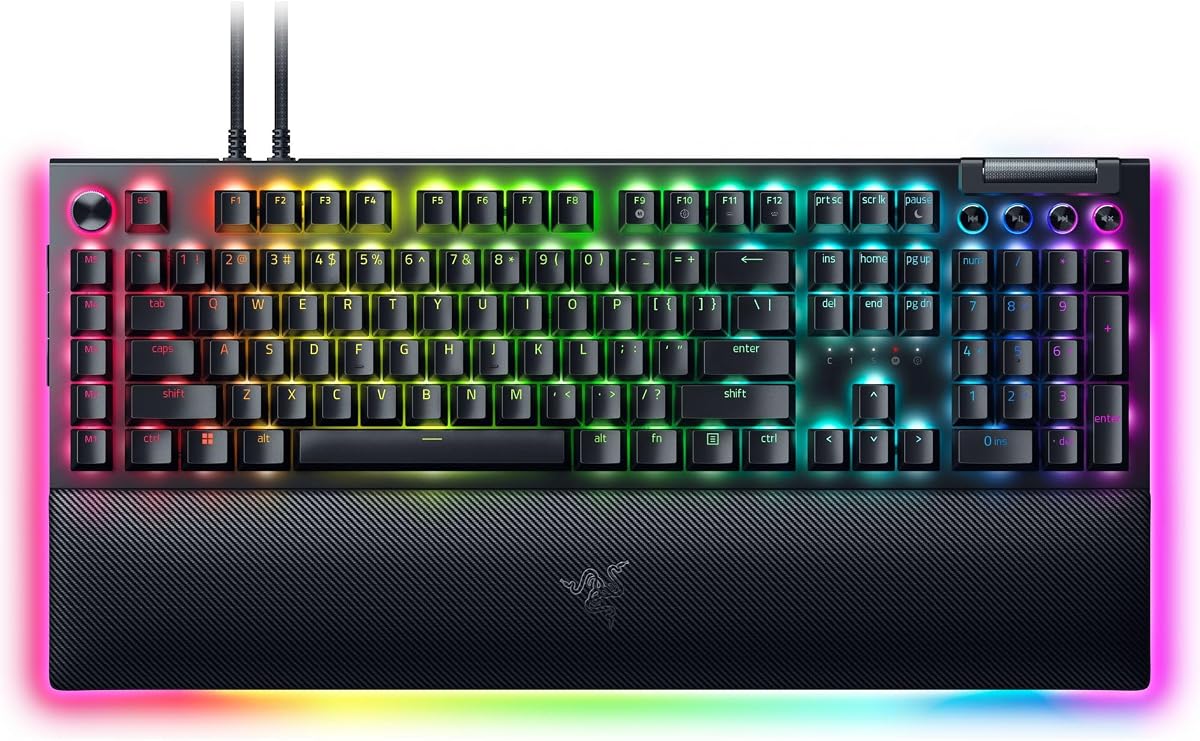
The Razer BlackWidow V4 Pro represents the pinnacle of macro keyboard technology with its extensive customization and premium build quality. Featuring a 4.3-star rating, it includes eight dedicated macro keys that can be programmed to execute essential keybinds or complex sequences with ease. This model is designed for users who want every possible control at their fingertips.
We may earn a commission when you buy through this link, at no additional cost to you.
Its most notable feature is the command dial, which allows you to assign custom functions like volume control or brightness adjustment instantly. The keyboard also boasts an immersive underglow and per-key lighting that syncs with your setup. The magnetic plush leatherette wrist rest provides excellent comfort during long gaming marathons, enhancing the overall experience.
The main drawback is the premium price, which might not be justified for casual users. Additionally, fully utilizing features like the underglow sync requires Razer Synapse software. Despite these points, the build quality and advanced macro capabilities offer a professional-grade experience for serious gamers and streamers.
If you seek a high-end keyboard with robust macro support and exceptional build quality, the V4 Pro is the top choice. Its command dial and additional macro keys provide a level of control that few other models can match, making it ideal for demanding gaming and productivity setups.
The programmable command dial adds a versatile control element for quick adjustments to volume or media without reaching for software.
Underglow lighting creates a striking visual effect that enhances your gaming environment and synchronizes with Razer Chroma supported titles.
We may earn a commission when you buy through this link, at no additional cost to you.
The Corsair K55 RGB PRO is a reliable membrane keyboard that combines essential gaming features with durability. With a 4.4-star rating, it offers six dedicated macro keys that can be set up easily through the iCUE software. It is particularly noted for its integration with Elgato Stream Deck software, making it a strong choice for content creators.
We may earn a commission when you buy through this link, at no additional cost to you.
Its key strengths include its dust and spill-resistant design, which protects the internal components from accidents during intense gaming sessions. The detachable palm rest adds comfort, and dedicated volume keys allow for quick audio adjustments without interrupting gameplay. The dynamic RGB lighting adds a vibrant touch to any desk setup.
While the membrane switches provide a smooth typing experience, they may lack the tactile feedback preferred by mechanical switch enthusiasts. The macro programming requires the iCUE software, which might be a hurdle for users who prefer simple plug-and-play solutions. However, the build quality and spill resistance are significant assets.
For gamers who need a spill-resistant keyboard with solid macro capabilities and media controls, the K55 RGB PRO is a solid investment. Its integration with streaming tools and comfortable design make it suitable for long sessions in various environments.
The IP42 rating ensures that the keyboard is protected against dust and spills, extending its lifespan significantly.
Dedicated volume and media keys provide quick access to audio controls, ensuring seamless gameplay interruptions.
We may earn a commission when you buy through this link, at no additional cost to you.
The Redragon K580 offers a robust mechanical experience with five dedicated macro keys that can be recorded on the fly. With a 4.5-star rating, it focuses on usability and durability, making it a strong contender in the mid-range market. The hot-swappable socket design allows you to change switches without soldering, adding a layer of customization.
We may earn a commission when you buy through this link, at no additional cost to you.
Its standout feature is the quiet tactile feel provided by the brown switches, which offer a gentle bump without the loud clicking. The keyboard is rated for 50 million keystrokes, ensuring longevity. The full anti-ghosting matrix supports rapid multi-key combos, which is crucial for fast-paced games and complex macro execution.
While the macro functionality is solid, deeper customization requires optional software, which may not be immediately available to all users. The RGB lighting is functional but lacks the advanced effects found in premium models. These limitations are minor considering the overall build quality and switch flexibility.
If you want a mechanical keyboard with solid macro support and quiet operation, the K580 is an excellent value. Its hot-swappable design and durable construction make it ideal for users who want reliability and customization options without spending too much.
The brown switches provide tactile feedback while remaining quiet, making this keyboard suitable for shared environments.
Hot-swappable sockets let you try different switch types easily, allowing you to tailor the feel to your preference.
We may earn a commission when you buy through this link, at no additional cost to you.
The Redragon K550 is designed for users who need an extensive number of macro keys, offering twelve onboard G keys. With a 4.1-star rating, it emphasizes high macro capacity, making it suitable for complex workflows or games with many commands. The solid aluminum top plate adds a premium feel and stability to the device.
We may earn a commission when you buy through this link, at no additional cost to you.
Its features include an extra USB pass-through port, which helps reduce cable clutter by allowing you to connect your mouse or receiver directly to the keyboard. The custom purple switches provide a distinct tactile feel, while dedicated media controls ensure quick access to audio functions. This setup is highly practical for multitaskers.
The clicky nature of the purple switches might be disruptive in quiet environments, so consider your setting before purchasing. Additionally, the available software is required to fully utilize the macro capabilities beyond basic use. Despite these points, the high macro count is a significant advantage.
If you require twelve distinct macro keys and a sturdy build, the K550 is a compelling choice. The added USB port and solid construction make it a reliable workhorse for users who prioritize macro availability over quiet operation.
With twelve macro keys available on the fly, this keyboard offers one of the highest counts in its price range.
The extra USB pass-through port helps keep your workspace tidy by reducing the need for extra ports on your computer.
We may earn a commission when you buy through this link, at no additional cost to you.
The Razer BlackWidow V4 X is a sleek mechanical keyboard with six dedicated macro keys that support rapid-fire inputs. With a 4.5-star rating, it stands out for its silent yellow switches, which provide speed without the noise. It is an excellent choice for users who prioritize quiet performance and macro speed.
We may earn a commission when you buy through this link, at no additional cost to you.
Its standout feature is the multi-function roller and secondary media keys, which allow for precise volume and brightness control. The per-key RGB lighting is vibrant and supports dynamic effects for integrated games. The doubleshot ABS keycaps ensure that labels never wear off, maintaining a professional look over time.
One notable omission is the lack of an included wrist rest, which might be needed for comfort during long sessions. Additionally, advanced RGB and macro customization require the Razer Synapse software. These are minor drawbacks for a keyboard that delivers such a smooth and quiet mechanical experience.
For gamers who need fast, quiet inputs and solid macro support, the V4 X is a great option. Its compact design and excellent acoustics make it suitable for shared workspaces or rooms where noise is a concern.
The yellow linear switches offer rapid actuation and reset without the loud noise of clicky switches, perfect for shared rooms.
The multi-function roller provides tactile control over volume and brightness, offering a convenient alternative to standard media keys.
We may earn a commission when you buy through this link, at no additional cost to you.
The Redragon K618 PRO is a unique wireless option offering twenty macro-on-the-fly keys without software installation. With a 4.1-star rating, it is designed for users who want portability and extensive macro support. The low-profile design reduces travel distance, making it feel faster and lighter during typing sessions.
We may earn a commission when you buy through this link, at no additional cost to you.
Its key strengths include tri-mode connectivity that supports Bluetooth, 2.4GHz wireless, and USB-C. This flexibility allows you to switch between devices easily without re-pairing. The one-touch Windows/Mac switch also ensures compatibility with different operating systems instantly. These features make it highly practical for multitaskers using multiple devices.
Wireless functionality requires batteries or charging, which can be an inconvenience for some. While basic macros work on the fly, deeper customization requires software, which is not always necessary but helpful for advanced users. Despite this, the convenience is unmatched in its class.
If you want a portable keyboard with extensive macro keys and wireless freedom, the K618 PRO is ideal. Its ability to switch devices quickly and operate without cables makes it perfect for a flexible workspace or travel.
Tri-mode connectivity allows you to connect to three devices simultaneously, switching between them instantly without lag.
The low-profile keys reduce travel distance, enabling faster keystrokes and a lighter typing feel for extended use.
We may earn a commission when you buy through this link, at no additional cost to you.
The Logitech G213 Prodigy is a durable gaming keyboard with media controls that support macro programming via software. With a 4.2-star rating, it offers a full-sized design with an integrated palm rest for comfort. The anti-ghosting matrix ensures precise inputs during intense gaming sessions, keeping you in full control.
We may earn a commission when you buy through this link, at no additional cost to you.
Its main features include five customizable lighting zones that can sync with other Logitech G devices for a cohesive look. The dedicated media controls allow you to play, pause, and mute media instantly without leaving your game. The durable construction repels liquids and dirt, making it easy to clean and maintain over time.
While the membrane switches provide smooth operation, they may not offer the tactile feedback preferred by mechanical enthusiasts. Additionally, programming macros requires the Logitech G Hub software, which might be complex for some users. However, the build quality and integration with other G devices are strong selling points.
For users seeking a reliable, durable keyboard with solid media controls, the G213 is a great choice. Its integration with Logitech ecosystems and comfortable design make it suitable for gamers who need consistency and ease of use.
The five lighting zones can synchronize with other G devices, creating a unified visual experience across your setup.
An integrated palm rest and adjustable feet provide comfort and stability during extended gaming sessions.
We may earn a commission when you buy through this link, at no additional cost to you.
The Razer BlackWidow V4 is a balanced premium keyboard with six dedicated macro keys and a multi-function roller. With a 4.2-star rating, it offers a linear switch experience that is fast and quiet. The two-side underglow adds a striking visual effect to your desk setup, enhancing immersion during gaming.
We may earn a commission when you buy through this link, at no additional cost to you.
Its key strengths include the magnetic plush leatherette wrist rest, which securely attaches and provides comfort for long sessions. The multi-function roller allows precise control over volume and brightness. The doubleshot ABS keycaps ensure long-term durability, preventing wear and fading over years of use.
The price point is higher than entry-level options, which may not suit all budgets. Additionally, unlocking all RGB features requires Razer Synapse software, which might be a slight hurdle. Despite this, the overall build quality and feature set are competitive in the premium segment.
If you are looking for a balanced premium keyboard with macro support and aesthetic features, the V4 is an excellent choice. Its combination of speed, comfort, and visual appeal makes it suitable for serious gamers who value quality.
The two-side underglow provides a striking visual effect that enhances your setup's aesthetic and gaming atmosphere.
The magnetic wrist rest and multi-function roller provide essential comfort and control for extended gaming marathons.
We may earn a commission when you buy through this link, at no additional cost to you.
Selecting the right keyboard with macro keys requires understanding several key factors that impact performance and usability.
Macro flexibility refers to how many keys you can assign and how complex your sequences can be. Some keyboards offer six keys while others offer twelve or more. Look for a model that allows easy on-the-fly recording if you do not want to install software constantly.
Choose a keyboard that supports the number of macros you need for your specific workflow or game to ensure maximum efficiency.
Switch type determines the feel and sound of your keystrokes. Mechanical switches provide tactile feedback and durability, while membrane switches are quieter and more budget-friendly. Linear switches are best for gaming speed, while tactile ones are good for typing accuracy.
Consider your preference for noise and feel when choosing between mechanical or membrane switch types for your macro keyboard.
Build quality affects the longevity and stability of the keyboard. Look for materials like aluminum plates or sturdy ABS cases to prevent flex during intense use. A gasket mount design can also improve typing comfort and acoustics.
Prioritize keyboards with solid construction and high-quality materials to ensure long-lasting performance over years of daily use.
Customization software is required for advanced macro programming on many models. Some boards allow simple on-the-fly recording, while others need complex apps like iCUE or Synapse. Check if the software is intuitive and supports profile switching for different games.
Ensure the software matches your technical comfort level and provides the depth of customization you require for complex tasks.
Ergonomics play a vital role in comfort during long sessions. Look for keyboards with detachable wrist rests, adjustable stands, or low-profile designs to reduce strain on your hands and wrists.
Select a model with ergonomic features that match your typing style to prevent fatigue during extended gaming or work periods.
Connectivity options range from wired USB to wireless Bluetooth or 2.4GHz dongles. Wired connections offer zero latency, while wireless provides freedom of movement. Some keyboards support tri-mode connectivity for switching between devices easily.
Decide between wired and wireless based on your need for reliability versus cable freedom in your workspace setup.
RGB lighting adds personalization to your setup, with options ranging from simple zones to per-key control. Some keyboards feature underglow or streaming deck LCDs for advanced visual effects. Choose a model that complements your desk aesthetic.
Pick a keyboard with lighting features that match your style and offer enough control to personalize your visual experience.
Durability ratings indicate how many keystrokes a switch can handle before failing. Look for ratings of 50 million keystrokes or higher to ensure the keyboard lasts through heavy use without degradation.
Prioritize keyboards with high durability ratings to ensure your investment remains functional for the long term.
To use macro keys effectively, start by installing the manufacturer's software on your system. Navigate to the macro section and assign a key to a sequence of actions you perform frequently, such as a complex game combo or a document formatting shortcut.
Regularly clean your keyboard with compressed air to prevent dust buildup that could interfere with macro keys. Wipe the surface with a damp microfiber cloth and avoid spilling liquids near the keyboard to protect the internal circuitry.
For wireless models, ensure the battery is charged or replace batteries regularly to maintain stable macro performance. Re-calibrate your software settings periodically to ensure macros are firing correctly and profiles are loaded automatically.
Not always. Some keyboards allow you to record macros directly on the hardware without software, while others require a companion app for detailed configuration. Always check the product specifications to confirm the macro setup process before purchasing.
Mechanical keyboards use individual switches under each key, providing tactile feedback and longer lifespan. Membrane keyboards use a rubber dome sheet, which is quieter and more budget-friendly but generally offers less tactile response and durability.
Yes, most software allows you to save profiles for specific applications. This means you can have different macro configurations for different games, ensuring you have the right commands ready without complex manual changes.
It depends on the game's rules. Some competitive titles prohibit macros that automate complex sequences. Always review the terms of service or game rules to avoid potential bans when using programmable keys in esports.
Six to twelve macro keys are common and sufficient for most users. Power users who manage complex workflows might prefer models with twelve or more dedicated keys to keep essential commands within easy reach without relying on software menus.
Many keyboards are compatible with both systems, though software support may vary. Check the manufacturer's documentation to confirm macOS support and ensure that all macro features function correctly on your specific operating system.
We have reviewed ten excellent keyboards with macro keys, ranging from budget membrane models to high-end mechanical ones. The VSD K1 Pro leads with its unique streaming deck integration, while the Redragon K512 offers unbeatable value for entry-level users.
When selecting your next keyboard, prioritize the type of switches, build quality, and macro flexibility that best suits your daily tasks. Whether you need quiet operation for work or rapid-fire keys for gaming, there is a model in this list that fits your needs perfectly.
Remember that prices and stock availability change frequently, so always verify the current details before finalizing your purchase. Investing in a high-quality macro keyboard today can significantly boost your efficiency and performance for years to come.