
ASUS Prime AP201 Micro-ATX PC Case
4.7Editor score
High airflow mesh panels
Supports 360mm radiators
Tool-free side panels
This guide compares ten top ASUS PC Case models for performance and cooling, helping you choose the right chassis for your build in October 2026.
Choosing the right ASUS PC Case is essential for protecting your components and ensuring optimal airflow. A well-designed chassis supports modern hardware standards while offering aesthetic appeal and practical features for builders.
We evaluated ten distinct models based on build quality, cooling potential, and user feedback. Each entry was selected to represent different budgets and form factors available from ASUS this year.
Every pick highlights specific strengths and potential trade-offs to guide your decision. Prices fluctuate often, so verify current listings before purchasing to ensure the best value for your setup.
4.7Editor score

4.8Editor score

4.6Editor score
This side-by-side comparison highlights key specifications across all ten models. Use this table to quickly identify the right size, cooling support, and unique features for your specific needs.


This case offers a robust full-tower solution with a 4.8 rating from users who appreciate its durability. The TUF Gaming spatter pattern adds a distinct look while the design supports large components and excellent cooling.
We may earn a commission when you buy through this link, at no additional cost to you.
The standout features include ergonomic woven-cotton carry handles that make moving the chassis easier. It supports vertical GPU expansion slots and offers ample space for radiators and fans to keep heat down.
While the case is heavy and the glass panel requires care, these are standard trade-offs for high-end builds. The internal layout ensures efficient cable routing and component placement for organized setups.
Ideal for enthusiasts with high-end hardware, this model provides reliable protection and airflow. It stands out as a top recommendation for those needing large component support in a sturdy chassis.
Support for multiple radiator sizes and fan points ensures thermal headroom for demanding hardware configurations.
The custom spatter pattern and thick glass panels offer a premium aesthetic that aligns with gaming rigs.
We may earn a commission when you buy through this link, at no additional cost to you.
Rated 4.7 by users, this Micro-ATX case delivers incredible value with its quasi-filter mesh panels. The design prioritizes airflow and spatial efficiency within a compact footprint suitable for smaller desks.
We may earn a commission when you buy through this link, at no additional cost to you.
Its mesh panels feature over 57,000 precision holes that significantly improve ventilation. The tool-free clip mechanism allows quick access for maintenance without losing screws or panels accidentally.
The trade-off is a Micro-ATX limitation which restricts motherboard choices. However, the compact size supports full-length GPUs and PSUs making it versatile for entry level builds.
Perfect for budget builders or those with limited space, this model maximizes cooling performance per dollar. It remains a top choice for small form factor enthusiasts seeking reliable airflow.
The high hole count on mesh panels ensures unrestricted airflow to hot components like CPUs and GPUs.
Clip mechanisms for side panels simplify cleaning and upgrades without needing tools or extra parts.
We may earn a commission when you buy through this link, at no additional cost to you.
With a 4.6 rating, this E-ATX case features a durable diecast aluminum frame and semi-open structure for airflow. It is built to support massive radiators and heavy components with premium finish.
We may earn a commission when you buy through this link, at no additional cost to you.
The integrated graphics card holder supports both vertical and horizontal installations to prevent sag. Additional conveniences include a storage drawer and Type-C ports with fast charge capabilities for peripherals.
While expensive and heavy, the build quality justifies the cost for high-end custom loops. The semi-open design prioritizes thermal performance over traditional enclosure styles found in standard cases.
Best suited for custom water cooling enthusiasts with large budgets, this case offers top tier aesthetics and thermal potential. It delivers a premium building experience unmatched by other chassis options.
Support for dual 420mm radiators enables extreme cooling for custom loop setups with high heat loads.
The integrated storage drawer and card holder streamline hardware access and protect heavy GPUs from damage.
We may earn a commission when you buy through this link, at no additional cost to you.
This ATX case features a unique dual-chamber design that separates heat sources for better thermal control. The panoramic glass panels offer a fully unobstructed view of the internals for impressive aesthetics.
We may earn a commission when you buy through this link, at no additional cost to you.
Independent cooling zones allow the CPU and GPU to operate in dedicated airflow channels. Tool-free panels make hardware installation simpler while the modular design supports custom configurations.
The tinted glass may reduce visibility slightly but enhances the premium look of the rig. The USB Type-C port provides high-speed data transfer for modern peripherals without extra dongles.
Ideal for builders prioritizing visual impact and cooling separation, this model delivers a balanced feature set. It stands out for its dual-chamber concept which is rare in mid-tower cases.
Separating CPU and GPU chambers prevents heat transfer between components for optimized thermal performance.
Front and side glass panels create a seamless panoramic view that showcases internal components beautifully.
We may earn a commission when you buy through this link, at no additional cost to you.
Rated 4.1, this ATX case focuses on modern cable management with support for hidden connector motherboards. The panoramic design offers unobstructed views while maintaining efficient cooling performance.
We may earn a commission when you buy through this link, at no additional cost to you.
The angled base enhances airflow efficiency and widens the viewing angle for better aesthetics. Four pre-installed ARGB fans provide immediate lighting effects without extra purchases or wiring.
Users must ensure their motherboard supports hidden connectors to leverage the cable management features. This requirement limits compatibility but rewards those with newer systems with a cleaner look.
Best for owners of modern ASUS motherboards seeking a tidy build, this case delivers strong value. The angled base and hidden support make it unique for organized setups.
Designed for hidden connector motherboards to eliminate cable clutter and improve system aesthetics significantly.
An 8 degree base improves airflow and viewing angles while adding a distinctive look to the build.
We may earn a commission when you buy through this link, at no additional cost to you.
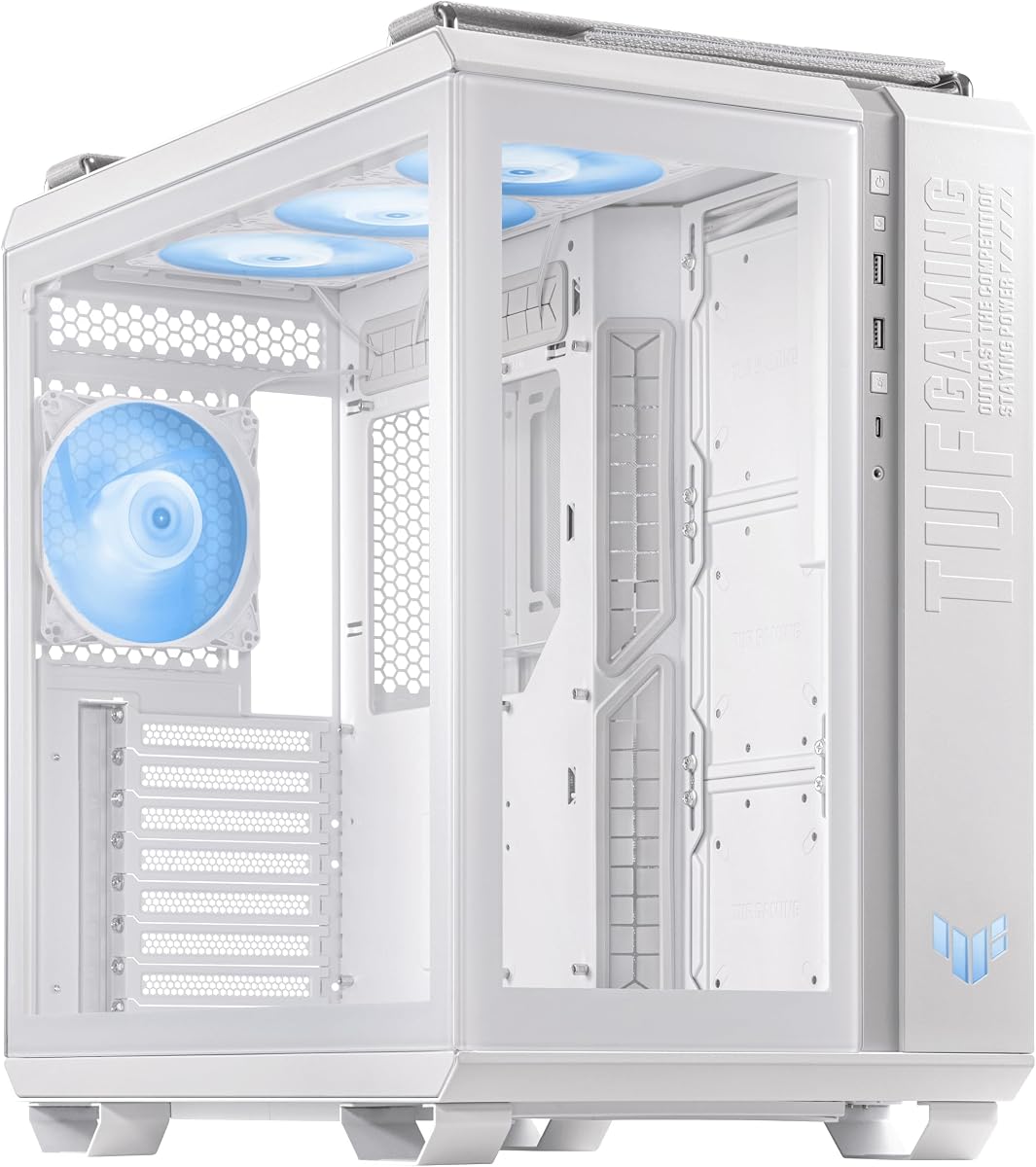
This white variant of the GT501 maintains the same robust build quality and cooling potential as the standard model. It appeals to users seeking a clean aesthetic without compromising on durability.
We may earn a commission when you buy through this link, at no additional cost to you.
Ergonomic carry handles support up to 30Kg allowing safe transport for complete systems. The metal panel and tempered glass combination showcases internal components beautifully while protecting them.
White finishes can show dust more than black versions but offer a unique look. The case remains optimized for TUF motherboards ensuring perfect cable routing and cooling control.
Ideal for white-themed builds, this model delivers premium protection and airflow. It stands out for its high capacity handles and reliable performance in a striking finish.
The white spatter pattern provides a clean look that complements white component builds effectively.
Heavy duty woven-cotton handles ensure the case is easy to move without risking damage to parts.
We may earn a commission when you buy through this link, at no additional cost to you.
Rated 4.6, this compact mid-tower uses a perforated honeycomb front panel for maximum airflow. It is designed to showcase internals while keeping heat out effectively.
We may earn a commission when you buy through this link, at no additional cost to you.
The integrated 6 port RGB controller simplifies lighting setup without extra software or hubs. Additional accessories like the headphone hanger add practical convenience for gaming stations.
The smaller footprint may limit larger GPU options but supports up to 360mm radiators. This balance makes it suitable for mid-range builds needing strong cooling in less space.
Perfect for compact gaming setups, this case offers high airflow and practical features. It stands out for the included RGB hub and headphone hanger adding value.
Perforated honeycomb patterns maximize airflow intake to keep components cool during intensive gaming sessions.
Included headphone hanger and RGB hub enhance daily usability without additional purchases or clutter.
We may earn a commission when you buy through this link, at no additional cost to you.
This white version of the GT502 Horizon features tempered tinted glass for a limitless panoramic view. It includes four ARGB fans to balance cooling and lighting out of the box.
We may earn a commission when you buy through this link, at no additional cost to you.
The USB Type-C port supports 20Gbps speeds for fast data transfer with compatible devices. The dual chamber design creates independent cooling zones for optimized airflow paths.
Modular panels simplify installation allowing users to remove parts for easier hardware mounting. While white may require more cleaning, the aesthetic payoff is significant for matching setups.
Ideal for users wanting white glass and fast connectivity, this model delivers style and performance. It stands out for the high-speed USB and included ARGB lighting features.
20Gbps Type-C ports enable rapid data transfer speeds for modern external drives and peripherals.
Pre-installed ARGB fans save time and money by providing lighting effects immediately upon assembly.
We may earn a commission when you buy through this link, at no additional cost to you.
Rated 4.9, this model offers excellent value with concealed port support and panoramic glass. The 8 degree angled base improves airflow efficiency and viewing angles for the chassis.
We may earn a commission when you buy through this link, at no additional cost to you.
Concealed ports optimize cable management for clutter-free setups on compatible motherboards. The tempered glass panels provide unobstructed views of the main chamber inside the case.
Compatibility with specific boards is the main trade-off for such a clean look. However, the high user satisfaction and performance make it a strong choice.
Ideal for modern builds focusing on aesthetics, this case delivers top ratings. It stands out for its high scores and concealed features that reduce cable clutter.
Concealed ports hide cables effectively for a streamlined build appearance without excess wiring.
Top user ratings reflect reliable performance and design quality that meets modern expectations well.
We may earn a commission when you buy through this link, at no additional cost to you.
This ATX mid-tower features dual chamber cooling to separate heat sources effectively. The front panel includes USB 32 Gen 2 Type-C for high-speed data transfer to peripherals.
We may earn a commission when you buy through this link, at no additional cost to you.
Four ARGB fans ensure balanced cooling performance while tool-free panels simplify hardware installation. Modular mounts allow users to reconfigure the chassis for custom needs.
The complexity of the dual chamber may require planning for initial setup. However, the thermal separation and connectivity options offer significant benefits for performance.
Ideal for performance-focused builders, this model offers strong cooling and modern I/O. It stands out for its USB speed and flexible modular components.
USB 32 Gen 2 Type-C supports high-speed data transfer for modern storage and peripherals.
Dual chambers allow independent cooling strategies for CPU and GPU heat management.
We may earn a commission when you buy through this link, at no additional cost to you.
Selecting the right case depends on hardware needs, size constraints, and aesthetic goals. This guide outlines key factors to consider for a balanced selection.
Check the motherboard size your case supports. Full-tower models handle E-ATX while mid-towers suit ATX. Micro-ATX cases offer compact efficiency but limit expansion.
Always verify motherboard dimensions against case specs to avoid fitting issues during assembly.
Look for fan mounting points and radiator support. Larger cases accommodate multiple 360mm radiators for water cooling while compact models may only support 280mm.
Prioritize mesh panels and high airflow designs for heat dissipating builds over solid glass panels.
Vertical GPU slots are available on select models for better airflow and aesthetics. Ensure your case supports your graphics card type if this feature matters to you.
Traditional expansion slots remain standard but vertical options offer unique visual layouts.
Steel and aluminum frames provide durability while plastic may reduce weight. Heavy cases like ROG models use diecast aluminum for robust protection.
Invest in thicker metal panels for long-term build quality and rigidity.
Hidden connectors and spacious cutouts streamline cable routing. Look for extended trays and gaps to tuck wires out of view.
Proper cable management improves airflow and reduces dust accumulation inside the case.
Front panel USB-C ports with high speeds like 20Gbps enhance connectivity. Ensure your peripherals match these capabilities for optimal transfer rates.
High-speed ports reduce the need for dongles and improve peripheral performance.
Glass panels offer panoramic views while metal hides internals. Colors like white require more maintenance but match themed builds better.
Choose designs that align with your room setup and component colors.
Prices vary widely from budget mesh cases to premium metal chassis. Allocate more for cooling performance and build quality if you plan overclocking.
Compare features against cost to find the best value for your specific needs.
Clean the interior and exterior regularly using compressed air. Dust accumulation can reduce airflow efficiency over time.
Use the tool-free panels to inspect fans and filters. Replacing filters keeps dust from entering sensitive components.
Store the case upright during transport to protect glass panels. Use carry handles designed for the chassis weight safely.
Yes, models like the TUF Gaming GT501 and ROG Hyperion GR701 offer vertical GPU expansion slots. This feature improves airflow and aesthetics but requires compatible motherboards.
The ROG Hyperion GR701 supports dual 420mm radiators making it ideal for water cooling. The GT501 also supports 360mm radiators effectively for large setups.
Most models feature tool-free panels for quick access. Mesh panels require periodic vacuuming to maintain optimal airflow performance.
Yes, cases like the Prime AP201 support standard ATX power supplies. Always check maximum PSU dimensions before purchasing a new unit.
Dual-chamber designs separate CPU and GPU heat to improve thermal performance. The GT502 Horizon series uses this layout effectively.
Most models include pre-installed RGB fans. Some like the GT501 have three to four fans while others require separate purchase for full effects.
The A31 Plus series supports motherboards with hidden connectors. This feature optimizes cable management for a clutter-free look.
White finishes show dust more than black. Regular cleaning helps maintain appearance regardless of color choice.
The GT501 E-ATX stands out for its versatility and durability while the AP201 offers incredible value for smaller builds.
Prioritize airflow and expansion support based on your specific hardware needs. Cooling performance often impacts long-term reliability significantly.
Check current prices and availability before purchasing to ensure you get the best deal for your setup.