
VIVO Pneumatic Arm Quad Ultrawide
4.5Editor score
Pneumatic height adjustment
Holds ultra-wide screens up to 49 inch
Heavy-duty cast aluminum construction
Finding the right workstation setup is crucial for productivity. A 4 Monitor Mount with Adjustable Arms transforms cluttered desks into organized hubs. It elevates screens to eye level, reducing strain on your neck and back during long work sessions.
We analyzed ten highly rated products based on compatibility, arm strength, and adjustability. Each option supports multiple VESA patterns and varies in weight capacity. Our review highlights key features to help you match the mount to your specific monitor sizes and desk type.
Each pick below shows real user ratings and detailed specifications. We focus on build quality and ease of installation. Remember that prices can change over time, so check the current listings before making your final purchase decision today.
4.5Editor score

4.5Editor score

4.5Editor score
As an Amazon Associate we earn from qualifying purchases.
This side-by-side comparison outlines the core specifications and unique strengths of every model reviewed. Use this table to quickly identify which mount supports your monitor size and weight requirements before diving into the detailed reviews.

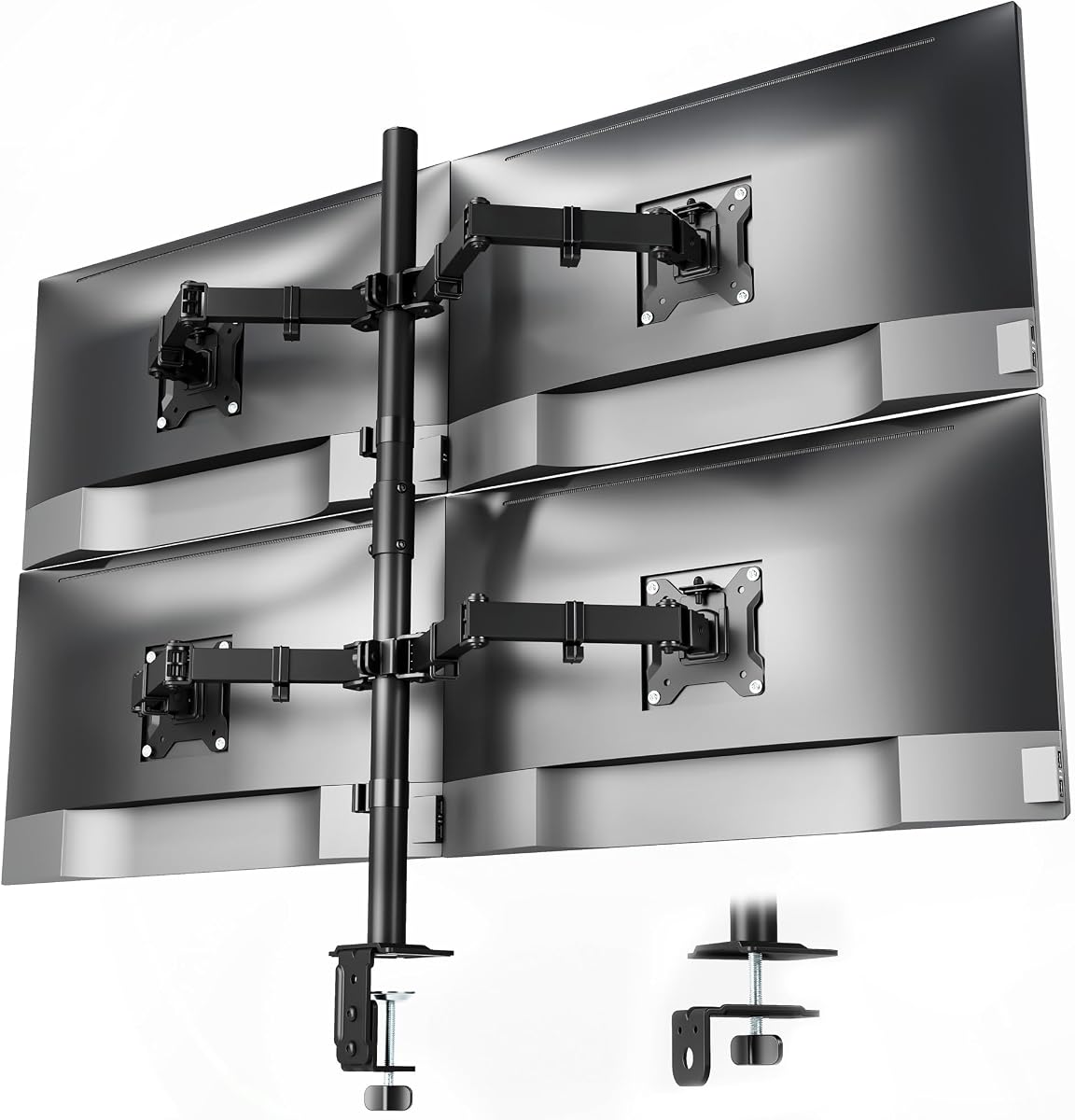


This WALI quad mount stands out for balancing strength and price. It earned a 4.5-star rating from users who value stability. The design allows you to stack four screens neatly while keeping your desk surface clear for other tasks.
We may earn a commission when you buy through this link, at no additional cost to you.
The adjustable arms tilt and swivel widely to help you find comfortable angles. Its cable management system hides wires along the arms. This feature prevents clutter and keeps your workspace looking professional during video calls or focus work.
While the height is fixed, it may not suit standing desks. However, for seated work, the reach is ample. The steel frame ensures monitors stay level even when adjusted frequently throughout the day.
Buy this if you need a reliable mount for standard 27-inch screens. It is ideal for home offices where space is limited. The clear manual makes setup straightforward for anyone with basic tools.
The mount raises screens to eye level to reduce neck strain. You can rotate monitors to portrait mode for reading documents.
By lifting screens off the desk, you gain room for keyboards. This setup creates a cleaner workflow for multitasking.
We may earn a commission when you buy through this link, at no additional cost to you.
This VIVO model is built for users with large ultra-wide displays. It supports up to 49-inch screens on the top arms. The pneumatic system lets you adjust height with a light touch instead of using tools.
We may earn a commission when you buy through this link, at no additional cost to you.
The cast aluminum construction provides premium strength for heavy loads. It resists scratches and keeps the arms stable during adjustments. The tilt joints are high capacity so screens stay level even when heavy.
The price is higher than standard models due to the premium materials. However, the ease of moving screens justifies the cost. It is the best choice for high-end trading setups.
Choose this if you own heavy or ultra-wide monitors. The detachable VESA plates make installation easier. Ensure your desk can support the clamp before purchase.
The arms use gas pressure to balance the weight of monitors. You can glide screens up and down effortlessly without tightening bolts.
Aluminum construction resists bending under heavy loads. It looks sleek and professional on any desk surface.
We may earn a commission when you buy through this link, at no additional cost to you.
This mount offers excellent value for those on a budget. It supports screens up to 32 inches with good adjustability. The tall pole allows you to reach comfortable viewing heights easily.
We may earn a commission when you buy through this link, at no additional cost to you.
The mount lets you rotate and tilt screens to suit your posture. Cable clips help organize wires for a tidy look. The assembly process is simple and comes with clear instructions.
It does not support very heavy monitors compared to premium options. For standard office screens, it is more than enough. The finish is functional but not as polished as others.
Buy this for a cost-effective quad setup. It works well for home offices or study rooms. Check the desk thickness limits before installing the clamp.
You get essential features without paying for extra bells. It meets the needs of most standard monitor setups.
The pole reaches over 31 inches to support standing work. This flexibility helps users of different heights.
We may earn a commission when you buy through this link, at no additional cost to you.
This PUTORSEN mount handles a mix of large ultra-wide screens and smaller ones. It places a 49-inch screen on top and smaller screens below. This layout is perfect for traders needing a wide view and extra data.
We may earn a commission when you buy through this link, at no additional cost to you.
The arms use a gas spring to hold heavy screens steady. The 3-section design prevents sagging at the joints. The center bracket tilts to help align the top screen with lower ones.
Installation takes more time due to the complex structure. Ensure you have space to move around during setup. The weight capacity is high but the mount itself is heavy.
Choose this for specialized multi-monitor workflows. It fits well in financial or control centers. The design maximizes visibility for critical data screens.
The top slot fits wide screens while lower slots take smaller ones. This creates a focused viewing pyramid for tasks.
Heavy duty steel keeps the setup level even with large screens. You won't notice sagging during daily use.
We may earn a commission when you buy through this link, at no additional cost to you.
The monTEK stand focuses on keeping your displays level and secure. It handles up to 22 lbs per arm easily. The design prevents sagging which ensures your screens stay aligned.
We may earn a commission when you buy through this link, at no additional cost to you.
It features a quick-release VESA plate for easy attachment. Integrated cable organizers keep wires tidy along the arms. The tilt range is generous allowing you to avoid glare.
The arm movement is smooth but limited compared to others. It is sufficient for most office tasks though. The setup fits well in modern home office environments.
Buy this if you prioritize stability over extreme reach. It works well for standard workstations. The modern look fits various desk styles.
The joint design ensures screens stay level under weight. You can adjust without worrying about drift.
VESA plates snap on for fast installation. This saves time when setting up new monitors.
We may earn a commission when you buy through this link, at no additional cost to you.
This MOUNTUP model is known for its user-friendly design. It supports standard monitors up to 32 inches easily. The VESA plates make attaching screens a quick process.
We may earn a commission when you buy through this link, at no additional cost to you.
You can adjust height along the center pole easily. The tilt range is wide for portrait or landscape views. It is simple enough to set up in under 20 minutes.
The weight capacity is lower than heavy-duty options. It is perfect for lighter office monitors. The customer service includes a 3-year support promise.
Buy this if you want a simple setup without hassle. It is great for shared workspaces. The height flexibility works well for different desks.
Setup is streamlined with labeled parts and clear steps. Most users finish in minutes without help.
Wide tilt and swivel range let you find angles easily. You can rotate screens for reading documents.
We may earn a commission when you buy through this link, at no additional cost to you.
The VIVO Quad Pneumatic model uses springs to balance monitors. It supports up to 32 inch screens per arm. Dual springs help with smooth transitions during adjustments.
We may earn a commission when you buy through this link, at no additional cost to you.
You can increase tension for heavier screens if needed. The clamp attaches without drilling into your desk. It provides solid hold for standard office work.
The center brackets are fixed which limits vertical movement. But the side arms offer plenty of range. The assembly process is straightforward for most users.
Buy this if you want smooth movement on a budget. It fits well for standard setups. Ensure your desk is thick enough for the clamp.
The pneumatic springs allow easy gliding of screens. You can adjust height with minimal effort.
You can adjust the springs to match monitor weight. This customization ensures stability during daily use.
We may earn a commission when you buy through this link, at no additional cost to you.
This Pholiten arm uses gas springs for easy positioning. It supports up to 10 kg per arm comfortably. The design keeps the desk free for other tools.
We may earn a commission when you buy through this link, at no additional cost to you.
It adjusts forward and backward to fit your reach. The VESA plates allow vertical or horizontal viewing. It is easy to install with C-clamp or grommet.
The weight limit is lower than steel options. It is better for laptops or light monitors. The design is functional and saves desk space.
Choose this for a minimal setup. It works well for compact workspaces. The gas springs make adjustments smooth and effortless.
The mount sits at the back to save space. It lifts screens to clear your desktop area.
You can adjust arm forward and backward easily. This helps find the perfect viewing distance.
We may earn a commission when you buy through this link, at no additional cost to you.
This WALI model holds the highest rating in our list. It supports screens from 13 to 32 inches. The two-stage locking system ensures secure attachment.
We may earn a commission when you buy through this link, at no additional cost to you.
Built-in cable guides keep wires out of sight. You can rotate screens fully for portrait use. The height pole supports comfortable viewing angles easily.
The assembly requires care to tighten all bolts. It is worth the effort for the stability. The design helps organize your desk well.
Buy this for a proven and reliable option. It is great for long workdays. The high rating reflects user satisfaction.
The two-stage system keeps monitors tightly in place. This prevents any accidental tilting or shifts.
Built-in guides keep wires along the arms. Your desk remains clean and tidy.
We may earn a commission when you buy through this link, at no additional cost to you.
This VIVO entry-level model offers reliable support for many users. It holds four screens with good stability. The clamp attaches securely without drilling.
We may earn a commission when you buy through this link, at no additional cost to you.
The tilt range is limited but sufficient for basic needs. It is simple to assemble with clear instructions. The design works well for team projects.
It may not suit heavy ultra-wide screens. For standard monitors, it is a solid choice. The price is accessible for new setups.
Buy this to start organizing your workspace. It is great for budget-conscious users. Ensure your desk thickness matches the clamp.
You get a reliable mount without a high cost. It is a practical choice for starting a multi-screen setup.
The setup allows multiple screens for collaboration. It is useful for shared offices or small workspaces.
We may earn a commission when you buy through this link, at no additional cost to you.
Selecting the right mount requires checking compatibility with your screens and desk. This guide outlines the key factors to consider for a secure ergonomic setup.
Check the VESA pattern on the back of your monitors. Most mounts support 75x75mm or 100x100mm patterns. Ensure your screens match these holes before buying.
Verify the hole pattern on your monitors. If they do not match, you may need adapters to use the mount.
Each arm has a maximum weight limit you must respect. Exceeding this can cause sagging or instability. Check the weight of each monitor against the limit.
Ensure your monitors fit within the weight range. This is crucial for long-term stability and safety.
Measure the thickness of your desk before selecting a mount. Some clamps fit up to 4 inches while others are smaller. Ensure the clamp matches your desk's edge.
Measure your desk thickness to ensure the clamp fits. Most mounts have clear limits for desk depth.
Confirm that the mount supports your monitor sizes. Some mounts go up to 32 inches while others handle 49. Ensure the arm length matches your screen size.
Check the maximum screen size supported by the mount. Larger screens need stronger arms to stay stable.
Look for tilt, swivel, and rotation options. These features help you align screens for comfortable viewing. Some mounts offer gas springs for smoother height moves.
Ensure the mount offers the range of motion you need. Good adjustability reduces strain on your neck and back.
Steel or aluminum frames provide better stability. Heavy-duty materials prevent wobbling during adjustments. Premium models often use cast aluminum for durability.
Choose materials that feel solid and sturdy. Higher quality metal ensures the mount lasts longer.
Some mounts include clips or guides for wires. This keeps cables hidden and organized along the arms. It helps maintain a clean and tidy workspace.
Look for integrated cable management features. Organized wires prevent clutter and improve safety.
Read the instructions to see how complex setup is. Some mounts require tools while others are tool-free. Clear manuals make installation faster for everyone.
Check if all necessary hardware is included. Easy assembly saves time when setting up your station.
Start by measuring your desk and monitors before assembly. Ensure the VESA holes match and your desk is sturdy enough. This preparation prevents issues during installation later.
Use the provided tools to tighten all bolts securely. Check the tension on arms if they use springs. You want the screens to stay in place without drooping.
Adjust the cable clips to route wires neatly along arms. This keeps your desk tidy and prevents tangles. Periodically check for wear on joints and cables.
Most mounts support both flat and curved screens as long as the VESA pattern matches. Check the specifications to ensure your monitor's weight is within limits. Curved screens often need stronger arms to stay stable.
Yes these mounts work well for gaming setups with multiple screens. They allow you to position monitors at eye level for better comfort. Adjusting the angles helps reduce eye strain during long sessions.
Most mounts support desk thickness up to 4 inches. If your desk is thicker you may need to find a clamp with a longer bolt. Alternatively check if the grommet option fits your hole.
Ensure you do not exceed the weight limit per arm. Tighten all joints properly during installation. Some mounts allow tension adjustments to balance heavier screens.
Yes many mounts allow you to mix sizes within the limits. The PUTORSEN model specifically supports 49 inch top and smaller lower screens. Check each arm's capacity before combining screens.
These are designed for fixed desks but can be moved. You need to unclamp and reassemble to move locations. They are not built for frequent daily relocation like stands.
We reviewed ten mounts that offer solid options for any workspace. The WALI and VIVO models lead in versatility and premium features. Choose based on your screen sizes and budget constraints.
Prioritize weight capacity and desk thickness when deciding. These factors determine the safety and longevity of your setup. Ensure your choice matches your daily workflow needs.
Remember to check current listings for the best pricing. Prices change often so verify deals before purchase. This guide helps you find the perfect fit for your multi-screen desk.