
VTech Play Smart Preschool Laptop
4.6Editor score
Thirty activities total
Personalized avatar setup
Spanish language basics
This guide compares the best laptop for 5 year old children focusing on educational value, durability, screen quality, and age appropriate content features.
Finding the right laptop for a five year old child requires careful consideration of educational value and physical durability. Young learners need devices that inspire curiosity while protecting their developing eyes and motor skills during extended play sessions at home or school.
We compared ten top rated models based on learning activities, screen technology, battery life, and parental control features. Each product was evaluated for its ability to engage children with age appropriate content that supports literacy, numeracy, and creative exploration without excessive screen time risks.
Each pick shows detailed specifications, pros, cons, and real world usage scenarios to help you choose wisely. Please note that product availability and pricing may change over time so always verify current details before making your final purchase decision online or in stores.
4.6Editor score

4.7Editor score

4.2Editor score
The following table provides a side by side comparison of all ten selected laptops highlighting key specifications such as screen size, learning modes, connectivity options, and intended age ranges to streamline your decision making process quickly and effectively.





The LeapFrog 2-in-1 LeapTop Touch earns our top spot for its unique ability to transform from a keyboard-based laptop into a touch tablet. With an impressive 4.7 rating, this device stands out for its versatility in supporting preschoolers transitioning into kindergarten age learning environments effectively.
We may earn a commission when you buy through this link, at no additional cost to you.
Its key strengths lie in the five distinct learning modes covering ABCs, numbers, games, music, and messages. The ability to customize the child's name within the system adds a personal touch that increases engagement. Additionally, the flip screen mechanism allows for varied interaction styles keeping attention spans high during play.
Trade-offs include the need for three AA batteries which are not included for regular use and the absence of expandable app content beyond what is pre-loaded. These limitations are acceptable given the device's primary role as a standalone educational toy rather than a connected computer platform.
This laptop is ideal for parents seeking a durable, engaging toy that mimics real computer use without the complexity of internet connectivity. We recommend it for children aged two to five who benefit from structured, screen-free interactive learning experiences at home.
The five distinct modes ensure children explore different subjects like math and language without boredom setting in quickly.
Switching between laptop and tablet modes encourages fine motor skill development through physical interaction with the device.
We may earn a commission when you buy through this link, at no additional cost to you.
The VTech Play Smart Preschool Laptop offers exceptional value with its sleek design that mirrors adult laptops while providing thirty leveled learning activities. Boasting a 4.6 rating, it effectively introduces basic concepts like letters, numbers, and Spanish words in a playful, child-friendly interface.
We may earn a commission when you buy through this link, at no additional cost to you.
Strengths include the ability to personalize the device with a child's name, age, and avatar which fosters a sense of ownership. The activities are structured to grow with the child ensuring long-term engagement without the need for complex setup or additional downloads.
While the pink color scheme might limit appeal for some users and the lack of internet connectivity restricts content expansion these factors are minor for a standalone educational toy. The design prioritizes safety and simplicity which are critical for this age group.
We recommend this laptop for families seeking an affordable yet robust introduction to computer concepts. It is best suited for children aged three to six who are ready to explore digital interfaces without the risks associated with online browsing.
Customizing profiles helps children connect emotionally with the device increasing motivation to return for daily learning sessions.
Early exposure to Spanish words builds foundational language skills that can be expanded upon in later schooling years.
We may earn a commission when you buy through this link, at no additional cost to you.
The LEXiBOOK LAPTAB 10 inch stands out as a premium option bridging the gap between toy laptops and real computing devices. With a 4.2 rating, it offers a 10.1-inch HD touchscreen and access to Google Play providing endless entertainment and educational possibilities for tech-savvy families.
We may earn a commission when you buy through this link, at no additional cost to you.
Key strengths include the powerful octa-core processor and 128GB storage which allow for smooth multitasking and ample space for apps. The inclusion of USB ports, Bluetooth, and WiFi makes it a versatile tool for both learning and creative projects like video conferencing or digital art.
Trade-offs involve the higher cost compared to simpler toys and the necessity for vigilant parental controls to manage app usage and screen time. These challenges are manageable with the built-in family-friendly features that allow customization of profiles and app restrictions.
We recommend this laptop for families ready to invest in a device that grows with the child into early elementary years. It is ideal for kids who need more than basic pre-loaded activities and require access to a wider range of educational resources online.
Access to standard apps and browsing enables children to learn digital literacy skills essential for future academic success.
Robust hardware ensures the device remains relevant longer than budget models keeping it useful through multiple school grades.
We may earn a commission when you buy through this link, at no additional cost to you.
The VTech Genio Bilingual JuniorBook is a standout choice for parents prioritizing language acquisition alongside computer skills. With a 4.5 rating, it features a full-size QWERTY keyboard and cursor controller to build foundational typing skills while offering over eighty pre-loaded activities.
We may earn a commission when you buy through this link, at no additional cost to you.
Its bilingual design allows every activity to be played in English or Spanish fostering immersive language learning without external tools. The offline nature ensures safe, controlled play environments while parents monitor progress through built-in curriculum topics like math and science.
While it lacks a touch screen and requires four AA batteries the robust build quality and educational depth justify the trade-offs. The focus on traditional keyboard interaction prepares children for real-world computer use more effectively than touch-only devices.
We recommend this laptop for children aged five and older who are ready to explore typing and language skills. It is perfect for households seeking a dedicated learning tool that supports bilingual education in a fun, engaging format.
Using a standard keyboard layout helps children transition smoothly to school computers and typing software later on.
Pre-loaded content eliminates risks associated with internet browsing ensuring children access only verified educational materials.
We may earn a commission when you buy through this link, at no additional cost to you.
The Kids Laptop Educational Color Screen offers a vibrant visual experience with its 4.3-inch TFT display and forty-eight distinct learning modes. Rated at 4.2, it combines convenience with comfort through an ergonomic design that fits easily in small hands for extended use.
We may earn a commission when you buy through this link, at no additional cost to you.
Its color screen enhances engagement by providing lifelike visuals for activities ranging from alphabet recognition to music and clock reading. The included protective film ensures the display remains scratch-free during initial use though it must be removed for optimal clarity.
Trade-offs include the need to peel off the protective film and potentially lower brand recognition compared to established toy makers. However, the device's functional design and reasonable price point make it a solid contender for families prioritizing screen quality.
We recommend this laptop for children who respond well to colorful visual cues during learning. It is suitable for home or travel use where a compact yet visually stimulating device is preferred over traditional black-and-white toy laptops.
High-quality color output helps maintain focus and makes abstract concepts like numbers more concrete for young learners.
Slim dimensions and lightweight construction make it easy to transport for car rides or visits to grandparents homes.
We may earn a commission when you buy through this link, at no additional cost to you.
The LEXiBOOK Barbie Educational Laptop combines familiar branding with robust educational content featuring 124 activities in English and Spanish. Rated at 4.3, it maintains a slim and elegant design that mimics adult laptops while offering interactive learning experiences suitable for young children.
We may earn a commission when you buy through this link, at no additional cost to you.
Its comprehensive curriculum covers math, logic, music, and clock reading ensuring a well-rounded educational foundation. The interactive design encourages children to test their knowledge at their own pace with multiple levels for each activity promoting sustained engagement.
While the screen is smaller than some competitors and the themed design may not appeal to all children the activity variety ensures value. The compact size makes it ideal for travel or storage in small backpacks or toy boxes.
We recommend this laptop for children who enjoy themed toys but still require substantial educational content. It is an excellent choice for families looking to balance fun character designs with meaningful skill development in a portable package.
Over a hundred activities provide long-term value reducing the need for frequent device upgrades or replacements.
Dual language options allow siblings with different language needs to share the same device effectively.
We may earn a commission when you buy through this link, at no additional cost to you.
The Kids Laptop with Camera distinguishes itself with integrated photography features alongside 64 learning modes. Rated at 4.6, it encourages creativity by allowing children to take photos with frames and filters while maintaining a robust curriculum covering math, colors, and music.
We may earn a commission when you buy through this link, at no additional cost to you.
Its 4.3-inch color display offers vibrant visuals that enhance both the learning and photography experiences. The ergonomic design with a realistic mouse and keyboard ensures comfortable handling during extended play sessions for young users.
Trade-offs include basic camera resolution and potentially faster battery drain due to the active camera feature. However, these are minor compromises given the unique opportunity for kids to document their world through a playful lens.
We recommend this laptop for families wanting to blend traditional learning with creative expression. It is ideal for children who enjoy capturing memories and engaging in role-play activities that mimic adult tech tools.
Taking photos and applying filters fosters artistic skills and encourages children to observe their surroundings carefully.
The combination of learning modes and camera ensures a holistic digital experience beyond standard rote memorization.
We may earn a commission when you buy through this link, at no additional cost to you.
The LeapFrog LeapPad Academy bridges the gap between laptops and tablets with a stylus and robust learning apps. Rated at 4.3, it supports development in math, reading, and coding through educator-approved content that grows with the child through age eight.
We may earn a commission when you buy through this link, at no additional cost to you.
Its 7-inch shatter-safe screen ensures durability while the included stylus encourages fine motor skill development through drawing and writing activities. Parental controls allow for time limits and content management ensuring a safe digital environment.
Trade-offs include a higher upfront cost and the need to purchase additional apps separately for full access to all content. However, the inclusion of a three-month trial and rechargeable battery adds value compared to battery-operated competitors.
We recommend this device for families seeking a long-term learning tool that evolves with their child. It is best for children aged three to eight who benefit from interactive apps and creative writing tools on a secure platform.
Content that grows with the child extends the device's useful life reducing the need for multiple purchases over time.
Reinforced screen and bumper design withstand drops and spills common in young children's daily play environments.
We may earn a commission when you buy through this link, at no additional cost to you.
The LEXiBOOK Unicorn Educational Laptop captures attention with its beloved unicorn theme while delivering solid educational activities. Rated at 4.3, it features a realistic mouse and keyboard to simulate real computer use alongside music and logic games for comprehensive learning.
We may earn a commission when you buy through this link, at no additional cost to you.
Its design is slim and elegant making it easy for small hands to grip comfortably. Activities cover mathematics, logic, and music encouraging diverse skill development through interactive sessions that keep children engaged during play.
Trade-offs include the lack of a touch screen and relatively basic activity levels compared to more advanced models. However, the theme and functional interface make it a compelling choice for children who love unicorns and enjoy structured play.
We recommend this laptop for families seeking a themed toy that supports foundational academic skills. It is perfect for home use where visual appeal and hands-on interaction are primary priorities for young learners.
Learning notes and composing melodies introduces basic musical theory through interactive play and auditory feedback.
Standard keyboard layout familiarizes children with typing mechanics before they transition to real school computers.
We may earn a commission when you buy through this link, at no additional cost to you.
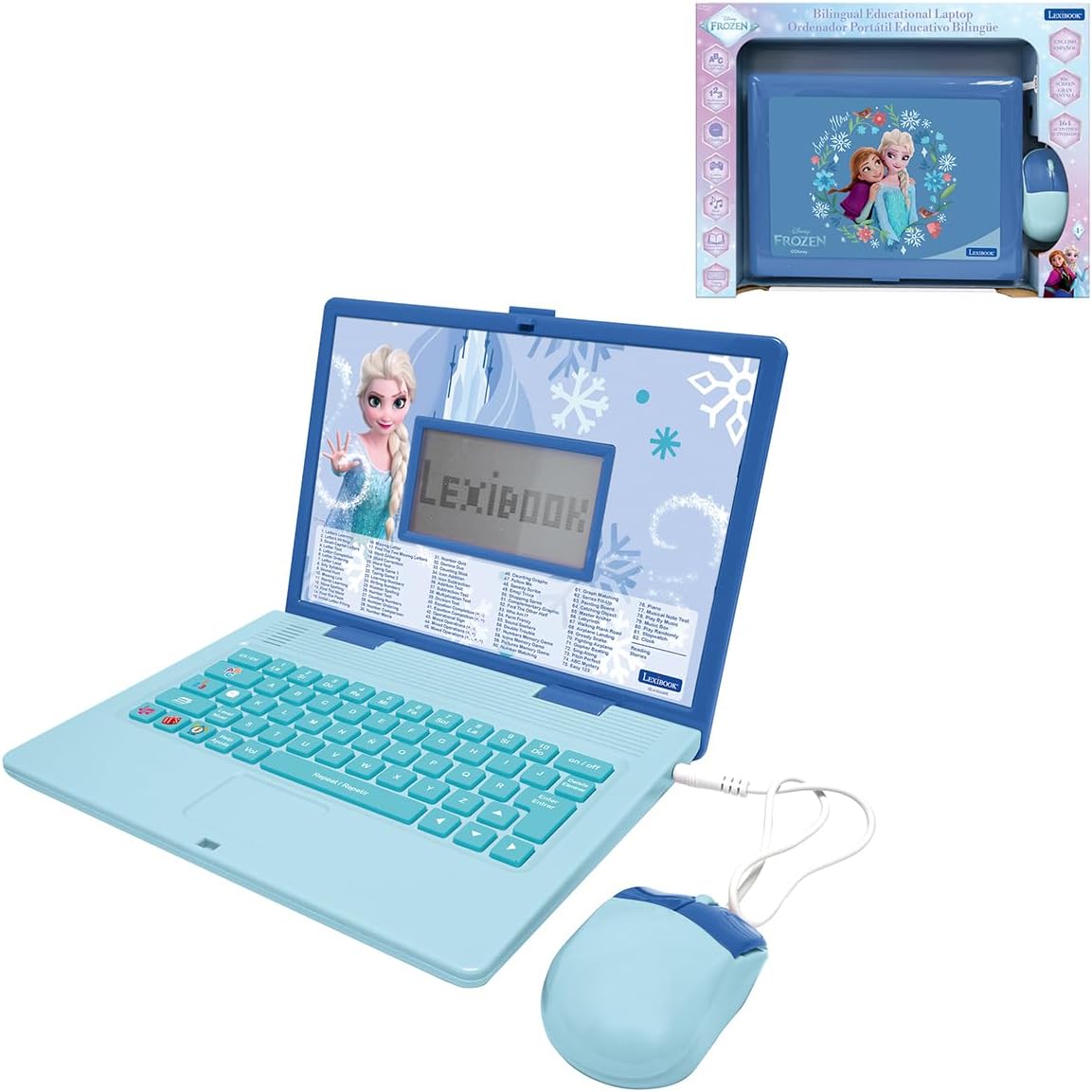
The LEXiBOOK Frozen Educational Laptop offers an impressive 164 activities with a focus on vocabulary and music. Though rated N/A, its strong activity count and bilingual features make it a compelling option for children who love the Frozen franchise while building language skills.
We may earn a commission when you buy through this link, at no additional cost to you.
Its lightweight design ensures easy portability for travel or car rides. Voice guidance helps children navigate menus independently while the clear LCD screen displays content effectively for extended learning sessions.
Trade-offs include potential screen contrast issues and limited public information on the specific model's technical reliability. However, the sheer volume of activities ensures plenty of content to keep children entertained for weeks.
We recommend this laptop for families seeking a budget-friendly way to combine theme love with education. It is ideal for home use where screen time is monitored and a variety of activities is preferred over high-end features.
Over one hundred activities mean children can revisit favorites and discover new ones without getting bored quickly.
Lightweight construction makes it easy to carry to grandparents or vacation spots without adding bulk.
We may earn a commission when you buy through this link, at no additional cost to you.
Selecting the right laptop for a five year old involves balancing educational content, physical durability, and screen safety. This guide outlines key factors to consider when evaluating different models.
Ensure the device offers age-appropriate activities that cover literacy, numeracy, and creative skills. Look for models with diverse modes such as math, language, and music to provide a well-rounded learning experience.
Prioritize devices with structured lessons that adapt to a child's progress rather than those with static repetitive tasks.
Choose a screen size that is large enough for clear visuals but small enough for small hands to manage easily. TFT or LCD screens with bright colors improve engagement and reduce eye strain during extended play.
Opt for displays with protective films or shatter-resistant designs to ensure longevity and safety during daily use.
Consider whether the device uses AA batteries or a rechargeable lithium-ion battery. Rechargeable options reduce long-term costs and environmental waste while AA batteries offer convenience for travel where charging ports may be limited.
Check battery life ratings to ensure the device lasts through typical play sessions without frequent interruptions.
Look for ruggedized designs with reinforced corners and bumpers to withstand drops and spills. A sturdy build ensures the device remains functional despite the rough handling common with young children.
Materials should be non-toxic and easy to clean to maintain hygiene in shared family environments.
Decide between offline pre-loaded content and WiFi-enabled models. Offline devices provide a safe environment with no risk of accidental web browsing while connected models offer access to a wider range of educational apps.
If choosing WiFi enabled devices ensure robust parental controls are in place to manage app access and screen time.
Evaluate whether the keyboard is full-size QWERTY or simplified with large keys. A full keyboard helps develop typing skills while simplified keys reduce frustration for younger learners.
Consider models with touch screens or stylus support if your child benefits from interactive drawing or writing activities.
Review available parental control features that allow monitoring of usage time and content access. Models with profile customization and app restrictions provide a safer environment for independent play.
Look for systems that offer reports on learning progress to help parents track development over time.
If your family values language diversity consider devices offering bilingual content in English and Spanish. This feature exposes children to multiple languages without requiring additional purchases or subscriptions.
Check that both languages are well-supported with clear audio and accurate translations to avoid confusion.
Start by setting up any personal profiles or customization options available on the device to engage your child immediately. Insert batteries fully or charge the device completely before the first session to avoid interruptions during initial setup.
Establish a routine of supervised play sessions where you explore learning modes together to reinforce concepts. Use parental controls to limit screen time and ensure the child balances digital activities with physical play.
Clean the screen and keyboard regularly with a dry microfiber cloth to remove dust and grime. Store the laptop in a cool dry place away from direct sunlight to preserve battery life and screen quality over time.
Learning laptops are typically designed for children aged two to eight years depending on the complexity of the content. For five year olds, models with keyboard input and structured lessons work best to support pre-kindergarten and kindergarten skills.
Most toy laptops operate offline with pre-loaded content which is ideal for safety and ease of use. However, some advanced models offer WiFi access for additional apps but require careful parental supervision to ensure appropriate usage.
Battery life varies by model and usage intensity but generally ranges from four to ten hours on a full charge or fresh batteries. Rechargeable models often provide longer continuous use while AA battery models are convenient for travel.
Yes, reputable brands design learning laptops with safety in mind using non-toxic materials and rounded edges. Always supervise younger children to prevent choking hazards from small parts or battery compartments.
Toy laptops usually cannot have apps added as they are pre-loaded by the manufacturer. Advanced tablets or laptop hybrids may allow app installations via app stores but require specific setup and parental controls.
Learning laptops focus on foundational skills such as alphabet recognition, counting, logic, music, and basic problem-solving. Some models also introduce early typing skills and bilingual language exposure to prepare children for school.
Many devices come with protective films that should remain on during regular use. Additionally, using a protective case and storing the laptop in a soft pouch can prevent accidental damage to the display.
Most modern learning laptops include basic parental controls to manage usage time or lock specific features. Advanced models offer detailed monitoring of activity progress and content restrictions for a safer digital environment.
We highlighted top picks like the LeapFrog 2-in-1 LeapTop Touch and VTech Play Smart Preschool Laptop for their balanced blend of durability and educational value. These models stand out for their ability to engage children while maintaining safety and ease of use.
Prioritize devices that offer age-appropriate content with diverse learning modes to support holistic development. Consider whether your child benefits more from a simple offline toy or a more advanced connected device before making your choice.
Remember to check current availability and product specifications before purchase as details may change over time. Investing in a quality learning laptop now can provide years of educational entertainment and skill building for your child.