
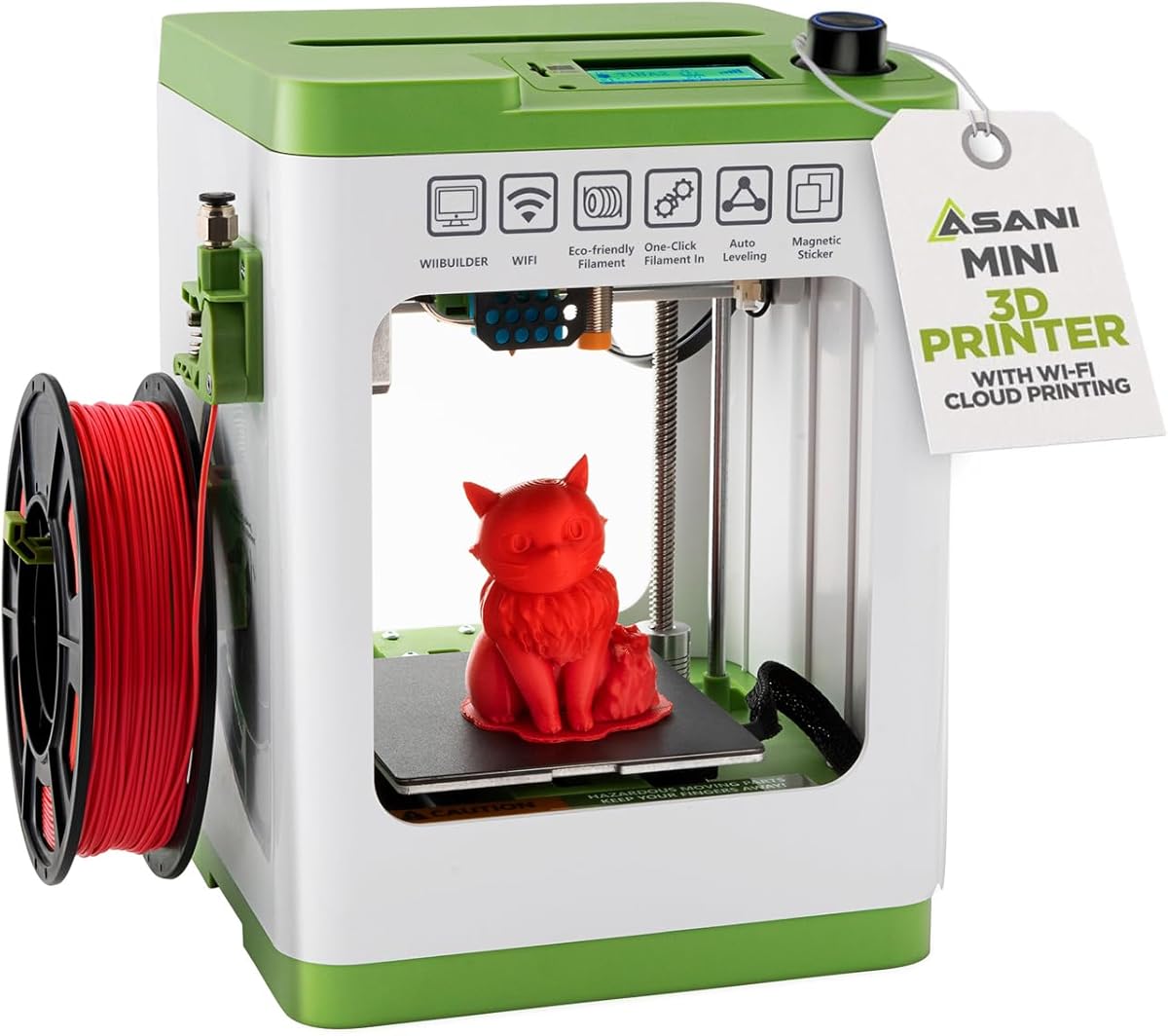
Entina Tina2C 3D Printer
4.4Editor score
App and WiFi control
Auto leveling included
Compact mini size
This guide compares the ten easiest 3D printers for beginners, highlighting auto-leveling, setup speed, and user-friendly features for hassle-free creative
Finding a printer that simplifies creation is essential for newcomers. Look for models with auto-leveling, quick setup, and intuitive controls to ensure your first print succeeds without frustration.
We evaluated ten top models based on ease of use, calibration features, and community support. Our analysis focuses on beginners who value reliability and speed over complex technical tuning or manual adjustments.
Each pick highlights specific strengths like multi-color options or compact sizes. Note that prices change frequently, so verify current deals before purchasing to ensure you get the best value for your needs.
4.4Editor score

4.7Editor score

4.5Editor score
This side-by-side comparison reviews ten top models to help you choose the right machine for your home or studio based on specific ease-of-use features.





The Bambu Lab A1 3D Printer is a top choice for beginners due to its ready-to-use nature and high speed. It holds a rating of 4.7, reflecting its reliability and precision in home environments.
We may earn a commission when you buy through this link, at no additional cost to you.
Its standout features include full-auto calibration and active flow rate compensation. This means you avoid manual leveling hassles and get consistent prints. The multi-color printing with AMS lite unlocks vibrant creative possibilities easily.
Trade-offs include the need to buy the AMS lite separately for multi-color prints. However, the cost is justified by the speed and ease of use compared to other models in the market.
Buy this if you want a printer that handles setup automatically. It is ideal for those who prioritize speed and convenience while learning the ropes of 3D printing without frustration.
The A1 handles calibration automatically so you can start printing immediately without manual adjustments.
Multi-color capabilities bring your designs to life with vibrant details right out of the box.
We may earn a commission when you buy through this link, at no additional cost to you.
The FLASHFORGE Adventurer 5M is a powerful option for those seeking speed and automation. It offers a CoreXY structure and high-speed printing up to 600mm/s for efficient production cycles.
We may earn a commission when you buy through this link, at no additional cost to you.
Its one-click automatic printing and fast warm-up reduce wait times significantly. The mobile app allows for remote monitoring, which is useful for checking on long prints from anywhere in the house.
However, the rating is slightly lower than other top picks. Some users may find the app interface less intuitive initially, though it offers robust control once configured correctly.
Choose this if you need a fast machine for prototyping. It balances performance with ease of use, provided you are comfortable with the digital controls and mobile integration.
The high-speed CoreXY design allows you to complete prototypes much faster than standard printers.
Use the mobile app to track progress and adjust settings without needing to stand by the machine.
We may earn a commission when you buy through this link, at no additional cost to you.
The Bambu Lab A1 mini is designed to make 3D printing easy from day one. It includes an LED Lamp Kit to inspire creative light projects right out of the box.
We may earn a commission when you buy through this link, at no additional cost to you.
Automatic calibration and simple setup ensure a smooth start. Access to MakerWorld provides a library of ready-to-print models, making it perfect for beginners who want to dive into creation quickly.
Its compact size is great for small spaces like bedrooms or offices. While the print volume is smaller, it maintains high quality and speed for everyday DIY projects.
Ideal for hobbyists with limited space. The included LED kit adds immediate value, making it a fun gift or starter tool for creative individuals.
This mini printer fits easily on a desk without sacrificing print quality or speed capabilities.
Access thousands of tested models online to start printing immediately without designing from scratch.
We may earn a commission when you buy through this link, at no additional cost to you.
The Bambu Lab P1S offers a fully enclosed design that improves performance for advanced filaments. It is ready to use with auto bed leveling making 3D printing very easy.
We may earn a commission when you buy through this link, at no additional cost to you.
Users can set it up in about 15 minutes, saving time on assembly. The high-speed capabilities allow you to focus on creating rather than waiting for prints to finish.
The price is higher than entry-level options, but the enclosed build and speed justify it for serious makers. It supports a wide range of filaments including PETG and TPU.
Select this for professional-grade results at home. The enclosed body ensures quality and safety while maintaining user-friendly operation for all skill levels.
A fully enclosed body ensures better results with advanced materials and maintains consistent temperatures.
Assembly takes only fifteen minutes so you can start printing almost immediately after unboxing.
We may earn a commission when you buy through this link, at no additional cost to you.
The AOSEED AI 3D Printer is designed for kids with features that make creativity simple. It allows children to create custom models using voice or text prompts via its AI tools.
We may earn a commission when you buy through this link, at no additional cost to you.
Safety is prioritized with an enclosed, pinch-resistant design. The built-in camera lets parents monitor progress remotely, adding peace of mind during creative sessions.
It comes with an all-in-one kit including filament and tools. While it supports only single-color printing, the ease of use and safety features make it ideal for families.
Perfect for STEM education at home. The AI tools spark imagination without needing design skills, making 3D printing accessible for young creators.
Kids can turn doodles into 3D models using voice or text commands without needing design software.
Safety features and simple controls allow parents and kids to enjoy 3D printing together safely.
We may earn a commission when you buy through this link, at no additional cost to you.
The Entina Tina2C is designed for beginners to start printing in as fast as 8 minutes. It comes fully assembled so there is no frustration with setup or assembly.
We may earn a commission when you buy through this link, at no additional cost to you.
You can control it via app or WiFi and access over 3500 models. The auto leveling feature ensures better first-layer adhesion for consistent results every time.
Its compact size is ideal for classrooms or small desks. While the print volume is limited, it is perfect for learning the basics of 3D printing without big costs.
Great for STEM learning and first projects. The combination of ease of use and educational content makes it a top budget choice.
Regularly updated STEM courses help children learn while they create with the included creative modules.
Supports both online printing and offline card modes for flexible learning and creative workflows.
We may earn a commission when you buy through this link, at no additional cost to you.
The FLASHFORGE AD5M combines new technology and craftsmanship for reliable prints. It features a fully automatic one-click leveling system for precise nozzle-to-plate distance.
We may earn a commission when you buy through this link, at no additional cost to you.
Its CoreXY all-metal structure ensures durability and stability. The quick-release nozzle simplifies maintenance which is a huge plus for beginners who might struggle with repairs.
It also includes a resume feature after power outages. This reduces material waste and saves prints that would otherwise fail during interruptions.
Choose this for durability and ease. The tool-free maintenance features make it a long-term solution for those who value reliability in their printing workflow.
The all-metal CoreXY structure ensures high-speed printing without compromising quality or stability.
Nozzle swapping takes seconds so you can change settings quickly without special tools.
We may earn a commission when you buy through this link, at no additional cost to you.
The TINA2S is a complete starter kit that comes with everything needed to start printing. It is fully assembled so you avoid issues with incorrect setup.
We may earn a commission when you buy through this link, at no additional cost to you.
Its compact size fits perfectly on desks or in classrooms. The auto leveling and dual z-axis rails ensure high-precision prints right out of the box.
Open source printing allows compatibility with many slicing software. This provides flexibility for users who want to experiment with different settings and features.
Ideal for schools and new users. The inclusion of filament and tools in the box makes it a true all-in-one solution for beginners.
The fully assembled design ensures you can start printing immediately without any assembly tools.
Compatible with Windows and macOS slicing software for open source freedom and customization.
We may earn a commission when you buy through this link, at no additional cost to you.
The Creality Ender 3 V3 SE is a beginner-friendly option with auto leveling included. It features a CR Touch system for reliable first layers without manual adjustments.
We may earn a commission when you buy through this link, at no additional cost to you.
Its Sprite Direct Drive Extruder supports a wide range of materials. The stable motion system helps reduce vibration for consistent quality over long prints.
It operates quietly thanks to a 32-bit silent mainboard. This makes it suitable for home environments where noise could be a distraction.
Choose this for value. The combination of speed and auto features at this price point makes it a strong contender for those on a budget.
The silent mainboard ensures a comfortable printing experience in home or office spaces.
The proven direct drive design supports consistent filament feeding for reliable prints.
We may earn a commission when you buy through this link, at no additional cost to you.
The Anycubic Kobra X stands out with native multicolor capabilities. It comes with four colors built-in and can expand to nineteen colors for vibrant designs.
We may earn a commission when you buy through this link, at no additional cost to you.
Its LeviQ 3.0 leveling system ensures flawless first layers. The smart AI monitoring detects issues like spaghetti to prevent print failures remotely.
The large model library offers over 100,000 choices. Dual-band WiFi connectivity allows for stable remote control via the Anycubic App.
Buy this for colorful projects. The advanced features and multicolor capability make it a top choice for those wanting to push creative limits.
Native four-color printing allows for multi-colored designs without complex setups.
AI detection features prevent failures by catching issues early during the print process.
We may earn a commission when you buy through this link, at no additional cost to you.
Selecting the right printer involves understanding key features that simplify operation and maintenance.
Auto leveling ensures the build plate is perfectly flat before printing. This eliminates manual adjustments which are often the cause of failed prints.
Always choose models with fully automatic leveling systems for the smoothest experience.
Look for printers that can be assembled in minutes. Fully assembled models save time and reduce the risk of incorrect setup.
Prioritize options labeled ready-to-use or quick-start for immediate creativity.
Faster printing reduces wait times for your projects. High acceleration and travel speeds allow you to complete prototypes quickly.
Ensure the speed does not compromise print quality or material consistency.
User-friendly apps and libraries simplify the process. Access to pre-tested models means less work designing from scratch.
Choose printers with active communities and easy cloud integration.
Consider the size of objects you want to print. Larger volumes are great for projects but require more desk space.
Match the build volume to your typical project size to avoid wasted space.
For households with kids, safety features like enclosed designs are vital. These prevent contact with hot parts and reduce fume exposure.
Always verify safety certifications if printing around children.
Quiet operation is important for home use. Loud motors can be distracting in a living space or bedroom.
Look for models with silent boards and noise-canceling features.
Easy maintenance ensures long-term reliability. Quick-swap nozzles and tools make upkeep simple for everyone.
Simpler tools for maintenance lead to fewer failed prints.
Start by loading your filament carefully using the auto-loading buttons provided. Ensure the spool is secured to prevent tangles during the print process.
Regularly clean the nozzle and build plate to maintain adhesion. Use a soft brush or alcohol wipe to remove residue after prints are finished.
Keep the software updated to access new features and bug fixes. This ensures your printer runs smoothly and securely on your network.
The Bambu Lab A1 is considered the easiest due to its fully automatic calibration. It handles all setup steps for you so you can focus on creating.
Many modern models come fully assembled. Check the product description for fully assembled keywords to avoid complex setup processes.
Times vary based on object size and speed. Fast printers can finish small projects in under an hour with high-speed settings enabled.
Yes if you choose enclosed models designed for safety. These prevent contact with hot parts and reduce fume risks significantly.
PLA is the most common and easiest material for beginners. It does not require a heated bed and prints cleanly without fumes.
Most modern printers connect via WiFi and a mobile app. This allows you to monitor prints remotely and adjust settings from your phone.
Some models like the Anycubic Kobra X offer native multi-color support. Others may require additional modules for multi-color capabilities.
Auto leveling measures the bed to ensure it is flat. This prevents failed prints caused by uneven surfaces without manual adjustment.
The top picks like the Bambu Lab A1 and Tina2C offer excellent balance of ease and performance. They ensure your first prints succeed with minimal effort or technical knowledge required.
Prioritize models with auto leveling and app control to reduce frustration. These features are essential for a smooth experience regardless of your skill level.
Always check current prices and availability before buying. Deals change frequently so verify the latest offers to secure the best value for your budget.