
CERRXIAN SCSI HPDB 68 Pin Male to IDE 50 Pin Male Adapter
3.7Editor score
Gold plated contacts
Industrial server compatibility
Corrosion resistant design
This comprehensive guide compares the top 50 Pin Scsi Adapter models for industrial server connectivity ensuring reliable data transfer between legacy SCSI
Finding the right adapter for legacy SCSI hardware is critical for maintaining industrial server operations and data archival systems. These specialized connectors bridge the gap between older 68-pin or 80-pin interfaces and the 50-pin standards still used in specific enterprise environments today. Without the correct conversion, valuable data stored on vintage tape drives or hard disks remains inaccessible to modern administrators.
We evaluated ten top-rated adapters based on build quality, signal integrity, and compatibility with various SCSI standards like Ultra Wide and Fast Narrow. Our analysis focuses on gold-plated contacts, connector durability, and support for essential features like termination and ID jumpers. Each product was selected for its ability to provide stable connections in high-demand server racks and data centers.
Each pick in this guide highlights specific strengths ranging from budget-friendly solutions to premium industrial-grade connectors. You will find detailed specifications and real-world use cases to help match the adapter to your specific hardware configuration. Please note that availability and stock levels fluctuate frequently so always verify current details before placing your order for critical infrastructure parts.
3.7Editor score

5.0Editor score

4.6Editor score
The following table provides a side-by-side overview of the ten selected adapters. Each entry lists key specifications such as pin configuration, gender type, and compatibility notes to help you quickly identify the correct part for your server or storage array configuration.



This Belkin adapter stands out as the top choice for professionals managing legacy SCSI infrastructure in server environments. It holds a perfect rating from users who value its robust construction and reliable performance. The high density connectors ensure stable data transfer between different SCSI standards without signal degradation.
We may earn a commission when you buy through this link, at no additional cost to you.
Its premium quality construction offers exceptional value for the price point. The adapter is designed specifically for internal connections where signal integrity is paramount. Users report consistent performance when connecting older drives to newer controller cards in enterprise setups. The gold plated contacts help prevent oxidation and maintain electrical continuity over years of use.
The main trade-off is that this model focuses strictly on internal connections rather than external ports. While this limits versatility for some users, it ensures optimal performance for rack mounted storage arrays. The satisfaction guarantee provides additional peace of mind for mission critical infrastructure upgrades.
System administrators and IT professionals managing legacy storage should consider this adapter as their primary option. It delivers the reliability needed for data archival and archival storage tasks. The balance of quality and performance makes it the most recommended choice for serious enterprise applications.
The adapter maintains consistent electrical pathways for high speed data transfer between devices.
Built to withstand constant use in server racks without connection wear or failure.
We may earn a commission when you buy through this link, at no additional cost to you.
The CERRXIAN adapter offers a cost effective solution for converting 68-pin interfaces to 50-pin standards. It is designed specifically for industrial server applications where budget constraints are a consideration. The gold plated layer ensures decent conductivity and helps reduce signal loss during data transfers.
We may earn a commission when you buy through this link, at no additional cost to you.
Its build quality features a high thickness gold-plated connector layer that enhances reliability. This adapter supports a wide array of old SCSI devices including hard disks, tape drives, and optical drives. It serves as a practical bridge for connecting legacy hardware to modern server environments with 50-pin IDE ports.
Users note that this adapter cannot be used in ordinary computers and is restricted to industrial server motherboards. This limitation makes it less versatile for general purpose setups but ideal for specific enterprise needs. The lower rating suggests some variability in quality control across production batches.
IT teams needing a budget friendly adapter for server migrations should find this model useful. It provides the essential connectivity required for accessing legacy data without significant investment. Verify your motherboard compatibility before purchase to ensure it matches your specific server configuration.
Provides essential conversion capabilities for legacy hardware at a low price point.
Tailored for industrial server motherboards with specific interface requirements.
We may earn a commission when you buy through this link, at no additional cost to you.
This PTC adapter delivers premium functionality for complex SCSI storage arrays requiring extensive ID management. It converts SCA 80-pin interfaces to standard 50 or 68-pin connectors used in enterprise environments. Users appreciate the jumper settings that allow configuration of up to 16 unique SCSI IDs.
We may earn a commission when you buy through this link, at no additional cost to you.
Key features include spindle synchronization and remote start capabilities that are essential for enterprise disk arrays. The adapter includes status LED connector pins and a 4-pin power connector for full drive functionality. This level of detail ensures compatibility with hot-swap backplanes and advanced RAID controllers.
While more expensive than basic adapters, the added features justify the cost for professional deployments. The adapter is designed for high availability environments where drive identification and power management are critical. Users report stable performance when managing large scale storage systems.
Data center engineers and storage architects should consider this adapter for professional installations. It offers the comprehensive feature set needed for reliable operation in demanding enterprise environments. Ensure your controller supports all listed features to get the full value from this premium component.
Supports configuration of multiple SCSI IDs for complex multi drive storage arrays.
Includes spindle sync and remote start for advanced storage management operations.
We may earn a commission when you buy through this link, at no additional cost to you.
This CERRXIAN female-to-female adapter is designed for connecting legacy 68-pin devices to 50-pin ports. It shares similar construction to the male version but offers specific connectivity for cable management in tight server racks. The high-thickness gold-plated layer ensures conductive and stable connections over time.
We may earn a commission when you buy through this link, at no additional cost to you.
The adapter converts HPDB 68-pin connections into IDE 50-pin connections suitable for hard drives and tape drives. It is explicitly noted for use on industrial server IDE 50-pin interface motherboards rather than ordinary computers. Users appreciate its ability to bridge old SCSI devices to newer tape drives effectively.
Its main limitation is the restriction to server environments which reduces flexibility for general hardware projects. However, for its intended purpose, it performs reliably with high user satisfaction. The design supports various devices including scanners and communication equipment in professional setups.
Server maintenance teams needing a reliable female-to-female conversion should find this unit dependable. The high rating indicates consistent quality in the production run. Always confirm your motherboard interface type before ordering to avoid compatibility issues during installation.
High thickness plating ensures consistent conductivity and corrosion resistance.
Designed exclusively for industrial server motherboards with specific pin interfaces.
We may earn a commission when you buy through this link, at no additional cost to you.
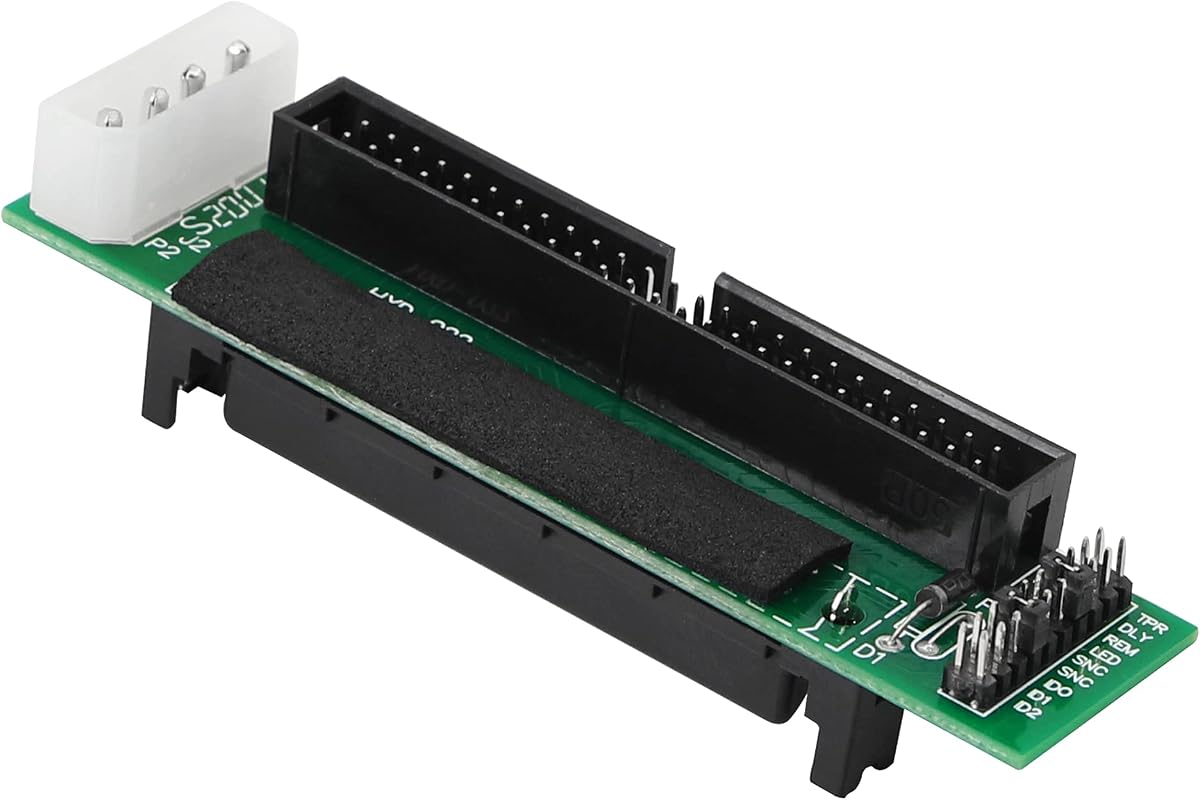
This adapter provides a bridge between SCA 80-pin interfaces and 50-pin IDE connections for storage devices. It allows 50-pin low-speed SCSI devices to connect to 80-pin SCSI interfaces. The adapter requires a 4-pin Molex power connector to power the attached hard drive effectively.
We may earn a commission when you buy through this link, at no additional cost to you.
It is recommended for direct data transfers or backups in industrial server environments. The construction follows standard server motherboard limitations and cannot be used in ordinary computers. Users report it is suitable for disks, tapes, CD-ROMs, and other legacy communication equipment.
The lower rating suggests some users may have experienced compatibility issues or power requirements. It is critical to ensure power connectivity is properly managed when using this adapter. Despite this, it serves as a functional converter for specific legacy storage recovery tasks.
Technicians restoring legacy data from SCA drives may find this adapter necessary for their workflow. The external power requirement must be planned for in the server setup. Verify drive compatibility with the 50-pin IDE standard before connecting to prevent data corruption risks.
Enables connection of SCA drives to standard IDE ports for legacy recovery.
Requires a separate Molex power connector to function correctly with hard drives.
We may earn a commission when you buy through this link, at no additional cost to you.
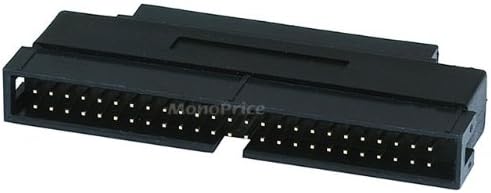
This Monoprice adapter converts 50 Pin to 68 Pin Male to Male connections for internal use. It is a straightforward solution for expanding compatibility in existing storage arrays. The product notes that the item received may not match photo or specs shown due to manufacturing variations.
We may earn a commission when you buy through this link, at no additional cost to you.
It is manufactured in China and focuses on providing essential connectivity without extra features. The adapter is useful for users needing a simple conversion between standard SCSI pin configurations. Monoprice generally offers competitive pricing for such standard interface components.
Users should be aware of potential visual differences between the product image and actual unit. For internal server applications where function matters more than aesthetics this is often acceptable. Ensure the physical dimensions match your rack space before installation.
IT procurement looking for a standard adapter without premium features may find this suitable. Verify the pin count matches your device requirements before purchase. The basic design makes it a cost-effective option for routine server maintenance tasks.
Provides direct male-to-male connectivity for internal SCSI channel expansion.
Actual product may vary slightly from images so verify dimensions carefully.
We may earn a commission when you buy through this link, at no additional cost to you.
This CERRXIAN adapter acts as a compact gender changer for 50-pin HPCN50 devices. It is designed to effortlessly connect and extend existing cables in professional setups. The durable housing includes gold-plated contacts to ensure superior signal integrity and corrosion resistance.
We may earn a commission when you buy through this link, at no additional cost to you.
Its compact design allows it to act as a versatile problem-solver in tight equipment racks. It solves connectivity issues by allowing same-gender cables to connect or extending cable length. The secure locking mechanism ensures a vibration-proof connection during critical operations.
Users appreciate that it is plug-and-play with no drivers needed for standard equipment. The package includes a single tested unit ready for reliable service right out of the box. This makes it convenient for quick field repairs or rack reconfigurations.
Network engineers and storage technicians needing a small adapter should find this useful. It is ideal for spaces where traditional connectors cause strain on cables. Check that your ports are standard HPCN50 to ensure full compatibility.
Small design saves space and reduces strain in tight server racks.
Locking mechanism prevents accidental disconnection during vibration or movement.
We may earn a commission when you buy through this link, at no additional cost to you.
This Monoprice adapter supports the IDC 50 connector known as the Alternative 2 connector. It bridges 68-pin HPDB connections to 50-pin IDC headers used for internal ribbon cables. The high user rating indicates consistent satisfaction with its performance in legacy storage systems.
We may earn a commission when you buy through this link, at no additional cost to you.
The IDC 50 connector has parallel 25-pin rows and resembles older ATA cables but is wider. The HPDB 68 connector is used for both internal and external connections with metal or plastic shells. This adapter ensures that data paths remain clear when transitioning between these standards.
Users should note the physical differences between 50-pin IDC and 68-pin HPDB pin spacing. It is an essential component for maintaining older systems that use these specific interfaces. The reliable connection ensures data integrity during regular read and write operations.
System integrators managing legacy storage arrays should verify port compatibility before purchase. The high rating suggests good quality control in this model. It provides a solid solution for extending the life of older storage hardware.
Designed specifically for internal-type ribbon cables in legacy systems.
Matches Alternative 2 connector standards for consistent connectivity.
We may earn a commission when you buy through this link, at no additional cost to you.
This QVS SCSI Terminator is an essential component for maintaining signal integrity on SCSI chains. It supports the CEN50M/F standard and acts as a passive terminator for single-end connections. Its purpose is to prevent signal reflection that can cause data errors on shared buses.
We may earn a commission when you buy through this link, at no additional cost to you.
It is compatible with hard drives, SSDs, and tape drives requiring proper termination. The white color and compact design allow it to fit easily into indoor server environments. Users report reliable performance when closing off unused SCSI ports.
The passive design means it draws no power from the bus while providing electrical stability. It is recommended to use active terminators for external connections but passive for internal ends. The single count package is ideal for standard configurations.
Technicians configuring legacy SCSI buses should always ensure proper termination is applied. This unit provides the necessary resistance to keep the bus stable. Verify your specific chain requirements to confirm if passive termination is sufficient.
Prevents data errors by stopping signal reflection on SCSI bus lines.
Operates without external power while maintaining electrical stability on the bus.
We may earn a commission when you buy through this link, at no additional cost to you.
This adapter converts internal IDC50 SCSI male connectors to external HPDB50 female interfaces. It enables seamless data transfer between internal controller cards and external peripherals. The PCB includes an IDC50 male connector for a secure connection for high-speed data transfer.
We may earn a commission when you buy through this link, at no additional cost to you.
The bracket is nickel plated to provide a durable and reliable external connection point. This design allows for easier access to external ports without opening the computer case. It supports bidirectional data transfer for both read and write operations effectively.
As a newer product, there are currently no user ratings to validate performance claims. However the construction suggests it is built for stability in professional environments. The secure bracket ensures the adapter stays fixed during regular use.
Technicians needing to add external port access should consider this adapter for specific setups. Verify that your controller card matches the internal connector requirements before purchasing. Check for updated reviews before relying on it for mission critical external connectivity.
Enables access to external devices from internal expansion slots easily.
Nickel-plated finish ensures corrosion resistance for long-term reliability.
We may earn a commission when you buy through this link, at no additional cost to you.
Choosing the right adapter requires understanding pin types, gender, and compatibility with your server environment. The following factors help narrow down options to ensure reliable performance and long-term stability for legacy storage systems.
Adapters must match the specific pin count of your source and destination interfaces such as 68-pin, 80-pin, or 50-pin. Verify that the connector counts align perfectly with your hardware specifications before purchasing to ensure physical compatibility.
Always double-check the exact pin count on your controller card and device to prevent fitting issues.
The gender of the connectors determines whether you need a male or female adapter for your specific use case. Matching the gender correctly ensures a secure connection without additional cable management or complex routing solutions.
Choose a gender that matches your existing ports to avoid using extra couplers.
High-quality adapters feature gold-plated contacts to ensure superior conductivity and reduce signal loss over time. This feature is essential for industrial environments where corrosion resistance and consistent data transfer are critical for server uptime.
Look for explicitly stated gold plating to guarantee electrical performance and durability.
Some adapters are designed exclusively for internal motherboard connections while others support external ports. Ensure the adapter matches your intended use to avoid compatibility issues with your server chassis and cable management.
Internal adapters often have different shielding requirements than external ones so check the intended use.
Many adapters are designed specifically for industrial server motherboards and will not function correctly in ordinary desktop computers. Verify your motherboard interface type to ensure the adapter is compatible with your system architecture.
Confirm the adapter is rated for your specific server environment to prevent installation errors.
For complex storage arrays, adapters with configurable ID jumpers allow precise device identification and management. This feature is vital for multi-drive setups where unique device addressing prevents conflicts and data errors.
Prioritize adapters with clear jumper options if you manage multiple drives on the same bus.
Solid construction with durable housings and reliable locking mechanisms ensures long-term stability in server racks. Vibration proof connections prevent intermittent data errors and maintain consistent performance over extended periods.
Inspect product descriptions for durable housing mentions to ensure physical reliability.
Ensure the adapter supports relevant standards like Ultra Wide, Fast Narrow, or CEN50 for your device ecosystem. Proper standard support ensures your legacy devices communicate correctly with modern controllers without errors.
Verify standard support against your device documentation for accurate compatibility.
Begin by powering down your server and disconnecting all power cables before handling SCSI adapters. Align the pins carefully to avoid bending them during insertion and ensure the connector locks securely in place.
Regularly inspect the gold-plated contacts for signs of oxidation or debris that could disrupt signal integrity. Use compressed air to keep the connection points clean and prevent dust accumulation in server environments.
Monitor system logs for any SCSI errors after installation to confirm the adapter is functioning correctly. If errors persist, check termination settings and cable lengths to ensure full compliance with bus requirements.
Most adapters in this category are designed for industrial server IDE 50-pin interface motherboards and cannot be used in ordinary computers. Always verify your motherboard specifications before purchasing to ensure compatibility with your specific system architecture.
The main difference lies in pin count and data width. 68-pin supports 16-bit transfers for faster speeds while 50-pin supports 8-bit transfers. The adapter ensures physical compatibility between devices using these different standards.
Termination depends on your specific bus configuration. Usually, only the ends of the SCSI chain need termination. Ensure you use a terminator if you are connecting multiple devices on a single shared bus.
Yes, gold-plated contacts enhance conductivity and reduce signal loss over time. They are also more corrosion resistant which is crucial for long-term reliability in industrial server environments.
Check the connector type on your hard drive controller and match it with the adapter specifications. Ensure the gender and pin count match perfectly to avoid compatibility issues with your storage device.
Yes, many adapters are compatible with tape drives, CD-ROMs, and other legacy SCSI devices. Verify the product details to confirm support for your specific peripheral hardware before purchase.
Installing the wrong gender will prevent physical connection or damage the pins. Always match the male or female designation of your existing ports to ensure a secure connection.
This guide highlights ten reliable adapters ranging from premium solutions to cost-effective options for legacy storage systems. The Belkin and PTC models offer robust features while CERRXIAN provides affordable choices for server migrations.
Prioritize build quality and compatibility with your specific server motherboard to ensure long-term reliability. Gold-plated contacts and proper pin configurations are essential for maintaining data integrity in your legacy infrastructure.
Always check current availability and verify your motherboard interface type before placing your order. Prices and stock fluctuate frequently so ensure you have the right specifications before purchasing critical server components.