
ORICO 5.25 Trayless Hot Swap Mobile Rack
4.1Editor score
Tool-free mounting process
Supports SATA III up to 6 Gbps
Durable stainless steel construction
Finding the right storage solution is critical for modern computing environments. A hot swap sata mobile rack allows you to add or remove drives without shutting down your system, ensuring continuous operation and maximum uptime for your infrastructure.
We evaluated ten top-rated models based on build quality, compatibility, ease of use, and cooling performance. Each product was analyzed for its ability to support various drive sizes and maintain stability during frequent hot swapping operations in demanding settings.
Each pick below highlights specific strengths and ideal use cases for different users. While prices may fluctuate, these models represent the current market leaders. Always verify compatibility with your chassis before purchasing to ensure a perfect fit for your setup.
4.1Editor score

4.4Editor score

5.0Editor score
As an Amazon Associate we earn from qualifying purchases.
The following comparison table provides a quick overview of the key specifications for each of the ten products reviewed in this guide. This allows you to quickly identify which model matches your specific drive capacity and connectivity requirements.




The StarTech HSB100SATBK stands out as the top choice for users needing reliable single-bay storage expansion. Its trayless design allows for instant drive installation without tools, making it ideal for environments where quick data swaps are common. With a high insertion rating, it ensures longevity even with frequent use.
We may earn a commission when you buy through this link, at no additional cost to you.
Its internal rubber shock absorbers protect hard drives from physical damage during insertion and removal. The lockable bay adds a layer of security for sensitive data, while the solid aluminum construction aids in passive cooling. This model is particularly robust for enterprise or home server setups requiring consistent uptime.
While it only supports one drive, the ease of use often outweighs the capacity limitation for many users. The lack of trays reduces bulk and allows for bare drive insertion, which simplifies maintenance. However, users needing multi-drive redundancy should look at other models in this comparison.
We recommend this unit for technicians and IT professionals who prioritize speed and durability. Its compatibility with standard 5.25 inch bays makes it a versatile addition to most desktop cases. For those seeking a balance of security and performance, this remains the market leader.
The innovative trayless design eliminates the need for screws or separate enclosures, allowing for rapid hot swapping. This feature significantly reduces downtime during maintenance windows or data migration tasks.
Built with solid aluminum and rubber shock absorbers, this rack protects drives from wear and tear. The 50,000+ insertion rating ensures it withstands heavy daily use without degrading over time.
We may earn a commission when you buy through this link, at no additional cost to you.
The ICY DOCK MB522SP-B is engineered specifically for users working with 2.5 inch SSDs or HDDs. Its doorless design provides immediate access to drives, making it perfect for systems that require frequent hot swapping. The support for both SATA and SAS protocols increases its versatility across different server environments.
We may earn a commission when you buy through this link, at no additional cost to you.
Active Power Technology ensures that power is only supplied when a drive is detected, which saves energy and reduces heat generation. The built-in activity lights offer visual confirmation of drive status, helping users monitor operations without software. Its compact form factor fits neatly into a standard 3.5 inch drive bay.
However, this unit is optimized for smaller drives, which may limit its use for users with only 3.5 inch HDDs. The lack of trays means bare drives must be handled carefully to avoid connection issues. Despite this, the convenience of hot swapping makes it a strong contender for specific use cases.
This rack is ideal for mobile computers or industrial automation systems where space is at a premium. If you need to dock multiple small form factor drives quickly, this model delivers excellent performance. It bridges the gap between a simple adapter and a full mobile rack.
APT powers up individual LEDs only when a drive is installed. This feature not only saves energy but also helps in identifying which bays are active during troubleshooting or maintenance.
Supporting SAS 3.0 12Gbps ensures high-speed data transfer for enterprise-grade hardware. This compatibility makes it suitable for professional environments that rely on SAS drives for performance.
We may earn a commission when you buy through this link, at no additional cost to you.
The StarTech HSB220SAT25B transforms a single 3.5 inch bay into a dual-drive hot-sappable interface. It supports both SATA I/II/III, ensuring compatibility with legacy and modern drives. The aluminum construction provides robust protection while helping to dissipate heat effectively through its open-top design.
We may earn a commission when you buy through this link, at no additional cost to you.
Each drive slot features dedicated eject buttons and activity LEDs, making it simple to monitor and remove drives safely. The included SATA cables simplify installation, ensuring you have everything needed to start using the rack immediately. This is particularly useful for technicians who value convenience and speed.
One trade-off is the lack of trays, which requires users to handle bare drives with care during installation. The open-top design, while great for cooling, leaves drives exposed to dust in some environments. Regular cleaning may be necessary to maintain optimal performance over time.
This unit is perfect for professionals managing data centers or building storage servers on a budget. If you need to expand storage capacity without adding another chassis, this solution is efficient. It balances functionality and cost well for dual-drive needs.
Converting one 3.5 inch bay into two 2.5 inch slots maximizes storage density. This allows for RAID configurations or simple data expansion within a compact footprint.
The open-top design and vented slot divider maximize air flow. This passive cooling method helps prevent drive failure due to overheating during heavy workloads.
We may earn a commission when you buy through this link, at no additional cost to you.
The Kingwin Tray-Less Hot Swap Mobile Rack Cage is designed for users who need secure and easy access to dual 2.5 inch drives. Its key lock feature adds a layer of physical security, ensuring unauthorized personnel cannot remove critical drives. The non-scratch connectors protect your drives during frequent insertion cycles.
We may earn a commission when you buy through this link, at no additional cost to you.
Constructed with high-quality ABS and metal materials, this enclosure balances durability with effective heat dissipation. The support for both SATA and SAS interfaces makes it versatile for various systems. LED indicators provide clear visibility of power and drive activity status.
The trayless design allows for bare drive insertion, which can be tricky if the drive lacks protective casing. While the cage is sturdy, the ABS trays are removable and may need careful handling. However, the overall build quality and security features make it a strong choice.
This rack is ideal for enterprise systems where data security and accessibility are equally important. It fits perfectly into a 3.5 inch bay and is compatible with most PC and server cases. For security-conscious users needing flexible drive options, this model is highly recommended.
The built-in key lock ensures that only authorized users can access the drives inside. This feature is essential for public or shared workspaces where physical theft is a concern.
The metal and ABS material combination aids in maintaining ideal operating temperatures. Good heat management extends the lifespan of your drives and prevents unexpected shutdowns during high activity.
We may earn a commission when you buy through this link, at no additional cost to you.
The ICY DOCK MB326SP-1B is a premium solution for high-density storage needs, supporting six 2.5 inch drives in a single 5.25 inch bay. Its ExpressTray system allows for toolless installation while maintaining the stability of traditional trays. This unit is perfect for data centers or intensive home server setups.
We may earn a commission when you buy through this link, at no additional cost to you.
Equipped with dual upgradeable fans and three-speed control, it ensures optimal thermal performance even under heavy loads. Active Power Technology minimizes power consumption by powering only installed drives. The individual LED indicators provide clear status for each drive, simplifying monitoring tasks.
The main trade-off is the higher price and the requirement for a 5.25 inch bay, which limits compatibility with modern slim cases. However, for users who need massive capacity and reliability, the investment is justified. It represents the top tier of mobile rack engineering.
We recommend this model for professionals who prioritize capacity and cooling performance. If you need to expand storage without adding multiple enclosures, this rack is unmatched. Its robust features and perfect rating make it a standout choice for demanding environments.
Supporting six drives in one bay maximizes your storage density. This is ideal for RAID arrays or extensive backup needs that require a large number of hard drives.
Dual 40mm fans with speed control keep drives cool even in dense configurations. This active cooling ensures drives run at optimal temperatures, reducing the risk of overheating.
We may earn a commission when you buy through this link, at no additional cost to you.
The ICY DOCK ExpressCage MB324SP-1B offers a solid four-bay solution for users needing more capacity than a single or dual rack provides. Its durable metal enclosure and heavy-duty trays ensure stability during operation. The locking latch design secures connectors, preventing accidental disconnections during drive swaps.
We may earn a commission when you buy through this link, at no additional cost to you.
Individual blue LED indicators allow for precise monitoring of each drive's status. The three-speed fan control helps manage noise and cooling efficiently. This model supports both SATA and SAS interfaces, making it adaptable to various server architectures.
Unlike some higher-end models, it lacks Active Power Technology, meaning all drives may consume power even if idle. However, the build quality and connector security are excellent. It is a reliable choice for users who need four drives without the bulk of a full chassis.
This unit is suitable for cloud computing storage or media servers where moderate capacity and reliability are key. The metal construction helps with heat dissipation, extending the life of your hardware. For balanced performance and storage, this remains a strong contender.
Locking latches on both data and power connectors ensure a secure fit. This reduces the risk of connection loss during hot swapping, maintaining data integrity and system stability.
The metal enclosure combined with ABS trays provides a sturdy and reliable structure. This design helps in dissipating heat and protecting drives from physical stress during frequent use.
We may earn a commission when you buy through this link, at no additional cost to you.
The ORICO 5.25 Trayless Hot Swap Mobile Rack is an affordable option for users seeking basic drive access. Its tool-free mounting process makes installation quick and simple for home users. The stainless steel construction ensures durability and good heat dissipation at a budget-friendly price.
We may earn a commission when you buy through this link, at no additional cost to you.
It supports all 3.5 inch SATA drives, providing flexibility for users with mixed drive types. The on/off button adds convenience, allowing you to toggle connection status without physical disconnection. It detects automatically under major Windows operating systems, simplifying setup.
While it lacks advanced features like Active Power Technology, its simplicity is its strength. It is a straightforward adapter that does the job well for occasional use. However, frequent hot swapping may lead to wear on the basic connectors over time.
We recommend this model for casual users or home setups with limited budgets. If you need to swap drives occasionally without spending much, this unit is perfect. It balances cost and functionality well for simple storage needs.
At a low cost, this rack offers essential hot swap functionality. It is an excellent entry point for those new to mobile racks who want to test the concept without a large investment.
The durable stainless steel construction helps dissipate heat effectively. This material choice ensures the unit remains robust even in demanding home or office environments.
We may earn a commission when you buy through this link, at no additional cost to you.
The Rosewill RSV-SATA-Cage-34 offers a unique solution by converting three optical drive bays into four 3.5 inch drive slots. This maximizes storage capacity without needing a larger chassis. Its rugged design combines steel and ABS materials to ensure years of reliable use in tough conditions.
We may earn a commission when you buy through this link, at no additional cost to you.
A single rear 120mm exhaust fan provides effective airflow, which is crucial when housing multiple mechanical hard drives. The support for SAS 6Gbps adds professional-grade capabilities to this unit. It is ideal for systems that need to house many drives but have limited space.
The main challenge is that it requires three contiguous drive bays, which might not be available on all cases. Installation can also be more involved compared to single-bay options. However, the storage density and cooling make it a valuable tool for data centers.
This enclosure is best for users who need significant storage expansion quickly. It is perfect for legacy systems that still have multiple optical drive slots. If you need a high-capacity solution and have the physical space, this is a practical choice.
Turning three optical bays into four hard drive slots maximizes the use of internal space. This allows for significant storage expansion without replacing the entire system chassis.
The 120mm exhaust fan ensures that all drives remain cool during operation. Effective cooling is essential for maintaining drive health and preventing data loss due to overheating.
We may earn a commission when you buy through this link, at no additional cost to you.
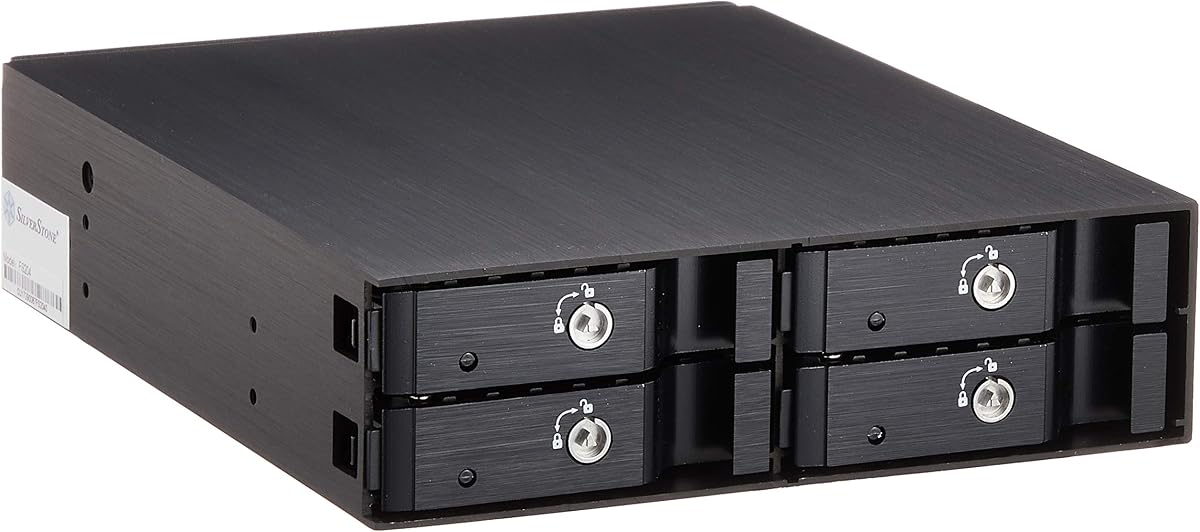
The Silverstone SST-FS204B is a premium mobile rack known for its high-quality aluminum body and aesthetic finish. It holds four 2.5 inch drives securely, with individual metal key locks for each bay. This design ensures that unauthorized personnel cannot access the drives without a key.
We may earn a commission when you buy through this link, at no additional cost to you.
A built-in cooling fan provides necessary airflow to keep the drives running within safe temperatures. The all-aluminum construction helps in heat dissipation and provides a durable, long-lasting build. It fits into any standard 5.25 inch drive bay, making it easy to install.
While the price is higher than other options, the build quality and security features justify the cost for professional use. The individual locks are rare in this category, adding significant value for shared or public environments. It is a top choice for those who value security and design.
We recommend this model for professionals requiring both capacity and secure access to data. If you need a rugged and stylish solution for your workstation, this is an excellent investment. It stands out for its attention to detail and robust construction.
Each drive bay has its own metal key lock, ensuring granular access control. This level of security is rare in consumer mobile racks and is perfect for enterprise environments.
The beautiful hairline brushed finish and all-aluminum body enhance the look of your setup. This design choice blends functionality with style for high-end workstations.
We may earn a commission when you buy through this link, at no additional cost to you.
The LYNICESHOP 5-Bay Mobile Rack offers an impressive storage solution by expanding three contiguous optical drive bays into five hot-swap drive positions. Its space-saving design is ideal for users who need high capacity in limited chassis space. The aluminum alloy body ensures durability and corrosion resistance.
We may earn a commission when you buy through this link, at no additional cost to you.
Equipped with a high-quality cooling fan, it provides excellent heat dissipation to maintain drive performance. The dual power supply design enhances safety and stability during operation. This unit supports both SATA and SAS interfaces, offering flexibility for various drive types.
While the brand may have less support compared to major manufacturers, the features and performance are compelling. The compact footprint allows for efficient storage management without expanding the physical size of your case. It is a strong value proposition for power users.
We recommend this model for those seeking a high-capacity solution at a reasonable price. If you need five drives without taking up too much space, this is a practical choice. It balances cost and functionality effectively for complex storage needs.
By utilizing three optical drive bays for five hard drives, this rack maximizes internal capacity. This efficient layout is perfect for systems that need massive storage without a full server chassis.
Dual power supplies ensure safer and more stable operation. This redundancy is critical for systems that require consistent uptime and reliable data access.
We may earn a commission when you buy through this link, at no additional cost to you.
Selecting the right mobile rack involves considering multiple factors to ensure compatibility and performance.
Most mobile racks are designed for either 2.5 inch or 3.5 inch drives. Some models support both sizes, but you must verify the physical dimensions and connector spacing to avoid fit issues. Consider how many drives you need to house simultaneously, as some units offer single bays while others support up to six drives.
Always measure your available drive bay space and compare it with the rack's dimensions to ensure a perfect fit.
Ensure the rack supports the interface types your drives use, such as SATA or SAS. Some advanced racks support both, which offers flexibility for mixed drive environments. Check for data transfer speed support, as modern drives require SATA 3.0 or higher for optimal performance.
Match the interface capabilities of the rack with your drives to prevent bottlenecks or connection failures.
Materials like aluminum and steel provide better heat dissipation and durability compared to plastic. High-quality construction protects your drives from physical damage and ensures long-term reliability. Look for models with solid frames that feel sturdy when handling drive swaps.
Choose metal enclosures for better thermal management and structural integrity.
Hot swapping drives generates heat, especially in multi-bay units. Models with built-in fans or open-top designs help maintain optimal operating temperatures. Active cooling is vital for systems that run continuously or handle heavy workloads.
Prioritize racks with adequate airflow or fan support to prevent drive overheating.
For shared environments, security is paramount. Some racks include locking mechanisms or individual key locks for each drive bay. These features prevent unauthorized access and protect sensitive data from theft or tampering.
Opt for units with physical locks if data security is a top priority.
Look for trayless designs or toolless mounting systems to simplify drive insertion and removal. Features like activity LEDs and dedicated eject buttons make monitoring and handling drives easier. A user-friendly design reduces downtime during maintenance.
Select racks that offer intuitive controls and quick access mechanisms.
Advanced units may include Active Power Technology to power drives only when detected. This saves energy and reduces heat generation in multi-bay setups. Ensure the power connectors are secure to prevent accidental disconnections during operation.
Consider power features to optimize energy consumption and drive stability.
A solid warranty indicates manufacturer confidence in product quality. Brands like ICY DOCK often offer multi-year warranties that provide peace of mind. Check customer reviews to gauge reliability and support responsiveness.
Choose models with good warranty terms to protect your investment over time.
Before inserting any drive, ensure the system is powered on if hot swapping is required. Align the drive correctly with the connectors to avoid damaging the pins or the backplane. Some units require you to lock the drive into place using a lever or latch.
After inserting the drive, wait for the operating system to detect it before accessing files. Use the activity LED to confirm that data transfer is occurring safely. Always use the eject button or lever to remove drives to prevent data corruption.
Keep the rack clean by dusting it regularly to maintain airflow and cooling efficiency. Check cables periodically to ensure they are secure and not worn out. If you notice excessive heat, consider adding external fans or improving case ventilation.
A hot swap SATA mobile rack is an enclosure that allows you to insert or remove SATA hard drives while your computer system is running. This feature is essential for servers and workstations that require continuous operation without downtime.
Most standard motherboards with SATA ports can support these racks. However, you may need a SAS controller if you plan to use SAS drives. Check your motherboard documentation for compatibility details.
Yes, most racks support both 2.5 inch and 3.5 inch drives regardless of type. Ensure the height of the drives fits within the enclosure specifications to avoid physical conflicts.
Locking features secure the drives in place to prevent accidental removal or theft. This is particularly useful in environments where multiple people have access to the computer system.
Look at the activity LED on the rack, which will light up when the drive is powered and active. You can also check your operating system's disk management utility to confirm detection.
Yes, you can install multiple racks as long as your case has enough contiguous drive bays. Ensure your power supply can handle the increased power load from multiple drives.
The StarTech 3.5in SATA Trayless Mobile Rack stands out as the top overall pick due to its robust build and ease of use. For those needing multiple bays, the ICY DOCK 6-Bay model offers premium capacity and cooling features that meet professional demands.
Consider your specific needs such as drive size, capacity, and security requirements before making a purchase. A high-quality rack will not only extend the life of your drives but also streamline your workflow by simplifying storage management.
Prices for these products vary based on features and capacity, so always check current deals before buying. Ensuring compatibility with your current setup is the most critical step to guarantee a successful upgrade.