
HP OmniBook 3 17.3 inch Laptop PC
4.5Editor score
AMD Ryzen 3 30 Processor
8GB RAM and 512GB SSD
17.3 Inch FHD Display
Choosing the right laptop for Enscape requires balancing performance with portability. Enscape is a real-time rendering tool that demands strong graphics capabilities and sufficient memory to handle complex architectural visualizations smoothly.
We evaluated ten diverse laptops based on processor speed, GPU performance, display quality, and overall build. Each model was assessed for its ability to run rendering software efficiently while maintaining battery life and portability for professionals on the move.
This guide presents detailed reviews, specifications, and comparisons to help you find the perfect match. Remember that prices and availability can change frequently, so verify current details before making your final purchasing decision today.
4.5Editor score

4.3Editor score

4.4Editor score
As an Amazon Associate we earn from qualifying purchases.
The following table provides a side-by-side comparison of all ten laptops evaluated in this guide. Review the key specifications including processor type, memory capacity, storage options, and display characteristics to identify the model that best suits your specific rendering needs and budget constraints.


The Lenovo V15 Gen 4 stands out as a top contender for professionals needing a reliable machine for architectural visualization. It holds a strong rating from users who value consistent performance and business-oriented features. The inclusion of a high-speed processor and ample RAM makes it suitable for moderate Enscape workflows.
We may earn a commission when you buy through this link, at no additional cost to you.
At the heart of this laptop is the Intel Core i5-13420H processor which delivers robust computational power. This chip is designed to handle demanding applications and multitasking scenarios without significant slowdowns. Paired with 16GB of RAM, users can keep multiple design tools and browser tabs open simultaneously. The 512GB SSD ensures quick boot times and fast access to project files.
While the integrated Intel UHD Graphics are capable for general tasks, they may struggle with high-fidelity real-time rendering in Enscape compared to dedicated GPUs. However, for users working on smaller projects or needing a portable machine for presentations, this trade-off is often acceptable. The 15.6-inch FHD display provides clear visuals for design work.
This laptop is best suited for architects or designers who need a balance of performance and durability without breaking the bank. It is an excellent choice for daily work tasks and moderate rendering needs. We recommend it for professionals who prioritize system stability and standard business features over cutting-edge graphics power.
The processor and memory configuration ensure smooth operation during standard design and modeling tasks without lag.
Ports like HDMI and RJ45 along with Windows 11 Pro provide a comprehensive suite for professional connectivity.
We may earn a commission when you buy through this link, at no additional cost to you.
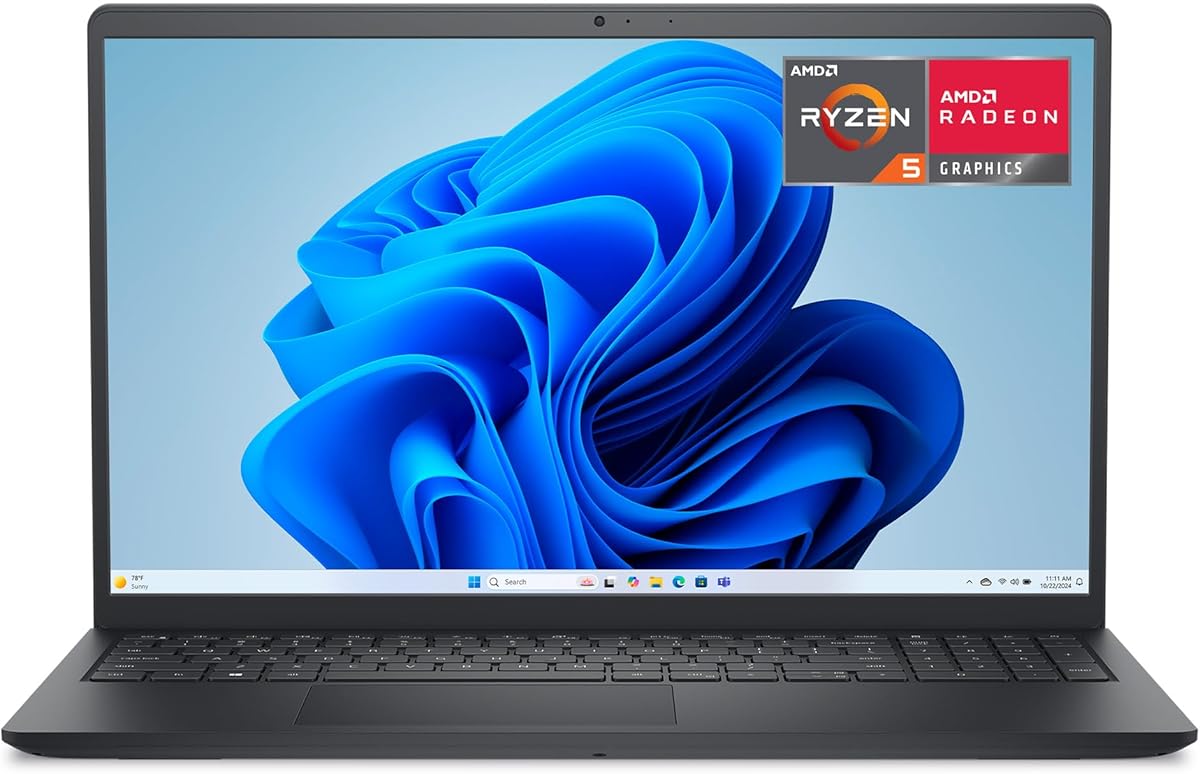
For those on a tight budget, the HP OmniBook 3 offers a surprisingly capable platform for entry-level rendering work. Its high user rating reflects satisfaction with its build quality and display size. The large screen is particularly beneficial for viewing detailed architectural plans and models comfortably.
We may earn a commission when you buy through this link, at no additional cost to you.
This model features an AMD Ryzen 3 processor that provides efficient everyday performance. While not a powerhouse for heavy rendering, it handles basic Enscape tasks well when paired with the integrated AMD Radeon 610M graphics. The 512GB SSD offers plenty of space for software and project storage while ensuring fast system responsiveness.
The main limitation here is the 8GB of RAM which can become a bottleneck if you run multiple heavy applications simultaneously. Users may find themselves needing to close other programs to maintain smooth rendering previews. The display offers wide viewing angles which helps with collaboration and detailed visual inspection.
We recommend this laptop for students or freelancers starting out who need a large screen and reliable performance without high costs. It is ideal for learning Enscape and working on smaller scale projects. For those who find a larger workspace and portability over raw graphical power this is a strong budget option.
The 17.3-inch screen provides ample real estate for splitting views between design software and reference materials.
Priced competitively this laptop delivers essential features needed for basic 3D modeling and rendering tasks.
We may earn a commission when you buy through this link, at no additional cost to you.
The Dell 16 Laptop represents a premium option for professionals seeking high-quality visuals and robust processing power. It consistently receives positive feedback for its screen quality and build comfort. The combination of a strong processor and generous memory makes it a serious candidate for demanding design workloads.
We may earn a commission when you buy through this link, at no additional cost to you.
Powered by the Intel Core 7 150U processor this machine is designed to handle complex computations efficiently. The FHD+ display offers a wider aspect ratio which is excellent for vertical design tools and detailed architectural drawings. 16GB of RAM ensures that you can run Enscape alongside other heavy applications without interruption.
Despite its strengths the lack of a dedicated high-end GPU might limit its performance in the most advanced rendering scenarios. However for most professional use cases the integrated graphics paired with the strong CPU provide a smooth experience. The ComfortView Plus feature helps reduce eye strain during long working sessions.
This laptop is best for architects and designers who need a reliable and comfortable machine for daily tasks and moderate rendering. It is an excellent choice for those who prioritize screen real estate and build quality. We suggest it for professionals willing to invest in a high-end device for long-term productivity.
The FHD+ display and ComfortView Plus technology ensure clear and comfortable viewing for detailed design work.
The Intel Core 7 processor provides the necessary speed for smooth multitasking and quick project execution.
We may earn a commission when you buy through this link, at no additional cost to you.
The HP 17 inch Business Laptop provides a solid foundation for professional use with its emphasis on screen size and processing power. Users appreciate its durable design and the inclusion of a numeric keypad which is useful for data entry. It is a reliable choice for business environments and design tasks alike.
We may earn a commission when you buy through this link, at no additional cost to you.
Equipped with an AMD Ryzen 5 CPU this laptop offers strong multitasking capabilities. The 16GB of RAM allows for smooth operation of multiple applications which is beneficial when running design software alongside communication tools. The 512GB SSD ensures quick access to frequently used files and applications.
While the integrated graphics are not designed for heavy 3D rendering they can handle basic visualization tasks adequately. The large display offers ample space for viewing complex models and blueprints. Battery life is a standout feature allowing for extended use without needing a power outlet.
We recommend this laptop for professionals who need a large screen and reliable performance for general business and light design work. It is ideal for users who value productivity features like the numeric keypad. For those focused primarily on high-end rendering this might be better suited as a secondary machine.
The numeric keypad and large screen work together to enhance efficiency during detailed work sessions.
Long battery life and fast charging ensure you stay productive throughout the workday without interruption.
We may earn a commission when you buy through this link, at no additional cost to you.
The Light Gaming Laptop brings high frequency processing power to a portable chassis. Its impressive user rating suggests strong reliability and performance for the price. The combination of a Ryzen 7 processor and 16GB of RAM makes it a versatile tool for various computing tasks.
We may earn a commission when you buy through this link, at no additional cost to you.
The AMD Ryzen 7 430U processor delivers high clock speeds that benefit tasks requiring quick single-core performance. This is particularly useful for software that does not fully utilize multiple cores. The 512GB NVMe SSD provides rapid loading times for applications and large files.
While marketed as a gaming laptop the integrated graphics are primarily for light gaming and general graphics tasks. Enscape performance will depend on how complex your scenes are as the GPU is not a dedicated discrete card. The display offers an immersive experience with a thin bezel design.
This laptop is well suited for users who need a balance of performance and portability for general work and light design. It is a good option for those who travel frequently and need a capable machine in a lightweight package. We recommend it for students and professionals needing a versatile everyday computer.
The Ryzen 7 processor ensures quick response times for demanding applications and multitasking scenarios.
A compact design makes it easy to carry while maintaining the power needed for daily tasks.
We may earn a commission when you buy through this link, at no additional cost to you.
The HP 2025 New 17 inch offers an exceptional amount of memory and storage for users working with large files. It is designed for those who need to manage extensive project libraries and keep many applications running. The inclusion of a portable SSD adds significant value for external storage needs.
We may earn a commission when you buy through this link, at no additional cost to you.
With 32GB of RAM this laptop can handle heavy multitasking with ease. This is particularly beneficial for rendering workflows that require substantial memory resources. The AMD Ryzen 5 processor ensures solid performance for general tasks and basic rendering. The storage bundle provides ample space for OS and data.
The integrated graphics may limit the speed of complex real-time rendering but the RAM helps compensate for some of this. The large 17.3 inch display is perfect for detailed viewing of architectural models. This machine is a stationary powerhouse rather than a portable solution.
We recommend this laptop for professionals who have a fixed workstation and need maximum RAM and storage capacity. It is ideal for users who manage multiple large projects simultaneously. For those who need to carry their laptop daily this might be too heavy but for desk use it is excellent.
32GB of RAM allows for smooth operation of multiple heavy applications without performance drops.
The combination of internal and portable SSDs ensures you never run out of space for files.
We may earn a commission when you buy through this link, at no additional cost to you.
The HP OmniBook 3 14 inch introduces a new generation of processors designed for efficiency and AI tasks. Users love the vibrant OLED display which offers deep blacks and rich colors. This laptop is particularly appealing for mobile professionals who need a device that lasts all day on a single charge.
We may earn a commission when you buy through this link, at no additional cost to you.
Powered by the Snapdragon X processor this machine focuses on power efficiency and integrated AI capabilities. The 2K OLED screen provides stunning visuals for presentations and visual work. However the ARM-based architecture might limit compatibility with some traditional x86 software applications.
The Qualcomm Adreno GPU is sufficient for basic graphics tasks but may not support all features of complex rendering software like Enscape. Users should check software compatibility before purchase. The battery life is a standout feature which is rare for laptops with such high quality displays.
We recommend this laptop for users who prioritize battery life and screen quality for presentation and design review. It is a great choice for mobile workers who need a sleek and efficient device. For heavy 3D rendering work it is better to choose a laptop with a traditional x86 processor.
Up to 41 hours of battery life ensures you can work anywhere without worrying about finding an outlet.
The 2K OLED display offers vibrant colors and sharp details for a premium viewing experience.
We may earn a commission when you buy through this link, at no additional cost to you.
The HP Laptop 14 Computer is designed for users who prioritize portability and basic productivity. It is an affordable option that comes with essential software included. The compact size makes it easy to slip into a bag and use on the go or during travel.
We may earn a commission when you buy through this link, at no additional cost to you.
Featuring an Intel N150 processor this laptop handles web browsing and document editing efficiently. However the 4GB of RAM is a limitation for modern multitasking and complex software. The 128GB storage is sufficient for the OS but will require external storage for large project files.
The display offers clear visuals for its size and resolution but is not intended for detailed graphic design work. While it can run light versions of design tools it may struggle with more demanding applications. The connectivity options include a versatile USB-C port for modern peripherals.
We recommend this laptop for students or users who need a budget-friendly secondary device for basic work. It is ideal for those who do not require heavy rendering capabilities. For serious Enscape work you will need a machine with significantly more memory and storage capacity.
The lightweight design makes it perfect for travel and use in small workspaces.
A budget friendly price point with included software makes it an easy choice for general users.
We may earn a commission when you buy through this link, at no additional cost to you.
The HP OmniBook 3 16 inch combines a large display with a responsive touchscreen for an interactive experience. It is rated highly for its build quality and visual appeal. The resolution and touch features make it a pleasure to use for visual design and review tasks.
We may earn a commission when you buy through this link, at no additional cost to you.
Equipped with an AMD Ryzen 3 processor this laptop delivers consistent performance for daily work. The 256GB SSD ensures quick boot times and access to applications. The 2K resolution provides sharp details which is helpful for viewing high-quality images and models on the screen.
The touchscreen capability adds a new dimension to interacting with software allowing for intuitive navigation and zooming. However using the screen as an input method consumes more battery power. The integrated graphics are best suited for lighter 3D tasks and general productivity.
We recommend this laptop for professionals who need a versatile machine for presentations and design review. It is an excellent choice for those who appreciate a high resolution screen. For those who work on the go frequently the battery life may be impacted by the touch features.
The touchscreen allows for intuitive zooming and navigating through detailed design elements easily.
The 2K resolution offers sharp details that are essential for accurate visual work and presentations.
We may earn a commission when you buy through this link, at no additional cost to you.
The Dell 15.6 Laptop focuses on efficient performance and user comfort for daily tasks. It features ergonomic design elements that enhance the typing experience. The build quality is solid making it a reliable option for business environments and general computing needs.
We may earn a commission when you buy through this link, at no additional cost to you.
Powered by an AMD Ryzen 5 processor this machine provides adequate power for everyday computing tasks. The adaptive thermals ensure the system remains cool and efficient even under sustained loads. The display offers clear visuals suitable for work and entertainment purposes.
The integrated graphics are designed for standard tasks and will not support heavy 3D rendering workloads. However for light design work and general productivity it performs well. The inclusion of onsite service adds a layer of security for business users who need reliability.
We recommend this laptop for users who need a reliable and efficient machine for daily work. It is a good choice for those who prioritize comfort and support. For those focused on 3D rendering this might not meet the performance requirements needed for complex scenes.
The lifted hinges provide a comfortable typing angle which reduces wrist strain during long sessions.
One year onsite service ensures you get prompt support when needed without technical delays.
We may earn a commission when you buy through this link, at no additional cost to you.
Selecting the right laptop for architectural visualization requires understanding the specific hardware demands of real-time rendering software.
Enscape relies heavily on GPU power for real-time rendering and interactive previews. A dedicated graphics card with sufficient VRAM is ideal for complex 3D scenes and high-resolution outputs.
For best results look for a laptop with a dedicated GPU that meets the software minimum requirements for professional work.
Multitasking between design tools and web browsers requires ample RAM to maintain system responsiveness. Insufficient memory can lead to slowdowns when switching between applications during a project.
Choose a model with at least 16GB of RAM to ensure smooth performance while running demanding visualization software.
The CPU handles many calculations related to modeling and scene preparation in Enscape. A processor with high single-core speeds is crucial for responsive interaction within the software interface.
Prioritize laptops with modern multi-core processors that offer high base and turbo speeds for efficient task handling.
A high-resolution display is essential for seeing fine details in architectural models and blueprints. Color accuracy and brightness levels impact how well you can visualize materials and lighting conditions.
Look for an IPS panel with FHD or higher resolution and good color gamut coverage for accurate visual work.
Project files and software installations require fast storage access to reduce boot and loading times. Slow storage can cause delays when opening large models or saving work frequently.
Ensure the laptop includes a solid state drive with sufficient capacity for your operating system and software suite.
Architects often connect to external monitors or projectors for presentations. Sufficient ports are necessary to expand your workspace and connect peripherals easily.
Check that the laptop has HDMI and USB-C ports to support external displays and fast data transfer needs.
Mobile professionals need a laptop that can last through meetings or field visits without constant access to power. Long battery life ensures uninterrupted work regardless of location.
Select a model with high battery capacity to maintain productivity during the entire workday.
Laptops used in construction sites or offices need to withstand daily wear and transport. A sturdy build ensures longevity and reliability for your professional tools.
Opt for a laptop with a reinforced chassis to protect against bumps and drops during travel.
Start by installing the latest drivers for your graphics card to ensure optimal performance with rendering software.
Keep your system clean of dust to maintain efficient cooling and prevent thermal throttling during heavy tasks.
Backup your project files to an external drive regularly to prevent data loss from hardware failures.
Yes a dedicated graphics card is recommended for smooth real-time rendering. Integrated graphics can work for very simple scenes but will struggle with complex models and high-resolution outputs.
At least 16GB of RAM is ideal for running Enscape and other design tools simultaneously. 32GB offers more headroom for very large projects and heavy multitasking.
Enscape currently only supports Windows operating systems. Mac users must run Windows via virtualization or dual boot to use the software effectively.
Larger screens provide more workspace for tool palettes and design views. However a high resolution on a smaller screen can also be effective if you use external monitors.
Close unnecessary background applications and ensure your drivers are updated. You can also lower preview quality in the software settings to improve performance.
An SSD is highly recommended as it reduces load times for large models and application launches. HDDs may cause significant lag and slow overall system performance.
We have reviewed ten diverse laptops ranging from budget-friendly options to high-end business machines for your visualization needs.
Prioritize a strong CPU and at least 16GB of RAM to ensure smooth workflow and rendering performance.
Prices change frequently so verify current deals and availability before finalizing your purchase decision.