
Microsoft Surface Dock
4.5Editor score
Classic Surface Connect
Gigabit Ethernet port
Four USB 3.0 ports
This guide compares the top ten docking stations for Surface Pro devices, evaluating connectivity, display support, and charging power for optimal productivity.
Transform your versatile tablet into a full desktop workstation with the right docking station. The ideal dock provides seamless connectivity for multiple monitors, high-speed data transfer, and reliable charging while maintaining a clutter-free workspace for professionals.
We evaluated ten leading docking solutions based on port variety, display capabilities, and compatibility with the Surface ecosystem. Our analysis focuses on real-world performance, build quality, and the ability to handle demanding workflows without compromising speed or stability.
Each selection highlights specific strengths tailored to different user needs, from budget-friendly hubs to premium Thunderbolt options. Please note that availability and specific feature sets may vary by region and manufacturer updates, so always verify current specifications before purchasing.
4.5Editor score

4.4Editor score

4.8Editor score
The following table provides a side-by-side comparison of all ten selected docking stations to help you quickly identify the model that best fits your specific connectivity and workflow requirements.



This docking station stands out as the premier choice for users needing maximum speed and versatility. With a rating of 4.4 stars, it delivers lightning-fast connectivity via Thunderbolt 4, making it ideal for heavy data workflows.
We may earn a commission when you buy through this link, at no additional cost to you.
The port selection is generous, featuring three USB-C and three USB-A ports alongside a 2.5G Ethernet connection. This ensures you can connect all essential peripherals without needing additional adapters or hubs for your daily tasks.
While the price is higher than standard options, the rapid charging capability and support for two 4K monitors justify the investment. The raised tactile indicators on each port also prevent fumbling in low-light office environments.
If you prioritize performance and sustainability, this model is the clear winner. It is made with recycled ocean-bound plastic and offers a unified connection point that elevates your entire workspace setup effectively.
The variety of ports ensures you can connect legacy devices alongside modern peripherals without compatibility issues.
Thunderbolt 4 technology enables rapid file transfers and quick laptop charging to keep you productive all day.
We may earn a commission when you buy through this link, at no additional cost to you.
This classic dock provides essential desktop connectivity at a competitive value. It maintains a high rating of 4.5 stars by delivering stable performance for standard office tasks and general productivity needs.
We may earn a commission when you buy through this link, at no additional cost to you.
The magnetic Surface Connect cable transforms your device into a desktop PC effortlessly. It includes four USB 3.0 ports and two Mini DisplayPorts, which are sufficient for most standard monitor and peripheral setups.
While it lacks the latest high-speed standards, it remains a reliable choice for users who do not need 4K 60Hz displays. The included external power supply ensures your device stays charged while docked.
Ideal for students or home office users, this dock simplifies your desk setup significantly. It works with a wide range of Surface models including the Pro, Laptop, and Go series.
The magnetic cable allows for instant connection without the frustration of aligning small ports repeatedly.
The included Gigabit Ethernet port provides a reliable wired internet connection for stable video calls.
We may earn a commission when you buy through this link, at no additional cost to you.
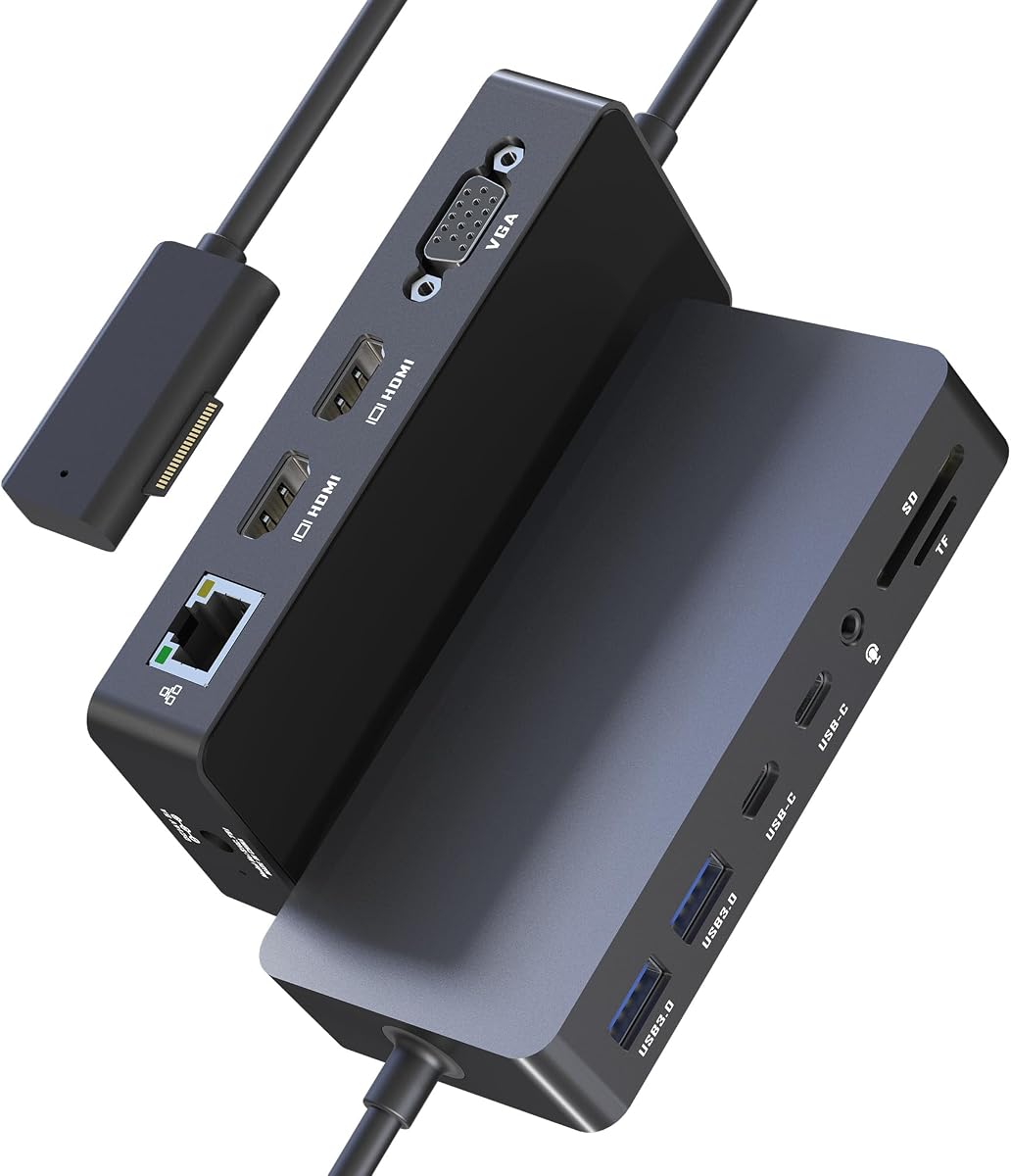
This docking hub excels at multi-monitor productivity with support for three distinct displays simultaneously. It scores a 4.1 rating by offering a comprehensive suite of ports for creative and professional workflows.
We may earn a commission when you buy through this link, at no additional cost to you.
With dual HDMI ports supporting 4K at 30Hz and a VGA port, you can extend your workspace across multiple screens. The 72W power adapter ensures your Surface device remains charged while powering these external displays.
Data transfer is efficient with USB 3.0 and USB-C ports reaching speeds up to 5Gbps. Additionally, integrated SD and TF card slots allow for quick photo transfers from cameras without extra dongles.
For professionals needing extensive screen real estate, this unit is a powerful tool. Just note that using three external displays requires turning off the Surface's own screen to maximize resolution output.
The ability to drive three monitors boosts efficiency for multitasking and complex data visualization tasks.
The included 72W power adapter ensures both the dock and your device receive adequate power.
We may earn a commission when you buy through this link, at no additional cost to you.
Rated an impressive 4.8 stars, this model offers a refined experience for desktop transformation. It is designed for professionals who need reliable connectivity without driver complications or complex setups.
We may earn a commission when you buy through this link, at no additional cost to you.
The 12-in-1 design includes dual HDMI and VGA ports, allowing for flexible display configurations. A 72W power supply provides enough energy to charge your device while running multiple peripherals simultaneously.
Data transfer is handled by USB-C and USB-A ports with speeds up to 5Gbps, ensuring quick file moves. The minimalist design pairs well with modern office aesthetics while reducing desk clutter effectively.
Ideal for remote workers moving between home and office, this hub ensures seamless connectivity. It includes a warranty and straightforward documentation to support hassle-free installation and usage.
The design focuses on reliability and ease of use for professionals who need a consistent workspace.
A 72W adapter ensures your device stays powered even during intensive use with external monitors.
We may earn a commission when you buy through this link, at no additional cost to you.
This versatile dock transforms your Surface into a powerhouse workstation with multiple display capabilities. It holds a 4.2 rating by balancing performance with a user-friendly plug-and-play setup.
We may earn a commission when you buy through this link, at no additional cost to you.
The included 72W power adapter ensures your device remains fully charged even when driving dual 4K HDMI and VGA monitors. This capability is essential for maintaining productivity during long work sessions.
High-speed data transfer is supported via USB-A and USB-C ports, allowing rapid file syncing. Integrated SD and TF slots further streamline workflows for photographers or creators handling large media files.
With extensive compatibility across Surface Pro, Laptop, and Go models, this hub is a practical choice. It simplifies your workspace by combining charging, video, and data connectivity into one compact unit.
The 72W charging capability ensures you can work longer without worrying about battery drain.
Direct SD card slots eliminate the need for extra adapters when importing photos from cameras.
We may earn a commission when you buy through this link, at no additional cost to you.
This next-generation dock from Microsoft provides high-speed connectivity for demanding professional workflows. With a 4.5 rating, it delivers dual 4K displays at 60Hz for smooth video and detailed design work.
We may earn a commission when you buy through this link, at no additional cost to you.
The 199W power supply ensures that even heavy workloads are handled without interruption. It features both front and rear USB-C ports, offering convenient access for frequently used devices like phones.
Security is enhanced with a Kensington-compatible lock slot, making it suitable for shared or public office spaces. The longer Surface Connect cable allows for flexible placement on larger desks.
If you need official support and high-end performance, this is the definitive choice. It instantly turns your tablet into a full desktop PC with reliable connectivity and premium build quality.
Support for dual 4K 60Hz ensures crisp visuals without flickering during high-frame-rate tasks.
The security lock slot allows for physical protection of the dock in shared office environments.
We may earn a commission when you buy through this link, at no additional cost to you.
With a stellar 4.8 rating, this Surface Dock 2 variant offers seamless connectivity for a broad range of devices. It supports dual 4K displays at 60Hz, making it ideal for creative professionals and multitaskers.
We may earn a commission when you buy through this link, at no additional cost to you.
The 199W power supply included in the package ensures sufficient power for both the device and connected peripherals. A longer 80 cm cable provides added reach for better desk organization and cable management.
Front-facing USB-C ports offer convenient access for charging phones or transferring data without reaching behind the dock. This design consideration improves daily usability for users who frequently plug and unplug devices.
For those seeking a reliable and powerful desktop experience, this unit is a top contender. It is compatible with various Surface models including Pro, Book, and Go, providing wide ecosystem support.
The 80 cm Surface Connect cable helps reduce cable tension and improves placement flexibility.
Front-facing ports allow quick access for devices you use multiple times a day.
We may earn a commission when you buy through this link, at no additional cost to you.
This 12-in-1 dock transforms your device into a desktop powerhouse with extensive connectivity options. It holds a 4.3 rating by offering dual 4K outputs and robust power delivery for professional use.
We may earn a commission when you buy through this link, at no additional cost to you.
The 100W DC power input ensures your laptop stays charged while running multiple high-performance peripherals. With 5Gbps data ports and integrated SD card readers, file transfers are handled efficiently.
Gigabit Ethernet provides a stable network connection for smooth conferencing and downloading large files. The plug-and-play design means you do not need to install extra drivers or complex software to get started.
Ideal for students and creative professionals, this dock eliminates the clutter of multiple adapters. It is future-proof and bridges the gap between your mobile tablet and a full-performance desktop setup.
A 100W input ensures enough power to charge your laptop while running multiple heavy peripherals.
The design supports modern standards to ensure compatibility with upcoming devices and monitors.
We may earn a commission when you buy through this link, at no additional cost to you.
This renewed option offers premium features at a potentially more accessible price point. With a 4.7 rating, it maintains high performance standards while including essential accessories for immediate setup.
We may earn a commission when you buy through this link, at no additional cost to you.
It comes with the original 199W power supply and USB-C cable, ensuring reliable delivery and connectivity. The design includes integrated thermal management to maintain consistent performance under heavy loads.
Support for dual 4K at 60Hz and fast data transfer makes it suitable for demanding tasks. It is backed by a limited hardware warranty to give buyers confidence in its durability.
For those seeking a proven dock without paying the highest retail price, this is a smart choice. It works across a wide range of Surface models including Pro, Book, and Laptop series.
Integrated thermal management ensures the dock runs cool even during extended periods of heavy use.
The inclusion of power supply and cable means everything is ready to connect right out of the box.
We may earn a commission when you buy through this link, at no additional cost to you.
This classic Surface Dock focuses on stability and essential connectivity. It holds a 4.2 rating by providing reliable performance for users who prioritize straightforward operation over cutting-edge features.
We may earn a commission when you buy through this link, at no additional cost to you.
The 90W power supply ensures your device stays charged during daily use. Two Mini DP ports allow for dual monitor connections, supporting resolutions up to 4K and 1080P simultaneously.
Four USB 3.0 ports offer ample space for keyboards, mice, and external drives. The included gigabit network card ensures your internet speed remains consistent regardless of wireless interference.
Ideal for basic office setups or home desks, this dock simplifies your workflow. It supports a wide variety of Surface models, ensuring you can upgrade your workspace without complex configurations.
The two Mini DP ports allow you to extend your display across two screens easily.
The gigabit port provides a consistent connection for downloading files or attending online meetings.
We may earn a commission when you buy through this link, at no additional cost to you.
Selecting the right dock requires balancing connectivity needs, display requirements, and power delivery capabilities.
Look for docks that support the resolution and refresh rate of your monitors. High-performance models offer dual 4K at 60Hz, while others support up to three displays using HDMI or Mini DisplayPort combinations.
Ensure the dock supports the number of external screens you need. Some models require turning off the laptop screen to achieve three external displays.
Verify the wattage provided by the dock. A good dock should provide at least 65W to charge your laptop while connected to multiple high-power peripherals.
Higher wattage units like 100W or 199W are better for intensive workflows or larger devices like the Surface Laptop Studio.
Check for USB-C ports that support Thunderbolt 4 for maximum data transfer speeds. Standard USB-A ports are still essential for legacy peripherals.
USB 3.0 ports should offer speeds up to 5Gbps to handle fast file transfers without bottlenecks.
A Gigabit Ethernet port is vital for stable and fast internet connections during video calls and large file downloads.
Some premium models offer 2.5G Ethernet for even faster network speeds in professional environments.
Integrated SD card slots are useful for photographers and creatives who need to offload images quickly.
Audio jacks and security lock slots are important for audio work and public office safety.
Choose a dock with a durable design and adequate thermal management to prevent overheating during extended use.
A compact and minimalist design helps keep your workspace organized and clutter-free.
Ensure the dock is compatible with your specific Surface model version and generation for optimal performance.
Check if additional drivers are required for plug-and-play functionality.
Look for docks backed by a manufacturer warranty and reliable customer support for peace of mind.
Renewed options may offer value but check the specific warranty terms carefully.
To set up your dock, connect the power adapter to the dock and the wall outlet. Then use the appropriate cable to connect the dock to your Surface device, ensuring the connection is secure.
Connect your monitors, keyboard, and other peripherals to the available ports on the dock. Once connected, your device should automatically recognize the peripherals and adjust the display settings.
Keep your dock in a well-ventilated area to prevent overheating. Periodically clean the ports to remove dust and debris that could affect connectivity or damage the pins.
Yes, most docks are designed to provide power delivery to your laptop even when multiple peripherals are connected. Ensure the dock provides sufficient wattage to handle both charging and peripheral power needs simultaneously.
Most modern Surface docks work on a plug-and-play basis without requiring extra drivers. However, some specific features or legacy setups might benefit from installing the latest firmware updates.
Thunderbolt 4 docks offer faster data transfer speeds and support for higher resolution displays compared to standard USB-C docks. They are ideal for users with high-end monitors or large file workflows.
Standard docks typically support two monitors, while more advanced models can support three external displays. Check the specific product specifications for multi-monitor capabilities and resolution limits.
Most Surface docks use the proprietary Surface Connect port, so they are optimized for Surface devices. However, USB-C or Thunderbolt docks may work with other compatible laptops depending on the port type.
Check all power and data connections to ensure they are secure. Try restarting your device or updating your system firmware. If issues persist, contact the manufacturer for technical support.
We explored ten top docking stations ranging from budget-friendly options to premium Thunderbolt hubs. Each model offers unique strengths for transforming your tablet into a robust desktop setup.
Prioritize features like display support and power delivery based on your specific work requirements. A high-quality dock can significantly improve productivity by streamlining your workspace.
Remember to check current availability and verify compatibility with your device model before making a purchase decision. The right dock ensures seamless connectivity and long-lasting performance.