
IDVisor Smart V2 ID Scanner
4.8Editor score
Reads passports and all US IDs
Stores over 50,000 customer records
GPS locate and remote data erase
Finding the right ID scanners for age verification is critical for businesses serving age-restricted products. Reliable devices ensure compliance with laws while maintaining smooth customer flow during busy shifts.
We evaluated ten leading models based on scanning speed, accuracy, durability, and software features. Our analysis focuses on real-world performance in high-volume environments like bars and retail stores.
Each pick highlights key strengths and limitations to help you decide quickly. Note that product availability and pricing can change frequently, so verify details before purchasing your device today.
4.8Editor score

4.9Editor score
4.7Editor score
As an Amazon Associate we earn from qualifying purchases.
This side-by-side comparison highlights the core specifications and capabilities of each model to help you identify the best fit for your specific operational needs.


The IDetect ID Scanner stands out as a top choice for venues needing fast age verification. With a strong rating, it promises validation within seconds for IDs from the US, Canada, and Mexico. Its design focuses on keeping customer interactions brief while maintaining strict compliance standards for staff.
We may earn a commission when you buy through this link, at no additional cost to you.
This model integrates directly with your existing POS or PC screen to alert staff about tampered or banned cards immediately. The USB connection simplifies setup for laptops, tablets, and fixed terminals. It calculates age automatically and provides audible warnings so you do not need to read every screen manually.
While it excels at speed, it does not detect holograms or watermarks on IDs, which may limit security depth for some managers. Also, the optional photo capture feature does not store images permanently in this specific unit. These trade-offs are acceptable for venues prioritizing speed and basic compliance over deep forensic checks.
Bus bars and clubs should choose this scanner if you need a reliable tool that works right out of the box. It is ideal for teams that want to reduce wait times at the door without sacrificing basic age verification integrity. The included software updates ensure long-term usability.
The scanner pops up alerts on your main screen to flag tampered IDs immediately. This ensures staff can react quickly without guessing or manual checks.
It reads IDs from all 50 states plus Canada and Mexico with equal speed. This makes it suitable for cross-border tourism venues or diverse urban locations.
We may earn a commission when you buy through this link, at no additional cost to you.
This countertop scanner offers a dedicated solution for fixed points of sale like bar entrances. It operates continuously when plugged in and provides instant verification results. The system is designed to deter fake IDs and keep compliance logs accurate for inspections.
We may earn a commission when you buy through this link, at no additional cost to you.
You get clear Go or No-Go results in under a second by scanning the barcode on the back of an ID. It supports all US licenses and allows manual entry for passports or damaged cards. The included vinyl decal alerts customers upfront that scanning is in place to reduce disputes.
The main limitation is that it is not portable, so staff cannot carry it to tables. Additionally, advanced fake detection uses a credit system where you pay only when you run a check. This might require budget planning for high-risk venues seeking maximum security.
Choose this unit if you want a plug-and-play device that works independently without computer connections. It is perfect for staffed booths where speed and legal compliance are the top priorities. The customizable logging helps you meet specific state or local reporting needs.
The device complies with laws like Pennsylvania SB 688 and Utah Code 32B-1-407. This reduces legal risk during official state inspections or audits.
The included decal informs patrons that IDs are verified to help deter fraud attempts. Clear signage often reduces confrontation at the door.
We may earn a commission when you buy through this link, at no additional cost to you.
The AgeVisor Mini brings a compact form factor to age verification. It is ideal for spaces with limited counter real estate. Setup is straightforward, and motion-activated scanning allows staff to check IDs with one hand while holding a drink or tray.
We may earn a commission when you buy through this link, at no additional cost to you.
It reads US and Canadian IDs quickly and calculates age automatically using intuitive icons. Notifications alert you to expired or underage IDs immediately. You can customize age requirements based on jurisdiction rules. The optional DMVCheck service verifies IDs against issuing agencies in 40+ states for deeper security.
While the rating is slightly lower than other models, it offers lifetime software upgrades without recurring fees. This saves money over time compared to subscription-based systems. However, advanced fake detection features may require pay-per-use services which adds variable costs depending on volume.
Opt for this scanner if space is tight and you want a no-subscription model. It suits small bars or liquor stores needing basic compliance with easy setup. The loyalty tracking helps identify frequent visitors while maintaining security checks on new customers.
Motion activation means staff do not need to press a button to scan. This speeds up flow during peak hours when hands are full.
Lifetime software upgrades and support are included without monthly bills. This ensures your device stays current without increasing operational costs.
We may earn a commission when you buy through this link, at no additional cost to you.
The IDVisor Smart V2 excels with advanced customer relationship management features. It stores over 50,000 records and lets you tag VIP or banned guests instantly. The 12+ hour battery life ensures it lasts through long shifts without frequent recharging.
We may earn a commission when you buy through this link, at no additional cost to you.
You can capture two photos per record with an 8MP camera and download data via USB or WiFi. Challenge questions like Zodiac sign or state capital help verify identity. The GPS location feature allows you to find the device remotely and lock data if the unit is lost or stolen.
The higher investment reflects its extensive data capabilities and robust security options. Staff may need training to utilize the full CRM suite effectively. However, the ability to track repeat clients and manage venue occupancy offers long-term value for customer retention.
High-end venues should choose this scanner if they want a mobile powerhouse with secure data management. It is perfect for nightclubs needing detailed client records and remote control. The included spare battery ensures you never face downtime during busy nights.
GPS locate and remote erase protect customer data if the scanner is misplaced. This ensures sensitive records remain safe even if hardware is lost.
Asking questions about state capitals or area codes adds a layer of identity verification. This helps confirm the ID belongs to the person presenting it.
We may earn a commission when you buy through this link, at no additional cost to you.
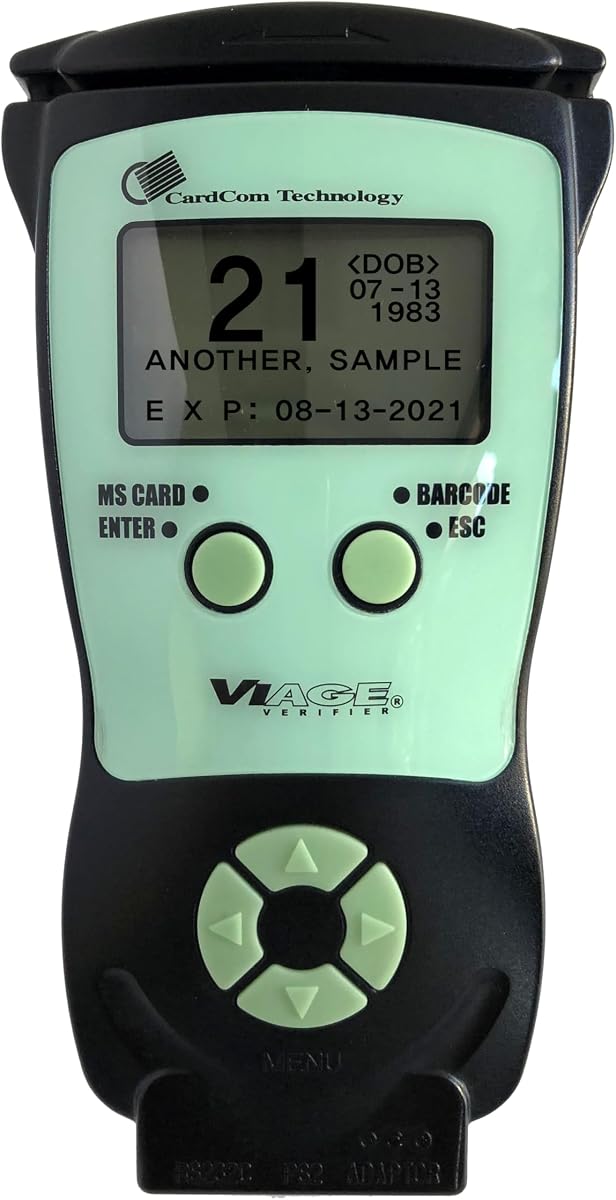
The CAV3200 is a strong budget-friendly option for basic compliance. It works independently without needing a laptop or smartphone connection. Its dual scanning technology reads both magnetic stripes and barcodes ensuring compatibility across different card formats.
We may earn a commission when you buy through this link, at no additional cost to you.
The backlight display shows age and expiration status clearly even in dim lighting. You get free compliance software and lifetime ID updates without extra fees. The ergonomic design makes it comfortable for staff to hold during extended shifts at the door.
It does not offer advanced photo capture or GPS features found in premium models. However, for venues needing reliable age checks without complex data needs, it delivers excellent value. The memory can be enabled for due diligence reporting during inspections to protect your business.
Choose this scanner if you want affordable technology that handles standard US and Canadian IDs well. It is ideal for retail stores or small bars focusing on core verification tasks. The lack of hidden fees makes it financially predictable for long-term use.
Supports both magnetic stripe and barcode scanning for broader card coverage. This ensures you can read older or damaged IDs more effectively.
Operates without external devices to simplify setup and reduce costs. Staff can use it immediately without configuring network connections or apps.
We may earn a commission when you buy through this link, at no additional cost to you.
The IDVisor Smart Plus features an extra large 5 inch LCD screen for clear results. It matches the battery life of the Smart V2 model with 12+ hours of operation. Staff benefit from seeing age results without squinting in dark environments.
We may earn a commission when you buy through this link, at no additional cost to you.
It supports all US IDs and lets you export records in Excel format for analysis. This helps managers track venue occupancy or identify repeat clients. GPS locate and remote lock features ensure the device remains secure even if it leaves the premises.
The larger screen adds weight which might make it slightly less portable than smaller units. However, the visibility improvement is significant for high-traffic areas. It suits venues prioritizing ease of use and data reporting over compact portability.
Consider this model if your staff needs clearer visual feedback during checks. It is ideal for nightclubs where data export helps optimize staffing or marketing. The included cradle ensures batteries are always charged for your next shift.
Export records directly to Excel for easy compliance reporting or analysis. This simplifies audits and lets you review trends in customer traffic.
The 5 inch LCD shows results clearly for staff in low light. This reduces errors and speeds up decision-making at the point of sale.
We may earn a commission when you buy through this link, at no additional cost to you.
This portable scanner is built to survive tough environments with an IP68 rating. It resists dust, moisture, and drops according to military standards. Swappable batteries allow staff to keep working without waiting hours for a full charge.
We may earn a commission when you buy through this link, at no additional cost to you.
It supports US licenses, passports, and employment authorization cards for broad coverage. Results appear in under two seconds and it logs data for compliance reports. Fast charging ensures the battery is ready again quickly if you need to swap during busy times.
The rugged build adds weight which may affect comfort for extended use. Also, it is pricier than standard handheld units. However, for venues with high spill risks or rough handling, this durability protects your investment better than plastic alternatives.
Choose this scanner if you need a device that can withstand spills or accidental drops. It is ideal for outdoor festivals or clubs where equipment abuse is common. The regulatory compliance features help you meet state requirements without extra software setup.
Rated to resist dust and water immersion for harsh conditions. This keeps the unit functional even after accidental liquid exposure.
Full charging time is under 90 minutes for quick turnaround between shifts. This minimizes downtime and keeps your entry staff equipped.
We may earn a commission when you buy through this link, at no additional cost to you.
The Quantum Edge V3 features a water and dust seal to handle drink splashes and weather. It validates age quickly and lets you transfer data via Wi-Fi. The side button makes scanning fast and intuitive for trained staff at the entry.
We may earn a commission when you buy through this link, at no additional cost to you.
Audible warnings and hand vibrations alert staff if a person is banned or underage. It comes with an outer carry case to protect the device when not in use. It supports IDs from 50 states, Canada, and military IDs effectively.
The Wi-Fi requirement means you need network access for best use. The device is heavier than some alternatives which could cause fatigue. However, the waterproof seal is a major advantage for venues with outdoor patios or bar spills.
Select this scanner for environments where liquid exposure is a real risk. It suits bars with open-air sections or busy dance floors. The case ensures the unit remains protected during transport between locations.
Designed to keep out dust and liquid splashes to prevent damage. This ensures the scanner continues to work even after accidental spills.
Vibrates in the hand to signal issues without needing visual focus. This helps staff react quickly even in loud environments.
We may earn a commission when you buy through this link, at no additional cost to you.
This fixed countertop scanner provides reliable age verification for stationary checkpoints. It connects directly to a standard outlet and delivers results in under a second. The built-in compliance log helps you track scans for audits.
We may earn a commission when you buy through this link, at no additional cost to you.
Results appear clearly as Sale or No-Go on the display for quick staff action. It supports all US licenses and manual entry for passports. The included vinyl decal informs patrons clearly that IDs are being checked to deter fraud.
The unit lacks battery power so it cannot be moved to tables. If you need to power outlet nearby, this limitation is acceptable. It suits staffed booths or dedicated ID checking lanes where mobility is not required.
Choose this device for high-compliance zones where consistency is key. It is ideal for large clubs with separate entry lanes. The flexible logging options let you adjust retention to meet local regulations.
Scans are recorded automatically to assist with regulatory reporting. This helps you prove due diligence during state inspections or audits.
Instant results on the screen reduce ambiguity for entry staff. This streamlines the decision process and reduces customer wait times.
We may earn a commission when you buy through this link, at no additional cost to you.
The Swish S1 is a simple optical scanner for desktop use in offices or admin desks. It captures high-resolution images of IDs and licenses without damaging cards. You get a searchable database of card images and automatic age verification via included software.
We may earn a commission when you buy through this link, at no additional cost to you.
It operates via USB without external power and fits into small desk spaces. The drop-and-scan feature allows one-sided scanning without inserting cards into slots. It supports TWAIN compliance for use with electronic healthcare and medical management systems.
Mac users cannot use this scanner as it only supports Windows OS. It is also a desktop solution rather than a handheld tool. However, for offices needing to archive ID images securely, it offers a gentle scanning method without mechanical rollers.
Select this scanner if you need to store physical card images on a PC securely. It is ideal for medical offices or admin staff verifying ID photos. The included app manages images and data in one simple interface for records.
No rollers mean fragile cards won't bend or get stuck during scans. This protects customer documents during the verification process.
Works with standard TWAIN apps for healthcare and medical systems. This makes it versatile for offices managing patient insurance or identity.
We may earn a commission when you buy through this link, at no additional cost to you.
Choosing the right scanner depends on your business needs and budget. Use these factors to find the best fit for your operations.
Decide between handheld battery models or countertop plug-in units. Handheld scanners offer flexibility for roaming checks while countertop units ensure constant power without battery anxiety.
Prioritize devices that match your venue layout and staffing model.
Look for scanners that validate IDs in under two seconds. Faster results reduce queues and keep patrons happy during peak entry times.
Speed is critical for high-volume bars to maintain efficient service.
Ensure the software logs scans for state compliance audits. Exportable reports help you meet legal obligations and protect your business during inspections.
Choose models that support your local reporting requirements.
Check for rugged ratings if you operate in wet or dusty environments. Water-resistant units survive spills better than standard plastic models.
Durability reduces long-term replacement costs significantly.
Consider how many customer records the device stores. Large venues benefit from scanners that save thousands of customer profiles for repeat tracking.
Verify storage limits before buying to ensure future growth.
Select models with free lifetime updates for ID formats. This keeps your device current without extra subscriptions or fees over time.
Free updates protect your investment against new state laws.
Review how photos and data are stored and secured. Look for devices with remote erase features to comply with privacy regulations.
Strong privacy safeguards build customer trust quickly.
Check if the manufacturer provides US-based support during nights or weekends. Reliable customer service helps you fix issues fast when needed.
Always confirm warranty terms before finalizing your purchase.
To use your scanner, simply power it on and open the companion software on your connected device. Place the ID under the scanner and wait for the beep or vibration to indicate a successful read.
Keep the glass surface clean by wiping it with a dry microfiber cloth before each shift. Avoid using abrasive chemicals that might scratch the lens or reduce scan accuracy over time.
Store handheld units in their protective cases when not in use to prevent accidental drops. Charge the battery fully after every shift to ensure readiness for the next business day.
Many scanners verify barcodes against live databases to flag tampered cards. Advanced models require optional fake check credits for deeper encryption analysis beyond basic scans.
Some standalone models operate independently without PCs. However, most require software for full logging and advanced customer management features on local devices.
Some units take and store photos for compliance proof. Others do not save images to protect privacy unless you configure settings to retain them.
Most units read US driver's licenses, state IDs, and passports. Many support Canadian IDs and military cards for broader verification across regions.
Some scanners include free lifetime updates with no subscriptions. Others charge fees for advanced features like DMV verification or cloud syncing.
High-end handheld models often last 12+ hours on a single charge. Always keep a spare battery or charging dock handy for uninterrupted shifts.
Rugged units with IP68 ratings resist water and dust. Standard handheld scanners may not survive heavy rain or accidental spills.
Many systems highlight repeat clients by storing profile data. This helps staff identify frequent visitors without manual records.
Top picks like IDetect and IDVisor Smart V2 excel in speed and customer management respectively. Both offer reliable performance for bars needing compliance without complexity.
Prioritize durability and battery life if you work in dynamic environments. Countertop units suit fixed booths while rugged handhelds serve outdoor or spill-prone areas.
Always verify current pricing and availability before buying as details may change. Choose a model that aligns with your long-term compliance goals.