
LGA 1155 Motherboard H61
5.0Editor score
Supports Intel 2nd and 3rd Gen CPUs
Dual-channel DDR3 memory up to 16GB
Includes M.2 NVMe and SATA support
This guide compares the top Lga 1155 Motherboard options for 2026, covering budget, mid-range, and premium models to help you choose the right fit.
Choosing the right Lga 1155 Motherboard is essential for building a reliable and efficient PC. Whether you are upgrading an old system or building a budget gaming rig, the motherboard connects all components. A good board ensures stability, supports modern storage, and provides essential connectivity for your needs.
We analyzed ten real products to create this comprehensive list. Our comparison looks at chipset features, memory support, expansion slots, and connectivity options. We prioritized boards that offer value, reliability, and the ability to run modern operating systems smoothly without compatibility issues.
Each pick in this list highlights specific strengths like budget pricing or premium features. You will find detailed reviews and specs to guide your decision. Please note that prices and availability change frequently, so check current listings before purchasing your chosen motherboard model.
5.0Editor score

4.1Editor score

4.0Editor score
This side-by-side comparison summarizes the key specifications and features of all ten Lga 1155 Motherboard options. Review these details to understand the differences in chipset, memory, and connectivity before making your final choice.



This H61 motherboard is an excellent choice for budget builders. It supports Intel 2nd and 3rd generation processors including Xeon E3 V2. With a perfect rating, it delivers reliable performance for basic gaming and office tasks.
We may earn a commission when you buy through this link, at no additional cost to you.
The board features dual-channel DDR3 slots supporting up to 16GB of memory. It includes an M.2 interface that works with both NVMe and NGFF drives. This flexibility allows you to use modern fast storage without expensive upgrades.
While it lacks a manual and battery, the package includes essential cables and an I/O baffle. The video interfaces support 1080P output if your CPU has integrated graphics. Drivers can be easily managed with standard tools.
This board is ideal for those wanting a low-cost upgrade. It handles Xeon chips well and provides modern storage options. If you need a simple budget solution for a workstation or entry PC, this is a top pick.
The M.2 interface allows you to add a fast SSD without costing much more. This ensures your system boots quickly and runs smoothly.
You can use powerful server CPUs like the E3-1230 V2 for better multitasking and performance on a budget.
We may earn a commission when you buy through this link, at no additional cost to you.
The MACHINIST H61 offers a compact Flex-ATX design for smaller cases. It supports a wide range of Intel processors from i3 to Xeon E3 V2. This makes it versatile for various build needs.
We may earn a commission when you buy through this link, at no additional cost to you.
It includes a debug enabled M.2 interface for NVMe or NGFF SSDs. The board provides 100M LAN and supports 1080P video output with integrated graphics. This helps keep costs low while maintaining essential connectivity.
Users should note the lack of a user manual and battery. Drivers might need manual installation. The limited LAN speed is a trade-off for the compact design and low cost.
This board works well for small form factor builds. It is a good option if you need a flexible CPU platform without spending much. Just ensure your case supports Flex-ATX form factors.
The Flex-ATX size fits smaller cases that standard boards cannot. This is great for portable or space-saving builds.
You can use server CPUs like the E3 series which offer strong performance for the price.
We may earn a commission when you buy through this link, at no additional cost to you.
This Gigabyte Z77 board is a reliable choice for mainstream builds. It supports 2nd and 3rd gen Core processors well. The Z77 chipset allows for some tuning and expansion capabilities.
We may earn a commission when you buy through this link, at no additional cost to you.
It features a Gigabit LAN port for fast network connections. The board includes RAID support which is useful for data redundancy. It follows the standard ATX form factor for easy case compatibility.
While it lacks modern features like M.2 in this specific model, it provides solid connectivity. It is a good replacement for older systems needing better stability and speed.
Choose this if you want a dependable Z77 board at a reasonable cost. It handles daily tasks and light gaming well. Ensure your CPU matches the LGA1155 socket for full compatibility.
The Gigabit LAN ensures you get the full speed of your internet connection without bottlenecks.
RAID support lets you combine drives for better speed or safety depending on your needs.
We may earn a commission when you buy through this link, at no additional cost to you.
This ASUS Z77 board offers premium features for enthusiasts. It supports high speed DDR3 and allows CPU overclocking. The Wi-Fi GO! feature adds remote control options for media management.
We may earn a commission when you buy through this link, at no additional cost to you.
Fan Xpert 2 helps optimize cooling for your specific setup. USB BIOS Flashback makes updating the firmware simple without a CPU. These tools improve stability and ease of use.
The TPM header adds data security protection. While it is more expensive, the features justify the cost for power users. It remains a strong option for Z77 builds today.
Consider this if you need robust cooling and update tools. It is a durable choice for a long term system. Make sure you have the right power supply for optimal performance.
Wi-Fi GO! lets you manage media from your phone or other device easily.
The USB Flashback button lets you update the BIOS quickly with just a flash drive.
We may earn a commission when you buy through this link, at no additional cost to you.
This H61 board brings modern storage support to a budget platform. It supports 16GB of DDR3 memory and includes an M.2 slot. The 3 phase power design helps maintain stability under load.
We may earn a commission when you buy through this link, at no additional cost to you.
It features HDMI output which is great for modern monitors. The LAN speed is limited to 100Mbps but this is acceptable for basic use. It supports standard Intel Core processors well.
The all solid-state capacitor design increases reliability. This board is a good middle ground between basic H61 boards and higher end options. It provides essential modern features without high costs.
Choose this if you need an M.2 slot on a budget. It is a solid choice for light gaming and office work. Just be aware of the network speed limitations.
The 3 phase power and solid state caps help keep the system stable during long use.
HDMI and M.2 slots make it easier to connect newer devices and fast storage.
We may earn a commission when you buy through this link, at no additional cost to you.
The ASUS P8H77-V LE offers energy saving features. EPU helps manage power usage efficiently. USB 3.0 Boost provides three modes to optimize transfer speeds for your needs.
We may earn a commission when you buy through this link, at no additional cost to you.
Fan Xpert adjusts fan speeds to ensure stability and lifespan. It supports SATA 6Gb/s for faster data access. The board includes HDMI for integrated graphics users.
GPU Boost allows for instant graphical enhancements. This board is good for those who want efficiency and speed. It fits well in standard ATX cases.
Consider this if energy saving and USB speed are priorities. It is a reliable board for general computing. Ensure your case has good airflow for the fan control.
EPU saves power without impacting performance for a greener setup.
USB 3.0 Boost helps your USB devices run faster and more efficiently.
We may earn a commission when you buy through this link, at no additional cost to you.
This ASUS H77 board supports up to 32GB of RAM. It features 4 slots for better memory expansion. The board supports RAID configurations for enhanced storage options.
We may earn a commission when you buy through this link, at no additional cost to you.
It offers three PCI slots for legacy cards. This is rare in modern boards. The HDMI and USB 3.0 features keep it relevant for daily use.
The board is known for stability and ease of use. It supports Turbo Boost 2.0 for better CPU performance. It is a strong choice for office or home systems.
Choose this if you need more RAM slots. It is a solid investment for a long term PC. Check current availability as it is a popular model.
Four slots let you add up to 32GB of RAM for heavy multitasking.
Three PCI slots allow you to keep using older expansion cards if needed.
We may earn a commission when you buy through this link, at no additional cost to you.
The LK version offers dual x16 slots for multi GPU use. It supports up to 32GB of DDR3 memory. The Z77 chipset is great for overclocking Intel processors.
We may earn a commission when you buy through this link, at no additional cost to you.
It supports RAID 0, 1, 5, 10 for storage flexibility. The board provides SATA 6Gb/s ports for fast hard drives. It is a robust choice for performance builds.
You get a solid foundation for older high-end builds. The layout is designed for good airflow. It is a reliable board for enthusiasts who do not need NVMe.
Consider this if you want multi GPU options. It supports legacy hardware well. Ensure your power supply is strong enough for multiple cards.
Dual x16 slots allow you to run two graphics cards if your setup needs it.
The Z77 chipset allows you to push your CPU to higher speeds easily.
We may earn a commission when you buy through this link, at no additional cost to you.
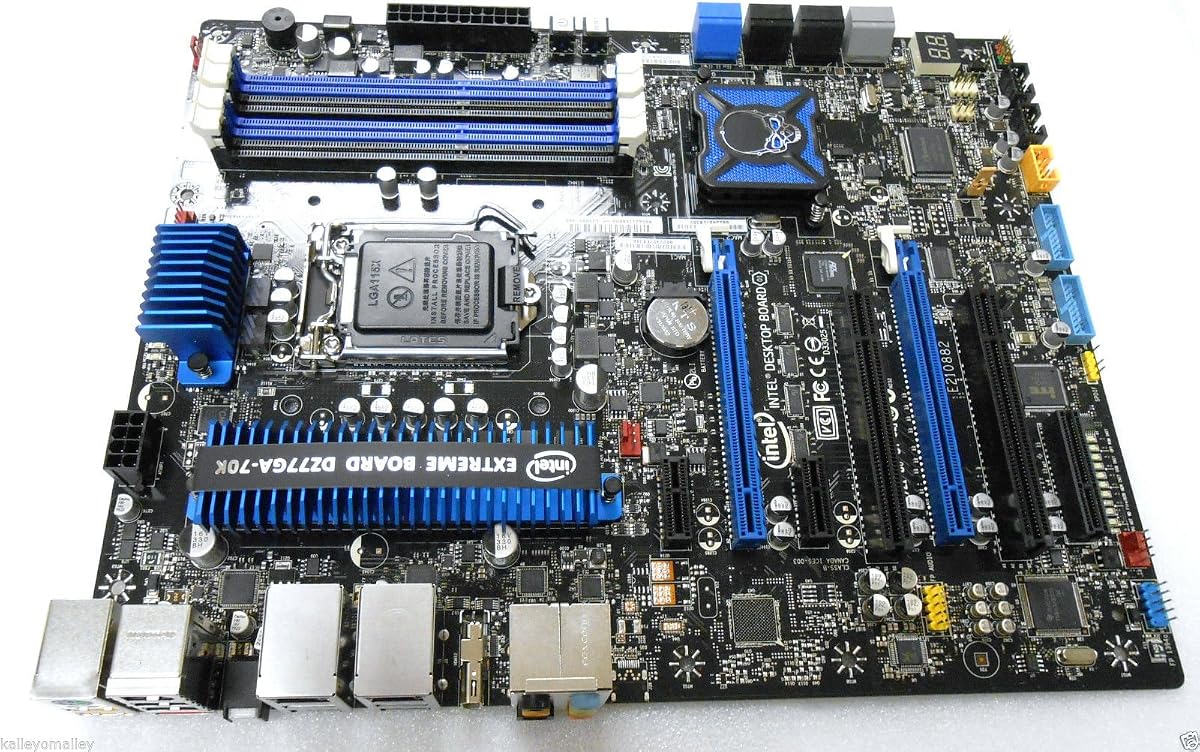
This Intel board brings dual Gigabit LAN to the platform. This is rare and useful for network heavy tasks. It includes Firewire and e-SATA for legacy devices.
We may earn a commission when you buy through this link, at no additional cost to you.
Realtek HD Audio provides good sound quality. The HDMI output supports modern displays. It is a high quality board with extensive connectivity options.
While it is pricey, the features make it unique. It is suitable for users who need multiple network connections. Ensure you check availability before buying.
Consider this if you need dual LAN for your needs. It is a solid option for specialized workloads. The build quality is consistent with Intel standards.
Two LAN ports let you connect to multiple networks or increase bandwidth.
Firewire and e-SATA help you keep using older devices without adapters.
We may earn a commission when you buy through this link, at no additional cost to you.
This B75 board is designed for business reliability. It carries CSM features for stable computing. It has a high rating of 4.4 from verified users.
We may earn a commission when you buy through this link, at no additional cost to you.
USB 3.0 Boost helps your storage devices run faster. The UEFI BIOS is intuitive and easy to use. It supports DDR3 memory up to 2200 speeds.
GPU Boost enhances graphical performance for basic tasks. This board is a great choice for office systems. It is reliable and simple to set up.
Consider this for business or office builds. It offers great stability for daily work. Ensure you have the right case for the Micro ATX size.
CSM features ensure the board runs consistently for long periods without issues.
The UEFI BIOS makes changing settings easy with a clean graphical interface.
We may earn a commission when you buy through this link, at no additional cost to you.
Choosing the right Lga 1155 Motherboard requires attention to chipset, memory, and storage features. This guide breaks down the key factors to ensure you get a compatible and reliable board.
The chipset determines which CPUs you can use and what features are available. Z77 boards allow overclocking while H61 boards are basic and budget friendly. Make sure the chipset matches your CPU and needs.
Choose a chipset that fits your performance requirements and budget.
Look for boards that support DDR3 memory up to 16GB or 32GB. Some boards have 2 slots while others have 4 for more capacity. This helps your system run modern applications smoothly.
Ensure the board has enough slots for your memory goals.
Modern builds need M.2 slots or SATA 6Gb/s ports. Some budget boards include M.2 for fast NVMe drives. This speeds up boot times and file transfers significantly.
Check for M.2 or SATA support based on your storage needs.
Standard ATX boards fit most cases but Flex-ATX boards save space. Measure your case to ensure the board fits inside. The size affects cooling and cable management options.
Match the board size to your case dimensions carefully.
Many boards include HDMI and VGA for integrated graphics. If your CPU lacks graphics you will need a dedicated card. Make sure the output matches your monitor.
Verify video outputs match your display and CPU capabilities.
Ethernet speed varies from 100Mbps to Gigabit. Some high end boards include dual LAN ports. This is useful for network intensive tasks like file servers.
Pick a board with the network speed you need.
Boards with more power phases are more stable. This is key for overclocking or heavy CPUs. Look for solid state capacitors for better durability.
Ensure power delivery matches your CPU requirements.
Consider expansion slots for future graphics or sound cards. PCIe x16 slots are vital for performance. Check how many slots are available for future needs.
Plan for future upgrades with enough slots.
Install the motherboard in your case before connecting most cables. Secure it with screws to avoid shorts. Align the rear ports with the I/O shield provided.
Update the BIOS to the latest version if supported. This ensures better CPU compatibility and stability. Use a USB drive and follow the manufacturer instructions.
Keep the board clean and dry to prevent damage. Use compressed air to remove dust regularly. Check connections periodically to ensure everything is secure.
Intel Core i3, i5, and i7 2nd and 3rd gen processors work well. Xeon E3 V2 CPUs also offer great value for performance.
Yes most boards support Windows 10 but you may need to install drivers manually. Using the Windows Update feature can help find drivers.
Most boards support DDR3 up to 1600MHz or 1866MHz. Some Z77 boards may support higher speeds with overclocking.
Yes most boards support SATA SSDs. Some budget boards include M.2 slots for faster NVMe SSDs.
Boards with 2 slots support up to 16GB. Boards with 4 slots can support up to 32GB total.
Not if your CPU has integrated graphics like non F models. Otherwise a dedicated GPU is needed for video output.
Standard supplies with 24 pin and 4 pin CPU connectors work. Higher end boards may need more stable 12V rails.
Drivers can be downloaded from manufacturer websites. Use tools like Driver Talent or Win 10 to help find them.
We reviewed ten Lga 1155 Motherboard options ranging from budget to premium. Each board offers unique features like M.2 support or overclocking capabilities.
Prioritize memory and storage features based on your use case. Ensure the board fits your case and matches your CPU model.
Prices and availability change so check current listings before buying. With the right choice your system will remain reliable and efficient for years.