
Peakeep Large Display Digital Alarm Clock
4.6Editor score
Large easy-read digital screen
Adjustable brightness control
USB charging port included
Finding the right timepiece for your home or office requires careful consideration of visibility and functionality. A large display digital clock offers clear readability from across the room ensuring you stay organized without straining your eyes. These devices combine practicality with modern design to suit various environments.
We evaluated ten leading models based on display size brightness control ease of use and additional features like temperature tracking. Each product was analyzed for its suitability for seniors visually impaired individuals and general household use. Our comparison focuses on reliability user experience and overall value for money.
Each pick highlights key strengths and potential trade-offs to help you make an informed decision. We include detailed specs pros and cons along with a comprehensive buying guide. Please note that prices and availability may change so verify current details before purchasing your chosen clock.
4.6Editor score

4.7Editor score

4.6Editor score
As an Amazon Associate we earn from qualifying purchases.
This side-by-side comparison highlights the key specifications and features of each model to help you quickly identify the best fit for your specific needs and environment.




The DreamSky Large Digital Alarm Clock stands out as a top choice for those needing clear visibility. With a rating of 4.7 stars it delivers reliable performance and exceptional readability. The 3-inch jumbo LED digits ensure you can see the time effortlessly even from across the room.
We may earn a commission when you buy through this link, at no additional cost to you.
Its standout features include a wheel dimmer that lets you set brightness from 0 to 100 percent ensuring comfort day and night. The adjustable alarm sound ranges from 30 to 90 decibels so you can tailor it to your hearing needs. A convenient USB port on the back allows you to charge devices without extra adapters.
While it requires an outlet for power the included battery backup preserves settings during outages. The absence of a remote control is a minor trade-off given the intuitive front buttons. This clock balances simplicity and functionality making it ideal for bedrooms offices or senior living spaces.
If you prioritize clarity and ease of use this model is a strong recommendation. It is particularly suited for visually impaired individuals or anyone who struggles with small digits. The combination of brightness control and USB charging adds practical value to everyday routines.
The large 3-inch LED digits are designed to be crystal clear even from a distance helping those with limited vision read time without glasses.
The built-in USB port lets you charge smartphones directly from the clock keeping your nightstand organized and devices ready for the day.
We may earn a commission when you buy through this link, at no additional cost to you.
This Digital Wall Clock offers a practical solution for large spaces with its remote control and auto dimming features. It displays time date and humidity making it informative beyond just telling time. The 11-inch screen ensures visibility while the remote allows adjustments without getting up.
We may earn a commission when you buy through this link, at no additional cost to you.
Key strengths include the auto dimming function that reduces brightness at night to prevent sleep disturbance. The memory function saves settings during power outages using backup batteries. It also supports countdown timers which are useful for cooking or classroom activities.
The main limitation is that it must be plugged in to operate the display. Batteries only serve as memory backup not for continuous use. However for wall-mounted setups this requirement is standard and manageable with the included power adapter.
Ideal for living rooms or offices this clock combines utility with ease of use. The remote control is a significant advantage for elderly users or those with mobility challenges. Consider this model if you want a wall-mounted option with comprehensive environmental data.
The auto dimming feature adjusts brightness automatically at night ensuring the display remains visible without disturbing your rest or causing glare.
Tracking temperature and humidity provides valuable indoor climate data helping you maintain a comfortable environment in any room.
We may earn a commission when you buy through this link, at no additional cost to you.
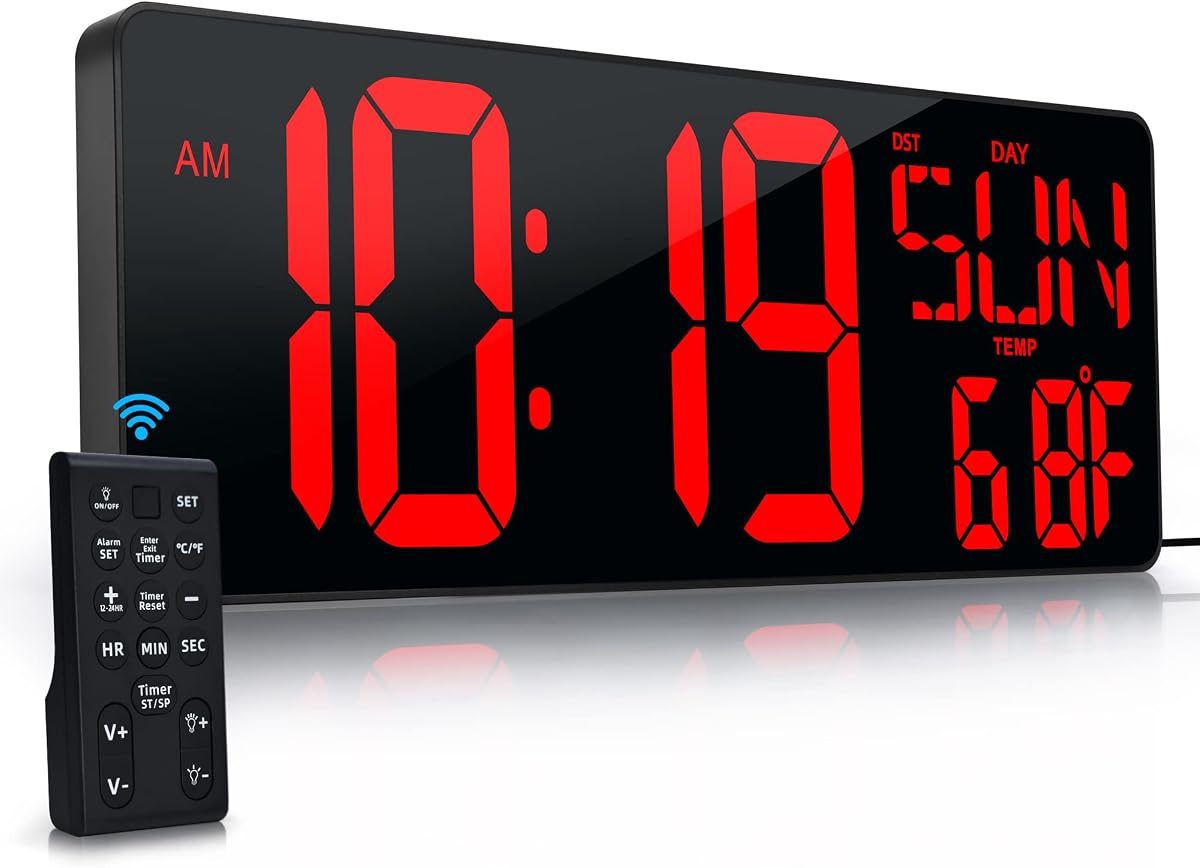
The Peakeep Large Display Digital Alarm Clock offers exceptional value with its oversized screen and essential features. Rated 4.6 stars it provides a budget-friendly option without sacrificing readability. The display shows time date and day of the week simultaneously for easy reference.
We may earn a commission when you buy through this link, at no additional cost to you.
Its five volume levels for the alarm cater to different hearing preferences ensuring you wake up reliably. The dimmable display lets you adjust brightness to avoid eye strain or sleep disruption. A USB port on the back allows convenient phone charging while you sleep.
While it lacks a remote control the straightforward button layout makes setup simple. It requires outlet power but includes automatic DST adjustment so you do not need to reset time manually. This convenience saves effort twice a year.
This clock is perfect for bedrooms or desks where simplicity and cost matter most. It is an ideal choice for students or seniors who need clear timekeeping without extra costs. The combination of affordability and functionality makes it a standout budget pick.
With five adjustable volume settings you can customize the alarm tone to ensure it is loud enough to wake you but gentle enough for shared spaces.
The built-in DST feature updates the clock automatically twice a year eliminating the hassle of manual time adjustments during seasonal changes.
We may earn a commission when you buy through this link, at no additional cost to you.
The EASYERA 16.5 Large Digital Wall Clock is a premium choice with its massive screen and Bluetooth synchronization. It syncs time daily from your phone ensuring accuracy without manual input. The 11 RGB colors allow you to match the display to your room decor or mood.
We may earn a commission when you buy through this link, at no additional cost to you.
Its large 16.5-inch screen makes it highly visible from anywhere in the room ideal for gaming rooms or large living areas. The clock can be mounted on a wall or placed on a desk offering flexibility in placement. Auto DST adjustment keeps time accurate year-round.
While it needs a power adapter the memory battery preserves settings during outages. The RGB lighting adds a decorative touch that transforms spaces into immersive environments. However the larger size may not suit smaller bedrooms or compact spaces.
This clock is best for those seeking style and advanced features like Bluetooth sync. It is perfect for tech enthusiasts or anyone who wants a statement piece. The premium features justify the cost for users prioritizing design and functionality.
Daily automatic synchronization with your phone ensures the clock always displays the correct time without manual adjustments or confusion.
Choose from 11 RGB colors to create a customized atmosphere that enhances your room decor or provides a soothing night light effect.
We may earn a commission when you buy through this link, at no additional cost to you.
The WallarGe 14.5 Large Digital Wall Clock offers the convenience of battery operation with clear high-definition visibility. It runs on four AA batteries which allows placement anywhere without seeking an outlet. The display switches between day and temperature modes every 10 seconds.
We may earn a commission when you buy through this link, at no additional cost to you.
Its fold-out stand enables desk placement while mounting holes on the back support wall installation. The low battery indicator warns you before power loss preventing unexpected resets. Auto DST adjustment ensures the clock stays accurate without manual intervention twice a year.
While battery operation is a plus it requires periodic battery changes which adds maintenance. There is no USB charging or remote control but core functions remain accessible. This model is ideal for spaces where outlets are limited or inconvenient.
Consider this clock if you need portability or wall placement far from power sources. The large screen ensures readability from a distance making it suitable for offices or kitchens. Its battery flexibility sets it apart from plug-in only models.
Running on standard AA batteries allows you to place the clock anywhere without worrying about proximity to electrical outlets or cords.
Switch between day and temperature displays to monitor indoor climate or stay organized with the current day of the week at a glance.
We may earn a commission when you buy through this link, at no additional cost to you.
This 16.5 Large Digital Wall Clock is designed for classrooms and large spaces with its vivid display and remote control. The massive screen shows time date and temperature clearly from a distance. Remote control operation allows management from up to 40 feet away.
We may earn a commission when you buy through this link, at no additional cost to you.
It features dual alarms and a countdown timer useful for testing or fitness activities. The auto dimming function adjusts brightness to room lighting ensuring visibility without glare. High-contrast numbers are easy to read even without glasses for seniors or students.
The clock requires outlet power for the display but saves settings with memory batteries during outages. While the battery memory is limited it prevents manual resetting after blackouts. This durability makes it reliable for busy environments like gyms or offices.
Ideal for educational or commercial settings this clock combines size and utility. The remote control is a key advantage for high placements or hard-to-reach locations. Consider this model if you need a large screen with robust timer features.
Set two separate alarms to manage different schedules such as wake up time and daily reminders without needing multiple clocks.
Control the clock from 40 feet away making it easy to adjust settings without moving from your seat or desk.
We may earn a commission when you buy through this link, at no additional cost to you.
The MASHI Digital Wall Clock features a built-in night light that provides gentle illumination for nighttime navigation. With a 16-inch LED display it offers excellent visibility for seniors or those with visual impairments. The remote control works from 32 feet making adjustments convenient.
We may earn a commission when you buy through this link, at no additional cost to you.
Auto dimming adapts brightness to ambient light ensuring comfort throughout the day and night. The night light offers eight fixed colors plus a multi-color option for ambiance. Settings are saved via memory batteries during power outages to avoid resetting.
It requires a power adapter to function but the convenience of auto brightness reduces manual input. The lack of USB charging is offset by the decorative night light feature. This makes it ideal for bedrooms or living rooms needing both time and lighting.
Choose this clock for its combination of display clarity and lighting versatility. It is particularly helpful for elderly users who need clear time and low light at night. The remote control adds accessibility for those with limited mobility.
The bottom night light provides a gentle glow that helps you navigate safely at night without turning on bright overhead lights.
Adjust all settings from 32 feet away with a simple remote reducing the need to reach the clock on a wall or shelf.
We may earn a commission when you buy through this link, at no additional cost to you.
The 17.2 Large Digital Wall Clock stands out with its extra large HD display and 180-degree visibility. It can be read clearly from almost any angle in the room making it ideal for wide spaces. The remote control simplifies operation without needing to approach the clock.
We may earn a commission when you buy through this link, at no additional cost to you.
It includes a count up down timer useful for workouts or competitive timing. Temperature display toggles with date and day information for comprehensive data. Auto dimming adjusts brightness based on light intensity to reduce glare at night.
Power requires an outlet but memory batteries preserve settings during outages. The hanging template included makes wall mounting straightforward. While it lacks USB charging the timer and wide view offer unique utility for fitness or office use.
This clock is best for those needing visibility from multiple angles or large rooms. The timer function adds practical value for active lifestyles. Consider it if you want the largest display option with versatile timekeeping features.
The wide viewing angle ensures the display is readable from any seat in the room without needing to face it directly.
Use the up to 30-hour timer for tracking activities like cooking fitness sessions or competitions with precise timing.
We may earn a commission when you buy through this link, at no additional cost to you.
The DreamSky Large Digital Clock with Date and Day of Week features automatic dimming that adjusts brightness at set times. It displays temperature and day of the week for comprehensive daily info. The screen is 7.6 inches large with clear digits for easy reading.
We may earn a commission when you buy through this link, at no additional cost to you.
Auto dimming activates at 9:01 PM and brightens at 7:00 AM to match sleep cycles. The four-level alarm volume allows customization for different hearing needs. A USB port on the back charges devices without needing extra outlets.
It uses a battery backup to preserve settings during power outages but requires an adapter for display. The lack of remote control is balanced by simple front buttons. This model is particularly suited for seniors needing hands-off brightness control.
Choose this clock for its automation and senior-friendly design. The auto dimmer reduces manual adjustments and protects sleep quality. It is an excellent choice for bedside tables where convenience and clarity are priorities.
The clock dims automatically at night and brightens in the morning ensuring optimal visibility without affecting your sleep.
Charge your phone directly from the clock using the USB port to keep your nightstand organized and devices powered.
We may earn a commission when you buy through this link, at no additional cost to you.
The JALL 16 Large Digital Wall Clock includes a countdown timer useful for cooking or study sessions. It features auto dimming and eight RGB colors to match any decor. The 16-inch screen ensures clear visibility for seniors and classrooms alike.
We may earn a commission when you buy through this link, at no additional cost to you.
Remote control allows adjustments from a distance and auto dimming adapts to room lighting. The night light provides safe illumination at night. Auto DST updates time twice a year saving manual effort and reducing errors.
It requires an outlet for power but memory batteries prevent resetting after outages. The countdown timer is a standout feature for productivity and organization. This versatility makes it suitable for kitchens gyms or study areas.
Consider this clock for its timer functionality and ambient features. It is a practical gift for students or teachers managing time effectively. The combination of large display and useful tools adds value beyond basic timekeeping.
Set a countdown up to 99 minutes to track cooking times exercise sessions or study intervals efficiently.
Select from eight vibrant colors to match your room decor and create a personalized ambiance that enhances your space.
We may earn a commission when you buy through this link, at no additional cost to you.
Selecting the right large display digital clock involves evaluating several key factors to ensure it meets your specific needs and environment.
The most critical factor is the display size which should be large enough to read from your typical viewing distance. Look for models with high-contrast digits and clear LED or LCD screens that minimize eye strain. For seniors or visually impaired individuals prioritize clocks with at least a 16-inch screen or 3-inch digits.
Ensure the display shows essential information like time date and day of the week clearly without clutter.
Adjustable brightness is essential for preventing glare and ensuring comfort day and night. Choose clocks with auto dimming or manual dimmers with multiple levels to customize the display to your preference. Some models offer automatic adjustments based on ambient light which adds convenience.
Verify that dimming does not reduce readability significantly when brightness is lowered.
Decide between plug-in and battery-operated clocks based on your placement needs. Plug-in models require an outlet but offer consistent power without battery changes. Battery-operated models provide flexibility but need periodic maintenance and may lack advanced features like remote control.
Consider backup battery options that save settings during power outages to avoid manual resetting.
Intuitive controls are vital especially for seniors or those with limited mobility. Look for simple buttons remote controls or app-based setup. The clock should allow easy setting of time alarms and other features without complex menus.
Test the remote range if available to ensure it works from your desired location.
Many clocks offer extra utilities like USB charging ports temperature display or countdown timers. USB ports help charge devices while temperature tracking adds value for home environments. Timers are useful for cooking or fitness routines making the clock more versatile.
Prioritize features that align with your daily habits to avoid unnecessary costs.
Check if the clock supports wall mounting desktop placement or both. Some models include stand or hanging hardware which simplifies setup. Ensure the design fits your room decor and does not obstruct visibility.
Consider the size and weight relative to where you plan to install or place the clock.
Automatic DST adjustment saves you from manual updates twice a year reducing the risk of errors. This feature is common in most modern clocks but verify it is included before purchase.
Manual DST clocks are more affordable but require your attention during time changes.
Compare prices against the features offered to determine overall value. Higher-priced models may include premium features like RGB lighting or Bluetooth sync. Basic models provide core functionality at lower costs suitable for essential use.
Avoid overpaying for features you do not need to maximize your budget efficiency.
Start by setting up the clock according to the manufacturer instructions whether plugging in or inserting batteries. Ensure the power source is stable and accessible for consistent operation. Use the provided remote or front buttons to set time date and alarm preferences.
Regularly check and replace batteries if your model is battery-operated to maintain accurate timekeeping. For plug-in models verify the cord is not damaged or tangled. Dust the display gently with a soft dry cloth to prevent scratches and ensure brightness.
Adjust brightness settings periodically to match changing room lighting conditions. Use auto dimming features if available to reduce manual adjustments. Keep the clock away from direct sunlight or moisture to protect its components and extend lifespan.
A clock with at least a 16-inch screen or 3-inch digits is ideal for seniors to ensure easy reading from a distance. Look for high-contrast displays and auto dimming to reduce eye strain.
Some models are battery-operated for flexible placement while others require outlet power. Most plug-in clocks use backup batteries to save settings during outages.
Most clocks have intuitive buttons or remote controls for time setting. Follow the manual to input hours minutes and date correctly.
Yes many models offer countdown timers and large screens suitable for classroom use. Remote control features help teachers manage settings from the front of the room.
Auto dimming adjusts display brightness based on ambient light to reduce glare at night. This ensures visibility without disturbing sleep or causing eye strain.
Some premium models support Bluetooth to sync time from your phone automatically. Most standard clocks require manual time input or DST settings.
Many modern digital clocks include built-in USB ports to charge smartphones directly. This feature eliminates the need for extra adapters on your nightstand.
Digital clocks generally maintain high accuracy using internal quartz movement. Auto DST and Bluetooth sync models further enhance precision by adjusting time automatically.
The top picks in this guide offer a range of options from budget-friendly to premium models with advanced features. Each clock provides clear visibility and practical tools suited for different environments and needs.
Prioritize display size brightness control and ease of use to ensure the clock meets your daily requirements. Consider additional utilities like USB charging or timers if they add value to your routine.
Remember to verify current prices and availability as these may change over time. Selecting the right clock will enhance organization and visibility in your home or office effectively.