
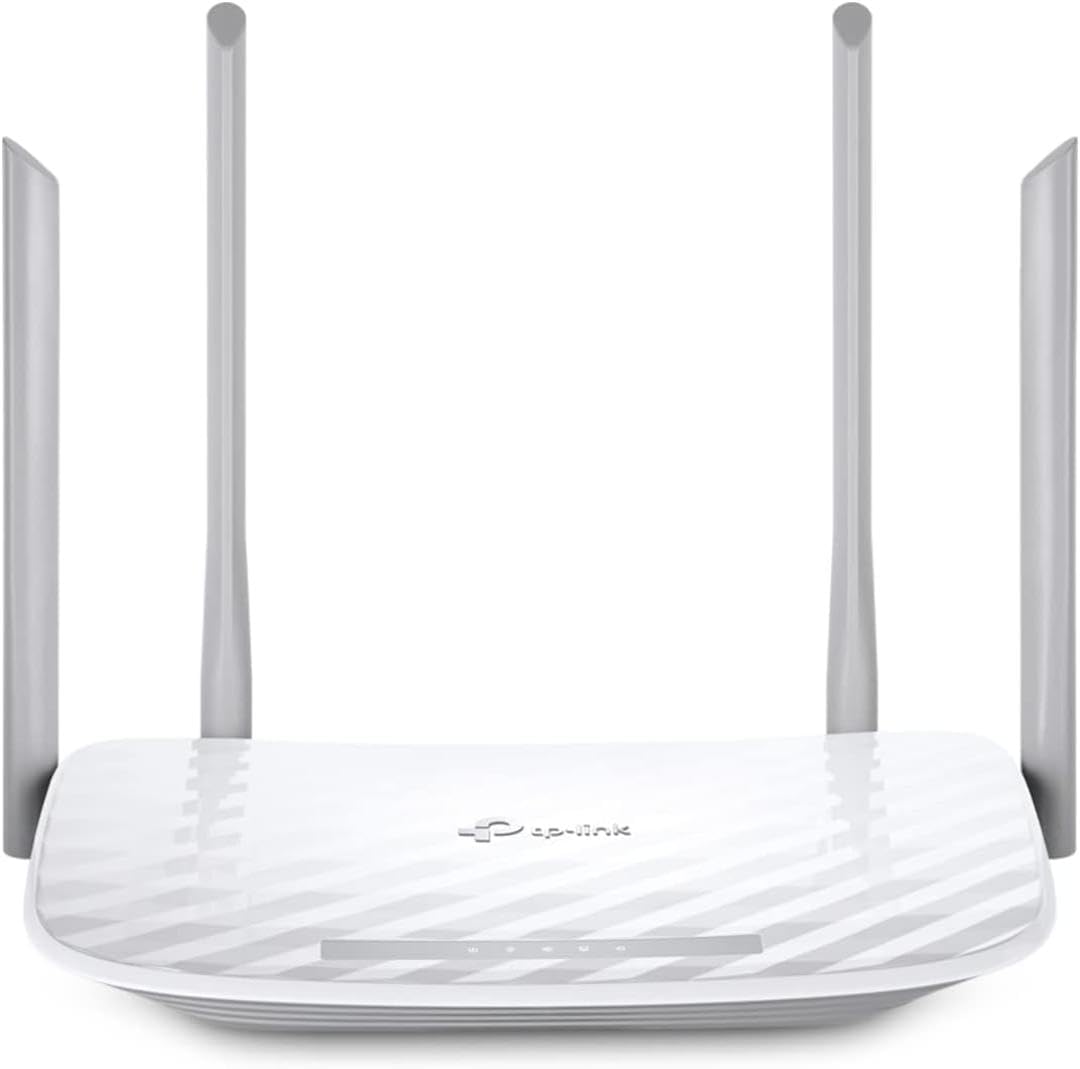
TP-Link AC1200 Gigabit Dual Band WiFi Router (Archer A6)
4.5Editor score
Easy Tether app setup
Gigabit ports included
Beamforming technology support
This guide compares the top easy setup WiFi router models to help you find fast reliable connectivity with minimal configuration effort for your home network
Setting up a home network should not feel like a technical nightmare. Modern routers now offer intuitive apps and guided processes that make connection simple for everyone. We explore the best options available that prioritize user experience and rapid deployment without sacrificing performance.
To build this list, we analyzed product specifications, user feedback, and official setup documentation. Our focus remains on models that streamline the initial connection process through dedicated mobile applications or hardware indicators that reduce user confusion significantly.
Each selection highlights specific strengths like speed coverage and security features tailored for different household sizes. Please note that model availability and specific configurations may vary by region and retailer so always check current listings before purchasing.
4.5Editor score

4.4Editor score

4.3Editor score
The following table provides a side-by-side look at the key specifications and capabilities of each selected router to help you compare performance and features at a glance.





The TP-Link Archer AX21 stands out as a top choice for users seeking a straightforward path to modern connectivity. It delivers the benefits of Wi-Fi 6 including OFDMA and beamforming without requiring complex configuration. Its rating reflects a balance of performance and ease of use that appeals to families.
We may earn a commission when you buy through this link, at no additional cost to you.
Setup is handled via the Tether app which walks you through connecting to your modem and configuring your network name and password. The dual-band system provides a stable 1.8 Gbps total bandwidth ensuring smooth streaming and gaming. Four high-gain antennas help focus the signal to devices throughout your home.
While it lacks the latest 6 GHz band found in newer models it covers the needs of most current households effectively. The cybersecurity commitment ensures it meets modern standards for safety and reliability out of the box without extra subscriptions.
This router is ideal for those upgrading from older Wi-Fi 5 models who want immediate improvement and simplicity. It works with any internet service provider and includes a VPN server for added flexibility. For a seamless initial experience with solid day-to-day reliability this model earns our top pick.
The Tether app provides visual guidance to get you online in minutes without technical jargon.
Beamforming technology focuses wireless signals toward connected devices to reduce dead zones and boost range.
We may earn a commission when you buy through this link, at no additional cost to you.
For households demanding the fastest possible speeds and lowest latency the Archer AXE75 brings the 6 GHz band to your home. It is designed for users with many devices that need simultaneous high-bandwidth connections like 4K streaming and video calls. The tri-band architecture splits traffic to minimize congestion effectively.
We may earn a commission when you buy through this link, at no additional cost to you.
Setup follows the familiar Tether app process allowing you to get the powerful router online quickly. The unique housing design ensures heat dissipation for long-term reliability even under heavy loads. HomeShield security provides basic protection for your network and IoT devices without additional monthly fees.
The inclusion of the 6 GHz band means you benefit from less interference and cleaner signals for compatible devices. However you must ensure your smartphones and laptops support Wi-Fi 6E to take full advantage of this frequency. It is a premium solution for performance enthusiasts.
We recommend this model if you have a large home or many connected smart devices that strain older routers. The EasyMesh compatibility allows you to expand coverage later if needed. Its blend of raw speed setup simplicity and security makes it a standout premium choice.
Adding a 6 GHz band reduces congestion and increases overall capacity for modern high-demand networks.
Optimized housing helps maintain stable performance during extended use by managing heat efficiently.
We may earn a commission when you buy through this link, at no additional cost to you.
The Archer A6 proves you do not need to spend a fortune to get a stable and easy-to-configure network. It offers solid AC1200 speeds with full Gigabit ports which is rare at this price point. Users praise its simplicity and the ability to get online quickly using the mobile app.
We may earn a commission when you buy through this link, at no additional cost to you.
Setup involves plugging in the router connecting to your modem and launching the Tether app to configure your settings. The four external antennas with beamforming provide consistent coverage across small to medium-sized homes. Security is handled by WPA3 ensuring your data stays protected without extra steps.
While it does not offer the latest Wi-Fi 6 technology it is fully compatible with all current devices and performs well for everyday tasks. The OneMesh feature allows you to add extenders later to expand coverage if your home grows. It is a pragmatic choice for value seekers.
This router is perfect for renters or families with modest internet plans who need dependable performance without complexity. It supports any internet service provider and includes access point mode for flexible setup. For those on a budget who still want Gigabit speeds and easy management this is an ideal selection.
Four Gigabit LAN ports allow you to connect wired devices without any speed bottlenecks for streaming.
OneMesh support lets you extend your network easily with compatible devices without replacing the main router.
We may earn a commission when you buy through this link, at no additional cost to you.
The Archer BE230 brings the latest Wi-Fi 7 technology to home users who want to prepare for upcoming device upgrades. It features Multi-Link Operation and 4K-QAM to boost speeds and capacity for future use cases. The setup experience remains consistent with other TP-Link models using the Tether app.
We may earn a commission when you buy through this link, at no additional cost to you.
Physical connections include two 2.5Gbps ports allowing you to take advantage of multi-gig internet plans immediately. The next-gen quad-core processor ensures there is no lag even when handling heavy data transmissions. Beamforming helps focus the signal to every corner of your home up to 2000 sq ft.
While Wi-Fi 7 devices are emerging the router works backward with older equipment so you are covered today. EasyMesh compatibility means you can expand your network later. The setup is guided and quick ensuring you do not spend hours configuring network parameters.
Choose this if you want to invest in the latest standards now and plan to upgrade your client devices soon. It works with any ISP and includes robust security tools for peace of mind. The combination of raw power and user-friendly setup makes it a strong contender.
Dual 2.5Gbps ports ensure your wired connections keep up with fast internet plans and LAN transfers.
Tether app keeps firmware updated automatically to maintain optimal performance and security over time.
We may earn a commission when you buy through this link, at no additional cost to you.
The NETGEAR Nighthawk RS90 is designed for homes that need maximum speed and reliability for streaming and gaming. It supports Wi-Fi 7 which delivers up to 3.6 Gbps and reduces latency significantly. The Nighthawk app provides an intuitive interface for managing your network from anywhere.
We may earn a commission when you buy through this link, at no additional cost to you.
Setting up is a guided process where you connect the router to your modem and follow the app instructions. The device covers up to 2000 sq ft making it suitable for larger residences. It includes a 2.5G WAN port to fully utilize high-speed internet plans from providers.
Security is a priority with features enabled directly out of the box including automatic firmware updates. While Armor requires a subscription for advanced features basic protection is free. The physical design supports strong range ensuring your devices maintain a connection even at a distance.
This router is recommended for users who want premium performance and the latest wireless standards in a single package. It supports multi-gig connectivity and handles many devices simultaneously. The app ecosystem offers control over settings without needing a computer for management.
Download the Nighthawk app to walk through connection and configuration with step-by-step instructions.
Multi-gigabit Ethernet port ensures your router can utilize faster internet plans without bottlenecks.
We may earn a commission when you buy through this link, at no additional cost to you.
The BE6500 leverages the latest Wi-Fi 7 technologies like Multi-Link Operation to optimize data transmission. It offers a total bandwidth of 6.5 Gbps ensuring ample capacity for large file transfers and heavy streaming. Setup is handled through the familiar Tether app which streamlines configuration for all users.
We may earn a commission when you buy through this link, at no additional cost to you.
Six high-performance antennas combined with beamforming deliver wide coverage across up to 2400 sq ft. This is ideal for larger homes where signal strength might otherwise drop. The device is designed with advanced security in mind meeting industry standards for cybersecurity out of the box.
The MLO technology allows simultaneous transfers across bands which increases reliability and lowers latency. You can also expand your network using EasyMesh compatible extenders. The Tether app keeps your firmware updated automatically to ensure performance and security remain optimal over time.
We suggest this model for users seeking a blend of high-speed performance and broad coverage without the complexity of tri-band systems. It supports VPN clients and HomeShield for robust protection. Its ease of use and raw power make it a reliable choice for power users.
MLO technology combines frequency bands to deliver faster and more stable connections for demanding apps.
The Tether app allows you to monitor and update your network with simple tap controls on your phone.
We may earn a commission when you buy through this link, at no additional cost to you.
The Archer A54 is a compact solution for apartments or small homes that need straightforward internet access. It offers AC1200 speeds which are sufficient for streaming and web browsing. The setup process via the Tether app is quick and guides you through all necessary steps.
We may earn a commission when you buy through this link, at no additional cost to you.
Security is handled by WPA3 and you can expand coverage later with EasyMesh extenders. It supports features like IGMP proxy to optimize IPTV streaming for TV viewing. The four external antennas help maintain a stable connection within its 1000 sq ft coverage range.
While it lacks the advanced features of higher-end models it gets the job done reliably. The access point mode allows it to integrate with existing wired setups easily. This is an excellent choice for those who want a no-fuss router that just works.
Choose this if you need a budget-friendly option that still provides modern security and simple management. It works with any ISP and requires a modem to function. Its focus on ease of use makes it a strong contender for small spaces.
The Tether app walks you through connecting your device to the modem and configuring settings instantly.
Optimized settings ensure smoother TV streaming by prioritizing video traffic on the network.
We may earn a commission when you buy through this link, at no additional cost to you.
The R6700AX provides a reliable bridge to Wi-Fi 6 for users who want improved capacity without high cost. It covers up to 1500 sq ft and supports up to 20 devices efficiently. The Nighthawk app simplifies setup and management so you can control your network easily.
We may earn a commission when you buy through this link, at no additional cost to you.
WPA3 encryption and automatic updates keep your data secure without manual intervention. You can run speed tests or pause devices directly from your phone for flexibility. It pairs with any existing modem to get your home online with minimal effort.
While the advanced features require a subscription the base performance is strong for everyday needs. It works with most internet service providers and includes multiple wired ports for stable connections. This model is well-suited for small to medium homes needing consistent performance.
Recommend this for users who want a trusted brand with straightforward controls and reliable daily operation. The app ecosystem offers a good balance of simplicity and control. It is a practical choice for those upgrading from older 802.11n or ac routers.
The Nighthawk app allows you to set up and monitor your network from your mobile device.
Firmware updates occur automatically to protect your network without requiring manual checks.
We may earn a commission when you buy through this link, at no additional cost to you.
The Deco X55 offers a mesh approach that simplifies connectivity by eliminating dead zones with a single network name. Setup is guided by the Deco app which makes configuration easy even for non-tech users. It can work as a standalone router or part of a larger system.
We may earn a commission when you buy through this link, at no additional cost to you.
Coverage extends up to 2500 sq ft per unit and you can add more for larger homes. AI-driven mesh ensures your devices stay connected to the best signal as you move. It includes three Gigabit ports for wired connections to devices that need stable speeds.
The security features include basic network protection and parental controls at no extra cost. The app keeps your network optimized and updated. This modular design allows you to start with one unit and expand as needed without replacing hardware.
This system is ideal for homes that need seamless coverage across multiple rooms or floors. It works with any ISP and provides robust protection for your devices. For those who prefer a plug-and-play setup with modern mesh benefits this is a top choice.
Deco units create a single network name so your devices switch automatically between units.
Intelligent learning adjusts settings to provide the best performance for your specific home environment.
We may earn a commission when you buy through this link, at no additional cost to you.
The RS140 delivers the latest Wi-Fi 7 technology with up to 5 Gbps speeds for those demanding peak performance. It covers up to 2250 sq ft making it suitable for larger homes. Setup is streamlined via the Nighthawk app guiding you through connections quickly.
We may earn a commission when you buy through this link, at no additional cost to you.
It supports multi-gig internet plans through its 2.5G WAN port ensuring your wired devices keep pace with fiber speeds. Security features are enabled by default and firmware updates happen automatically. The app allows you to manage guest networks and pause devices with ease.
While it is a premium investment the speed and reliability it provides are unmatched. The design supports many devices simultaneously without congestion. It works with all major internet service providers and requires a modem for connection.
Choose this if you want to future-proof your home network with the highest available speed and range. It supports multi-gig wired connections and offers simple mobile management. For power users who value cutting-edge performance this router is a standout.
Supports latest Wi-Fi 7 devices for faster streaming and gaming with reduced latency.
Nighthawk app makes network management simple from anywhere without needing a computer.
We may earn a commission when you buy through this link, at no additional cost to you.
Selecting a router that is easy to set up involves considering several technical and practical factors that impact your initial experience and long-term satisfaction.
Most modern routers provide dedicated apps that guide you through connection step-by-step. These apps help verify your modem connection and allow you to set network names and passwords without logging into complex web interfaces.
Look for models that offer clear visual cues and straightforward prompts to ensure you can get online quickly without needing technical support.
Wi-Fi 6 and Wi-Fi 7 standards offer better performance for multiple devices and lower latency compared to older models. Choosing a router that supports these standards ensures it works well with your current and future devices.
Ensure your router supports the latest protocols to avoid bottlenecks and take advantage of OFDMA or MLO technologies for smoother operation.
Match the router's rated coverage to your home size to avoid weak signals. Larger homes may benefit from mesh systems or models with high-gain antennas to reach every room effectively.
Select a unit with enough range or expansion capability to cover your square footage so you do not experience dead zones.
Ensure your router supports the maximum speed of your internet plan through its WAN port. Multi-gigabit WAN ports allow you to utilize high-speed plans without throttling your connection.
Verify the router has the right Ethernet port speed to handle your subscription to avoid wasting paid bandwidth.
Security protocols like WPA3 protect your network from unauthorized access. Built-in security features or subscriptions can add layers of protection against threats.
Choose a model that offers robust security options and regular firmware updates to keep your home network safe from evolving risks.
Mesh compatibility or EasyMesh support allows you to expand your network later if your needs grow. This feature ensures you do not need to replace the entire system for more coverage.
Prioritize routers that support expansion to keep your setup flexible as you add devices or move to larger homes.
Reliable customer support can be crucial if you face issues during setup or use. Check for available support channels and warranty terms before purchasing.
Opt for brands with strong reputations for assistance to ensure help is available if you encounter problems.
The number of LAN ports and antenna design affects wired connectivity and signal range. Ensure the router has enough ports for your devices and an antenna layout suitable for your home layout.
A well-designed physical unit helps maximize performance and convenience for your specific wired needs.
Begin by connecting your modem to the WAN port of your router using the provided Ethernet cable. Power on the modem first and wait until it stabilizes before turning on the router to ensure a clean boot sequence.
Download the designated mobile app for your router brand and follow the on-screen instructions to connect. The app will guide you through setting your network name and password securely without needing advanced knowledge.
Keep your router's firmware updated through the app to maintain security and performance. Place the router in a central location away from walls or electronic interference to maximize signal coverage throughout your space.
An easy setup WiFi router typically includes a dedicated mobile app that guides users through connecting to the modem and configuring network settings. This process replaces complex web interface logins with visual prompts and step-by-step instructions.
Yes most routers require a separate modem to connect to your internet service provider. The modem handles the external connection while the router distributes the signal wirelessly to your devices.
In most cases you can use an existing modem with a new router as long as the modem provides Ethernet output. Simply connect the modem to the router's WAN port to establish the internet link.
Most easy setup routers can be configured in under fifteen minutes using their mobile apps. The guided process handles physical connections and basic settings to get you online quickly.
WiFi 7 offers faster speeds lower latency and improved capacity over WiFi 6. It includes features like Multi-Link Operation and wider channels that benefit modern high-demand devices and networks.
Many routers support mesh systems or expanders that can be added later. Check for features like EasyMesh or OneMesh compatibility to ensure seamless expansion without replacing your main unit.
We have reviewed ten options that prioritize simplicity and performance from budget-friendly AC models to cutting-edge Wi-Fi 7 routers. Each pick offers a streamlined setup experience through dedicated apps to minimize technical barriers.
When choosing prioritize compatibility with your internet plan and home size to ensure reliable coverage. Models with mesh expansion options give you flexibility to grow your network as your needs change.
Always verify current availability and details with your retailer before finalizing your choice. The best router for you balances ease of use with the performance your household requires.