
NOYAFA NF-488 POE Cable Tester
4.5Editor score
Tests continuity and loop-back
Large LCD backlit screen
Detects standard and non-standard PoE
This guide compares the top 10 Inline POE Testers for network professionals, detailing features like voltage measurement and cable continuity testing.
Inline POE testers are essential tools for network professionals who need to verify power delivery over Ethernet cables. These devices ensure that cameras, phones, and access points receive the correct voltage and current without interruption. A good tester provides real-time data to help diagnose power issues quickly and accurately.
We compared ten leading models based on their testing capabilities, display quality, and ease of use. Our analysis covers devices that support standard IEEE 802.3af/at/bt protocols as well as non-standard passive PoE systems. This list helps you find the right tool for your specific networking environment.
Each pick highlights unique strengths such as battery-free operation, OLED displays, or advanced cable continuity checks. Note that product availability and pricing can change over time. Check the current details on the retailer site before making your final purchase decision.
4.5Editor score

4.1Editor score

4.1Editor score
The following table provides a side-by-side overview of the top ten Inline POE Testers available in the market. Each entry highlights key specifications and capabilities to help you compare models at a glance.


The TRENDnet Inline PoE Tester TC-NTP1 stands out as a top choice for professionals requiring reliable testing across multiple PoE standards. With a rating of 4.1, it balances cost and functionality effectively for field technicians. Its ability to test 4PPoE and PoE+ makes it versatile for modern network deployments.
We may earn a commission when you buy through this link, at no additional cost to you.
This device offers three distinct testing modes including T-mode for PSE device testing, N-mode for passive devices, and I-mode for inline testing. The battery-free operation is a significant advantage, allowing you to test right out of the box without worrying about power sources. The step button facilitates easy cycling through voltage, amperage, and wattage readouts.
While the display is functional, it may be hard to read in bright outdoor conditions. The step button also requires a firm press which some users might find less intuitive than a touch interface. However, these trade-offs are acceptable given the device's robust feature set and reasonable price point.
Network engineers and installers handling government projects will find the NDAA compliance particularly valuable. It ensures adherence to strict standards without compromising on testing accuracy. We recommend this model for those needing a dependable tool that covers both standard and non-standard PoE requirements.
The NDAA compliant status allows safe use in U.S. and Canadian government networking installations.
Three modes allow testing of PSE devices, passive PoE units, and inline power delivery accurately.
We may earn a commission when you buy through this link, at no additional cost to you.
The PoE-T100 is an excellent choice for those who prioritize visual clarity during testing. Its OLED display presents real-time power, voltage, and current measurements on a single page, making diagnostics faster. With a rating of 4.1, it offers a modern approach to network troubleshooting with high visibility.
We may earn a commission when you buy through this link, at no additional cost to you.
Self-powered operation is a key feature that eliminates the need for batteries or external power sources. This device draws power directly from the PoE or DC line, ensuring it is ready whenever you are. The ability to differentiate between standard and non-standard passive PoE adds significant value for diverse environments.
The OLED screen though bright, may consume more power than LCD alternatives if not set to auto-off quickly. Additionally, the DC voltage range is specific, which might limit some specialized industrial applications. Despite these points, it remains a top contender for modern network professionals.
Installers and engineers looking for a sleek and efficient tool will appreciate the single-page data layout. It reduces the time spent toggling through screens. We suggest this model for those who need reliable, high-visibility testing in both standard and DC-powered setups.
The OLED screen displays all critical power metrics on one page for rapid diagnosis.
Supports 12-57V DC inputs ensuring compatibility with many non-standard power sources.
We may earn a commission when you buy through this link, at no additional cost to you.
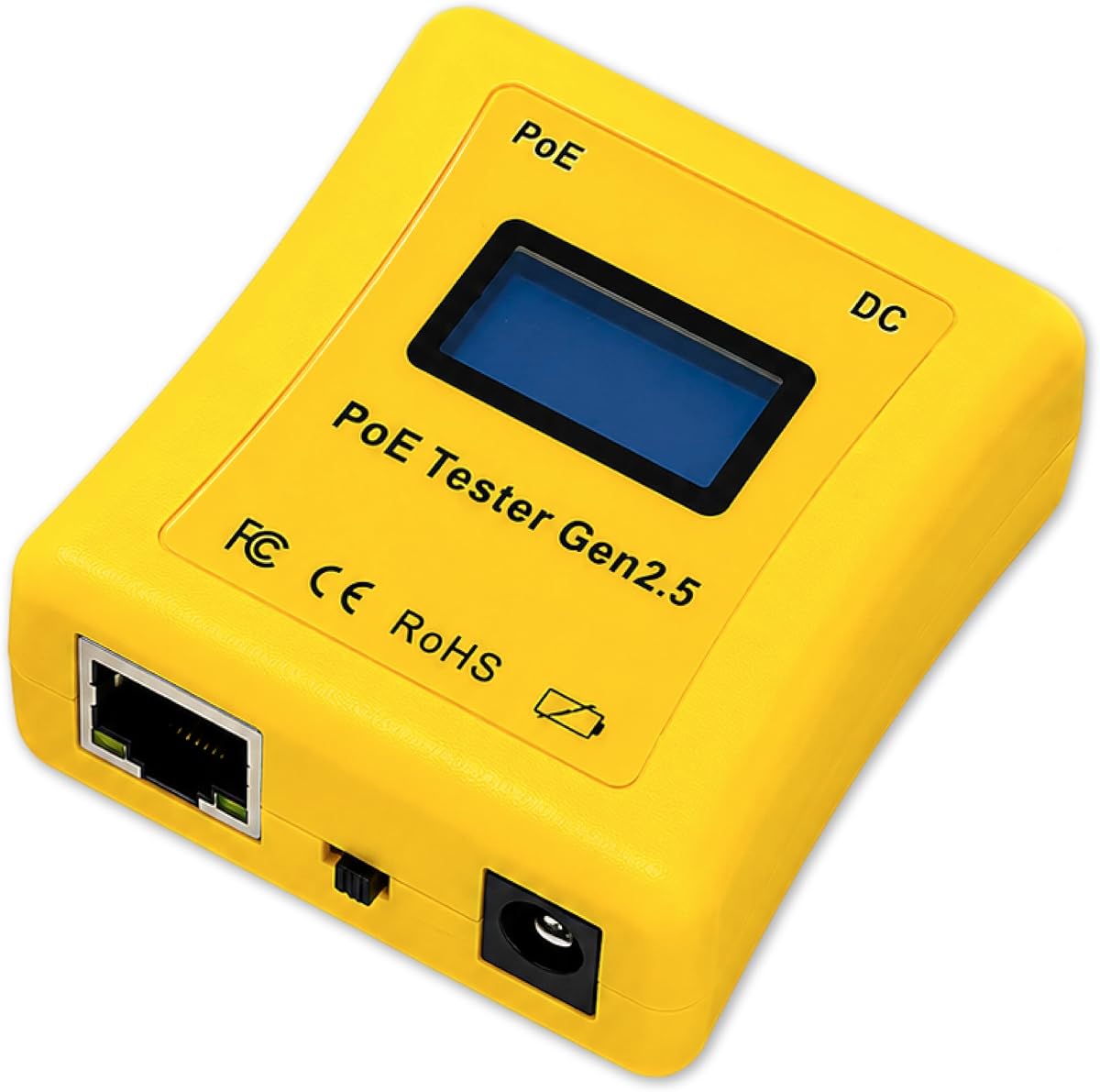
The NOYAFA NF-488 is a budget-friendly option that doesn't skimp on essential testing features. It earned a high rating of 4.5 by offering versatility at an accessible price point. This makes it ideal for small businesses or individual technicians managing multiple networks.
We may earn a commission when you buy through this link, at no additional cost to you.
Its multifunctional design allows it to test for PoE, network continuity, and switch loop-backs effectively. The backlit LCD screen ensures readability even in dark server closets or outdoor installations. The clear display interface makes results easy to interpret at a glance.
The casing is lightweight but may not withstand heavy drops as well as ruggedized tools. Some features still require batteries, so users should keep spares on hand. However, the value proposition remains strong given the wide range of supported diagnostics.
Entry-level professionals and small installers will find this tool perfect for daily tasks. It covers the basics of PoE and network health efficiently. We recommend it for anyone needing a reliable, affordable tester for basic to intermediate networking needs.
The illuminated screen helps you work comfortably in dimly lit cable runs.
Beyond PoE, it tests continuity and loops saving you from carrying multiple tools.
We may earn a commission when you buy through this link, at no additional cost to you.
The PoE Texas tester is recognized for its ergonomic design and lack of battery dependency. With a rating of 4.3, it offers a practical solution for technicians who need a tool that works continuously without interruption. The curved body makes it comfortable to hold during extended use.
We may earn a commission when you buy through this link, at no additional cost to you.
Its self-sufficient design draws power directly from the PoE line, ensuring it is always ready. It supports power up to 280 watts, covering almost all modern network devices. The LCD screen automatically cycles through voltage, current, and power for a dynamic readout.
The display size is compact, which might be challenging for users with larger hands or visual impairments. Additionally, it lacks advanced features like data logging that some higher-end models offer. Still, its portability and battery-free operation are significant advantages.
Field technicians who prioritize comfort and convenience will find this model appealing. It minimizes downtime by eliminating battery changes. We suggest it for those needing a robust and comfortable tool for frequent PoE verification tasks.
The curved design fits naturally in your hand reducing fatigue during long testing sessions.
Supporting up to 280W ensures it works with high-power PoE devices.
We may earn a commission when you buy through this link, at no additional cost to you.
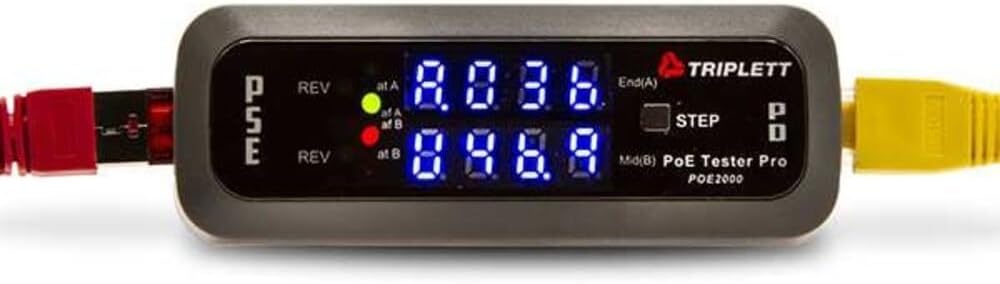
The Triplett POE2000 is a reliable tool for those who prefer a straightforward testing interface. With a rating of 3.5, it remains a solid choice for basic PoE verification tasks. The dual LED indicators provide clear visual feedback on power sources and polarity status.
We may earn a commission when you buy through this link, at no additional cost to you.
Its design allows you to alternate between voltage, current, and power data with a single step button. This simplifies the testing process by focusing on one metric at a time. The ability to detect reversed polarity is a safety feature that prevents damage to connected devices.
As an older model, its interface might lack the modern features found in newer devices. The rating reflects some limitations compared to advanced testers. However, for simple tasks, its functionality remains robust and dependable.
Professionals needing a no-frills tool will appreciate its straightforward design. It is easy to operate without extensive setup. We recommend it for users who prioritize simplicity and reliability over advanced digital features.
Clear LEDs instantly inform you about power type and polarity status.
A simple button allows quick switching between power metrics.
We may earn a commission when you buy through this link, at no additional cost to you.
The Triplett POE3000 is designed to speed up installation and troubleshooting for PoE systems. It offers visual indicators that show IEEE standards and polarity, making it easy to verify compliance at a glance. Its simple interface ensures quick adoption for new users.
We may earn a commission when you buy through this link, at no additional cost to you.
Inline power level monitoring alternates display data, which helps in tracking real-time power usage. The step button allows selection of specific data to display, giving control over the information presented. It supports both End Span and Midspan configurations.
The lack of rating data makes it harder to gauge customer satisfaction compared to other models. It may also lack some advanced troubleshooting features needed for complex networks. However, it remains a solid option for basic verification needs.
Installers looking for a mid-range option will find it suitable for standard deployments. It balances simplicity with essential features well. We suggest it for those who need a reliable tool without complex configuration steps.
LEDs clearly show which PoE standard the connected device supports.
The device handles both direct switch connections and midspan injectors.
We may earn a commission when you buy through this link, at no additional cost to you.
The Jonard Tools POE-1 is unique in its ability to verify cable continuity alongside PoE presence. It supports multiple PoE standards and measures resistance ensuring flawless data transmission. This dual functionality makes it a comprehensive tool for network diagnostics.
We may earn a commission when you buy through this link, at no additional cost to you.
Its design includes a belt clip for easy portability on the job. It can operate without batteries using PoE power or with included AA batteries for unpowered cables. This flexibility ensures you can test even when power sources are unavailable.
The lack of user ratings makes it difficult to assess long-term reliability compared to other models. The included kit may vary, so check contents before purchasing. Still, its comprehensive approach to testing is highly valuable.
Professionals who need both power and cable verification will appreciate this tool. It reduces the need for separate devices. We recommend it for technicians managing complex cabling and PoE installations.
Verify continuity and resistance ensuring cables are intact and working.
The belt clip ensures you have the tool ready wherever you walk.
We may earn a commission when you buy through this link, at no additional cost to you.
This tester is rated 4.6 for its extensive features including cable length measurement and rechargeable power. It confirms power supply from switches to PDs accurately. The ability to measure cable length is a standout feature for installation verification.
We may earn a commission when you buy through this link, at no additional cost to you.
The port flash detection helps locate active ports quickly reducing setup time. The rechargeable battery ensures extended uninterrupted testing sessions. Customizable auto-shutoff settings help conserve power when not in active use.
Battery life can vary based on usage intensity so carrying a backup charger is wise. It may also require an initial charge before the first use. Despite this, the convenience of rechargeable power is a significant advantage.
Installers focusing on physical network verification will find this model highly useful. It combines power and physical testing in one device. We suggest it for those who need reliable power and cable length data.
Measures cable lengths from 5 to 300 meters for installation checks.
A 1500mAh battery supports long field sessions without swapping batteries.
We may earn a commission when you buy through this link, at no additional cost to you.
This model integrates DVM functionality with network PoE testing providing a comprehensive view of power and data lines. It is designed for CAT5 and CAT6 cables ensuring compatibility with most network installations. The integration into a power panel streamlines testing workflows.
We may earn a commission when you buy through this link, at no additional cost to you.
The robust construction suggests durability for field use. It detects network PoE allowing quick verification of power delivery. However, the lack of rating data makes it harder to gauge real-world performance.
Specific use cases may vary, so understanding your exact requirements is essential. It may be more specialized than general-purpose testers. Despite this, the DVM integration is a unique feature for certain setups.
Professionals managing power panels will find this integration useful. It reduces the need to carry separate tools. We recommend it for those needing a combined solution for power and network testing.
The digital multimeter capability supports deeper electrical troubleshooting.
Designed for power panel integration simplifying complex testing environments.
We may earn a commission when you buy through this link, at no additional cost to you.
The NF-488 Network Cable Tester offers loop-back testing capabilities which are useful for diagnosing loop issues. It includes an LED lamp for illumination in dark environments ensuring visibility when testing. Its DC appliance testing adds versatility beyond standard PoE tasks.
We may earn a commission when you buy through this link, at no additional cost to you.
Customer service is a key benefit, offering lifetime friendly support within 24 hours. The current detection range supports 0-3A making it suitable for various DC devices. However, the display interface is basic compared to premium models.
The LED lamp is helpful but relies on its own battery. The vendor service is good but dependent on their responsiveness. Still, these trade-offs are minor given the features provided.
Technicians who value support and lighting will find this tool practical. It offers a mix of testing and utility features. We suggest it for those needing an all-in-one package with reliable service.
Diagnose loop problems quickly without needing extra equipment.
Built-in lighting helps in dark cable runs and server rooms.
We may earn a commission when you buy through this link, at no additional cost to you.
Selecting the right Inline POE Tester requires evaluating specific features based on your network environment. This section details critical factors to consider.
Ensure the tester supports IEEE 802.3af, at, and bt standards. Modern networks often use higher power devices that require newer standards. Compatibility with 4PPoE ensures future-proofing for advanced installations.
Always verify that the tester covers the standards used in your deployment.
Bright OLED or backlit LCD screens are vital for readability in low light. Clear displays reduce errors when reading voltage and current data. Choose a screen that suits your typical work environment.
Opt for high-contrast displays to ensure accurate data reading.
Battery-free operation is ideal for field work as it removes dependency on spare batteries. Some devices draw power from the PoE line ensuring continuous availability. Others may require AA batteries for specific functions.
Prioritize self-powered models to minimize downtime during testing.
Many users need both PoE and cable continuity testing. Check if the device supports loop-back or resistance verification. This reduces the need to carry multiple tools for network diagnostics.
Look for models that offer combined PoE and cable checks.
Confirm the voltage and wattage range covers your devices. Some testers support up to 300 watts while others cap at 100 watts. A wide range ensures compatibility with various power sources.
Select a tester that exceeds your maximum power requirements.
Ergonomic shapes and lightweight builds improve comfort during long hours. A belt clip or small footprint aids in carrying the tool. Field technicians need devices that fit easily in tool kits.
Choose a compact and comfortable model for frequent field use.
For government projects, NDAA compliance may be required. Ensure the device meets relevant certifications for your region. Compliance guarantees adherence to federal standards.
Verify certification status before purchasing for regulated projects.
Reliable technical support and warranty terms are important for long-term use. Check the duration of manufacturer protection and access to advisors. Good support helps resolve issues quickly.
Prioritize brands offering strong warranty and support options.
Plug the tester inline between the PoE switch and the device to verify power delivery. Observe the display for voltage and wattage readings to confirm the power matches requirements.
Use step buttons to cycle through modes such as current or power for detailed diagnostics. Ensure the device is clean before storage to maintain port functionality.
Store the tester in a dry place away from extreme temperatures. If using batteries, remove them if not used for long periods to prevent leakage.
Standard PoE follows IEEE 802.3af/at/bt specifications ensuring safe voltage negotiation. Passive PoE applies a fixed voltage without negotiation and may damage devices if mismatched. A tester helps identify these modes to prevent hardware failure.
Many modern Inline POE Testers are battery-free and draw power from the PoE line. Others may require AA batteries for specific modes. Always check the product specifications before purchase to understand power needs.
Some advanced testers offer cable length measurement features for installation verification. These are useful for ensuring your cabling meets distance standards. Check the device capabilities if this is a priority for your needs.
Yes, they are designed to handle typical network voltages safely. Always follow manufacturer guidelines and avoid using on exposed live wires. Safety features like polarity detection help prevent accidental damage.
A rating of 4.0 or higher generally indicates reliable performance and durability. Higher ratings often reflect user satisfaction and product quality. Consider reviews and specs to ensure the tool meets your needs.
Many newer testers explicitly support 4PPoE and higher wattage standards. Ensure the product description confirms compatibility with modern high-power devices. This ensures future-proofing for your network infrastructure.
We highlighted the TRENDnet TC-NTP1 as a top overall choice for its comprehensive testing modes and NDAA compliance. The NOYAFA NF-488 offers excellent value for budget-conscious users. The PoE-T100 provides a premium OLED experience for modern professionals.
Consider your primary needs such as cable verification or high wattage support when selecting a model. A reliable tester simplifies troubleshooting and ensures network stability. Prioritize features that match your daily tasks.
Prices and availability change frequently so check the latest details on the retailer site. Investing in a quality tool saves time and prevents costly downtime. Choose the model that best aligns with your project requirements.